What Is the Difference Between the OSI Model and TCP/IP Model?
The OSI model and TCP/IP model are two important networking models that explain how data is transmitted between computers over a network. Both models divide network communication into multiple layers, where each layer performs specific functions to ensure successful data transmission.
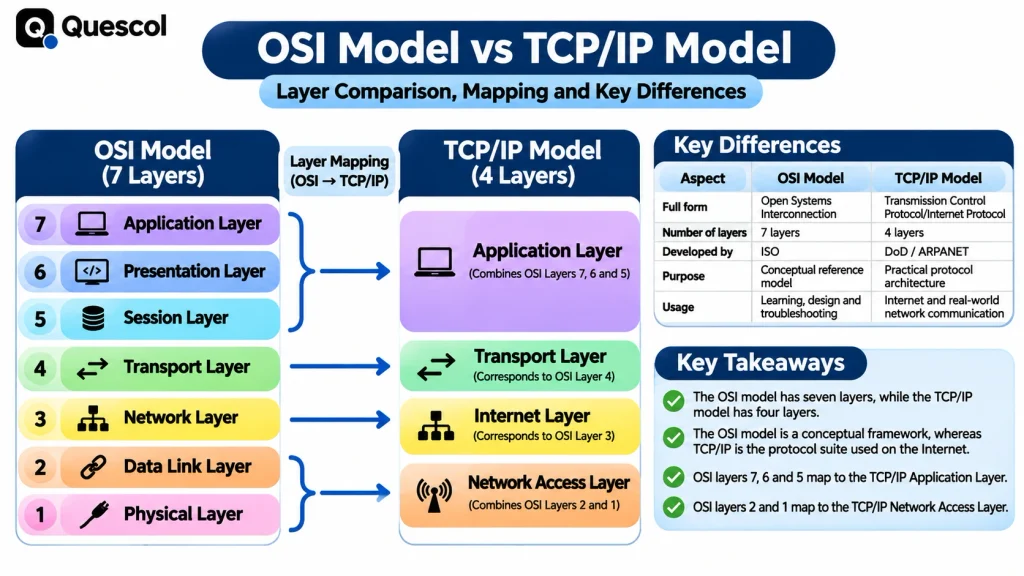
The main difference between the OSI model and TCP/IP model is that the OSI model contains seven layers, whereas the TCP/IP model traditionally contains four layers. The OSI model is primarily used as a conceptual reference for understanding network communication, while the TCP/IP model describes the protocol architecture used by the Internet.
Understanding the difference between these models helps computer science students, networking professionals and IT beginners learn network architecture, troubleshoot communication problems and understand Internet protocols.
What Is the OSI Model?
The OSI (Open Systems Interconnection) model is a conceptual networking framework that explains how data moves between two devices through seven different layers.
It was developed by the International Organization for Standardization (ISO) to provide a common framework for communication between different computer systems and networking technologies.
Each layer of the OSI model performs a specific task and communicates with the layers directly above and below it.
The seven layers of the OSI model are:
- Physical Layer
- Data Link Layer
- Network Layer
- Transport Layer
- Session Layer
- Presentation Layer
- Application Layer
What Are the Seven Layers of the OSI Model?
1. Physical Layer
The Physical Layer is the first and lowest layer of the OSI model. It is responsible for transmitting raw bits (0s and 1s) through physical communication media.
Functions:
- Transmits raw bits over a communication channel.
- Defines electrical, mechanical and physical characteristics.
- Specifies transmission speed and signal encoding.
- Defines cables, connectors and physical interfaces.
Examples: Ethernet cables, fiber-optic cables, hubs and repeaters.
2. Data Link Layer
The Data Link Layer is responsible for transferring data between directly connected devices over a network. It organizes bits into frames and uses MAC addresses for local delivery.
Functions:
- Converts packets into frames.
- Handles MAC addressing.
- Performs error detection.
- Controls access to the transmission medium.
- Manages communication between directly connected devices.
Examples: Ethernet, Wi-Fi MAC and switches.
3. Network Layer
The Network Layer is responsible for logical addressing and routing packets from the source device to the destination device across different networks.
Functions:
- Provides logical addressing using IP addresses.
- Determines suitable routes for packet transmission.
- Forwards packets between networks.
- Supports packet fragmentation where applicable.
Examples: IPv4, IPv6, IP and routers.
4. Transport Layer
The Transport Layer provides end-to-end communication between applications running on different devices.
Functions:
- Divides application data into smaller segments.
- Provides process-to-process communication.
- Uses port numbers to identify applications.
- Supports flow control and error recovery where provided by the protocol.
- Provides reliable or connectionless transport services.
Examples: TCP and UDP.
5. Session Layer
The Session Layer manages communication sessions between applications running on different devices.
Functions:
- Establishes communication sessions.
- Maintains active sessions.
- Terminates communication sessions.
- Supports session synchronization.
Example: Session management during communication between applications.
6. Presentation Layer
The Presentation Layer is responsible for representing data in a format that the receiving application can understand.
Functions:
- Data translation and format conversion.
- Data encryption and decryption.
- Data compression and decompression.
Examples: Character encoding, JPEG and data serialization formats.
7. Application Layer
The Application Layer is the highest layer of the OSI model. It provides network services that applications use to communicate.
Functions:
- Provides network services to applications.
- Supports file transfer and email communication.
- Enables web browsing and name resolution.
- Provides interfaces for network-based applications.
Examples: HTTP, HTTPS, FTP, SMTP and DNS.
What Is the TCP/IP Model?
The TCP/IP (Transmission Control Protocol/Internet Protocol) model is a networking architecture that describes how data is transmitted across interconnected networks, including the Internet.
It was developed through the work of the United States Department of Defense’s ARPANET research program and became the foundation of modern Internet communication.
The traditional TCP/IP model consists of four layers. Each layer performs a particular function and uses specific protocols to support communication between devices.
The four layers of the TCP/IP model are:
- Network Access Layer
- Internet Layer
- Transport Layer
- Application Layer
What Are the Four Layers of the TCP/IP Model?
1. Network Access Layer
The Network Access Layer is the lowest layer of the TCP/IP model. It handles communication between devices connected to the same physical or logical network.
Functions:
- Transmits data over the network medium.
- Handles framing and local addressing.
- Supports communication with network hardware.
- Defines how data is transmitted over Ethernet and wireless networks.
Examples: Ethernet and Wi-Fi.
2. Internet Layer
The Internet Layer is responsible for logical addressing and routing packets between different networks.
Functions:
- Provides IP addressing.
- Determines packet delivery paths.
- Forwards packets between networks.
- Supports network-level communication.
Examples: IPv4, IPv6 and ICMP.
3. Transport Layer
The Transport Layer provides communication between applications running on different devices.
Functions:
- Provides end-to-end data transmission.
- Uses port numbers for application identification.
- Supports reliable communication through TCP.
- Supports connectionless communication through UDP.
- Handles segmentation and reassembly where applicable.
Examples: TCP and UDP.
4. Application Layer
The Application Layer is the highest layer of the TCP/IP model. It provides protocols that applications use to exchange information over a network.
Functions:
- Provides services for network applications.
- Supports web communication.
- Handles file transfers.
- Supports email communication.
- Provides domain name resolution.
Examples: HTTP, HTTPS, FTP, SMTP, DNS and SSH.
What Are the Differences Between the OSI Model and TCP/IP Model?
The following table explains the major differences between the OSI model and TCP/IP model.
| Comparison | OSI Model | TCP/IP Model |
|---|---|---|
| Full form | Open Systems Interconnection | Transmission Control Protocol/Internet Protocol |
| Number of layers | 7 layers | 4 layers |
| Developed by | ISO | Developed through the DoD/ARPANET research program |
| Architecture | Reference model | Protocol suite and networking architecture |
| Main purpose | Explains network communication functions | Supports practical network communication |
| Application layers | Application, Presentation, Session | Application |
| Transport layer | Separate Transport Layer | Separate Transport Layer |
| Network layer | Network Layer | Internet Layer |
| Lower layers | Data Link and Physical | Network Access |
| Protocol dependency | Protocol-independent reference model | Based on TCP/IP protocols |
| Communication | Describes layered communication functions | Defines communication using Internet protocols |
| Network implementation | Primarily conceptual | Widely implemented in real networks |
| Design approach | Detailed separation of networking functions | Practical grouping of networking functions |
| Usage | Learning, network design and troubleshooting | Internet and network communication |
How Does Data Transmission Work in the OSI and TCP/IP Models?
Both models explain how data travels from a sender to a receiver through multiple networking layers.
Consider an example of sending a message through a web application.
Step 1: Application Layer
The application generates the message or data that needs to be transmitted.
Step 2: Transport Layer
The transport layer prepares the data for communication. TCP can provide reliable, ordered delivery using mechanisms such as acknowledgements and retransmission.
Step 3: Network or Internet Layer
The network layer adds logical addressing information and helps route packets toward the destination.
Step 4: Data Link or Network Access Layer
The data is organized into frames and transmitted through the local network.
Step 5: Physical Transmission
The data is converted into signals and transmitted through a wired or wireless medium.
At the receiving device, the process happens in reverse. Each layer processes the received information and passes it to the next higher layer until the destination application receives the data.
This process is called encapsulation at the sender and decapsulation at the receiver.