HTTP is one of the most important protocols used on the internet for communication between web browsers and web servers. It helps in loading web pages when a user enters a URL in the browser. In simple words, HTTP is the foundation of data communication on the World Wide Web. It ensures smooth transfer of text, images, videos, and other web content.
Moreover, HTTP works on a request and response model. The browser sends a request to the server, and the server responds with the required web page or data. In addition, it uses port 80 by default for communication. Because of its simplicity, HTTP is widely used for accessing websites across the world.
What is HTTP?
HTTP (HyperText Transfer Protocol) is a communication protocol used to transfer data between a web browser (client) and a web server. It defines how messages are formatted and transmitted over the internet. HTTP allows users to request web pages and receive responses from servers in a structured way. It is a stateless protocol, which means each request is independent and does not remember previous interactions.
For example, when you type www.google.com in your browser, HTTP sends a request to Google’s server. The server then processes the request and sends back the homepage as a response. After that, your browser displays the webpage with text, images, and links. This entire process happens in a few seconds using HTTP communication.
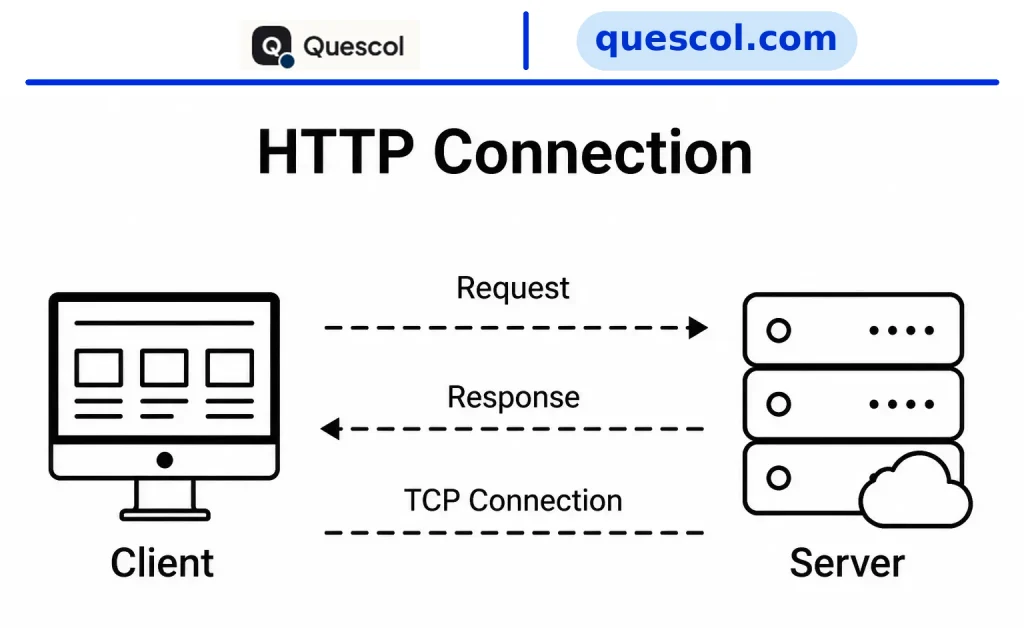
Figure: HTTP Connection
History of HTTP (HyperText Transfer Protocol)
HTTP was developed by Tim Berners-Lee and his team at CERN as part of the early World Wide Web system. It was created to enable communication between web browsers and web servers. Over time, HTTP has evolved to become faster and more efficient. Plain HTTP is not encrypted. HTTPS and HTTP/3 are.
Evolution of HTTP Versions
- HTTP/0.9 (1991): This was the first version of HTTP. It was very simple and mainly used for transferring basic web pages without headers or advanced features.
- HTTP/1.0 (1996): Introduced in RFC 1945, this version added headers, status codes, and improved communication between client and server.
- HTTP/1.1 (1997–1999): Released in RFC 2068 and later updated in RFC 2616, it improved performance with persistent connections and better caching support.
- HTTP/2 (2015): Published in RFC 7540, this version improved speed using multiplexing, header compression, and server push features.
- HTTP/3 (Latest): Based on the QUIC protocol developed by Google, HTTP/3 provides faster connection setup, better reliability, and improved security over modern networks.
What is HyperText?
HyperText is a special way of organizing text that includes links called hyperlinks. These links connect one document or webpage to another document or resource on the internet. When a user clicks on a hyperlink, they are directly taken to another page, image, video, or file. This makes navigation on the web easy and interactive.
HyperText is mainly used in web pages to connect information across the internet. It allows users to move from one page to another without searching manually. HTML (HyperText Markup Language) is used to create and structure hypertext in web pages. It helps in designing clickable links, text formatting, and webpage layout.
HTTP (HyperText Transfer Protocol) is the protocol that transfers this hypertext between a web browser and a web server. It allows users to request web pages and access linked content smoothly. Because of HTTP, users can click links and easily navigate across different websites on the internet.
How HTTP Works: Step-by-Step Process
HTTP works through a clear request–response cycle between a web browser and a web server. When a user opens a website, several background steps happen quickly to display the web page. This process ensures smooth communication and fast loading of internet content.
1. Open Web Browser
First, the user opens a web browser and enters a website URL like www.example.com. The browser prepares to fetch the required web page. This is the starting point of HTTP communication.
2. DNS Lookup
Next, the browser contacts the DNS (Domain Name System) server to find the IP address of the website. This step is important because computers use IP addresses instead of names. It works like finding the exact location of a website on the internet.
3. Send HTTP Request
After getting the IP address, the browser sends an HTTP request to the web server. This request asks for web resources like HTML pages, images, and scripts. It helps the server understand what the user wants.
4. Server Response
Then, the web server processes the request and sends back an HTTP response. This response contains all the required data such as text, images, and code files. The server delivers this information in a structured format.
5. Rendering the Web Page
Finally, the browser receives the response and processes the data. It combines HTML, CSS, and JavaScript to display the complete web page. As a result, the user sees the website on their screen within seconds.
HTTP Request and Response
HTTP communication works on a simple request and response model between a web browser (client) and a web server. The browser sends a request to get information, and the server replies with the required data. This process happens in milliseconds whenever you open a website.
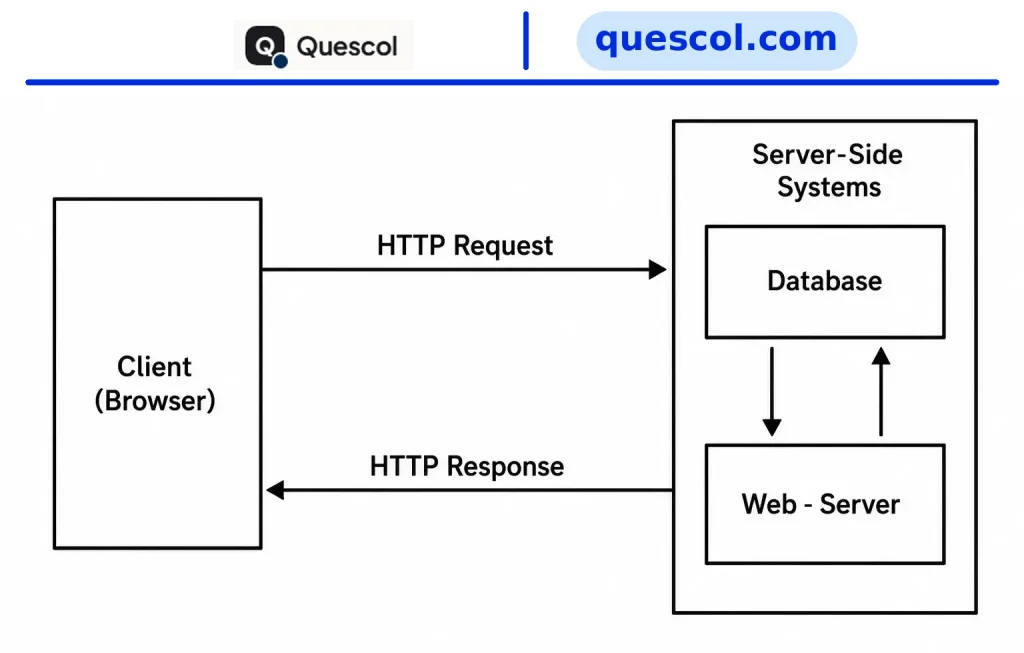
Figure: HTTP Request and Response
1. HTTP Request
An HTTP request is the message sent by the browser to the server to ask for a web resource. It tells the server what the user wants and how the data should be handled. It contains different parts that help in proper communication.
- HTTP Version: It shows the version of HTTP being used, such as HTTP/1.1 or HTTP/2.
- URL: It specifies the exact location of the resource, like https://www.example.com/about.
- HTTP Method: It defines the action, such as GET (to fetch data) or POST (to send data).
- Request Headers: It carries extra information like browser type, language, and data format.
- Request Body: It contains data sent to the server, usually used in forms or login pages.
2. HTTP Response
An HTTP response is the message sent by the server back to the browser after processing the request. It contains the result of the request and the required web content.
- HTTP Status Code: It indicates the result of the request, such as 200 OK (success) or 404 Not Found (page missing).
- Response Headers: It provides details about the response, like content type (HTML, JSON, etc.).
- Response Body: It includes the actual content sent by the server, such as HTML code for the webpage.
What is HTTP Status Code?
HTTP Status Codes are three-digit numbers sent by a web server to the browser after receiving a request. They help the browser understand what happened to the request. In simple terms, they act like messages that show whether a webpage was successfully loaded or if there was an error.
These status codes are grouped into different categories based on their purpose. Each group represents a specific type of response from the server, such as success, error, or redirection.
- Informational (1xx): These codes give temporary information. For example, 100 Continue means the request is still being processed.
- Successful (2xx): These codes show that the request was completed successfully. For example, 200 OK means everything worked fine.
- Redirection (3xx): These codes tell the browser to go to a different URL. For example, 301 Moved Permanently means the page has a new location.
- Client Error (4xx): These codes indicate a problem in the request sent by the user. For example, 404 Not Found means the page does not exist.
- Server Error (5xx): These codes show that the server failed to process the request. For example, 500 Internal Server Error means a server-side issue occurred.
Advantages of HTTP
HTTP (Hypertext Transfer Protocol) provides several advantages that make it one of the most widely used protocols for communication between web browsers and web servers. It offers a simple communication mechanism, supports different types of data, and allows web applications to exchange information efficiently.
1. Simple Request-Response Communication
HTTP follows a simple request-response communication model between a client and a server. The client sends a request to access a web page or resource, and the server processes the request and sends an appropriate response.
This makes communication easy to understand, implement, and manage. It also allows web browsers and servers to communicate without requiring complex connection management at the application level.
Example: When a user enters a website address in a browser, the browser sends an HTTP request to the web server, and the server responds with the requested web page.
2. Platform Independence
HTTP is a platform-independent protocol, which means it can work across different operating systems, devices, and hardware platforms.
A client running Windows can communicate with a web server running Linux or another operating system without requiring special compatibility arrangements. This makes HTTP suitable for communication between different types of computers and devices.
Example: A user can access the same website using a Windows computer, Android smartphone, iPhone, or macOS device.
3. Wide Interoperability
HTTP is supported by almost all modern web browsers, web servers, and web development frameworks. It provides a common communication standard that allows applications developed using different technologies to exchange information.
This interoperability makes it easier for developers to build websites and web applications that work across different devices and platforms.
Example: A website developed using Python, Java, PHP, or JavaScript can communicate with browsers using HTTP.
4. Supports Different Types of Data
HTTP supports the transfer of different types of data between clients and servers. It can transmit text, images, audio, video, documents, JSON data, and other web resources.
The Content-Type header helps identify the type of data being transmitted, allowing the receiving application to process it appropriately.
Example: When a user opens a website, HTTP can transfer HTML pages, CSS files, JavaScript files, images, and other resources required to display the website.
5. Extensible Through Headers and Methods
HTTP provides headers and methods that make communication flexible and extensible. Headers carry additional information about requests and responses, such as content type, authentication details, caching instructions, and accepted data formats.
HTTP also supports different methods, including GET, POST, PUT, PATCH, and DELETE, which allow clients to perform different operations on server resources.
Example: A web application can use the GET method to retrieve user information and the POST method to submit a registration form.
6. Supports Caching
HTTP supports caching, which allows browsers and intermediary servers to temporarily store copies of web resources. When a user requests the same resource again, the browser may use the stored copy instead of downloading the entire resource from the server.
HTTP uses headers such as Cache-Control, ETag, and Last-Modified to manage caching behavior.
This reduces unnecessary network requests, improves website loading speed, and decreases the workload on web servers.
Example: When a user visits a website repeatedly, the browser may load previously downloaded images, CSS files, and other resources from its cache instead of requesting them again.
7. Persistent Connections
HTTP/1.1 supports persistent connections, which allow multiple HTTP requests and responses to use the same TCP connection instead of establishing a new connection for every request.
This reduces connection establishment overhead and improves communication efficiency, especially when a web page contains multiple resources.
Example: When a browser loads a website containing multiple images, stylesheets, and scripts, it can reuse an existing connection to request these resources.
8. Improved Performance Through HTTP/2 and HTTP/3
Modern HTTP versions provide several performance improvements.
- HTTP/2: Supports multiplexing, which allows multiple request-response exchanges to share a single connection simultaneously. It also supports header compression to reduce repeated header information.
- HTTP/3: Uses QUIC over UDP instead of TCP. It supports independent streams, reducing the impact of packet loss on unrelated streams and improving connection establishment in many situations.
These improvements help websites and web applications deliver content more efficiently.
9. Supports Client-Server Architecture
HTTP follows a client-server architecture in which the client requests resources and the server provides the requested information.
This separation allows clients and servers to be developed, maintained, and updated independently, as long as they follow the HTTP communication rules.
Example: A mobile application can communicate with a remote web server to retrieve product details without storing all the information locally.
10. Supports Different Communication Methods
HTTP provides different request methods to perform operations on resources. These methods help developers design web applications and APIs according to their requirements.
Some commonly used HTTP methods include:
- GET: Retrieves information from the server.
- POST: Sends data to the server for processing.
- PUT: Creates or replaces a resource.
- PATCH: Partially updates an existing resource.
- DELETE: Removes a specified resource.
These methods make HTTP useful for websites, web services, and REST-based APIs.
Disadvantages of HTTP
Although HTTP provides many advantages, it also has certain limitations related to security, communication overhead, session management, and performance. Some important disadvantages of HTTP are explained below.
1. Lack of Encryption in Plain HTTP
The major disadvantage of plain HTTP is that it does not encrypt the information transmitted between the client and the server.
Data such as usernames, passwords, form details, and other sensitive information may be transmitted in readable form. If an attacker intercepts the communication, the transmitted information may be exposed.
This makes plain HTTP unsuitable for transmitting sensitive information over untrusted networks.
Example: If a user enters login credentials on a website using plain HTTP, an attacker monitoring the network may be able to read those credentials.
2. No Built-in Data Integrity Protection
Plain HTTP does not provide built-in cryptographic protection to ensure that transmitted data has not been modified during communication.
An attacker positioned between the client and server may modify the information being transferred without either party automatically detecting the modification at the HTTP protocol level.
This can result in incorrect or manipulated information being received by the user.
Example: An attacker may modify the content of a webpage or alter information exchanged between a browser and a server when communication is not protected.
3. No Server Authentication in Plain HTTP
Plain HTTP does not provide a mechanism to verify the identity of the server through cryptographic certificates.
As a result, a user may unknowingly communicate with a fake website created by an attacker. This can increase the risk of phishing attacks and other security threats.
HTTPS addresses this limitation by using TLS certificates to authenticate the server’s identity.
Example: An attacker may create a fake login page that looks similar to a genuine website and attempt to collect users’ login credentials.
4. Stateless Nature of HTTP
HTTP is a stateless protocol, which means that each request is treated independently by the server. The server does not automatically remember previous requests made by the same client.
This can create difficulties when developing applications that require continuous user sessions, login management, and shopping cart functionality.
To overcome this limitation, web applications use cookies, session identifiers, tokens, and other session management techniques.
Example: When a user logs into an online shopping website, cookies or session tokens help the website recognize the user when they visit different pages.
5. Additional Overhead Due to Headers
HTTP requests and responses contain headers that provide additional information about communication, such as content type, authentication, caching, and connection management.
Although headers are useful, they increase the amount of information transmitted over the network. When applications exchange many small requests, repeated header information may create additional communication overhead.
HTTP/2 and HTTP/3 reduce some of this overhead through header compression techniques.
Example: When a browser requests several resources from a website, each request may contain headers that add extra data to the communication.
6. Performance Depends on the HTTP Version
Different HTTP versions use different communication mechanisms, and their performance may vary depending on network conditions, server configuration, and application requirements.
- HTTP/1.0 generally uses separate connections for individual requests unless additional connection mechanisms are implemented.
- HTTP/1.1 supports persistent connections but may experience head-of-line blocking when multiple responses share a connection.
- HTTP/2 supports multiplexing, but TCP-level packet loss can affect all streams sharing the connection.
- HTTP/3 uses QUIC to reduce transport-level head-of-line blocking between independent streams.
Therefore, the performance of HTTP depends on the version being used and the network environment.
7. Vulnerability to Man-in-the-Middle Attacks
Plain HTTP communication is vulnerable to Man-in-the-Middle (MITM) attacks because it does not encrypt the communication or authenticate the server.
An attacker who gains access to the communication path may intercept, read, or modify the information exchanged between the client and server.
This can compromise the privacy and reliability of the transmitted information.
Example: When a user accesses a website through an unsecured public Wi-Fi network using HTTP, an attacker on the same network may be able to intercept or modify the communication.
8. Not Suitable for Sensitive Information
Plain HTTP should not be used for transmitting confidential or sensitive information because it lacks encryption and cryptographic authentication.
Information such as banking details, passwords, payment information, and personal data may be exposed during transmission.
For secure communication, HTTPS should be used because it protects HTTP traffic through TLS encryption.
Example: Online banking websites, payment gateways, and e-commerce platforms use HTTPS to protect users’ information.
9. Dependency on Network Connectivity
HTTP communication requires a network connection between the client and server to exchange information. If the internet connection is slow, unstable, or unavailable, the client may experience delays or fail to retrieve the requested resources.
Although browser caching and offline web technologies can reduce this limitation, normal HTTP requests still depend on network connectivity.
Example: If a user opens a website while the internet connection is unavailable, the browser may fail to retrieve updated information from the server.
10. Resource Consumption on Busy Servers
When a large number of clients send HTTP requests simultaneously, the web server must process those requests and generate appropriate responses.
This can increase CPU usage, memory consumption, and network bandwidth requirements. If the server does not have sufficient resources or proper load management, it may become slow or temporarily unavailable.
Modern HTTP versions and server optimization techniques help improve resource utilization, but heavy traffic can still affect performance.
Example: During online ticket booking or major shopping sales, thousands of users may access the same website simultaneously, increasing the server workload.
Conclusion
HTTP is a fundamental protocol that enables communication between web browsers and web servers, making the World Wide Web possible. It works on a simple request and response model and has evolved from HTTP/0.9 to HTTP/3 to improve speed, performance, and reliability. Features like cookies, status codes, and different versions of HTTP help in better web interaction and user experience.
However, HTTP also has limitations, especially in terms of security, as it does not encrypt data and is vulnerable to attacks. Despite these drawbacks, HTTP remains the backbone of internet communication, and its secure version HTTPS is widely used today to ensure safe and efficient data transfer across the web.
HTTP is one service of the application layer.