The Application Layer is the topmost layer of the OSI model and TCP/IP model. It acts as an interface between the user and the network services. Moreover, this layer allows users to access network resources such as web browsing, email communication, file transfer, and remote login services.
The Application Layer provides protocols and services that help software applications communicate over a network. It enables users to send messages, browse websites, transfer files, and access online applications easily. Therefore, the Application Layer plays an important role in modern internet communication and networking systems.
What is the Application Layer?
The Application Layer is the topmost layer of the OSI model that provides network services directly to end-user applications. It acts as a bridge between application software and the network by enabling communication between users and network services. This layer supports protocols such as HTTP, FTP, SMTP, DNS, and Telnet for web browsing, email, file transfer, and remote access. Therefore, the Application Layer allows users to interact with network applications efficiently and securely.
- Closest layer to the end user
- Provides network services to applications
- Enables file transfer, email, web access, and remote login
- Acts as an interface between user software and the network
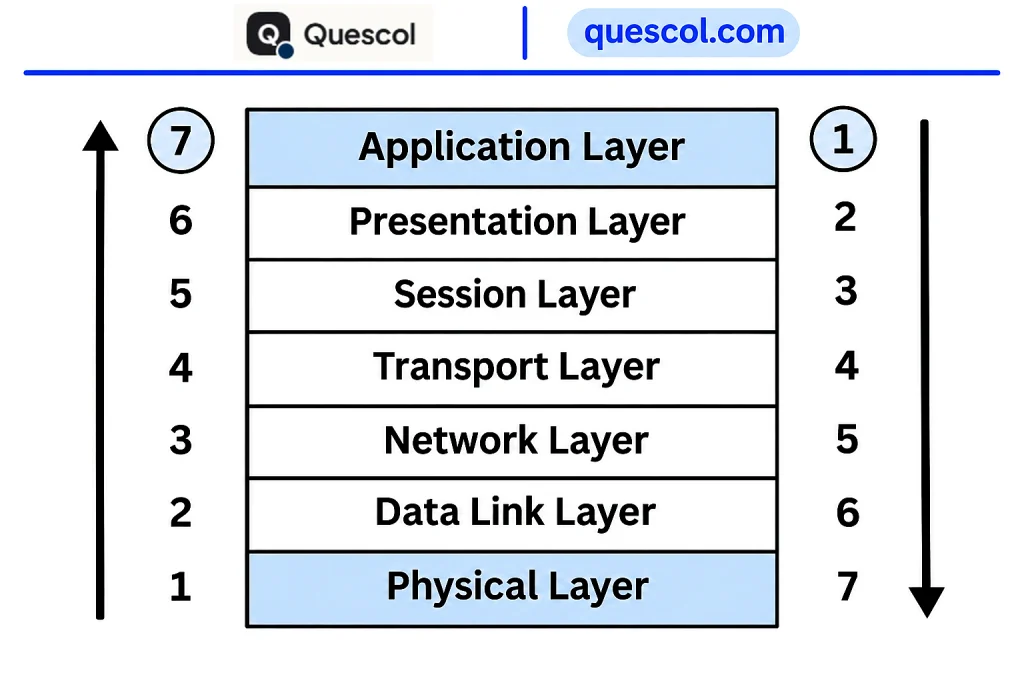
Figure: Application Layer
Functions of Application Layer
The Application Layer is the seventh and topmost layer of the OSI (Open Systems Interconnection) model. It provides network services directly to end-user applications and allows software applications to communicate with remote systems over a network.
The Application Layer performs several important functions, such as providing access to network services, supporting application protocols, and enabling applications to use presentation and session-related services. These functions help users exchange information and access network resources efficiently.
The major functions of the Application Layer are explained below.
1. Access to Representation Services
The Application Layer allows applications to exchange different types of data, such as text, images, audio, video, and documents. It uses the services provided by the Presentation Layer to ensure that information is represented in a format that the receiving application can understand.
The Presentation Layer is primarily responsible for data translation, character encoding, encryption, and compression. The Application Layer uses these capabilities when communicating through network applications.
For example, when a user sends an email containing text and images, the application uses suitable data formats and encoding methods to represent the content. Similarly, web browsers use HTML to structure webpage content, while images may be represented using formats such as JPEG or PNG.
Examples include:
- Text Representation: Text can be represented using character encoding standards such as ASCII and Unicode.
- Image Representation: Images can be stored and exchanged using formats such as JPEG, PNG, and GIF.
- Webpage Formatting: HTML is used to structure webpage content so that web browsers can interpret and display it.
- Multimedia Representation: Audio and video files can use formats such as MP3, WAV, MP4, and WebM.
Therefore, access to representation services helps applications exchange different types of information in a suitable and understandable format.
2. Network Service Access
The Application Layer provides applications with access to various network services. It acts as an interface between user applications and the underlying network, allowing users to perform different communication activities without understanding the internal details of network transmission.
It enables applications to communicate with remote computers and servers to request information, send data, and access network resources.
For example, when a user opens Gmail, the application communicates with mail servers to send, receive, and manage emails. Similarly, a web browser communicates with web servers to retrieve webpages.
Examples include:
- Email Services: Applications such as Gmail and Outlook allow users to send and receive emails over a network.
- Web Browsing: Web browsers provide access to websites and online information using HTTP or HTTPS.
- File Transfer: FTP allows users to upload and download files between computers over a network.
- Remote Access: Applications can use protocols such as Telnet and SSH to access remote systems.
Thus, network service access makes it possible for users to communicate, share information, and access online resources through different applications.
3. Application Protocols
The Application Layer defines and supports application-level protocols that establish rules for communication between applications running on different systems.
These protocols specify how messages are structured, how requests and responses are exchanged, and how particular network services are accessed. Each protocol is designed to perform a specific communication task according to application requirements.
For example, when a user visits a website, the browser uses HTTP or HTTPS to send a request to the web server. The server processes the request and returns the required webpage content.
Some important Application Layer protocols are explained below:
- HTTP (Hypertext Transfer Protocol): Used for transferring webpage content between web browsers and web servers.
- FTP (File Transfer Protocol): Used to upload and download files between computers over a network.
- SMTP (Simple Mail Transfer Protocol): Used for sending email messages between mail clients and mail servers or between mail servers.
- DNS (Domain Name System): Converts human-readable domain names into IP addresses so that systems can locate the required servers.
- POP3 (Post Office Protocol Version 3): Used by email clients to retrieve messages from a mail server.
- IMAP (Internet Message Access Protocol): Allows users to access and manage emails stored on a mail server.
- SSH (Secure Shell): Provides secure remote access to another computer over a network.
Therefore, application protocols establish common communication rules and allow different applications to exchange information correctly.
4. Access to Session Services
The Application Layer uses session-related services to support communication between applications. In the OSI model, establishing, managing, synchronizing, and terminating sessions are primarily responsibilities of the Session Layer.
Application protocols may use these services or implement their own session-management mechanisms to maintain communication between a client and a server.
For example, when a user logs into an online banking application, the application maintains a session to identify the user and manage interactions during the login period. When the user logs out, the session is terminated.
Examples include:
- Login and Logout: Managing user access and ending communication when a user logs out.
- Remote Communication: Using protocols such as SSH to establish and maintain remote login sessions.
- Video Conferencing: Maintaining communication sessions between participants during an online meeting.
- Session Management: Managing application states and user interactions while communicating with a server.
Thus, access to session-related services helps applications maintain organized communication and manage interactions between users and remote systems.
Working of Application Layer According to the Image
The Application Layer works as an interface between the user and network services. It allows communication between client applications and servers through different protocols such as HTTP, FTP, SMTP, and DNS. The image explains how the client and server communicate step by step using the Application Layer.
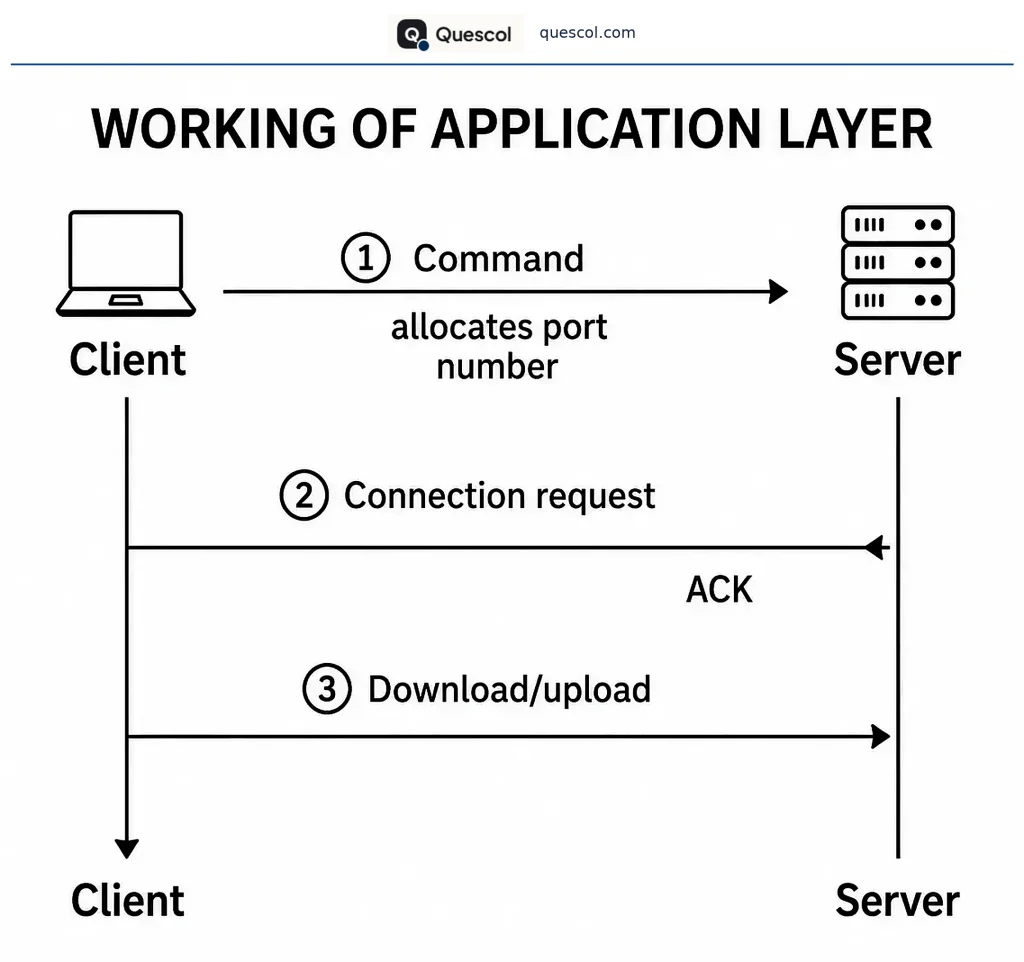
Figure: Working of Application Layer
The application layer is the seventh and topmost layer of the OSI (Open Systems Interconnection) model. It provides network services directly to end-user applications. It allows users to access services such as web browsing, email communication, file transfer, and video streaming.
The application layer enables communication between client applications and server applications using application-layer protocols such as HTTP, FTP, SMTP, and DNS. During communication, the client sends a request to the server, and the server processes the request and sends an appropriate response.
The working of the application layer can be explained through the following steps.
Step 1: Command from Client to Server
The process begins when a user performs an action through a client application, such as opening a website, sending an email, or requesting a file.
The client application creates a request using a suitable application-layer protocol and passes it to the lower layers of the network model for transmission.
For example, when a user enters a website address in a web browser, the browser creates an HTTP request to ask the web server for the required webpage. The application uses the appropriate network service and port information to communicate with the server.
The transport layer then handles the delivery of data between the client and server processes using protocols such as TCP or UDP.
Example: When a user enters www.example.com in a browser, the browser initiates communication to request the webpage from the web server.
Step 2: Connection Request and Acknowledgement (ACK)
After receiving the client’s request, the server processes it according to the application-layer protocol being used. The server identifies the requested resource or service and prepares an appropriate response.
If the communication uses TCP, a connection is established between the client and server through the TCP three-way handshake:
- SYN: The client sends a connection request to the server.
- SYN-ACK: The server acknowledges the request and sends a response.
- ACK: The client acknowledges the server’s response, and the TCP connection is established.
After the connection is established, the client and server can exchange application data.
However, it is important to understand that TCP acknowledgements are handled by the transport layer, not the application layer. Also, not all application-layer protocols use TCP. Some protocols use UDP or other transport mechanisms.
Example: When a browser communicates with a website using HTTP over TCP, TCP establishes the connection before the HTTP request and response data are exchanged. HTTPS commonly uses TLS to provide secure communication.
Step 3: Download and Upload Process
Once communication is established, the client and server start exchanging data according to the requested service.
The client can send information or upload files to the server. Similarly, the server can send requested information or files to the client.
- Download: Downloading refers to receiving data from a server to a client. For example, opening a webpage, downloading a PDF document, or receiving an image from a website.
- Upload: Uploading refers to sending data from a client to a server. For example, uploading documents to cloud storage, submitting a form, or sharing images through a website.
During this process, the application-layer protocol defines how requests and responses are organized. The lower layers handle the actual transmission of data across the network.
Example: When a user uploads a document to a cloud storage service, the client application sends the document data to the server. The server receives and stores the file and may send a response confirming that the upload was successful.
Step 4: Server Sends the Response to the Client
After processing the client’s request, the server sends the requested information or a suitable response back to the client.
The response may contain webpage content, a downloaded file, an email confirmation, or an error message. The client application receives the response and displays the information in a user-friendly format.
For example, when a user requests a webpage, the web server sends the webpage content to the browser. The browser processes the received content and displays the webpage on the screen.
Thus, the application layer makes network services accessible to users through applications.
Protocols of the Application Layer
The Application Layer provides several important protocols that allow software applications to communicate over a network easily and efficiently. These protocols help users send, receive, manage, and access information through internet and network services. The following are some commonly used Application Layer protocols.
- HTTP (HyperText Transfer Protocol): Used for web communication and accessing websites on the internet. It transfers webpages between web browsers and servers using Port 80.
- DNS (Domain Name System): Converts human-readable domain names into IP addresses. This protocol helps users access websites easily without remembering numerical IP addresses using Port 53.
- TELNET: Provides remote login, remote access, and file management services between systems over a network. It mainly works through Port 23.
- DHCP (Dynamic Host Configuration Protocol): Dynamically assigns IP addresses and network configuration information to devices connected to the network. It uses Ports 67 and 68.
- FTP (File Transfer Protocol): Supports file transfer between computers connected to a network. It uses Port 20 for data transfer and Port 21 for control communication.
- SMTP (Simple Mail Transfer Protocol): Handles sending and forwarding of email messages between mail servers and clients. It commonly uses Ports 25 and 587.
- NFS (Network File System): Allows users to access remote files and directories as if they were stored locally on their own systems. It operates through Port 2049.
- SNMP (Simple Network Management Protocol): Used for monitoring, controlling, and managing network devices such as routers, switches, and servers. It uses Ports 161 and 162.
Services Provided by Application Layer
1. Network Virtual Terminal Service
The Application Layer provides virtual terminal services that allow users to access remote systems over a network. Protocols like Telnet help users log in and control remote computers from different locations.
This service supports remote administration and troubleshooting. Therefore, users can manage systems without being physically present near the device.
2. File Transfer, Access, and Management (FTAM)
The Application Layer provides file transfer services using protocols such as FTP. Users can upload, download, rename, delete, and manage files between connected systems.
This service improves file sharing and remote data access. Consequently, organizations can exchange information quickly and efficiently.
3. Electronic Mail Services
The Application Layer supports email communication using protocols like SMTP, POP3, and IMAP. These protocols help users send, receive, and organize electronic messages over the internet.
Email services enable fast communication between individuals and businesses. As a result, information exchange becomes simple and reliable.
4. Directory Services
Directory services help users locate resources, devices, and websites on a network. DNS is a common Application Layer service that converts domain names into IP addresses.
This service makes internet access easier because users can use website names instead of remembering numerical IP addresses.
5. Web Services
The Application Layer provides web communication services using HTTP and HTTPS protocols. These protocols allow users to access websites, online applications, and internet resources securely.
Web services support online learning, shopping, banking, and communication. Therefore, users can interact with digital platforms smoothly.
6. Remote Access Services
The Application Layer allows users to remotely access applications, databases, and systems through a network connection. Users can work on remote devices from any location.
This service supports online collaboration and remote working environments. Consequently, productivity and flexibility increase.
7. Network Management Services
The Application Layer supports network monitoring and management using protocols like SNMP. Network administrators use these services to monitor devices and solve network issues.
This service improves network performance and maintenance. Therefore, communication systems remain stable and efficient.
8. Resource Sharing Services
The Application Layer allows multiple users to share network resources such as printers, files, databases, and applications. This service improves collaboration between users and systems.
Resource sharing reduces hardware costs and improves operational efficiency. As a result, organizations manage resources effectively.
Conclusion
The Application Layer is the topmost layer of the OSI model that provides direct communication between users and network services. It performs important functions such as data representation, network service access, application protocol management, and session management. These functions help users access internet services like web browsing, email communication, file transfer, and remote login efficiently and securely.
Additionally, the Application Layer supports several protocols such as HTTP, FTP, SMTP, DNS, and Telnet that enable smooth communication between applications and systems. Although it may face security and resource management challenges, the Application Layer remains essential for modern networking because it allows users to interact easily with online services, websites, and communication platforms.
One of those protocols is explained in the note on FTP.