User Datagram Protocol (UDP) is a simple and fast transport layer protocol used for transmitting data over a network. Unlike TCP, UDP is connectionless, meaning it does not establish a connection before sending data. It sends data in the form of datagrams without ensuring whether they are received, making it faster but less reliable.
UDP is mainly used in applications where speed is more important than reliability, such as live streaming, online gaming, and voice/video calls. It has a small header size (8 bytes), which reduces overhead and improves performance. However, it does not provide features like error recovery, flow control, or ordered delivery, so it is best suited for real-time communication where occasional data loss is acceptable.
What is UDP?
User Datagram Protocol (UDP) is a connectionless transport layer protocol used to send data quickly over a network. It transmits data in the form of datagrams without establishing a prior connection between sender and receiver. UDP does not guarantee delivery, ordering, or error correction, making it less reliable than TCP. However, it is widely used in real-time applications like streaming and online gaming where speed is more important than reliability.
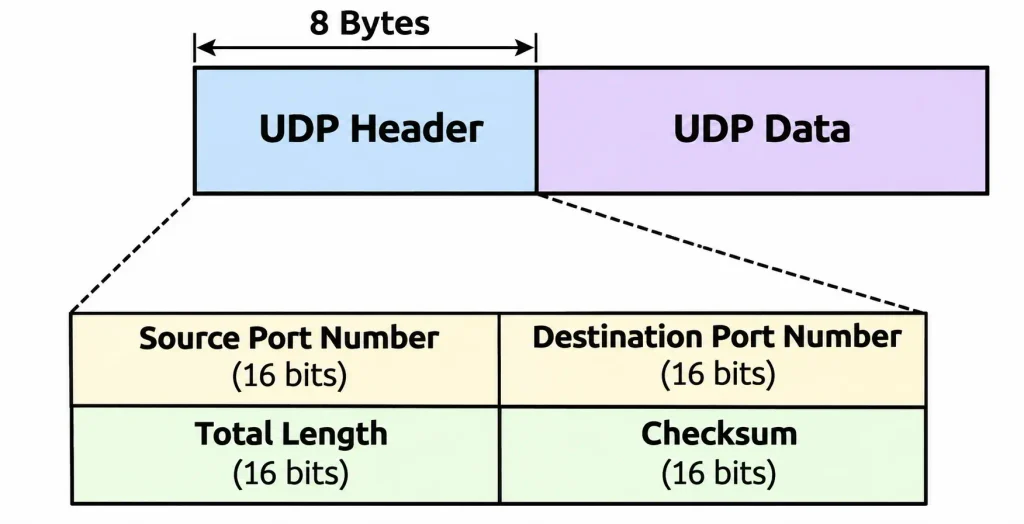
Figure: UDP Header
UDP Header Fields Table
| Field | Size | Description |
|---|---|---|
| Source Port | 16 bits | Identifies the sender’s port number. |
| Destination Port | 16 bits | Identifies the receiver’s port number. |
| Length | 16 bits | Specifies the total length of UDP header and data. |
| Checksum | 16 bits | Used for error detection (optional in IPv4, mandatory in IPv6). |
Working of UDP
1. No Connection Establishment
UDP does not establish any connection before sending data. There is no handshake process like in TCP, so communication starts immediately. This reduces delay and makes transmission faster. It is useful for real-time applications where quick delivery is important.
2. Data Transmission (Datagrams)
UDP sends data in the form of small packets called datagrams. Each datagram is independent and carries its own header information. These packets travel separately through the network. This independence allows fast transmission but may lead to loss or disorder.
3. No Acknowledgement
UDP does not send acknowledgements after receiving data. The sender does not get confirmation whether the data reached the receiver. This reduces overhead and increases speed. However, it makes communication unreliable.
4. No Error Recovery
UDP does not provide any mechanism to recover lost or corrupted data. It only uses a checksum to detect errors in transmission. If an error is found, the packet is simply discarded. There is no retransmission of lost data.
5. No Flow Control
UDP does not control the rate of data transmission. The sender continues to send data without checking the receiver’s capacity. This can sometimes overload the receiver. However, it helps maintain high speed in communication.
6. No Ordering Guarantee
UDP does not ensure that packets arrive in the correct order. Datagrams may reach the destination in a different sequence. The protocol does not rearrange them. If ordering is needed, it must be handled by the application itself.
Functions of UDP
1. Process-to-Process Communication
UDP uses port numbers to deliver data to the correct application. It enables communication between specific processes on sender and receiver systems. This allows multiple applications to work simultaneously over the network.
2. Fast Data Transmission
UDP sends data without establishing a connection or waiting for acknowledgements. This reduces delay and increases speed. It is suitable for real-time applications like video streaming and online gaming.
3. Connectionless Communication
UDP does not require a connection setup before data transfer. Each datagram is sent independently without depending on previous packets. This makes the protocol simple and efficient.
4. Supports Broadcasting and Multicasting
UDP can send data to multiple devices at the same time. It is useful for applications like live streaming and online conferencing. This improves efficiency in group communication.
5. Low Overhead
UDP has a very small header size of 8 bytes. This reduces processing time and network load. It helps in achieving faster communication.
6. Simple Protocol Design
UDP is simple because it does not include complex mechanisms like error recovery or flow control. This makes it lightweight and easy to implement. It is ideal for applications where speed is more important than reliability.
Use of UDP in DDoS Attacks
A UDP flood attack is a type of Distributed Denial of Service (DDoS) attack in which an attacker sends a large number of UDP packets to a target system. It takes advantage of UDP’s connectionless nature, forcing the target to process unnecessary requests and exhaust its resources.
Attack Process
- Massive Packet Sending –
The attacker sends a huge number of UDP packets to random ports on the target system.
These packets often use spoofed IP addresses to hide the attacker’s identity.
This increases the load on the target server. - Port Checking by Target –
The target system checks whether any application is listening on the requested ports.
In most cases, no service is available on those ports.
This wastes system processing power. - ICMP Response Generation –
The target replies with ICMP “Destination Unreachable” messages.
Generating these responses consumes additional bandwidth and CPU resources.
Continuous responses lead to system overload.
UDP flood attacks can be reduced by implementing proper network security measures and monitoring techniques. The following methods help detect, prevent, and minimize the impact of UDP flood attacks.
1. Traffic Monitoring
Traffic monitoring involves continuously observing network traffic to identify unusual patterns or suspicious activities.
- Monitor incoming UDP traffic for unexpected spikes in packet volume.
- Identify unusual traffic patterns that may indicate a UDP flood attack.
- Set up alerts to notify network administrators when abnormal activity is detected.
- Analyze traffic sources to identify potentially malicious IP addresses.
Early detection helps network administrators take preventive action before the attack causes serious damage.
2. Rate Limiting and Firewalls
Rate limiting and firewalls help control the amount of incoming UDP traffic reaching a network or server.
- Configure rate limits to restrict excessive UDP packets from a particular source.
- Use firewalls to filter unwanted and suspicious UDP traffic.
- Block malicious IP addresses and restrict access to unnecessary UDP ports.
- Apply traffic filtering rules to reduce the impact of large volumes of unwanted packets.
These techniques help prevent network resources from being overloaded by excessive UDP traffic.
3. Use of Security Systems
Security systems provide additional protection against UDP flood attacks by identifying and filtering malicious network traffic.
- Deploy Intrusion Prevention Systems (IPS) to detect and block suspicious traffic.
- Use Distributed Denial-of-Service (DDoS) protection services to handle large volumes of malicious requests.
- Configure security systems to identify abnormal UDP traffic patterns.
- Regularly update security software and firewall rules to protect against emerging threats.
These systems help maintain network availability and reduce the risk of service interruptions during an attack.
UDP (User Datagram Protocol) works on top of the Internet Protocol (IP) to provide communication between applications running on different devices. UDP is responsible for process-to-process communication, whereas IP handles logical addressing and routing of packets across networks.
UDP depends on IP to deliver data from the source device to the destination device. It uses port numbers to identify the sending and receiving applications, while IP addresses identify the source and destination devices.
Together, UDP and IP enable fast and connectionless data transmission over the internet.
Transmission Process
The interaction between UDP and IP involves the following steps:
1. Data from Application Layer
- The application layer generates data that needs to be transmitted to another device.
- It provides the data to UDP along with the destination port information.
- The destination IP address is also supplied through the network interface used by the application.
- UDP receives the data and prepares it for transmission.
2. UDP Header Addition
- UDP adds a header to the application data.
- The UDP header contains four fields: source port number, destination port number, length, and checksum.
- The source port identifies the sending application, while the destination port identifies the receiving application.
- After adding the header, the application data becomes a UDP datagram.
3. Passing Data to the IP Layer
- UDP passes the complete UDP datagram to the IP layer.
- UDP does not perform routing or determine the path through the network.
- It depends on IP to handle addressing and packet delivery.
- This allows UDP to focus on providing fast communication between applications.
4. IP Processing and Routing
- The IP layer adds its own header to the UDP datagram.
- The IP header contains the source and destination IP addresses.
- IP determines how the packet should be forwarded toward the destination using routing information.
- The packet travels through the network until it reaches the destination device.
5. Delivery at the Receiver End
- When the packet reaches the destination, the IP layer processes and removes the IP header.
- It identifies UDP as the upper-layer protocol and passes the UDP datagram to it.
- UDP checks the header and uses the destination port number to identify the correct application.
- Finally, UDP removes its header and delivers the original application data to the receiving application.
Applications of UDP
1. Live Audio and Video Streaming
- UDP is used in streaming services where continuous data flow is important.
- It allows fast transmission with minimal delay.
- Small data loss is acceptable in such applications.
2. Online Gaming
- UDP is widely used in multiplayer online games.
- It provides low latency communication between players.
- Speed is preferred over reliability in gaming.
3. Voice over IP (VoIP)
- Applications like internet calls use UDP for real-time communication.
- It ensures smooth voice transmission with low delay.
- Minor packet loss does not affect conversation much.
4. Domain Name System (DNS)
- UDP is used in DNS queries to quickly resolve domain names.
- It sends and receives small request-response messages.
- Fast response is more important than reliability.
5. Broadcasting and Multicasting
- UDP supports sending data to multiple receivers at once.
- Used in live events and network updates.
- Efficient for group communication.
6. Real-Time Applications
- UDP is ideal for applications requiring immediate data delivery.
- Examples include video conferencing and live feeds.
- It reduces delay and improves performance.
UDP (User Datagram Protocol) is a simple, fast, and connectionless transport layer protocol that enables quick data transmission between applications. It does not establish a connection or provide reliability features like error recovery, flow control, or ordered delivery, which makes it lightweight and efficient.
UDP works closely with IP, where UDP handles process-to-process communication and IP manages addressing and routing. Due to its low overhead and high speed, UDP is widely used in real-time applications such as streaming, online gaming, VoIP, and DNS. However, its lack of reliability also makes it vulnerable to issues like data loss and misuse in attacks such as UDP flooding, so proper security measures are important.