IPv4 (Internet Protocol Version 4) is one of the most widely used network-layer protocols in computer networks. It is responsible for identifying devices and delivering data packets from a source device to a destination device across interconnected networks.
IPv4 uses a 32-bit addressing system to assign a unique logical address to devices connected to a network. An example of an IPv4 address is 192.168.1.10.
When data is transmitted over a network, it is divided into smaller units called packets. Each packet contains two main parts: a header and data (payload). The header carries important information required for routing and delivering the packet, while the payload contains the actual data being transmitted.
The IPv4 packet format defines how this information is organized so that routers and destination devices can process packets correctly.
What is an IPv4 Packet?
An IPv4 packet is a formatted unit of data transmitted over a network using Internet Protocol Version 4. It contains a header followed by the actual data.
The IPv4 header provides information such as:
- Source IP address.
- Destination IP address.
- Packet length.
- Protocol used by the upper layer.
- Time to Live (TTL).
- Error-checking information.
- Fragmentation details.
The source device adds an IPv4 header to the data before transmission. Routers examine this header to determine how to forward the packet toward its destination.
In simple words: An IPv4 packet is a combination of a header and payload that carries data from a source device to a destination device over an IP network.
IPv4 Packet Format Diagram
The IPv4 packet consists of a header and a data section. The header contains several fields, and each field performs a specific function during packet transmission.
The following is an original, simplified representation of the IPv4 header format.
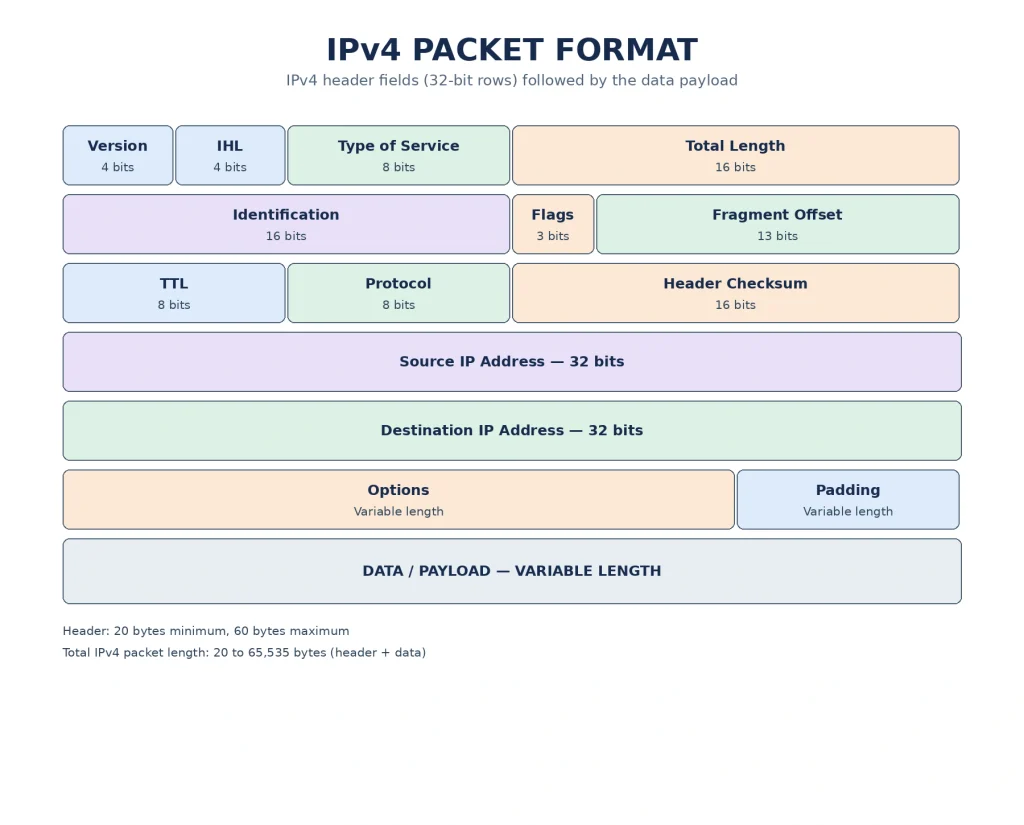
Figure: IPv4 Packet Format
The first five rows represent the fixed 20-byte IPv4 header. The Options and Padding fields are included only when required. The actual data follows the header.
Explanation of Each Field in the IPv4 Header
The IPv4 header contains several fields that help routers and receiving devices identify, process, and deliver packets correctly. Each field has a specific size and purpose.
1. Version (4 Bits)
The Version field specifies which version of the Internet Protocol is being used.
- It occupies 4 bits in the IPv4 header.
- For IPv4, the value of this field is always 4.
- It helps receiving devices identify the IP version and process the packet using the correct format.
For example, when a packet uses IPv4, the Version field contains the binary value 0100, which represents decimal 4.
Purpose: It identifies the IP version used in the packet.
2. Internet Header Length (IHL) (4 Bits)
The Internet Header Length (IHL) field specifies the size of the IPv4 header.
- It occupies 4 bits.
- It indicates the header length in units of 32-bit words (4 bytes).
- The minimum value is 5, which represents 20 bytes.
- The maximum value is 15, which represents 60 bytes.
For example, if the IHL value is 5, the header size is:
If the IHL value is 6, the header size is:
Purpose: It helps the receiver identify where the IPv4 header ends and the actual data begins.
3. Type of Service (ToS) (8 Bits)
The Type of Service (ToS) field specifies the desired quality of service for an IPv4 packet.
It helps indicate how a packet should be handled based on network requirements, such as priority, delay, throughput, and reliability.
- It occupies 8 bits.
- It helps routers make decisions about packet handling.
- It supports different network traffic requirements.
For example, voice and video communication require low delay, whereas file transfers may benefit from higher throughput.
In modern networking, this field is commonly interpreted using two components:
- DSCP (Differentiated Services Code Point): Uses 6 bits to indicate the traffic class and forwarding treatment.
- ECN (Explicit Congestion Notification): Uses 2 bits to support congestion notification.
Purpose: It helps provide appropriate service treatment to different types of network traffic.
4. Total Length (16 Bits)
The Total Length field specifies the complete size of the IPv4 packet, including both the header and the data.
- It occupies 16 bits.
- It is measured in bytes.
- The minimum packet length is 20 bytes because the minimum IPv4 header is 20 bytes.
- The maximum packet length is 65,535 bytes.
For example, consider an IPv4 packet containing:
- Header size = 20 bytes.
- Data size = 500 bytes.
The total packet length is:
Therefore, the Total Length field contains 520.
Purpose: It helps the receiving device determine the complete size of the IPv4 packet.
5. Identification (16 Bits)
The Identification field is used to identify individual IPv4 packets and their fragments.
When a large packet is divided into smaller fragments during transmission, all fragments belonging to the same original packet carry the same Identification value.
- It occupies 16 bits.
- It helps identify fragments belonging to the same original packet.
- It supports the reassembly of fragmented packets at the destination.
For example, if a packet is divided into three fragments, all three fragments carry the same Identification value. The destination device uses this value along with other fragmentation information to identify the fragments belonging together.
Purpose: It helps the destination device recognize and reassemble fragments of the original packet.
6. Flags (3 Bits)
The Flags field contains control information related to packet fragmentation.
It occupies 3 bits and consists of three flag bits:
- Reserved Bit: This bit is reserved and must be set to 0.
- DF (Don’t Fragment): When set to 1, the packet must not be fragmented by routers.
- MF (More Fragments): When set to 1, it indicates that more fragments follow. When set to 0, it indicates that the current fragment is the last fragment (or that the packet is not fragmented).
For example, if a packet is divided into multiple fragments, the MF flag is set to 1 in all fragments except the last one.
Purpose: It controls packet fragmentation and helps identify whether more fragments are expected.
7. Fragment Offset (13 Bits)
The Fragment Offset field indicates the position of a particular fragment within the original IPv4 packet.
- It occupies 13 bits.
- It helps the destination device arrange fragments in the correct order.
- It is measured in units of 8 bytes.
For example, when a packet is divided into multiple fragments, each fragment contains an offset value indicating where its data belongs in the original packet.
The first fragment has an offset value of 0.
Purpose: It helps the destination device correctly position and reassemble packet fragments.
8. Time to Live (TTL) (8 Bits)
The Time to Live (TTL) field specifies the maximum number of router hops that an IPv4 packet can make before being discarded.
- It occupies 8 bits.
- Its initial value is assigned by the sending device.
- Each router decreases the TTL value by at least 1 when forwarding the packet.
- When the TTL reaches 0, the packet is discarded.
For example, suppose a packet starts with a TTL value of 64.
- After passing through the first router, TTL becomes 63.
- After passing through the second router, TTL becomes 62.
- This process continues until the packet reaches its destination or its TTL becomes 0.
Purpose: It prevents packets from circulating endlessly in a network due to routing loops.
9. Protocol (8 Bits)
The Protocol field identifies the protocol used in the data portion of the IPv4 packet.
It helps the receiving device understand which upper-layer protocol should process the packet’s payload.
Some common protocol numbers are:
| Protocol | Protocol Number |
|---|---|
| ICMP | 1 |
| TCP | 6 |
| UDP | 17 |
| GRE | 47 |
| ESP | 50 |
| AH | 51 |
For example, if the Protocol field contains the value 6, it indicates that the packet carries TCP data.
If it contains the value 17, it indicates that the packet carries UDP data.
Purpose: It identifies the upper-layer protocol used in the IPv4 packet.
10. Header Checksum (16 Bits)
The Header Checksum field is used to detect errors in the IPv4 header.
- It occupies 16 bits.
- It checks the integrity of the IPv4 header.
- It does not calculate the checksum for the actual data or payload.
- Routers recalculate the checksum whenever they modify relevant header fields, such as TTL.
For example, when a router decreases the TTL value, the IPv4 header changes. Therefore, the router must update the Header Checksum before forwarding the packet.
Purpose: It helps detect errors in the IPv4 header during transmission.
11. Source Address (32 Bits)
The Source Address field contains the IPv4 address of the device that originally sent the packet.
- It occupies 32 bits.
- It identifies the sender of the packet.
- It helps the receiving device identify where the packet originated.
For example:
192.168.1.10
If a computer with this IP address sends a packet to another computer, its IP address is included in the Source Address field.
Purpose: It identifies the source device from which the packet originated.
12. Destination Address (32 Bits)
The Destination Address field contains the IPv4 address of the device to which the packet is being sent.
- It occupies 32 bits.
- It identifies the intended receiving device.
- Routers use this address to determine the next hop toward the destination.
For example:
192.168.1.20
If a packet is sent from 192.168.1.10 to 192.168.1.20, the destination IP address is stored in this field.
Purpose: It identifies the destination device that should receive the packet.
13. Options (Variable Length)
The Options field provides additional information and special processing instructions for an IPv4 packet.
- It is optional.
- Its length can vary.
- It can contain information related to routing, timestamps, and other special network functions.
- It can occupy up to 40 bytes.
Some examples of IPv4 options include:
- Record Route: Records the routers through which a packet travels.
- Timestamp: Records timing information during packet transmission.
- Loose Source Routing: Allows the sender to specify some routers that the packet should pass through.
- Strict Source Routing: Allows the sender to specify the route that the packet must follow.
Purpose: It provides additional control and processing information when required.
14. Padding (Variable Length)
The Padding field is used to make sure that the IPv4 header length is a multiple of 32 bits (4 bytes).
- It is used when Options are present and their length does not align with a 32-bit boundary.
- It contains zero bits.
- It helps maintain the correct header alignment.
For example, if the Options field does not occupy a complete 32-bit word, padding bits are added to complete the word.
Purpose: It ensures that the IPv4 header ends at a 32-bit boundary.
15. Data or Payload (Variable Length)
The Data field contains the actual information being transmitted from the source device to the destination device.
- It comes immediately after the IPv4 header.
- Its size depends on the Total Length field and the header size.
- It may contain TCP segments, UDP datagrams, ICMP messages, or other upper-layer data.
For example, when a user opens a website, the data portion of IPv4 packets may carry TCP segments containing parts of the website communication.
Purpose: It carries the actual information that needs to be delivered to the destination.
IPv4 Header Size and Packet Size
The IPv4 header has a variable length depending on whether the Options field is included.
There are two important measurements:
Minimum IPv4 Header Size: 20 Bytes
When the Options field is not included, the IPv4 header contains only the standard fields. Its size is 20 bytes.
Maximum IPv4 Header Size: 60 Bytes
When the Options field is included, the header size can increase up to 60 bytes, including padding.
The maximum IPv4 packet size is 65,535 bytes.
| Component | Size |
|---|---|
| Minimum header | 20 bytes |
| Maximum header | 60 bytes |
| Options | 0–40 bytes |
| Data (Payload) | Variable |
| Maximum packet size | 65,535 bytes |
The total packet size is calculated using the following formula:
Example:
Suppose an IPv4 packet contains a 20-byte header and 1,000 bytes of data.
Therefore, the total length of the IPv4 packet is 1,020 bytes.
Working of an IPv4 Packet
The IPv4 packet format plays an important role in transferring data between devices. The following steps explain how an IPv4 packet works during communication.
1. Data Creation: When a user sends data, the upper-layer protocol prepares the information for transmission.
2. Header Addition: The source device adds an IPv4 header containing the source address, destination address, packet length, TTL, protocol information, and other necessary fields.
3. Packet Transmission: The IPv4 packet is passed to the data-link layer and transmitted through the network.
4. Packet Processing by Routers: When the packet reaches a router, the router examines the destination IP address to determine the appropriate next hop.
5. TTL Update: The router decreases the TTL value by at least 1 and recalculates the header checksum.
6. Fragmentation (If Required): If fragmentation is permitted and required by the network’s MTU, the packet may be divided into smaller fragments.
7. Packet Delivery: The packet or its fragments reach the destination device.
8. Data Processing: The destination device processes the IPv4 header, reassembles fragments if necessary, and passes the payload to the appropriate upper-layer protocol.
In this way, the IPv4 packet format helps devices and routers communicate and transfer data across different networks.
Importance of IPv4 Packet Format
The IPv4 packet format is important because it provides a standard structure for transmitting data across interconnected networks.
Its major benefits include:
1. Address Identification: It identifies the source and destination devices using their IP addresses.
2. Efficient Routing: It helps routers forward packets toward their intended destinations.
3. Packet Fragmentation: It supports dividing packets into smaller fragments when required and permitted.
4. Error Detection: The Header Checksum helps detect errors in the IPv4 header.
5. Loop Prevention: TTL prevents packets from circulating endlessly in the network.
6. Protocol Identification: The Protocol field helps identify whether the payload belongs to TCP, UDP, ICMP, or another protocol.
7. Data Transmission: It provides a standard structure for carrying data between devices.
Advantages of IPv4 Packet Structure
The major advantages of the IPv4 packet structure are:
- Simple Structure: It provides a standardized format that networking devices can understand.
- Easy Routing: Source and destination addresses help routers forward packets.
- Fragmentation Support: It allows packets to be divided into smaller fragments when necessary and permitted.
- Protocol Support: It supports different upper-layer protocols such as TCP, UDP, and ICMP.
- Error Detection: The Header Checksum helps identify errors in the packet header.
- Loop Prevention: TTL prevents packets from remaining in the network indefinitely.