Reduction of ER Schema to Tables
The reduction of an ER schema to tables means converting an Entity-Relationship (ER) diagram into relational database tables.
Steps:
- Strong Entity
- Each strong entity is converted into a separate table.
- Its attributes become columns.
- The key attribute becomes the Primary Key.
- Weak Entity
- A weak entity is converted into a separate table.
- The primary key of its owner entity is included as a Foreign Key.
- The owner key and partial key together form the primary key.
- One-to-One (1:1) Relationship
- The primary key of one entity is added as a Foreign Key to the other table.
- One-to-Many (1:N) Relationship
- The primary key of the one-side entity is added as a foreign key to the many-side table.
- Many-to-Many (M:N) Relationship
- A new table is created for the relationship.
- It contains the primary keys of both participating entities as foreign keys.
- Multivalued Attribute
- A separate table is created for the multivalued attribute.
- The primary key of the related entity is included as a foreign key.
- Composite Attribute
- A composite attribute is divided into its individual simple attributes.
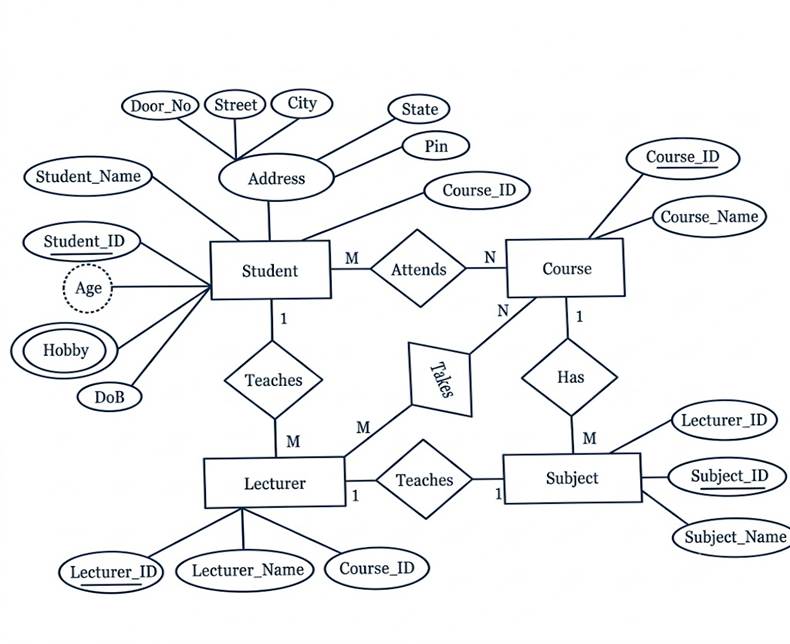
Basic rule
For reducing an ER model into tables is straightforward: every entity becomes a table on its own, and every relationship is handled either by adding a foreign key into an existing table or, in some cases, by creating a completely new table, depending on the type of relationship involved.
Entities become tables
Each entity is converted into a table with the same name. Its attributes become columns, and the key attribute becomes the primary key.
Weak entities carry their parent’s key
A weak entity can’t be identified by itself, so its table includes its own attributes plus the primary key of its owner entity as a foreign key. The primary key of this table becomes a combination of the parent’s key and the weak entity’s partial key.
Composite attributes keep only their parts
Only the simple sub-parts of a composite attribute are stored as columns. So Address split into Street, City, PinCode gives three separate columns instead of one Address column.
Multivalued attributes get a separate table
Since one column can’t hold many values, a multivalued attribute is moved into its own table along with the primary key of its entity.
Relationships follow the main rule
For a one to one relationship, no new table is needed, the primary key of either entity is simply added as a foreign key in the other entity’s table.
For a one to many relationship, the primary key from the “one” side is added as a foreign key in the table on the “many” side.
For a many to many relationship, a new table must be created, containing the primary keys of both entities together as the composite primary key, along with any attribute of the relationship.