In modern computer networks, data is constantly exchanged between devices. Every time you browse a website, send an email, watch a video, or make an online transaction, data travels through multiple layers of communication protocols. To ensure that this data reaches the correct destination accurately and efficiently, the OSI model divides the communication process into seven layers.
Among these layers, the Transport Layer plays a vital role in providing reliable end-to-end communication between applications running on different devices. It is responsible for data segmentation, error detection, flow control, connection management, and ensuring that data reaches the intended application without loss or corruption.
Without the Transport Layer, applications would not be able to communicate reliably over networks. In this article, we will learn what the Transport Layer is, its functions, working, protocols, advantages, disadvantages, and real-world examples in a simple and easy-to-understand manner.
What is Transport Layer?
The Transport Layer is the fourth layer of the OSI (Open Systems Interconnection) Model. It provides process-to-process communication and ensures the reliable transfer of data between source and destination systems.
The main objective of the Transport Layer is to deliver data from one application process to another application process running on different devices.
In simple words, the Transport Layer acts as a delivery manager that ensures data reaches the correct destination completely, correctly, and in the right order.
Position of Transport Layer in the OSI Model
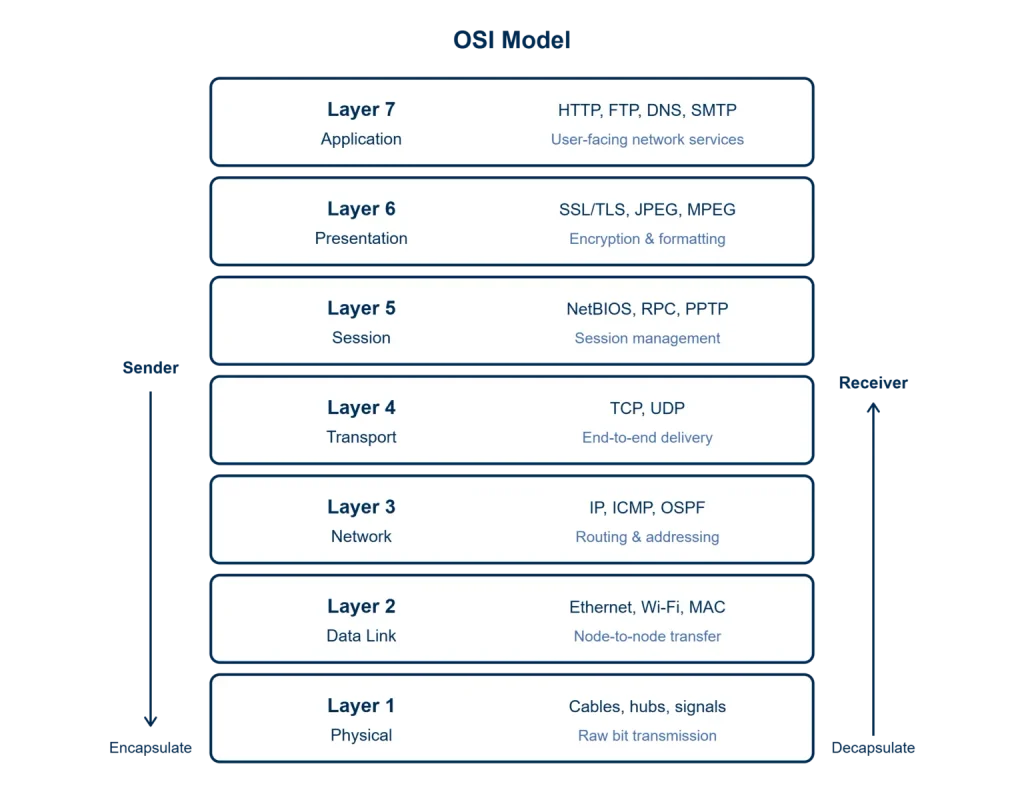
Figure : Position of Transport Layer in OSI Model
The Transport Layer sits between the Session Layer and the Network Layer and acts as a bridge between application services and network services.
Why Do We Need the Transport Layer?
Imagine you are downloading a 500 MB software file from the internet.
Problems may occur such as:
- Data packets may be lost.
- Data may arrive out of order.
- The receiver may become overloaded.
- Transmission errors may occur.
The Transport Layer solves these problems by:
- Dividing data into segments.
- Detecting transmission errors.
- Controlling data flow.
- Reassembling data at the destination.
- Ensuring reliable communication.
Functions of Transport Layer
The Transport Layer performs several important functions.
1. Segmentation and Reassembly
Large data cannot be transmitted as a single unit. Therefore, the Transport Layer divides data into smaller units called segments.
Example
If you send a 50 MB PDF file through email:
- The Transport Layer breaks it into small segments.
- Each segment is transmitted separately.
- The destination system reassembles all segments into the original file.
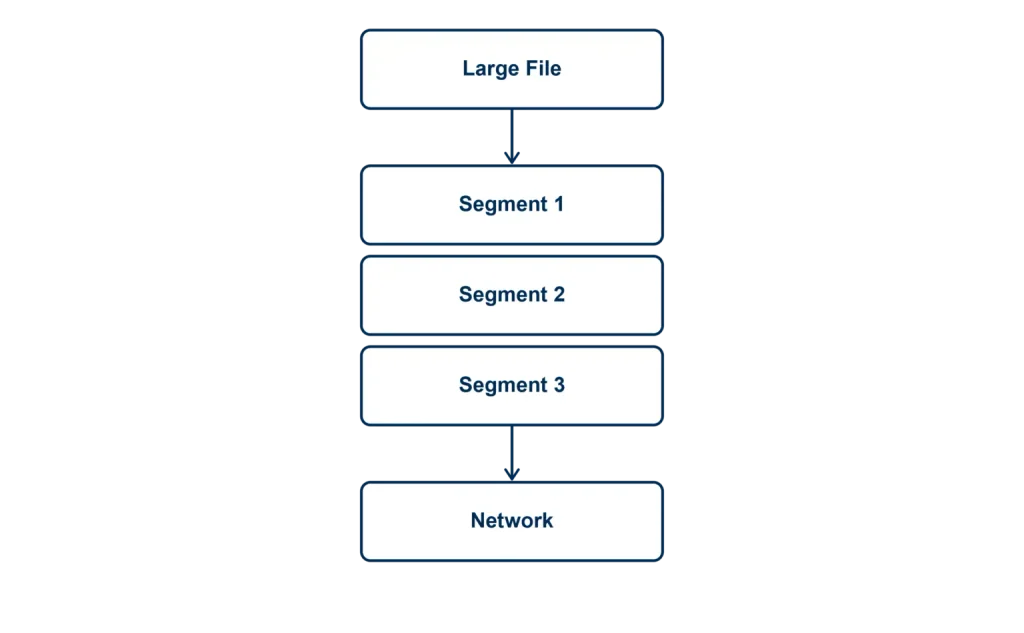
Figure : Data Segmentation
2. End-to-End Communication
The Transport Layer provides communication between applications rather than devices.
Example
When you open YouTube in your browser:
- The browser sends a request.
- The Transport Layer ensures that the response reaches the browser application specifically.
This is called process-to-process communication.
3. Flow Control
Flow control prevents a fast sender from overwhelming a slow receiver.
Example
Suppose:
- Sender speed = 100 Mbps
- Receiver speed = 20 Mbps
Without flow control, data loss would occur.
The Transport Layer regulates transmission speed so that the receiver can process incoming data efficiently.
4. Error Control
During transmission, data may become corrupted or lost.
The Transport Layer:
- Detects errors.
- Requests retransmission of lost segments.
- Ensures reliable delivery.
Example
If Segment 5 is lost during transmission:
Received:
1 2 3 4 X 6 7 8
The receiver requests Segment 5 again before reconstructing the file.
5. Multiplexing and Demultiplexing
Many applications can communicate simultaneously on a computer.
The Transport Layer uses port numbers to identify applications.
Example
| Application | Port Number |
|---|---|
| HTTP | 80 |
| HTTPS | 443 |
| FTP | 21 |
| SMTP | 25 |
When data arrives, the Transport Layer delivers it to the correct application using port numbers.
6. Connection Management
The Transport Layer establishes, maintains, and terminates communication sessions.
Example
When accessing a website:
- Connection is established.
- Data is transferred.
- Connection is closed.
This process ensures organized communication.
Working of the Transport Layer
The Transport Layer follows a structured process for transmitting data.
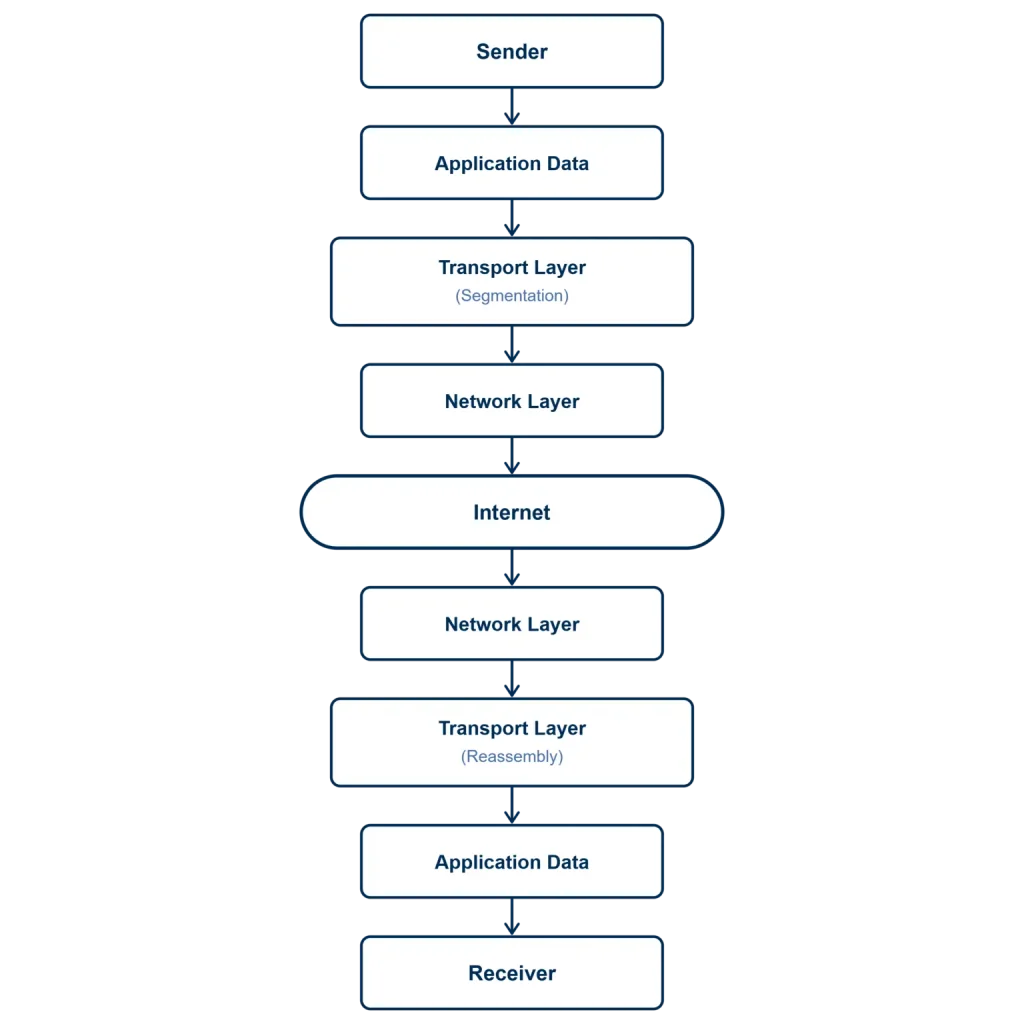
Figure : Working of Transport Layer
Step-by-Step Process
- Application generates data.
- Transport Layer divides data into segments.
- Sequence numbers are assigned.
- Segments are transmitted through the network.
- Receiver receives segments.
- Errors are checked.
- Missing segments are retransmitted.
- Segments are reassembled.
- Data is delivered to the destination application.
Transport Layer Protocols
Two major protocols operate at the Transport Layer:
1. TCP (Transmission Control Protocol)
TCP is a connection-oriented protocol that provides reliable communication.
Features of TCP
- Reliable delivery
- Error recovery
- Flow control
- Ordered transmission
- Acknowledgment mechanism
- Connection-oriented communication
TCP Communication
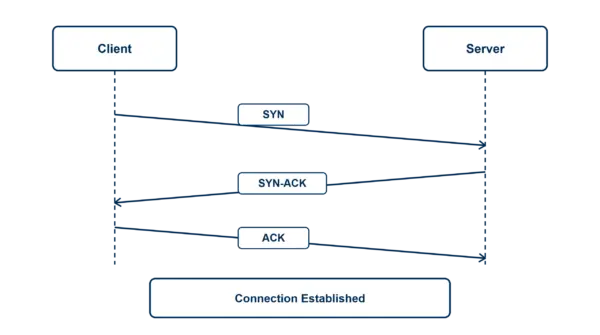
Figure : TCP Three-Way Handshake
Applications of TCP
- Web browsing
- Email services
- File transfer
- Online banking
- Cloud storage
Example
When downloading a software update, every byte must arrive correctly. Therefore, TCP is used.
2. UDP (User Datagram Protocol)
UDP is a connectionless protocol that prioritizes speed over reliability.
Features of UDP
- Fast communication
- No connection setup
- Low overhead
- No acknowledgments
- No retransmission
Applications of UDP
- Online gaming
- Live streaming
- Video conferencing
- Voice calls
- DNS queries
Example
In a live cricket stream, losing one or two packets is acceptable, but delays are not. Therefore, UDP is preferred.
Difference between TCP vs UDP
| Feature | TCP | UDP |
|---|---|---|
| Connection Type | Connection-Oriented | Connectionless |
| Reliability | High | Low |
| Speed | Slower | Faster |
| Error Recovery | Yes | No |
| Data Ordering | Guaranteed | Not Guaranteed |
| Acknowledgment | Required | Not Required |
| Usage | Banking, Email, Web | Streaming, Gaming |
Real-Life Example of Transport Layer
Consider a courier company delivering a large order.
Courier Service
- Package divided into boxes.
- Each box numbered.
- Missing boxes resent.
- Boxes assembled at destination.
Transport Layer
- Data divided into segments.
- Segments numbered.
- Lost segments retransmitted.
- Data reassembled at destination.
Thus, the Transport Layer works like a smart courier management system.
Advantages of Transport Layer
The Transport Layer is an important layer of the OSI model. It provides communication between applications running on different devices. It offers several services, such as reliable data transmission, error detection, flow control, and process-to-process communication.
The major advantages of the Transport Layer are explained below.
1. Reliable Communication
The Transport Layer provides reliable communication between the sender and receiver, mainly through the TCP protocol.
It ensures that data is delivered correctly and completely. If any data segment is lost during transmission, TCP can detect the loss and retransmit the missing segment.
For example, when downloading a file from the internet, all parts of the file must reach the destination correctly. The Transport Layer helps ensure that the complete file is received without missing data.
Benefit: It provides accurate and dependable data communication between devices.
2. Error Detection and Recovery
The Transport Layer helps detect errors that may occur during data transmission.
It uses mechanisms such as checksums to identify corrupted data. In TCP, acknowledgments and retransmission mechanisms help recover lost or corrupted data when necessary.
For example, if a data segment is damaged during transmission, the receiving device can detect the problem and request retransmission through TCP mechanisms.
UDP also provides checksum-based error detection, but it does not guarantee retransmission or recovery.
Benefit: It helps identify transmission errors and supports data recovery when reliable delivery is required.
3. Flow Control
Flow control is a mechanism used by the Transport Layer to control the rate of data transmission between the sender and receiver.
It prevents a fast sender from sending data faster than the receiver can process it.
TCP uses a sliding window mechanism to manage the amount of data that can be sent before receiving acknowledgments.
For example, if a computer sends data to a mobile device with limited processing capacity, flow control helps prevent the mobile device from becoming overloaded with incoming data.
Benefit: It prevents receiver overload and helps maintain smooth communication.
4. Process-to-Process Communication
The Transport Layer provides communication between specific applications or processes running on different devices.
The Network Layer delivers data from one host to another, whereas the Transport Layer delivers data to the correct application on the destination device.
It uses port numbers to identify different applications and services.
For example:
- Port 80 is commonly used for HTTP.
- Port 443 is commonly used for HTTPS.
- Port 25 is commonly used for SMTP.
When a user opens a website, the Transport Layer helps deliver the received data to the appropriate application using port numbers.
Benefit: It allows different applications running on different devices to communicate with each other.
5. Multiplexing
Multiplexing is a process that allows multiple applications to send and receive data through the network simultaneously.
The Transport Layer uses port numbers to identify different application data streams.
For example, a user can browse a website, listen to music, and download a file at the same time. The Transport Layer helps manage the data associated with these different applications.
It collects data from multiple applications at the sender side and passes the received data to the correct applications at the destination side.
Benefit: It allows multiple applications to share network resources efficiently.
6. Ordered Delivery
The Transport Layer supports ordered delivery of data, particularly through TCP.
When data is divided into smaller segments, they may reach the destination in a different order from the one in which they were sent.
TCP uses sequence numbers to identify the correct order of segments and rearranges them before delivering the data to the application.
For example, when downloading a document, the data may arrive in a different order. TCP rearranges the segments so that the document is delivered correctly.
UDP does not guarantee ordered delivery.
Benefit: It ensures that data is delivered to applications in the correct sequence when TCP is used.
Disadvantages of Transport Layer
Although the Transport Layer provides several important services, it also has some disadvantages. These limitations mainly depend on the protocol being used, especially TCP.
1. Increased Overhead
The Transport Layer adds additional information to data in the form of headers.
Protocols such as TCP use sequence numbers, acknowledgment information, checksums, and other control fields.
These additional fields increase the size of transmitted data and consume network bandwidth.
For example, TCP adds a minimum header of 20 bytes to each segment, increasing the amount of data transmitted over the network.
Limitation: Additional headers and control information increase communication overhead.
2. Additional Processing
The Transport Layer performs several operations, such as error detection, flow control, congestion control, connection management, and retransmission.
These operations require processing time and computational resources.
For example, TCP must maintain sequence numbers, process acknowledgments, and retransmit lost segments when necessary.
This additional processing can increase communication complexity, particularly when handling a large number of connections.
Limitation: Transport Layer mechanisms require additional processing and may increase system complexity.
3. Reduced Speed in TCP
TCP provides reliable data transmission through acknowledgments, retransmissions, flow control, and congestion control.
However, these mechanisms may introduce delays during communication.
For example, when a sender transmits data using TCP, it may need to wait for acknowledgments before sending additional data, depending on the available window and network conditions.
If packets are lost, retransmissions can further increase communication time.
UDP does not provide these reliability mechanisms, so it is often preferred for applications that require low latency.
Limitation: TCP reliability mechanisms can introduce additional delays and reduce effective communication speed in certain situations.
4. Resource Consumption
The Transport Layer, especially TCP, requires system resources to manage communication between devices.
TCP maintains connection information, sequence numbers, acknowledgment details, and transmission buffers.
These operations consume memory, processing power, and other system resources.
For example, a web server handling thousands of simultaneous TCP connections must maintain information for each active connection.
Limitation: Managing multiple connections can consume significant memory and processing resources.
Applications of Transport Layer
The Transport Layer is widely used in internet-based applications because it provides communication between different applications running on networked devices.
Some important applications are explained below.
1. Web Browsing
The Transport Layer plays an important role in web browsing. When users access websites through browsers, the Transport Layer helps transfer data between the browser and web server.
TCP is commonly used for HTTP communication, while modern HTTP/3 uses QUIC over UDP.
For example, when a user opens Google Chrome and visits a website, the Transport Layer helps establish and manage communication between the browser and the web server.
Application: Accessing websites, searching for information, and downloading web pages.
2. Online Banking
Online banking applications use Transport Layer services to exchange information securely between users and banking servers.
TCP provides reliable data delivery, which is important when transmitting account details, transaction requests, and payment information.
For example, when a user transfers money through a banking application, the application communicates with the bank’s server to process the transaction.
Security is provided through additional mechanisms such as TLS, along with authentication and other banking security controls.
Application: Fund transfers, balance checking, bill payments, and online transactions.
3. Email Communication
The Transport Layer supports sending and receiving emails between mail clients and mail servers.
Different application-layer protocols use transport protocols such as TCP to transfer email data.
Some commonly used email protocols include:
- SMTP: Used for sending emails.
- POP3: Used for downloading emails.
- IMAP: Used for accessing and managing emails on a mail server.
For example, when a user sends an email through Gmail, transport protocols help transfer the email between the relevant servers.
Application: Sending messages, receiving emails, and managing email accounts.
4. Video Streaming
Video streaming applications use Transport Layer services to deliver audio and video data over the internet.
Depending on the application and streaming technology, TCP or UDP-based transport may be used.
For example, when watching a movie on Netflix or YouTube, data is continuously transferred from the streaming server to the user’s device.
Some streaming systems use TCP-based HTTP delivery, while others use UDP-based technologies.
Application: Watching online movies, television programs, educational videos, and live streams.
5. Video Conferencing
Video conferencing applications use Transport Layer protocols to support real-time audio and video communication.
UDP is commonly preferred for real-time media because it provides faster transmission without waiting for retransmissions. TCP may also be used for certain signaling and communication functions.
For example, applications such as Zoom and Google Meet allow users to communicate through live audio and video.
Application: Online meetings, virtual classrooms, remote interviews, and business conferences.
6. Cloud Computing
Cloud computing uses Transport Layer services to exchange data between users, applications, and cloud servers.
It supports communication between devices and cloud platforms through reliable or connectionless transport protocols, depending on application requirements.
For example, when a user uploads a document to Google Drive, the Transport Layer helps transfer the document between the user’s device and the cloud server.
Application: Cloud storage, online applications, data backup, and remote computing services.
7. Online Gaming
Online gaming applications use Transport Layer protocols to exchange information between players and game servers.
UDP is commonly used for real-time gaming because low latency is important for quick responses. TCP may be used for login, account management, and other reliable communication.
For example, when playing an online multiplayer game, the Transport Layer helps exchange information about player movements, game actions, and other updates.
Application: Multiplayer games, online competitions, and real-time gaming.
8. File Transfer Systems
The Transport Layer supports transferring files between computers and servers.
TCP is commonly used because file transfers require accurate and reliable delivery of data.
For example, when a user downloads a software application from a website, TCP helps ensure that the transmitted data reaches the destination correctly.
Application: Uploading files, downloading documents, transferring software, and sharing data between computers.
Real-World Example of the Transport Layer
When you watch a live cricket match online, thousands of data packets carrying video and audio are transmitted every second. The Transport Layer manages the delivery of these packets. For live streaming, UDP is often used because speed is more important than perfect reliability, while for downloading the recorded match, TCP is used to ensure that every packet arrives correctly.