E-mail architecture and service form the foundation of modern digital communication systems. People use email every day for sending messages, documents, images, and business information through the internet. Moreover, email architecture defines how different components such as servers, protocols, and clients work together for smooth communication. Therefore, understanding email architecture helps users learn how email systems operate efficiently.
Today, email services are widely used in education, business, banking, healthcare, and online platforms. Email systems provide fast, secure, and low-cost communication across the world. Furthermore, modern email services support cloud storage, spam filtering, and mobile access for better user experience. Hence, e-mail architecture and services play a major role in global internet communication.
What is Email?
Email, also known as Electronic Mail, is a method of sending and receiving digital messages through the internet. It allows users to exchange text, files, images, videos, and documents electronically. Furthermore, email provides fast, secure, and cost-effective communication between individuals and organizations. People usually access email using email services such as Gmail, Outlook, or Yahoo Mail.
- Email stands for Electronic Mail.
- It is used to send and receive digital messages through the internet.
- Email communication is fast, reliable, and low cost.
- Users need an email address to send or receive emails.
- Email supports attachments such as documents, images, videos, and PDFs.
- It is commonly used in businesses, schools, banks, and online services.
- Popular email services include Google Gmail, Microsoft Outlook, and Yahoo Mail.
- Email works using protocols such as SMTP, POP3, and IMAP.
- Users can access emails through computers, smartphones, and tablets.
- Email helps in official communication, file sharing, and record keeping.
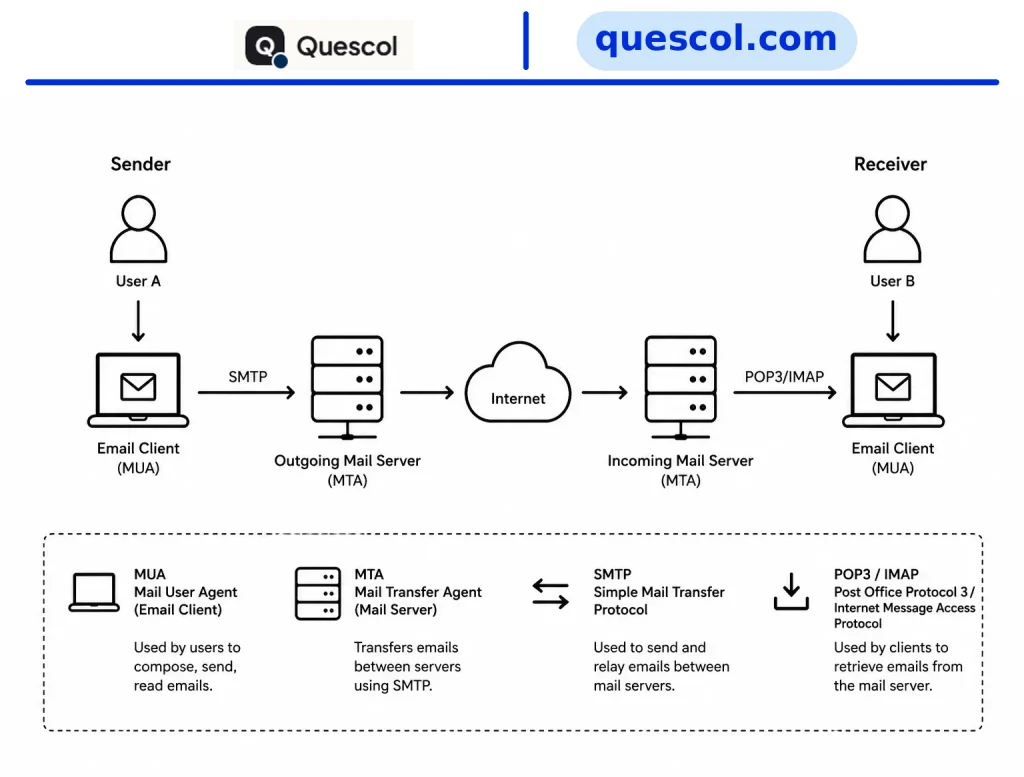
Figure: Email Architecture
Step-by-Step Explanation of the Email Architecture
1. Sender (User A)
The process starts with the sender, called User A in the diagram. The sender writes an email message using an email application such as Gmail or Outlook. Moreover, the sender enters the receiver’s email address, subject, and message content. After completing the email, the sender clicks the send button.
2. Email Client (MUA – Mail User Agent)
The sender uses an Email Client, also known as MUA (Mail User Agent). This software helps users compose, send, receive, and manage emails. Examples of MUAs include Gmail, Yahoo Mail, and Microsoft Outlook. Furthermore, the MUA acts as the interface between the user and the email system.
Functions of MUA
- Creates and sends emails
- Reads and manages incoming emails
- Supports attachments and inbox management
- Connects users with mail servers
3. Outgoing Mail Server (MTA)
After the sender sends the email, the message moves to the Outgoing Mail Server, known as MTA (Mail Transfer Agent). The MTA transfers the email from the sender’s server to the receiver’s mail server. Moreover, it checks the receiver’s address and routes the email correctly through the internet.
Functions of MTA
- Transfers emails between servers
- Verifies email addresses
- Routes emails correctly
- Handles outgoing mail communication
4. SMTP (Simple Mail Transfer Protocol)
The image shows that the email travels through the SMTP protocol. SMTP stands for Simple Mail Transfer Protocol, and it is responsible for sending emails over the internet. Furthermore, SMTP helps transfer emails between mail servers quickly and reliably. Therefore, SMTP is the main protocol for outgoing email communication.
Functions of SMTP
- Sends emails from sender to server
- Transfers emails between servers
- Supports email delivery over networks
- Ensures reliable outgoing communication
5. Internet
After leaving the outgoing mail server, the email travels through the Internet. The internet acts as the communication network that connects mail servers worldwide. Moreover, it helps transfer messages from one location to another within seconds. Hence, the internet enables global email communication.
6. Receiving MTA, MDA, and Message Store
The receiving MTA accepts the message and passes it to a Mail Delivery Agent (MDA). The MDA places the message in the recipient’s mailbox/message store, which an IMAP or POP3 service exposes to the recipient’s mail client.
Functions of Incoming Mail Server
- Receives emails from other servers
- Stores incoming messages
- Organizes user mailboxes
- Supports message retrieval
7. POP3 / IMAP Protocols
The image also shows POP3 and IMAP protocols used for receiving emails.
POP3 (Post Office Protocol Version 3)
POP3 downloads emails from the server to the receiver’s device. After downloading, users can read emails offline. Moreover, POP3 is useful for users who access emails on a single device.
IMAP (Internet Message Access Protocol)
IMAP allows users to access emails directly from the server without downloading them permanently. Furthermore, IMAP synchronizes emails across multiple devices such as phones and laptops. Therefore, it provides flexible email access.
8. Receiver (User B)
Finally, the email reaches the receiver, called User B in the diagram. The receiver opens the email client and reads the message. Moreover, the receiver can reply, forward, download attachments, or store the email for future reference. Thus, the communication process becomes complete.
Working of E-Mail Architecture
1. Email Composition
The sender writes an email using an email application or web service. The message includes the receiver’s address, subject, content, and attachments. After completing the message, the sender clicks the send button. Therefore, the email process begins.
2. Sending Through SMTP
The email client sends the message to the outgoing mail server using SMTP (Simple Mail Transfer Protocol). SMTP manages outgoing email communication over the internet. Furthermore, it forwards the message to the receiver’s mail server. Hence, SMTP supports email transmission.
3. Message Transfer by Mail Servers
The sender’s mail server communicates with the receiver’s mail server through network connections. The Mail Transfer Agent checks the receiver’s address and routes the email correctly. Moreover, servers temporarily store emails if necessary. Thus, mail servers manage email delivery efficiently.
4. Receiving Through POP3 or IMAP
The receiver accesses emails using POP3 or IMAP protocols. POP3 downloads emails to the user’s device, while IMAP allows direct access from the server. Furthermore, IMAP synchronizes emails across multiple devices. Therefore, users can access emails easily and conveniently.
5. Reading and Managing Emails
Finally, the receiver opens the inbox and reads the message. Users can reply, forward, delete, or store emails for future reference. Moreover, attachments can also be downloaded and shared. Hence, email services provide complete communication management.
Components of E-Mail Architecture
1. User Agent (UA)
The User Agent is the email application or software that allows users to create, send, receive, and manage emails. Examples include Gmail, Outlook, and Yahoo Mail. Moreover, the user agent provides features such as inbox management, attachments, and spam filtering. Therefore, it acts as the interface between the user and the email system.
2. Mail Transfer Agent (MTA)
The Mail Transfer Agent transfers emails from the sender’s mail server to the receiver’s mail server. It uses SMTP protocol for message delivery across networks. Furthermore, MTA checks email addresses and routes messages correctly. Hence, it ensures reliable email transmission.
3. Mail Delivery Agent (MDA)
The Mail Delivery Agent receives incoming emails from the mail server and stores them in the receiver’s mailbox. It helps organize and manage incoming messages efficiently. Moreover, MDA ensures that emails reach the correct user account. Therefore, it supports accurate email delivery.
4. Mailbox
A mailbox is the storage area where received emails are stored for users. It contains inbox messages, sent emails, drafts, and deleted items. Furthermore, users can access their mailbox anytime through email applications. Thus, mailboxes help manage digital communication records.
5. Email Protocols
Protocols are communication rules used for sending and receiving emails over the internet. SMTP handles outgoing emails, while POP3 and IMAP manage incoming emails. Moreover, these protocols ensure secure and organized message transfer. Therefore, protocols are essential parts of email architecture.
Popular Email Services
1. Google Gmail
Gmail is one of the most widely used email services in the world. It provides large storage space, strong security, and easy integration with Google services such as Google Drive and Google Meet. Moreover, Gmail offers spam filtering and a user-friendly interface. Therefore, students, professionals, and businesses commonly use Gmail.
2. Microsoft Outlook
Outlook is a professional email service developed by Microsoft. It supports email management, calendars, tasks, and Microsoft Office applications. Furthermore, Outlook is widely used in offices and business organizations for professional communication. Hence, it improves productivity and teamwork.
3. Yahoo Mail
Yahoo Mail is a popular email service that provides large storage capacity and useful features like spam protection and news integration. Moreover, it offers a simple interface for personal communication. Therefore, many users prefer Yahoo Mail for daily email usage.
4. ProtonMail
ProtonMail is an email service focused on privacy and security. It provides end-to-end encryption to protect user communication from unauthorized access. Furthermore, ProtonMail is useful for users who want secure email communication. Thus, it is popular among privacy-conscious users.
5. Zoho Mail
Zoho Mail is a business-focused email service designed for professional communication and teamwork. It provides features such as calendars, task management, and collaboration tools. Moreover, Zoho Mail offers a clean and advertisement-free interface. Therefore, many businesses use it for official communication.
Features of Email
1. Fast Communication
Email delivers messages within a few seconds. Therefore, users can quickly share information with others across the world.
2. File Attachment
Users can attach documents, images, videos, and presentations with an email. As a result, sharing files becomes simple and convenient.
3. Easy Storage
Email services store messages digitally. Hence, users can search and access old emails whenever needed.
4. Multiple Recipients
A single email can be sent to many people at the same time. This feature is useful for business meetings and announcements.
5. Secure Communication
Most email services provide passwords, spam filters, and encryption. Therefore, user data remains more secure.
Conclusion
E-mail architecture and services are essential parts of modern internet communication systems. They help users send, receive, store, and manage digital messages efficiently through protocols, servers, and email applications. Moreover, email services provide fast communication, secure file sharing, and global connectivity for personal and professional use.
Although email systems face challenges such as spam, cyber threats, and internet dependency, their advantages are much greater. Modern e-mail services continue to improve with advanced security, cloud storage, and multi-device support. Hence, e-mail architecture and services remain important technologies in today’s digital world.
How SMTP carries the message is in the note on SMTP.