SMTP is one of the most important protocols used in email communication systems. Whenever a user sends an email through Gmail, Outlook, or another email service, SMTP helps transfer that message from the sender to the receiver through the internet. Moreover, SMTP ensures that emails travel correctly between mail servers and reach the intended destination. Therefore, SMTP plays a major role in modern digital communication.
Today, businesses, schools, banks, and online platforms depend on SMTP for reliable email delivery. It supports fast communication and helps users send messages, documents, and attachments worldwide within seconds. Furthermore, SMTP works together with other email protocols such as POP3 and IMAP to complete the email communication process. Hence, SMTP is an essential part of every email system.
What is SMTP?
SMTP stands for Simple Mail Transfer Protocol. It is a communication protocol used for sending outgoing emails from a sender’s device to the mail server and between mail servers over the internet. Moreover, SMTP controls the process of email delivery and ensures that messages are transferred correctly. Therefore, SMTP acts as the main protocol for sending electronic mail in modern communication networks.
- SMTP uses TCP protocol to provide reliable and error-free email transmission over the internet.
- Email servers usually listen on Port 25 to receive incoming email messages from other servers.
- Before sending an email, the client first establishes a TCP connection with the mail server.
- SMTP acts as the main protocol for transferring emails between different mail servers efficiently.
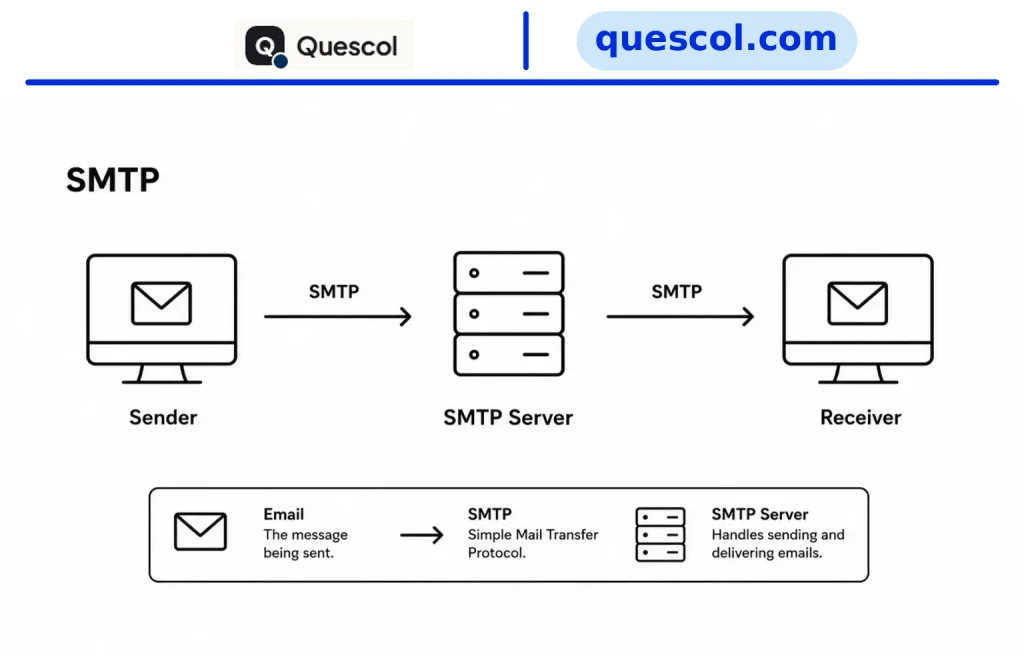
Figure: SMTP
Functions of SMTP
1. Sending Emails
The primary function of SMTP is to send emails from the sender’s email client to the mail server. Whenever a user clicks the “Send” button, SMTP starts the email transfer process. Moreover, it helps deliver messages quickly through internet networks. Therefore, SMTP supports fast digital communication.
2. Transferring Emails Between Mail Servers
SMTP transfers email messages from the sender’s mail server to the receiver’s mail server. It acts like a digital delivery system for electronic communication. Furthermore, SMTP ensures that the message reaches the correct destination server safely. Hence, it supports reliable email transmission.
3. Verifying Email Addresses
SMTP transmits envelope sender and recipient addresses. A receiving server may accept or reject a recipient during RCPT TO, but SMTP does not guarantee that a remote mailbox has been verified; final delivery can still fail and generate a delivery-status notification.
4. Managing Outgoing Mail
SMTP manages all outgoing email communication in the email system. It organizes message routing and delivery through internet servers. Furthermore, SMTP handles multiple outgoing messages efficiently at the same time. Thus, it improves overall email management.
5. Supporting Attachments and Multimedia
SMTP also supports sending attachments such as documents, images, videos, and PDFs through email. Moreover, it works with MIME (Multipurpose Internet Mail Extensions) to transfer multimedia content. Therefore, users can share different types of digital files easily.
6. Providing Reliable Message Delivery
SMTP ensures reliable email delivery by following communication rules and server responses. If the receiving server is busy, SMTP may retry message delivery later. Furthermore, it helps prevent message loss during communication. Hence, SMTP increases email reliability.
Model of SMTP System
The SMTP system model explains how an email travels from the sender to the receiver through different components and servers. It shows the complete process of email creation, transmission, storage, and delivery over the internet. Moreover, SMTP works with user agents, mail servers, queues, and TCP connections to provide reliable email communication. Therefore, the SMTP model is an important part of the email architecture.
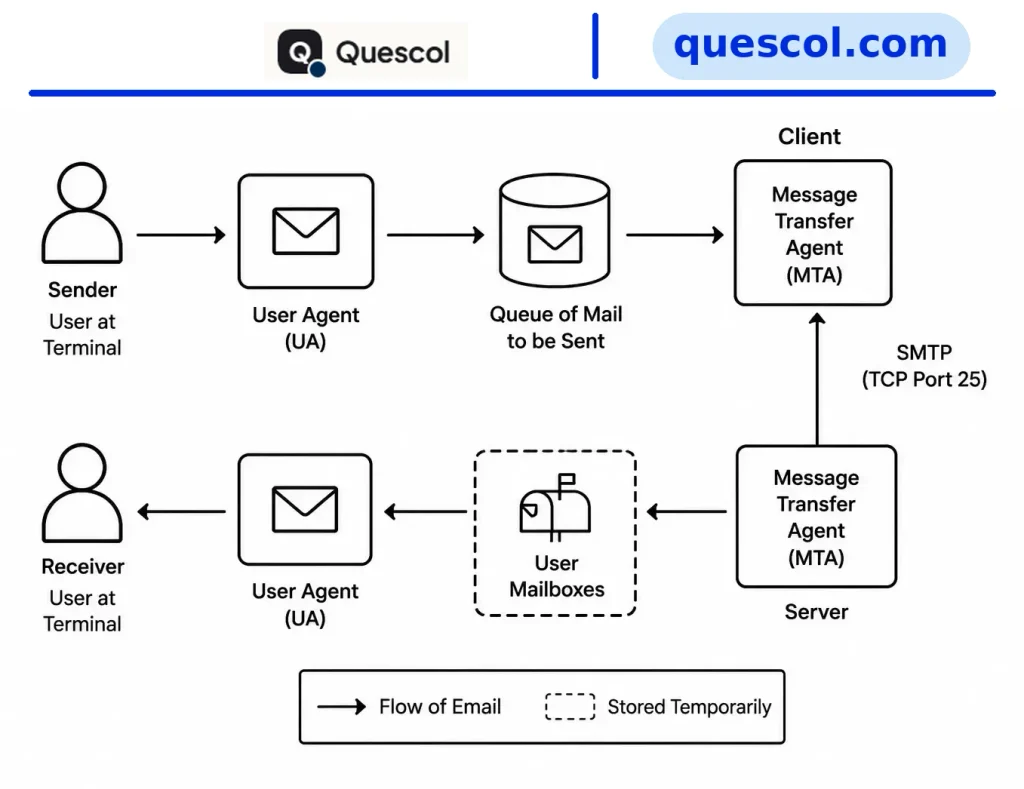
Figure: SMTP Model
1. User at a Terminal (Sender)
The process starts with the sender, who writes the email using a computer, smartphone, or another device. The sender creates the message, enters the receiver’s email address, and clicks the send button. Moreover, the sender may attach files such as documents or images. Therefore, the communication process begins from the sender’s terminal.
2. User Agent (Sender)
The User Agent is the email application used by the sender, such as Gmail, Outlook, or Thunderbird. It helps users compose, edit, and send emails easily. Furthermore, the User Agent transfers the email to the outgoing mail system for processing. Hence, it acts as an interface between the user and the email server.
Functions of User Agent
- Creates and edits emails
- Sends outgoing messages
- Supports attachments and formatting
- Connects users with email servers
3. Queue of Mail to Be Sent
After the email is created, it moves to the mail queue. This queue acts as a temporary storage area for outgoing emails before transmission. Moreover, emails wait in the queue until the mail server processes them. Therefore, the queue helps manage email traffic efficiently.
4. Message Transfer Agent (Client Side)
The Message Transfer Agent (MTA) on the sender’s side is responsible for transferring emails through the network. It retrieves messages from the outgoing queue and prepares them for delivery. Furthermore, the MTA communicates with the receiving server using SMTP protocol. Thus, it manages outgoing email transmission.
Functions of Client-Side MTA
- Retrieves emails from the queue
- Sends emails through the network
- Communicates using SMTP
- Ensures proper message routing
5. TCP Connection (Port 25)
SMTP uses a TCP connection for reliable email transmission. The sender’s MTA opens a TCP connection with the receiver’s mail server through Port 25. Moreover, SMTP commands, responses, and message data travel through this connection securely. Therefore, TCP ensures accurate and reliable communication.
6. Message Transfer Agent (Server Side)
The receiver’s Message Transfer Agent accepts the incoming SMTP connection from the sender’s server. It processes the incoming email and checks the receiver’s address before storing the message. Furthermore, it ensures that the email reaches the correct mailbox. Hence, the server-side MTA manages incoming mail delivery.
Functions of Server-Side MTA
- Accepts incoming emails
- Processes received messages
- Verifies receiver information
- Stores emails for users
7. User Mailboxes
After processing, the email is stored in the receiver’s mailbox on the mail server. The mailbox contains received messages, drafts, sent items, and deleted emails. Moreover, users can access stored emails anytime using email applications. Therefore, mailboxes help organize communication records.
8. User Agent (Receiver)
The receiver uses an email application such as Gmail or Outlook to access the mailbox. The User Agent retrieves emails using protocols like POP3 or IMAP. Furthermore, the receiver can read, reply, forward, or delete messages. Hence, the User Agent supports email management and communication.
9. User at a Terminal (Receiver)
Finally, the receiver reads the email on a computer, smartphone, or tablet. The receiver may respond to the message or download attachments if required. Moreover, the receiver can store the email for future reference. Therefore, the email communication process becomes complete.
How Does SMTP Work?
SMTP works as the main protocol for sending emails over the internet. It controls the process of transferring email messages from the sender’s device to the receiver’s mail server. Moreover, SMTP works with mail servers, user agents, and TCP connections to provide reliable communication. Therefore, SMTP plays an important role in modern email systems.
The SMTP process involves several steps such as composing the email, establishing a connection, transferring the message, and delivering it to the receiver’s mailbox. Furthermore, SMTP may use relays and gateways during communication between different servers and networks. Hence, SMTP ensures fast and organized email delivery worldwide.
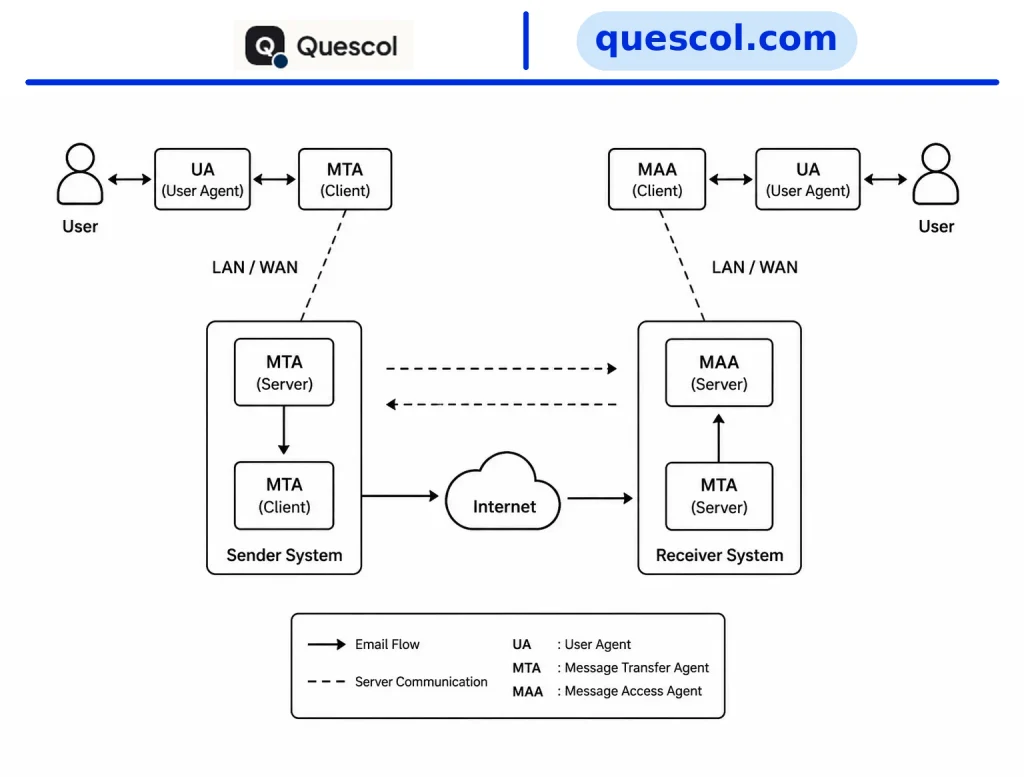
Figure: Working of SMTP
Following are the steps in the working of SMTP:-
1. Sending the Email
The process begins when a user creates an email using a User Agent (UA) such as Gmail, Outlook, or Thunderbird. The sender writes the receiver’s email address, subject, message, and attachments if required. After clicking the send button, the email is transferred to the Mail Transfer Agent (MTA). Therefore, the sending process starts from the user’s email application.
Functions During Sending
- Creates the email message
- Adds subject and attachments
- Transfers email to the mail server
- Starts the SMTP communication process
2. SMTP Client and SMTP Server Communication
After receiving the email, the sender’s Mail Transfer Agent acts as the SMTP Client. It establishes a connection with the receiver’s Mail Transfer Agent, which acts as the SMTP Server. This communication happens through TCP Port 25, which provides reliable message transfer.
The SMTP client sends commands and message data to the SMTP server. Moreover, the server responds with status codes to confirm successful communication. Therefore, SMTP ensures proper connection and message transfer between servers.
Functions of SMTP Client and Server
- Establishes TCP connection
- Transfers email data securely
- Verifies communication between servers
- Supports reliable message delivery
3. Use of Relays and Gateways
Sometimes, the email does not travel directly to the destination server. Instead, it passes through intermediate mail servers called Relays. These relay servers help forward the message toward the correct destination. Moreover, relays improve email routing and communication across large networks.
In some situations, different email systems may use different communication protocols. In such cases, an Email Gateway converts the message into the required format for proper delivery. Therefore, gateways help different email systems communicate smoothly.
Functions of Relays and Gateways
- Forward emails between servers
- Improve routing efficiency
- Convert messages between different protocols
- Support communication between different networks
4. Email Delivery to the Receive
After the email reaches the destination mail server, the receiver’s Mail Transfer Agent processes the message and stores it in the recipient’s mailbox. Then, the receiver accesses the email using a User Agent through POP3 or IMAP protocols. Furthermore, the user can read, reply, forward, or download attachments from the email. Hence, the email communication process becomes complete.
Functions During Delivery
Features of SMTP Services
The following are the important and simple features of SMTP services:
- Dedicated IP Address: Provides a separate sending IP address to improve email delivery and maintain a good sender reputation.
- Easy Email API Integration: Allows businesses to connect email systems quickly with simple setup and clear documentation.
- 24/7 Customer Support: Offers customer support anytime through live chat and website assistance for quick problem solving.
- High-Volume Email Sending: Supports businesses that send a large number of emails regularly with reliable infrastructure.
- Email List Monitoring: Automatically checks and cleans email lists to improve email performance and reduce spam issues.
- Reliable Email Delivery: Helps emails reach the receiver’s inbox safely and efficiently without delays.
- Business Communication Support: Useful for marketing emails, notifications, invoices, and customer communication.
- Secure Email Services: Provides better security and protection against spam and unauthorized access.
Components of SMTP
SMTP consists of several important components that work together to send, transfer, and deliver emails through the internet. Each component performs a specific task in the email communication process. Moreover, these components help ensure reliable, fast, and organized email delivery. Therefore, understanding SMTP components is important for learning how email systems operate.
1. Mail User Agent (MUA)
The Mail User Agent (MUA) is an email application used by users to create, send, receive, and manage emails. It acts as the interface between the user and the email system. Examples of MUAs include Gmail, Outlook, and Thunderbird. Furthermore, the MUA prepares the email message and forwards it to the next component for transmission.
Functions of MUA
- Creates and edits email messages
- Sends and receives emails
- Supports attachments and formatting
- Manages inboxes and folders
For example, A student uses Gmail to write and send an assignment email to a teacher. In this case, Gmail acts as the Mail User Agent.
2. Mail Submission Agent (MSA)
The Mail Submission Agent (MSA) is a program that receives outgoing emails from the Mail User Agent (MUA). After receiving the email, it checks the message format and sender details before forwarding it to the Mail Transfer Agent (MTA). Moreover, the MSA helps improve email security and proper message handling. Therefore, it acts as a bridge between the user application and the mail server.
Functions of MSA
- Receives emails from the MUA
- Verifies sender information
- Checks message formatting
- Forwards emails to the MTA
For example, When a user clicks the send button in an email application, the MSA receives the message and prepares it for server transfer.
3. Mail Transfer Agent (MTA)
The Mail Transfer Agent (MTA) is responsible for transferring emails from one mail server to another using the SMTP protocol. It routes the email through the internet until it reaches the receiver’s mail server. Furthermore, the MTA checks destination addresses and manages email transmission efficiently. Hence, it is one of the most important components in SMTP architecture.
Functions of MTA
- Transfers emails between servers
- Routes messages correctly
- Uses SMTP for communication
- Handles outgoing and incoming mail transfer
For example, When an employee sends an email from one company to another, the MTA transfers the message between both mail servers through the internet.
4. Mail Delivery Agent (MDA)
The Mail Delivery Agent (MDA), also called the Local Delivery Agent, is responsible for delivering received emails to the user’s mailbox. It stores incoming messages in the correct account so the receiver can access them later. Moreover, the MDA helps organize emails efficiently inside the mail server. Therefore, it completes the final step of email delivery.
Functions of MDA
- Receives emails from the MTA
- Delivers messages to user mailboxes
- Stores incoming emails safely
- Organizes local mail delivery
For example, After the teacher’s mail server receives the assignment email, the MDA stores the message in the teacher’s inbox for reading.
SMTP Commands
SMTP commands are instructions used between the SMTP client and SMTP server during email communication. These commands help establish connections, transfer messages, verify users, and manage email transactions. Moreover, SMTP commands ensure smooth and reliable communication between mail servers. Therefore, they are essential for the proper working of the SMTP protocol.
| S. No. | Keyword | Command Form | Description | Usage |
|---|---|---|---|---|
| 1 | HELO | HELO <SP> <domain> <CRLF> | Identifies the sender’s host name to the receiving server. | Mandatory |
| 2 | MAIL <SP> FROM : <reverse-path> <CRLF> | Specifies the sender or originator of the email. | Mandatory | |
| 3 | RCPT | RCPT <SP> TO : <forward-path> <CRLF> | Specifies the recipient of the email message. | Mandatory |
| 4 | DATA | DATA <CRLF> | Indicates the beginning of the actual email message content. | Mandatory |
| 5 | QUIT | QUIT <CRLF> | Closes the TCP connection between client and server. | Mandatory |
| 6 | RSET | RSET <CRLF> | Cancels the current email transaction while keeping the TCP connection active. | Highly Recommended |
| 7 | VRFY | VRFY <SP> <string> <CRLF> | Verifies and confirms a user name on the server. | Highly Recommended |
| 8 | NOOP | NOOP <CRLF> | Performs no operation but checks server response. | Highly Recommended |
| 9 | TURN | TURN <CRLF> | Reverses the roles of sender and receiver. | Seldom Used |
| 10 | EXPN | EXPN <SP> <string> <CRLF> | Expands and displays a mailing list. | Seldom Used |
| 11 | HELP | HELP <SP> <string> <CRLF> | Requests help or documentation from the server. | Seldom Used |
| 12 | SEND | SEND <SP> FROM : <reverse-path> <CRLF> | Sends email directly to the user terminal. | Seldom Used |
| 13 | SOML | SOML <SP> FROM : <reverse-path> <CRLF> | Sends email to the terminal if possible; otherwise to the mailbox. | Seldom Used |
| 14 | SAML | SAML <SP> FROM : <reverse-path> <CRLF> | Sends email to both the terminal and mailbox. | Seldom Used |
SMTP Ports
SMTP ports are communication channels used by email clients and mail servers to send and transfer emails through the internet. These ports help email systems communicate securely and efficiently using the SMTP protocol. Moreover, different ports are used for secure email submission, mail relay, and alternative communication. Therefore, SMTP ports are important for reliable email delivery.
- Port 587 is the standard message-submission port; clients commonly use STARTTLS on this port when offered and required by policy.
- Port 465 is registered for message submission using implicit TLS.
- Port 25 – This port is traditionally used for SMTP relay communication between mail servers. It mainly supports server-to-server email transfer rather than client email submission. Moreover, many Internet Service Providers (ISPs) block Port 25 because it is often used for spam activities.
- Port 2525 – This is an alternative SMTP port used when Port 25 is blocked or restricted. Although it is not an official SMTP standard port, many email providers support it for secure communication. Therefore, it acts as a useful backup SMTP port.
Advantages of SMTP
SMTP provides many benefits for modern email communication systems. It helps users send emails quickly, reliably, and efficiently through the internet. Moreover, SMTP supports communication between different mail servers and email applications worldwide. Therefore, it is one of the most important protocols used in email systems.
- Fast Email Delivery – SMTP transfers emails quickly from the sender to the receiver through internet networks.
- Reliable Communication – SMTP uses TCP protocol, which ensures accurate and reliable message transmission.
- Supports Global Communication – Users can send emails worldwide within seconds using SMTP services.
- Easy Integration – SMTP works smoothly with email applications such as Gmail, Outlook, and Thunderbird.
- Supports File Attachments – SMTP allows users to send documents, images, videos, and other files through email.
- Efficient Mail Transfer – SMTP efficiently transfers emails between different mail servers and networks.
- Low Communication Cost – Email communication through SMTP is much cheaper than traditional postal services.
- Simple and Standard Protocol – SMTP follows standard communication rules, making it easy to use and manage.
- Supports Mass Communication – Businesses use SMTP to send newsletters, notifications, and marketing emails to many users at the same time.
- Improves Business Communication – Organizations use SMTP for official communication, reports, updates, and customer support services.
Disadvantages of SMTP
Although SMTP is widely used for email communication, it also has some limitations and disadvantages. These issues mainly relate to security, spam control, and dependency on other protocols. Moreover, SMTP was originally designed for simple email transfer, so modern communication systems often require additional technologies for better performance and protection. Therefore, users and organizations must manage these limitations carefully.
- Supports Only Sending Emails – SMTP is mainly used for sending emails and cannot retrieve incoming emails without protocols like POP3 or IMAP.
- Security Risks – Basic SMTP does not provide strong built-in encryption, which may expose emails to hacking or unauthorized access.
- Spam and Phishing Problems – SMTP can be misused to send spam, fake emails, and phishing attacks.
- Requires Internet Connection – SMTP cannot function without an active internet connection.
- Large Attachments May Cause Delays – Sending large files through SMTP may slow down email transmission.
- Port Blocking Issues – Some Internet Service Providers block SMTP Port 25 because of spam-related misuse.
- Complex Server Configuration – Setting up SMTP servers may require technical knowledge and proper configuration.
- Delivery Failures Can Occur – Emails may fail to deliver if the receiver’s server is unavailable or the email address is incorrect.
- Limited Built-in Authentication – Traditional SMTP provides weak sender verification without additional security methods.
- Dependency on Other Protocols – SMTP must work with protocols like POP3 or IMAP for complete email communication services.
Applications of SMTP
SMTP is widely used in modern communication systems for sending and transferring emails over the internet. Businesses, educational institutions, banks, and online platforms depend on SMTP for reliable email communication. Moreover, SMTP supports fast message delivery, file sharing, and automated email services. Therefore, it plays an important role in digital communication and internet-based services.
- Business Communication – Companies use SMTP to send official emails, reports, meeting notices, and project updates to employees and clients.
- Educational Communication – Schools and universities use SMTP to send assignments, examination notices, and online learning updates to students.
- Banking Services – Banks use SMTP to send transaction alerts, OTPs, account statements, and payment confirmations securely.
- E-Commerce and Online Shopping – Online shopping websites use SMTP to send order confirmations, invoices, delivery updates, and customer support emails.
- Marketing and Promotions – Businesses use SMTP for email marketing, newsletters, promotional offers, and advertisement campaigns.
- Customer Support Services – Organizations use SMTP to manage customer queries, feedback, and support communication through email systems.
- Social Media Notifications – Social media platforms send account alerts, password reset links, and notification emails using SMTP.
- Automated System Alerts – Websites and software systems use SMTP to send automatic warnings, updates, and security notifications.
- File Sharing and Documentation – SMTP helps users send documents, images, presentations, and reports as email attachments.
- Global Communication – SMTP supports fast international communication between users and organizations across different countries.
Conclusion
SMTP is an essential protocol used for sending emails over the internet. It helps transfer messages from the sender’s device to mail servers and between different servers efficiently. Moreover, SMTP supports reliable communication, file attachments, and global email delivery for businesses, schools, and online services.
Although SMTP has some limitations such as security risks and dependency on other protocols for receiving emails, its advantages are much greater. Modern email systems continue to depend on SMTP for fast and organized digital communication. Hence, SMTP remains one of the most important technologies in email architecture and internet communication systems.
How an address is written is in the SMTP address scheme.