File Transfer Protocol (FTP) is one of the most commonly used Application Layer protocols in computer networks. It helps users transfer files between computers connected through a network or the internet. Moreover, FTP allows users to upload, download, rename, delete, and manage files efficiently from remote systems.
FTP works on a client-server model where the FTP client sends requests and the FTP server responds to them. It uses TCP for reliable communication and ensures proper file transfer between devices. Therefore, FTP plays an important role in website management, file sharing, software distribution, and network communication.
What is FTP?
File Transfer Protocol (FTP) is an Application Layer protocol used to transfer files between computers over a network using the TCP/IP protocol suite. It allows users to upload, download, modify, and manage files stored on remote servers. FTP normally uses TCP port 21 for control; traditional active-mode data connections originate from server port 20, while passive mode uses a server-selected port. Therefore, FTP provides reliable and organized file sharing between client and server systems.
- FTP transfers files over a network.
- It works on a client-server model.
- Well-known ports are 21 for control and 20 for active-mode data.
- It supports uploading and downloading files.
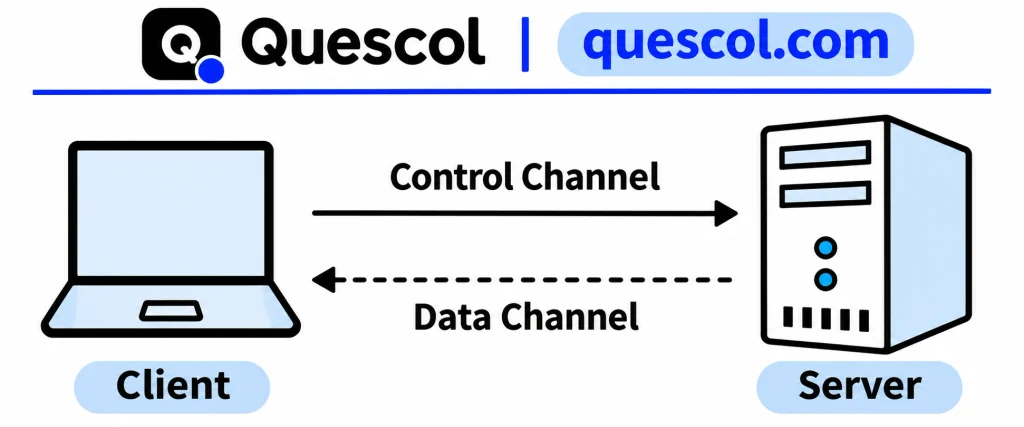
Figure: FTP
FTP Transmission Modes
- ASCII Mode – This mode is used for transferring plain text files. FTP may perform character conversion during transmission so that different systems can understand the text format properly.
- EBCDIC Mode – This mode is mainly used in systems that support EBCDIC character encoding. It converts data into EBCDIC format before transmission between compatible systems.
- Image (Binary) Mode – This mode transfers files in binary format without making any changes to the original data. It is commonly used for images, videos, software files, and other non-text files, and it is the default FTP transfer mode.
Advantages of FTP
1. Easy File Transfer
FTP allows users to transfer files between computers quickly and efficiently. Users can upload and download files without complicated procedures. This makes file sharing simple for individuals, businesses, and organizations. Therefore, communication and data exchange become faster.
2. Supports Large File Transfer
FTP can transfer very large files without major difficulty. It handles multimedia files, software packages, and backup data efficiently. As a result, organizations can exchange heavy data files smoothly over networks and the internet.
3. Reliable Communication
FTP uses TCP for communication, which provides reliable and accurate data transfer. TCP ensures that files reach the destination correctly and in the proper order. Therefore, file corruption and data loss are minimized during transmission.
4. Remote File Access
FTP allows users to access and manage files stored on remote servers from any location. Users can perform file operations without physically visiting the server. This improves flexibility and supports remote work environments efficiently.
5. File Management Support
FTP supports various file operations such as upload, download, rename, move, copy, and delete. Users can manage files directly through the FTP client. Consequently, remote file administration becomes easier and more organized.
6. Multiple File Transfer
FTP can transfer multiple files and folders simultaneously during a single session. This saves time and improves communication efficiency. As a result, businesses can exchange large amounts of data quickly.
7. Wide Compatibility
FTP works on different operating systems such as Windows, Linux, and macOS. Many devices and applications support FTP communication. Therefore, users can easily transfer files between different systems and platforms.
8. Continuous Data Transfer
FTP supports continuous transfer sessions for long file transfer operations. Large files can transfer without interruption when the network remains stable. This makes FTP suitable for backups, website uploads, and software distribution systems.
Disadvantages of FTP
1. Low Security
Basic FTP transfers usernames, passwords, and files in plain text without encryption. Attackers can intercept sensitive information during communication. Therefore, FTP is less secure for confidential data transfer over public networks.
2. Vulnerable to Attacks
FTP servers may become targets for hacking, password attacks, and unauthorized access. Weak authentication increases security risks. As a result, attackers may gain access to important files and system resources.
3. Requires Stable Internet Connection
FTP communication depends on a reliable network connection for successful file transfer. Slow or unstable internet connections may interrupt the transfer process. Consequently, file uploads and downloads may fail or become slower.
4. Complex Configuration
Setting up FTP servers, user permissions, and firewall settings can be difficult for beginners. Proper configuration requires technical knowledge. Therefore, system administration and maintenance may become complicated.
5. Firewall and NAT Problems
FTP uses separate control and data connections, which sometimes create issues with firewalls and NAT devices. As a result, communication problems may occur during file transfer sessions.
6. No Built-in Encryption
Traditional FTP does not provide built-in encryption for transferred data. Files travel through the network in readable format. Therefore, sensitive information may become exposed during transmission.
7. Higher Resource Usage
FTP servers consume memory, storage, and processing power while managing multiple client connections and large file transfers. Consequently, server performance may decrease during heavy usage.
8. Limited Reliability During Network Failure
If the network connection breaks during transfer, incomplete files may be generated. Users may need to restart the transfer process again. This can waste time and reduce communication efficiency.
Working of FTP According to the Image
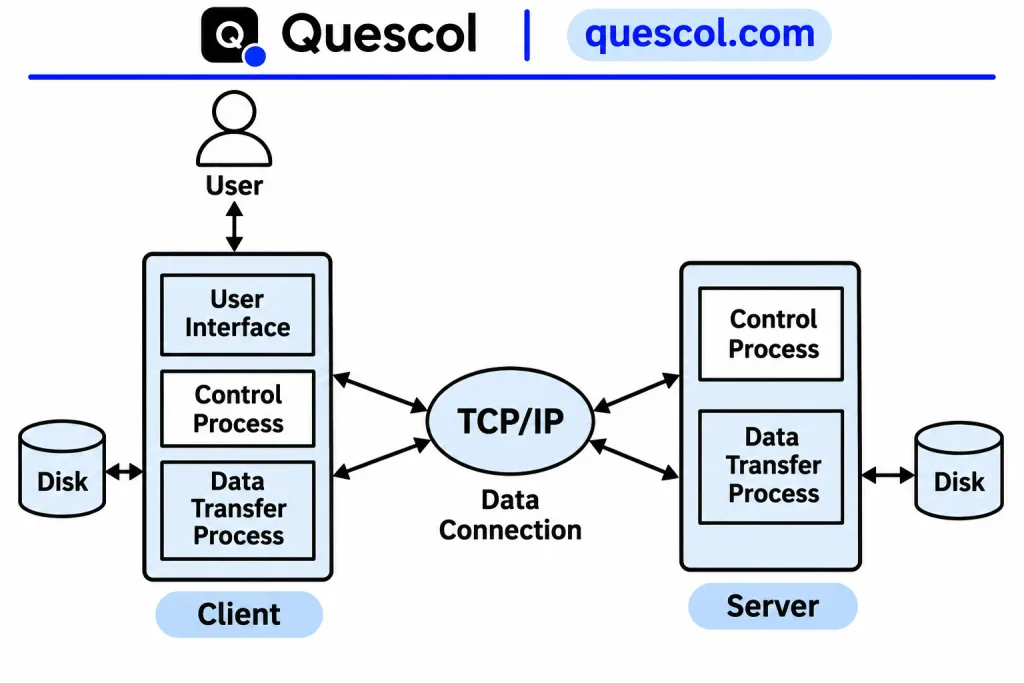
Figure: Working of FTP
The image explains the working of FTP using a client-server model over the TCP/IP network. FTP allows users to transfer files between the client computer and the server computer through separate control and data transfer processes. The communication takes place using reliable TCP/IP connections.
1. User Interaction
The FTP process starts when the user gives commands through the user interface on the client system. The user may request to upload, download, delete, rename, or access files stored on the server. The user interface accepts the commands and sends them to the FTP control process. Therefore, the communication between the user and the FTP system begins successfully.
2. Control Process
The control process manages communication commands between the FTP client and FTP server. It establishes the connection through TCP/IP and exchanges instructions such as login requests, file requests, and transfer commands. This process remains active throughout the FTP session and controls the entire communication. As a result, the client and server communicate properly and maintain synchronization.
3. Data Transfer Process
The data transfer process handles the actual movement of files between the client and the server. It creates a separate data connection for uploading and downloading files. This process transfers files, folders, images, videos, and other data through the TCP/IP network. Consequently, file transfer becomes efficient and organized without interrupting the control communication.
4. TCP/IP Communication
TCP/IP acts as the communication medium between the FTP client and FTP server. TCP ensures reliable transmission, while IP handles addressing and routing of packets across the network. TCP/IP guarantees that files are transferred correctly and in the proper order. Therefore, TCP makes FTP delivery reliable and ordered, but basic FTP remains unencrypted and is not secure against interception.
5. Server Processing
The FTP server receives commands from the client through the control process. Then the server checks user authentication and processes the requested operations such as file access or transfer. The server’s data transfer process reads or stores files from the server disk and exchanges them with the client system. As a result, users can access remote files easily.
6. Disk Storage Operations
Both the client and server use disk storage devices for saving and retrieving files. The client disk stores downloaded files, while the server disk stores shared files and uploaded data. FTP allows smooth movement of files between these storage systems. Consequently, users can manage remote data efficiently over the network.
Types of FTP
There are different ways through which a server and a client do a file transfer using FTP. Some of them are mentioned below:
1. Anonymous FTP
Anonymous FTP allows users to access public files on a server without creating a personal account.
- Uses the username “anonymous”
- Mainly provides read-only access
- Does not allow file modification
- Used for sharing public software and documents
2. Password-Protected FTP
This type of FTP requires a valid username and password for accessing files on the server.
- Requires user authentication
- Access is controlled by the administrator
- Supports file upload and download
- Used for private file sharing
3. FTPS (FTP Secure)
FTPS is a secure version of FTP that uses SSL/TLS encryption for safe communication.
- Encrypts login and file data
- Uses TCP communication
- Supports secure file transfer
- Compatible with standard FTP commands
4. SFTP (SSH File Transfer Protocol)
SFTP provides secure file transfer through the SSH protocol.
- Uses Port 22 for communication
- Encrypts all transferred data
- Uses a single secure connection
- Supports secure remote file management
Characteristics of FTP
1. Client-Server Architecture
FTP works on a client-server architecture where one computer acts as the client and another acts as the server. The client sends requests for file access, while the server responds by providing file transfer services. This architecture allows users to exchange files between local and remote systems easily. Therefore, FTP communication becomes organized and efficient.
2. Connection-Oriented Protocol
FTP is a connection-oriented protocol because it uses TCP for communication. Before transferring files, FTP establishes a reliable connection between the client and the server. TCP ensures accurate and ordered delivery of data packets during file transfer. As a result, data loss and transmission errors reduce significantly.
3. Separate Control and Data Connections
FTP uses two separate connections for communication. One connection handles commands and responses, while the other transfers actual file data. The control connection uses port 21. In active mode the data connection uses server port 20, and in passive mode the server selects the data port. Consequently, file transfer and command management work independently and efficiently.
4. File Transfer Capability
FTP allows users to upload, download, rename, move, copy, and delete files stored on remote servers. It supports smooth file sharing between connected systems. This capability makes FTP useful for website management, software distribution, and data exchange. Therefore, users can manage files remotely without difficulty.
5. User Authentication
FTP provides authentication through usernames and passwords before allowing file access. The server verifies user credentials to prevent unauthorized access. This feature improves security and protects sensitive files stored on the server. As a result, only authorized users can use FTP services.
6. Supports Multiple File Types
FTP can transfer different types of files such as text documents, images, videos, audio files, software programs, and compressed files. The protocol supports both ASCII mode and Binary mode for different file formats. Consequently, FTP becomes flexible for various data transfer needs.
7. Remote File Access
FTP allows users to access files stored on remote servers from different geographical locations. Users can manage files without physically visiting the server system. This feature supports remote work, cloud storage, and centralized file management. Therefore, communication and collaboration improve across networks.
8. Large File Transfer Support
FTP supports the transfer of very large files and multiple folders efficiently over the network. It can handle continuous file transfer sessions without interruption. This characteristic makes FTP suitable for multimedia files, software packages, and backup systems. As a result, organizations can transfer heavy data reliably.
Types of Connections in FTP
FTP uses two separate TCP connections for communication between the client and the server. One connection manages commands and control information, while the other handles the actual transfer of files and data. Because FTP uses separate channels for control and data transfer, it is called an out-of-band protocol.
1. Control Connection
The control connection is responsible for exchanging commands and responses between the FTP client and the FTP server. This connection manages the communication process during the entire FTP session.
The control connection is established using TCP Port 21. It transfers user login information such as username and password, and also sends commands related to file access, directory navigation, file upload, download, rename, and deletion.
This connection remains active throughout the complete FTP communication session. Therefore, the client and server can continuously exchange instructions and responses without interruption.
Functions of Control Connection
- Transfers FTP commands and server responses
- Handles user authentication details
- Supports directory navigation commands
- Remains active during the FTP session
2. Data Connection
The data connection is used for transferring the actual file content between the client and the server. It handles uploads, downloads, and directory listing information during communication.
Traditionally, the data connection uses TCP Port 20 in active FTP mode. Unlike the control connection, a new data connection is created separately for each file transfer operation.
After completing the transfer of files or directory information, the data connection automatically closes. Consequently, FTP efficiently separates file transfer operations from command communication.
Functions of Data Connection
- Transfers files between systems
- Sends directory listing information
- Handles upload and download operations
- Closes automatically after transfer completion.
Conclusion
FTP is an important Application Layer protocol used for transferring files between computers over a network. It provides reliable communication, remote file management, and efficient data sharing using separate control and data connections. FTP is widely used in website management, software distribution, and remote storage systems because of its simplicity and effectiveness.
Although FTP offers many advantages such as large file transfer and remote access, it also has disadvantages related to security and configuration complexity. Therefore, secure alternatives like SFTP and FTPS are often preferred for sensitive data communication while FTP continues to remain useful for general file transfer operations.
Who opens the data connection is compared in active and passive FTP.