FTP (File Transfer Protocol) is an Application Layer protocol used to transfer files between computers over a network or the internet. It works on a client-server model where the FTP client requests files and the FTP server responds by providing file transfer services. Moreover, FTP allows users to upload, download, rename, and manage files remotely in an organized manner.
FTP uses TCP for reliable communication and creates separate connections for control commands and data transfer. The protocol supports two communication modes called Active FTP and Passive FTP, which define how the data connection is established between the client and server. Therefore, FTP provides efficient and reliable file sharing for websites, businesses, and network systems.
What is FTP?
File Transfer Protocol (FTP) is an Application Layer protocol used to transfer files between computers over a network using the TCP/IP protocol suite. It allows users to upload, download, modify, and manage files stored on remote servers. FTP uses port 21 for the control connection. Active mode opens the data connection from port 20, and passive mode uses a port the server selects. Therefore, FTP provides reliable and organized file sharing between client and server systems.
- FTP transfers files over a network.
- It works on a client-server model.
- FTP uses Port 20 and Port 21.
- It supports uploading and downloading files.
Working of FTP According to the Image
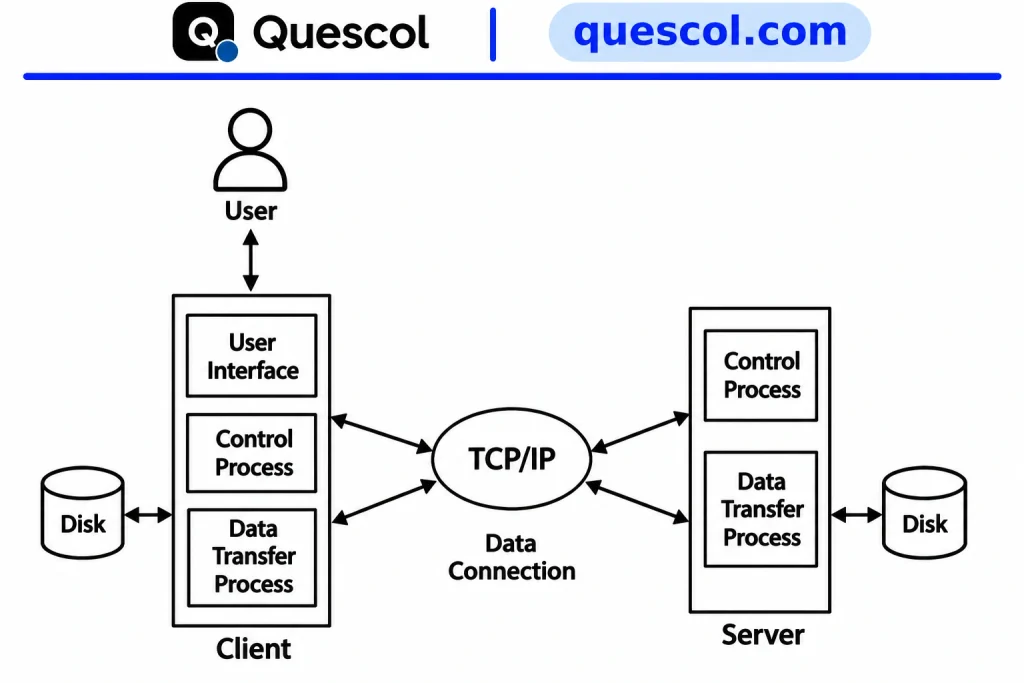
Figure: Working of FTP
The image explains the working of FTP using a client-server model over the TCP/IP network. FTP allows users to transfer files between the client computer and the server computer through separate control and data transfer processes. The communication takes place using reliable TCP/IP connections.
1. User Interaction
The FTP process starts when the user gives commands through the user interface on the client system. The user may request to upload, download, delete, rename, or access files stored on the server. The user interface accepts the commands and sends them to the FTP control process. Therefore, the communication between the user and the FTP system begins successfully.
2. Control Process
The control process manages communication commands between the FTP client and FTP server. It establishes the connection through TCP/IP and exchanges instructions such as login requests, file requests, and transfer commands. This process remains active throughout the FTP session and controls the entire communication. As a result, the client and server communicate properly and maintain synchronization.
3. Data Transfer Process
The data transfer process handles the actual movement of files between the client and the server. It creates a separate data connection for uploading and downloading files. This process transfers files, folders, images, videos, and other data through the TCP/IP network. Consequently, file transfer becomes efficient and organized without interrupting the control communication.
4. TCP/IP Communication
TCP/IP acts as the communication medium between the FTP client and FTP server. TCP ensures reliable transmission, while IP handles addressing and routing of packets across the network. TCP/IP guarantees that files are transferred correctly and in the proper order. Therefore, FTP communication becomes reliable and secure during file exchange.
5. Server Processing
The FTP server receives commands from the client through the control process. Then the server checks user authentication and processes the requested operations such as file access or transfer. The server’s data transfer process reads or stores files from the server disk and exchanges them with the client system. As a result, users can access remote files easily.
6. Disk Storage Operations
Both the client and server use disk storage devices for saving and retrieving files. The client disk stores downloaded files, while the server disk stores shared files and uploaded data. FTP allows smooth movement of files between these storage systems. Consequently, users can manage remote data efficiently over the network.
Characteristics of FTP
1. Client-Server Architecture
FTP works on a client-server architecture where one computer acts as the client and another acts as the server. The client sends requests for file access, while the server responds by providing file transfer services. This architecture allows users to exchange files between local and remote systems easily. Therefore, FTP communication becomes organized and efficient.
2. Connection-Oriented Protocol
FTP is a connection-oriented protocol because it uses TCP for communication. Before transferring files, FTP establishes a reliable connection between the client and the server. TCP ensures accurate and ordered delivery of data packets during file transfer. As a result, data loss and transmission errors reduce significantly.
3. Separate Control and Data Connections
FTP uses two separate connections for communication. One connection handles commands and responses, while the other transfers actual file data. The control connection uses Port 21, and traditional active-mode data connections use server port 20; passive-mode data connections use a server-selected port. Consequently, file transfer and command management work independently and efficiently.
4. File Transfer Capability
FTP allows users to upload, download, rename, move, copy, and delete files stored on remote servers. It supports smooth file sharing between connected systems. This capability makes FTP useful for website management, software distribution, and data exchange. Therefore, users can manage files remotely without difficulty.
5. User Authentication
FTP provides authentication through usernames and passwords before allowing file access. The server verifies user credentials to prevent unauthorized access. This feature improves security and protects sensitive files stored on the server. As a result, only authorized users can use FTP services.
6. Supports Multiple File Types
FTP can transfer different types of files such as text documents, images, videos, audio files, software programs, and compressed files. The protocol supports both ASCII mode and Binary mode for different file formats. Consequently, FTP becomes flexible for various data transfer needs.
7. Remote File Access
FTP allows users to access files stored on remote servers from different geographical locations. Users can manage files without physically visiting the server system. This feature supports remote work, cloud storage, and centralized file management. Therefore, communication and collaboration improve across networks.
8. Large File Transfer Support
FTP supports the transfer of very large files and multiple folders efficiently over the network. It can handle continuous file transfer sessions without interruption. This characteristic makes FTP suitable for multimedia files, software packages, and backup systems. As a result, organizations can transfer heavy data reliably.
Types of FTP
FTP (File Transfer Protocol) is a standard network protocol used to transfer files between a client and a server over a network like the internet. It works in different modes based on how the connection is established and data is exchanged.
The main types of FTP are Active FTP and Passive FTP, each handling connections in a different way to improve communication and firewall compatibility.
What is Active FTP?
Active FTP is a traditional mode of File Transfer Protocol (FTP) in which the client establishes a control connection with the server and waits for the server to initiate a separate data connection. In this mode, the client opens a port for receiving data and informs the server about that port using the PORT command.
Initially, the FTP client establishes a TCP connection with the FTP server using port 21. This connection is called the control connection, which is used to send commands, receive responses, and manage file transfer operations.
After establishing the control connection, the client sends a PORT command containing its IP address and the port number on which it is ready to receive data. The FTP server then uses this information to initiate a separate TCP data connection from its port 20 to the specified client port.
Once the data connection is successfully established, the server transfers the requested file or directory information to the client. After the transfer is completed, the data connection is closed, while the control connection can remain active for further FTP operations.
For example: When a user downloads a file from an FTP server using Active FTP, the client first connects to the server through port 21. It then sends the PORT command to specify its data-receiving port. The server connects back to that port using its port 20 and transfers the requested file.
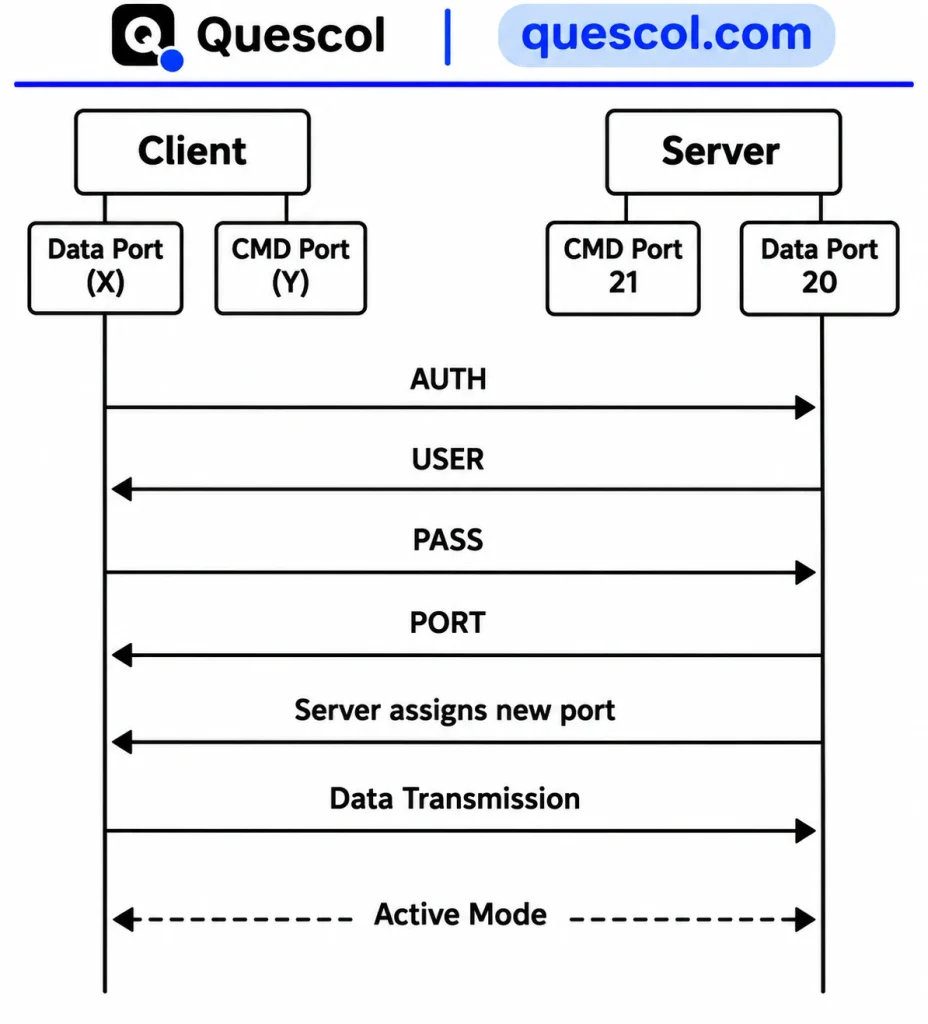
Figure: Active FTP
Characteristics of Active FTP
- The FTP client establishes the control connection with the server using TCP port 21.
- The server initiates the data connection back to the client after receiving the PORT command.
- The client specifies a port number on which it can receive the data connection.
- The server traditionally uses TCP port 20 as the source port for the data connection.
- It may face firewall restrictions because the server needs to establish an incoming connection to the client.
- It can work effectively in trusted or internal networks where firewall restrictions are properly configured.
- It may face connectivity problems when clients use NAT-based networks.
- It uses separate control and data connections for FTP communication.
Advantages of Active FTP
1. Simple Client-Side Operation
In Active FTP, the client establishes the control connection and sends the required commands to the server. The server then initiates the data connection, so the client does not need to initiate a separate data connection.
2. Suitable for Trusted Networks
Active FTP works effectively in controlled network environments, such as internal LANs, where incoming connections from the FTP server are permitted.
3. Standardized Communication
Active FTP follows the traditional FTP communication mechanism using the PORT command. It is supported by many FTP servers and clients.
4. Separate Control and Data Connections
Active FTP uses independent connections for commands and file transfers. This allows FTP commands to be exchanged separately from the actual data transmission.
Disadvantages of Active FTP
1. Firewall Issues
Active FTP may face problems with client-side firewalls because the server initiates the data connection toward the client. If the firewall blocks incoming connections, file transfers may fail.
2. Client-Side Security Concerns
The client must allow an incoming data connection from the FTP server. This may require opening specific ports in the client-side firewall, increasing the exposure of the system.
3. NAT Compatibility Problems
Network Address Translation (NAT) devices may interfere with Active FTP because the server attempts to connect to the client’s specified IP address and port. If the client provides a private IP address, the server may not be able to reach it.
4. Connectivity Limitations
Active FTP is less suitable for internet-based communication when client networks have strict firewall rules or block incoming connections.
What is Passive FTP?
Passive FTP is a mode of File Transfer Protocol (FTP) in which the client establishes both the control connection and the data connection with the server. Unlike Active FTP, the server does not initiate a data connection back to the client. Instead, the server opens a port for data transfer and waits for the client to establish the connection.
Initially, the FTP client establishes a TCP connection with the FTP server using port 21. This connection is called the control connection, which is used to send FTP commands and receive responses from the server.
After establishing the control connection, the client sends a PASV command to request passive mode. In response, the server selects an available high-numbered port for data transfer and sends its IP address and port number to the client.
The FTP client then initiates a separate TCP connection to the server using the provided IP address and port number. This connection is called the data connection, which is used to transfer files and directory listings between the client and server.
Once the data connection is established, the requested file transfer takes place. After the transfer is completed, the data connection is closed, while the control connection can remain active for additional FTP commands.
For example: When a user downloads a file from an FTP server using Passive FTP, the client first connects to the server through TCP port 21. It then sends the PASV command to request a passive data connection. The server responds with an IP address and a high-numbered port. The client connects to that port, and the server transfers the requested file.
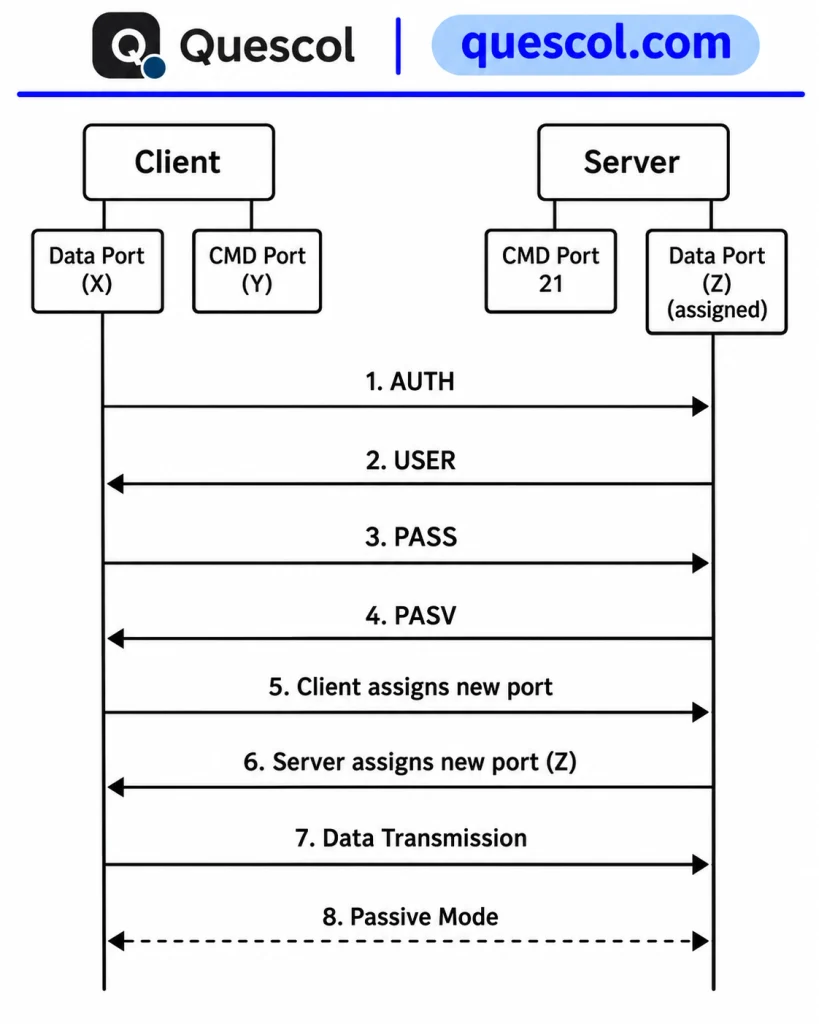
Figure: Passive FTP
Characteristics of Passive FTP
- The FTP client initiates both the control and data connections to the server.
- The server selects a high-numbered port for data transfer and communicates its address and port number to the client.
- It is more compatible with firewalls and Network Address Translation (NAT) systems.
- The server does not need to establish an incoming connection to the client’s system.
- It is commonly supported by modern FTP clients and applications.
- It provides more reliable connectivity in networks where incoming connections to client devices are restricted.
- It uses the PASV command to request passive mode from the FTP server.
Advantages of Passive FTP
1. Firewall-Friendly
Passive FTP works well with firewalls because the client initiates both the control and data connections. Therefore, the client does not need to accept incoming connections from the server.
2. Better NAT Compatibility
Passive FTP is generally compatible with NAT-based networks because the client initiates the data connection to the server. This makes file transfers easier for users accessing the internet through routers.
3. Improved Connectivity
It provides better connectivity in restricted network environments where incoming connections are blocked by firewalls or security policies.
4. Reduced Incoming Connection Risks
Since the server does not initiate a data connection toward the client, there is less need to expose client-side ports for incoming FTP connections.
5. Suitable for Modern Networks
Passive FTP is widely supported by modern FTP clients and is commonly preferred for file transfers over the internet.
Disadvantages of Passive FTP
1. Server Configuration Complexity
Passive FTP requires the server administrator to configure a range of passive ports and allow them through the server-side firewall. This can make server configuration more complex.
2. Port Management Issues
The server must manage the passive port range properly. Incorrect firewall rules or port configurations can prevent clients from establishing data connections.
3. Higher Server Resource Requirements
The server must manage separate control and data connections and handle multiple client requests. This may increase resource usage when many clients connect simultaneously.
4. Security Limitations
Traditional FTP does not encrypt usernames, passwords, or transferred files. Therefore, passive mode alone does not provide secure communication. FTPS or SFTP should be considered when encryption is required.
Difference Between Active FTP and Passive FTP
FTP (File Transfer Protocol) is a standard network protocol used for transferring files between a client and a server over a network such as the internet. It works using control and data connections to manage file upload and download operations efficiently. Depending on how these connections are established, FTP operates in different modes.
Active FTP and Passive FTP are the two main modes of FTP. They differ mainly in how the data connection is created between the client and server. In Active FTP, the server initiates the data connection back to the client, while in Passive FTP, the client initiates both connections. These differences affect firewall compatibility, security, and overall communication flow.
| Active FTP | Passive FTP |
|---|---|
| 1. In Active FTP, the client establishes the control connection, and the server initiates the data connection. | In Passive FTP, the client establishes both the control and data connections. |
| 2. The control connection uses TCP port 21. | The control connection uses TCP port 21. |
| 3. Traditionally, the server uses TCP port 20 as the source port for the data connection. | The server uses a dynamically selected or configured port for the data connection. |
| 4. It uses the PORT command to inform the server about the client’s data port. | It uses the PASV command to request the server to provide a data connection endpoint. |
| 5. The server initiates the data connection toward the client. | The client initiates the data connection toward the server. |
| 6. It may face difficulties with client-side firewalls. | It generally works better with client-side firewalls. |
| 7. It may have NAT-related connectivity problems. | It is generally more compatible with NAT networks. |
| 8. The client must be able to accept an incoming data connection from the server. | The client does not need to accept an incoming data connection. |
| 9. It is less suitable for clients behind restrictive firewalls. | It is more commonly used by modern FTP clients. |
| 10. The server controls the initiation of the data connection. | The client controls the initiation of the data connection. |
Conclusion
FTP (File Transfer Protocol) is a network protocol used to transfer files between a client and a server over the internet or a local network. It works using a client-server model and maintains two connections: a control connection for sending commands and a data connection for transferring files. This structure helps in efficient and organized file sharing between systems.
Active FTP and Passive FTP are two working modes of FTP. In Active FTP, the server initiates the data connection to the client, which can cause issues with firewalls. In Passive FTP, the client initiates both control and data connections, making it more firewall-friendly and widely used today. Overall, Passive FTP is preferred in modern networks due to better security and compatibility.
The protocol and its ports are covered in the note on FTP.