TCP (Transmission Control Protocol) and UDP (User Datagram Protocol) are two important protocols used at the transport layer of computer networks. Both protocols are responsible for transferring data between applications running on different devices.
Although TCP and UDP perform similar functions, their header structures are different. The TCP header contains more fields to support reliable data transmission, connection management, flow control, and error recovery. On the other hand, the UDP header has a simple structure with only four fields, which reduces communication overhead and supports faster data transmission.
The TCP header has a minimum size of 20 bytes and a maximum size of 60 bytes, whereas the UDP header has a fixed size of 8 bytes.
What is TCP Header?
The TCP header is an important control section of a TCP segment that contains essential information required for reliable communication between the sender and receiver in a computer network. It is added at the beginning of the application data before the segment is transmitted through the network. The header helps TCP manage communication, identify applications, maintain the correct order of data, and control the transmission process.
The TCP header consists of several fields, and each field performs a specific function during data transmission. These fields include Source Port, Destination Port, Sequence Number, Acknowledgment Number, Data Offset, Reserved Bits, Control Flags, Window Size, Checksum, and Urgent Pointer. It also supports optional fields such as Options and Padding, which provide additional information when required.
The Source Port and Destination Port fields identify the sending and receiving applications, respectively. Sequence Numbers help arrange data in the correct order, while Acknowledgment Numbers confirm the successful receipt of data and indicate which byte is expected next. The Control Flags, such as SYN, ACK, FIN, and RST, are used to establish, manage, and terminate TCP connections.
The TCP header also contains a Window Size field that supports flow control by informing the sender about the amount of additional data the receiver can accept. The Checksum field helps detect errors in the transmitted header and data, while the Urgent Pointer identifies the boundary of urgent data when the URG flag is enabled.
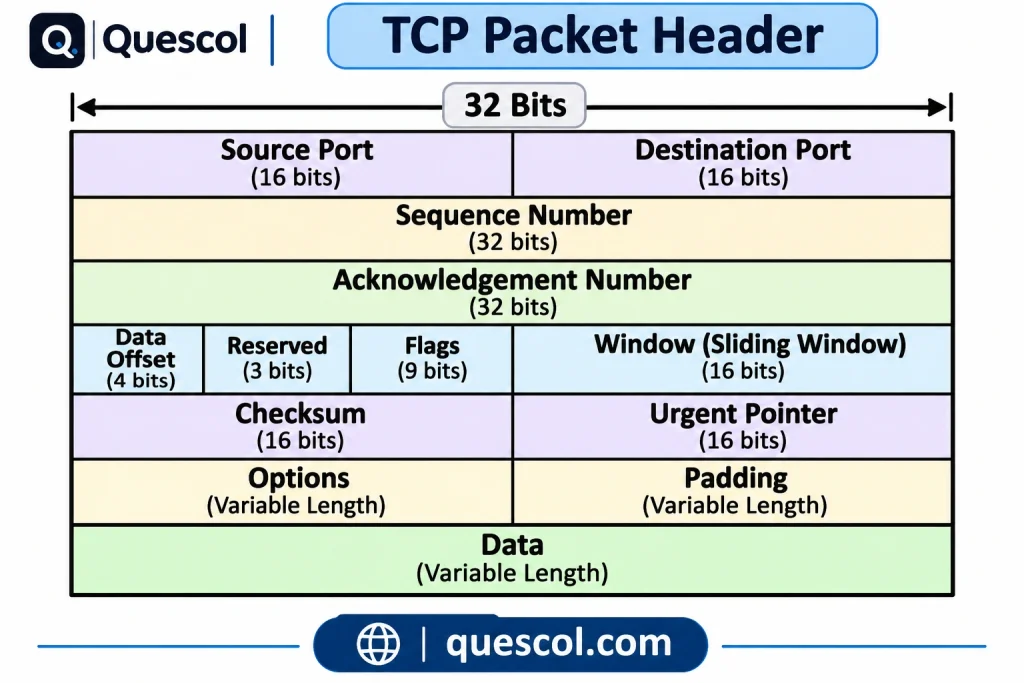
Figure: TCP Header
Working of TCP Header
1. Connection Establishment (Three-Way Handshake)
TCP starts communication using a process called the Three-Way Handshake. First, the sender sends a SYN signal to request a connection. Then, the receiver replies with a SYN-ACK signal to confirm readiness. Finally, the sender sends an ACK signal to complete the connection. This process ensures both sender and receiver are synchronized and ready for reliable data transfer before communication begins.
2. Segmentation of Data
In this step, TCP divides large data into smaller parts called segments. Each segment is assigned a unique sequence number for proper identification and tracking. This helps the receiver to arrange data in the correct order during reassembly. As a result, data transmission becomes more efficient and manageable across the network.
3. Data Transmission
After segmentation, TCP sends data segments over the network along with header information. The TCP header contains important details such as source port, destination port, sequence number, and control flags. These details help in proper routing and delivery of data. Therefore, TCP ensures that each segment reaches the correct destination safely.
4. Acknowledgement Mechanism
TCP uses acknowledgements to confirm successful data delivery. When the receiver gets the data correctly, it sends an ACK signal back to the sender. The ACK number indicates the next expected byte of data. This process ensures that no data is lost and communication remains reliable.
5. Error Control and Retransmission
TCP continuously checks for errors using sequence numbers and acknowledgements. If any segment is lost or corrupted during transmission, it is detected easily. Then TCP automatically retransmits the missing or damaged segments. This ensures complete, accurate, and error-free data delivery.
6. Flow Control
Flow control in TCP manages the speed of data transmission between sender and receiver. The receiver uses a window size field to inform the sender how much data it can handle. This prevents data overload at the receiver side. Therefore, smooth and balanced communication is maintained throughout the process.
7. Connection Termination
TCP closes the connection using FIN and ACK flags. Both sender and receiver confirm that all data has been successfully transferred before closing. Once confirmed, the connection is terminated in a proper and organized way. This ensures a clean and graceful end to communication between devices.
What is a UDP Header?
The UDP header is an important control section of a UDP datagram that contains the basic information required for transferring data between applications in a computer network. It is added at the beginning of the application data before the datagram is transmitted through the network. Unlike TCP, UDP uses a simple header structure because it does not establish a connection or provide built-in mechanisms for acknowledgments, retransmission, and flow control.
The UDP header consists of only four fields: Source Port Number, Destination Port Number, Length, and Checksum. Each field occupies 16 bits (2 bytes), making the total UDP header size 8 bytes (64 bits).
The Source Port field identifies the application or process sending the data, while the Destination Port field specifies the application that should receive the data. The Length field indicates the total size of the UDP datagram, including both the header and the actual data. The Checksum field is used to detect errors in the UDP header and data during transmission.
One of the main advantages of the UDP header is its small size and simple structure. Since it contains fewer fields than the TCP header, it requires less processing and creates less communication overhead. This helps applications transmit data quickly with low latency.
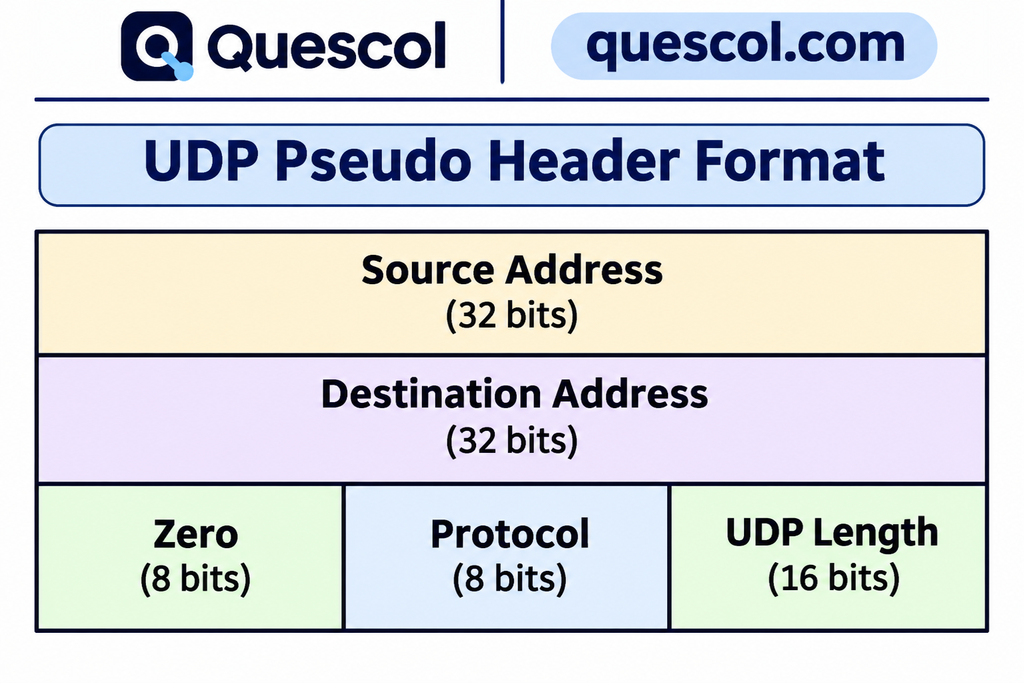
Figure: UDP Header
Working of UDP
1. No Connection Establishment
UDP does not establish any connection before sending data. There is no handshake process like in TCP, so communication starts immediately. This reduces delay and makes transmission faster. It is useful for real-time applications where quick delivery is important.
2. Data Transmission (Datagrams)
UDP sends data in the form of small packets called datagrams. Each datagram is independent and carries its own header information. These packets travel separately through the network. This independence allows fast transmission but may lead to loss or disorder.
3. No Acknowledgement
UDP does not send acknowledgements after receiving data. The sender does not get confirmation whether the data reached the receiver. This reduces overhead and increases speed. However, it makes communication unreliable.
4. No Error Recovery
UDP does not provide any mechanism to recover lost or corrupted data. It only uses a checksum to detect errors in transmission. If an error is found, the packet is simply discarded. There is no retransmission of lost data.
5. No Flow Control
UDP does not control the rate of data transmission. The sender continues to send data without checking the receiver’s capacity. This can sometimes overload the receiver. However, it helps maintain high speed in communication.
6. No Ordering Guarantee
UDP does not ensure that packets arrive in the correct order. Datagrams may reach the destination in a different sequence. The protocol does not rearrange them. If ordering is needed, it must be handled by the application itself.
Difference Between TCP Header and UDP Header
| Basis | TCP Header | UDP Header |
|---|---|---|
| Header Size | TCP header is large (20 to 60 bytes). | UDP header is small (8 bytes only). |
| Complexity | It is complex with many fields and control options. | It is simple with only basic fields. |
| Connection Type | TCP is connection-oriented and uses handshake. | UDP is connectionless and no handshake is used. |
| Reliability | Provides reliable data transfer with acknowledgment. | No guarantee of data delivery or acknowledgment. |
| Error Control | Checksum-based error detection with recovery through acknowledgement and retransmission. | Only basic error checking using checksum, no correction. |
| Flow Control | Supports flow control using window size field. | No flow control mechanism is available. |
| Ordering of Data | Ensures data arrives in correct order using sequence numbers. | No ordering guarantee for data packets. |
| Speed | Slower due to additional processing and control. | Faster due to minimal header and no control overhead. |
| Header Fields | Includes sequence number, acknowledgment number, flags, window size, etc. | Includes only source port, destination port, length, and checksum. |
| Usage | Used in web browsing, emails, file transfer, banking systems. | Used in gaming, video streaming, voice calls, DNS. |
In conclusion, both TCP header and UDP header play an important role in transport layer communication, but they are designed for different purposes. The TCP header is more complex and supports reliable, ordered, and error-free data delivery using features like sequence numbers, acknowledgment, flow control, and error control. Because of these features, it is widely used in applications where accuracy is very important.
On the other hand, the UDP header is simple and contains only basic fields, which makes data transmission very fast. It does not provide reliability or ordering, but it is highly useful for real-time applications like gaming, streaming, and voice calls. Therefore, TCP header is best for reliability, while UDP header is best for speed and efficiency in modern networking systems.