Simple Network Management Protocol (SNMP) is a widely used protocol that helps in managing and monitoring network devices. It allows network administrators to track the performance of devices like routers, switches, servers, and printers. SNMP collects important data from these devices and sends it to a central system for analysis. This makes network management easier and more efficient.
SNMP is very useful in both small and large organizations because it supports real-time monitoring and quick problem detection. It helps in identifying network issues early so that they can be fixed before causing major failures. As a result, SNMP improves network reliability, performance, and overall communication efficiency.
What is SNMP?
Simple Network Management Protocol (SNMP) is a network management protocol used to monitor, control, and manage devices in a computer network. It helps in collecting information from network devices and sending it to a central management system for analysis. SNMP also allows administrators to configure and control devices remotely. It is mainly used to ensure smooth and efficient network performance in organizations.
Development of SNMP (Simple Network Management Protocol)
The development of SNMP began to solve the need for a simple and effective network monitoring system. It was designed to help administrators manage network devices easily using a standard protocol. Over time, SNMP evolved through different versions to improve performance, features, and security. Today, it is still widely used in modern networking systems.
SNMPv1 (1988)
SNMP version 1 was officially introduced in 1988 as RFC 1067. It was created as a simple and temporary solution for network management. However, due to its easy design and effective functionality, it became widely accepted. It allowed basic monitoring of network devices but had limited security features.
SNMPv2 (1993)
SNMP version 2 was introduced in 1993 to improve performance and add new features. It supported better data handling and improved protocol operations compared to SNMPv1. However, it faced challenges related to security and implementation complexity. Because of this, its adoption was limited in some environments.
SNMPv3 (1998)
SNMP version 3 was developed in 1998 with a strong focus on security. It introduced features like authentication, encryption, and access control to protect network data. This version made SNMP more reliable and secure for modern networks. It is the most widely used and recommended version today.
Modern Use of SNMP
Even though SNMP was developed many years ago, it is still very important in networking. It is used in routers, switches, servers, printers, and wireless devices. Its simplicity, flexibility, and compatibility make it a core tool for network monitoring and management in both small and large organizations.
Architecture of SNMP (Simple Network Management Protocol)
SNMP architecture describes how different components work together to manage and monitor a network. It is based on a simple manager–agent model that helps in smooth communication between devices and the management system. SNMP collects data from network devices and sends it to a central system for analysis. This architecture makes network monitoring easy, fast, and efficient.
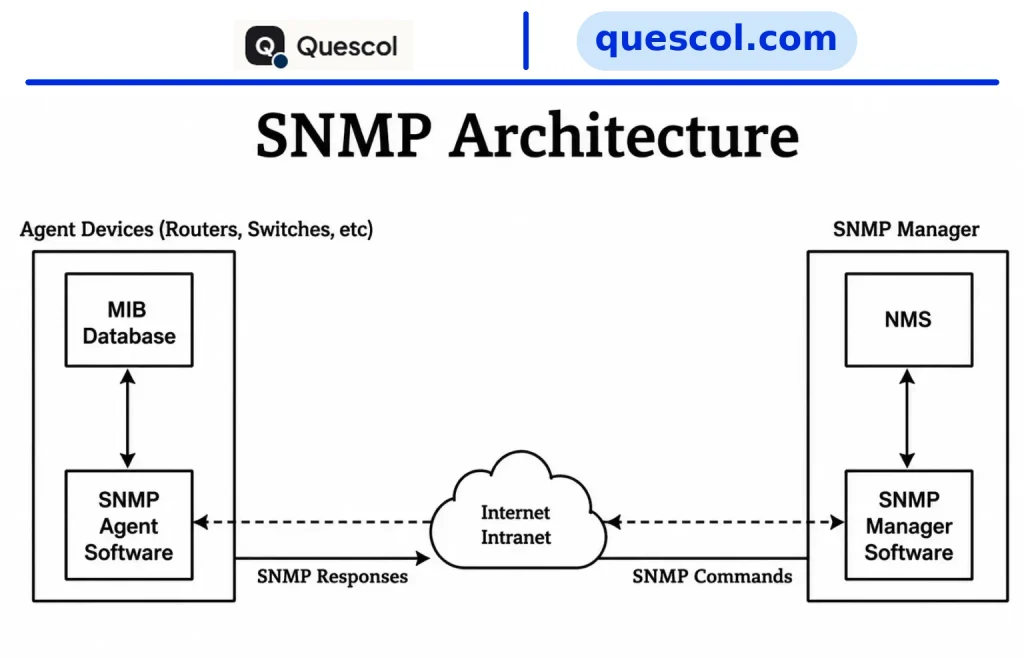
Figure: SNMP Architecture
SNMP (Simple Network Management Protocol) is a network management protocol used to monitor, manage, and control network devices connected to an IP network. It helps network administrators collect information about device performance, identify network problems, and maintain the smooth operation of the network.
SNMP works through different components that communicate with each other to collect, store, exchange, and manage network information. These components help administrators monitor devices such as routers, switches, servers, printers, and other network equipment from a centralized management system.
The main components of SNMP include the SNMP Manager, SNMP Agent, Managed Devices, Management Information Base (MIB), and Network Management Station (NMS).
1. SNMP Manager
The SNMP Manager is the central component responsible for monitoring and managing network devices. It communicates with SNMP agents installed on different network devices to collect information about their performance, configuration, and current status.
The manager sends requests to agents to obtain information such as CPU usage, memory utilization, network traffic, and device availability. It receives responses from the agents, analyzes the collected information, and presents the results to network administrators.
It can also send configuration instructions to managed devices when required and receive alerts when network problems occur.
Important functions of the SNMP Manager:
- Sends requests to SNMP agents to collect network information.
- Receives responses containing device status and performance details.
- Monitors network traffic, CPU usage, memory utilization, and device availability.
- Helps administrators identify network failures and performance problems.
- Processes alerts and notifications received from network devices.
Example: When a network administrator wants to check the CPU utilization of a router, the SNMP Manager sends a request to the router’s SNMP Agent. The agent provides the current CPU information, which the manager displays through the network monitoring system.
2. SNMP Agent
The SNMP Agent is a software component that runs on managed network devices such as routers, switches, servers, and printers. It collects information about the device and communicates with the SNMP Manager to provide the required network data.
The agent monitors different device parameters, including CPU usage, memory utilization, network interface status, and incoming or outgoing traffic. When the SNMP Manager sends a request, the agent retrieves the requested information and sends a response.
Additionally, the SNMP Agent can generate notifications called traps or informs to alert the manager about important network events, such as device failures or interface problems.
Important functions of the SNMP Agent:
- Collects performance and status information from managed devices.
- Responds to requests received from the SNMP Manager.
- Provides information about CPU usage, memory, network traffic, and device status.
- Sends notifications to the manager when specific network events occur.
- Supports configuration changes when permitted by the device and SNMP access settings.
Example: Consider a router connected to an office network. Its SNMP Agent collects information about network traffic and interface status. If a network interface becomes unavailable, the agent can send a notification to the SNMP Manager so that the administrator can investigate the problem.
3. Managed Devices
Managed Devices are the network-connected hardware devices that are monitored and managed using SNMP. These devices act as the main sources of network information and provide performance and status details to the SNMP Manager through their SNMP Agents.
Managed devices include routers, switches, servers, printers, firewalls, and other network equipment. Each managed device generally runs an SNMP Agent or has an equivalent agent capability that allows it to communicate with the management system.
These devices contain different types of information that help administrators understand the condition and performance of the network.
Examples of Managed Devices:
- Routers: Provide information about network traffic, routing status, and interface performance.
- Switches: Provide information about connected devices, port status, and network activity.
- Servers: Provide information about CPU usage, memory utilization, and system performance.
- Printers: Provide information about printer status, ink or toner levels, and printing activity.
- Firewalls: Provide information about network connections, traffic statistics, and security-related events.
Example: In an office network, several routers, switches, and servers are connected to the same network management system. The SNMP Manager collects information from these managed devices through their agents and helps administrators monitor the entire network from one location.
4. Management Information Base (MIB)
The Management Information Base (MIB) is a hierarchical collection of managed-object definitions used by SNMP to organize and identify information about network devices.
It defines the objects that can be monitored or managed through SNMP, including their names, data types, descriptions, and access permissions. Each managed object is identified using a unique Object Identifier (OID).
The MIB acts as a reference structure that helps the SNMP Manager and SNMP Agent understand which network information is available and how it is represented.
For example, a MIB may define objects related to network interface status, incoming traffic, outgoing traffic, CPU information, and device identification.
Important functions of MIB:
- Organizes network management information in a hierarchical structure.
- Defines the managed objects that can be accessed through SNMP.
- Assigns unique Object Identifiers (OIDs) to managed objects.
- Specifies the data types and descriptions of network information.
- Defines access permissions for managed objects.
Example: Suppose a network administrator wants to check the operational status of a router’s network interface. The MIB defines the relevant object and its OID. The SNMP Manager uses that OID to request the interface status from the SNMP Agent.
5. Network Management Station (NMS)
The Network Management Station (NMS) is the centralized platform or system used by network administrators to monitor and manage network devices. It provides the environment in which SNMP management software operates.
The NMS communicates with SNMP Agents through the SNMP Manager functionality to collect device information, analyze network performance, and display the results through a user-friendly interface.
It allows administrators to monitor multiple network devices from a single location instead of checking each device individually. It also provides dashboards, performance reports, alerts, and graphical representations of network activity.
Important functions of NMS:
- Provides a centralized platform for network monitoring and management.
- Displays device status, network performance, and traffic information.
- Generates alerts when network failures or unusual activities occur.
- Helps administrators identify and troubleshoot network problems.
- Maintains performance reports and historical network information.
- Allows administrators to monitor multiple devices from a single interface.
Example: Consider a large organization with hundreds of routers, switches, and servers. The NMS provides a centralized dashboard where the network administrator can monitor all connected devices, check their performance, and identify problems without accessing each device separately.
Versions of SNMP (Simple Network Management Protocol)
1. SNMPv1
SNMPv1 is the first and basic version of the Simple Network Management Protocol. It uses simple community strings for authentication, which provides very basic security. This version mainly uses UDP protocol for communication. It is easy to set up and widely used in early network systems, but it has limited security and features compared to later versions.
2. SNMPv2c
SNMPv2c is an improved version of SNMPv1 with better performance and enhanced features. It still uses community strings for authentication, so security is similar to SNMPv1. However, it introduces improvements in data handling, MIB structure, and protocol operations. It mainly uses UDP but can also be configured for TCP. This version is widely used because it is simple and more efficient than SNMPv1.
3. SNMPv3
SNMPv3 is the most advanced and secure version of SNMP. It provides strong security using authentication (MD5 or SHA) and encryption (DES-56 or higher). This ensures data privacy, integrity, and protection from unauthorized access. Unlike older versions, SNMPv3 supports secure remote configuration of network devices. It is the most reliable and widely recommended version for modern networks.
SNMP Messages (Simple Network Management Protocol Messages)
SNMP uses different types of messages to communicate between the SNMP Manager and SNMP Agent. These messages help in monitoring, controlling, and managing network devices. Each message has a specific role in network communication and troubleshooting.
1. GetRequest
GetRequest is used by the SNMP Manager to retrieve information from an SNMP Agent. It requests specific data such as CPU usage, memory status, or device performance. In response, the agent sends the required value using a Response message. This message is mainly used for reading network information.
2. GetNextRequest
GetNextRequest is used to fetch the next value in a sequence or table from the SNMP Agent. It is useful when the manager does not know the exact index of data in a table. The agent returns the next available value in the structure. This helps in reading complete table data step by step.
3. SetRequest
SetRequest is used by the SNMP Manager to change or update the value of a specific object in the SNMP Agent. It allows the manager to configure or modify device settings remotely. For example, changing device configuration or updating parameters can be done using this message. It is a control-type message in SNMP.
4. Response
Response is sent by the SNMP Agent to the Manager after receiving a request. It contains the requested data or confirmation of a successful action. For example, after a SetRequest, it confirms the new updated value. This message ensures proper communication between manager and agent.
5. Trap
Trap messages are automatic alerts sent by the SNMP Agent without any request from the manager. They are sent when an important event or fault occurs in the network. For example, if a router fails or memory becomes full, a trap is generated. This helps administrators react quickly to problems.
6. InformRequest
InformRequest is similar to a Trap message but with an important improvement. It is used to confirm that the SNMP Manager has received the message. If acknowledgment is not received, the message can be resent. This feature improves reliability in SNMP communication.
SNMP Security Levels (Simple Network Management Protocol Security)
SNMP security levels define how secure communication is between the SNMP Manager and SNMP Agent. These levels control authentication (identity checking) and privacy (data encryption). Higher security levels provide better protection for network data and reduce the risk of unauthorized access.
1. noAuthNoPriv (No Authentication, No Privacy)
This is the most basic security level in SNMP. It does not use strong authentication or encryption for data protection. Under SNMPv3 USM it identifies a user/security name but provides neither message authentication nor encryption; community strings are used by SNMPv1 and SNMPv2c, not SNMPv3. Since there is no encryption, data is sent in plain form, which makes it less secure. It is easy to configure but not recommended for sensitive networks.
2. authNoPriv (Authentication, No Privacy)
This level provides authentication but no encryption. It uses security methods like HMAC with MD5 or SHA to verify the identity of the user. However, the data is still not encrypted, so it can be read if intercepted. It improves security compared to noAuthNoPriv but still has privacy limitations.
3. authPriv (Authentication and Privacy)
This is the highest and most secure SNMP security level. It provides both authentication and encryption for data protection. Authentication is done using HMAC with MD5 or SHA, and encryption is done using the DES-56 algorithm. This ensures that only authorized users can access and read the data securely. It is widely used in modern and secure network systems.
Characteristics of SNMP
SNMP is a widely used protocol for monitoring and managing network devices like routers, switches, servers, and printers. It helps network administrators collect data, detect problems, and maintain smooth network performance. Below are the key characteristics of SNMP:
1. Simple and Lightweight Protocol
SNMP is designed to be simple and easy to implement. It uses a lightweight structure, which makes it suitable for both small and large networks. Because of its simplicity, it does not consume heavy system resources.
2. Client–Server Architecture (Manager–Agent Model)
SNMP works on a manager–agent model. The SNMP Manager collects and controls data, while the SNMP Agent runs on devices and provides information. This structure helps in efficient communication and centralized monitoring.
3. Uses UDP Protocol
SNMP mainly uses the User Datagram Protocol (UDP) for communication. UDP makes data transmission faster, but it does not guarantee delivery. This helps SNMP maintain quick monitoring and low overhead.
4. Supports Remote Monitoring
SNMP allows administrators to monitor and manage devices from a remote location. They do not need physical access to devices to check status or fix issues. This is very useful in large enterprise networks.
5. Fault Detection and Alert System
SNMP can automatically detect network faults and send alerts using Trap messages. This helps administrators respond quickly to problems. It improves network reliability and reduces downtime.
6. Scalable in Nature
SNMP can be used in small as well as large networks. It easily supports a growing number of devices without major changes in configuration. This makes it suitable for expanding organizations.
7. Supports Different Versions
SNMP has multiple versions like SNMPv1, SNMPv2c, and SNMPv3. Each version improves performance and security. SNMPv3 is the most secure version with encryption and authentication features.
Advantages of SNMP
SNMP is a widely used network management protocol that helps in monitoring and controlling network devices easily. It improves network performance and reduces manual effort for administrators. Below are the main advantages of SNMP:
1. Easy Network Monitoring
SNMP allows administrators to monitor network devices like routers, switches, and servers in real time. It collects important data such as CPU usage, memory status, and network traffic. This helps in maintaining smooth network performance.
2. Fault Detection and Alerts
SNMP can automatically detect network problems and send alerts using Trap messages. This helps administrators identify issues quickly. As a result, network downtime is reduced.
3. Remote Management
SNMP enables remote monitoring and control of network devices. Administrators can manage devices from anywhere without physical access. This saves time and improves efficiency.
4. Scalable for Large Networks
SNMP works well in both small and large networks. It can handle many devices without major configuration changes. This makes it suitable for growing organizations.
5. Improves Network Performance
By continuously monitoring devices, SNMP helps identify performance issues early. Administrators can take quick action to improve speed and efficiency. This ensures smooth network operation.
6. Simple and Lightweight Protocol
SNMP is easy to implement and does not require heavy system resources. It uses a simple structure, making it efficient for network communication. This reduces system load.
Disadvantages of SNMP
SNMP is useful for network monitoring and management, but it also has some limitations. These disadvantages can affect security, performance, and reliability in certain situations. Below are the main disadvantages of SNMP:
1. Security Issues in Older Versions
Older versions like SNMPv1 and SNMPv2c use simple community strings for authentication. They do not provide strong encryption or data protection. This makes them vulnerable to hacking and unauthorized access.
2. Limited Data Security
SNMP data is often transmitted in plain text in older versions. This means attackers can intercept and read sensitive information. Even in some cases, data integrity is not fully protected.
3. Network Traffic Overhead
SNMP continuously collects and sends data from many devices. This can increase network traffic, especially in large networks. As a result, it may slightly affect network performance.
4. Complex Configuration in Large Networks
In large and complex networks, SNMP setup and management can become difficult. Managing many devices, agents, and MIB structures requires skilled administrators. This increases system complexity.
5. Limited Functionality
SNMP mainly focuses on monitoring and basic control. It does not provide advanced management features like full automation or deep configuration control. This limits its use in modern advanced systems.
6. Dependency on Proper Configuration
SNMP works effectively only when it is correctly configured. Incorrect setup can lead to wrong data collection or missed alerts. This may reduce its reliability in network management.
Applications of SNMP
SNMP is widely used in modern networking systems to monitor, manage, and control different network devices. It helps administrators maintain smooth performance and quickly solve network issues. Below are the main applications of SNMP:
1. Network Monitoring
SNMP is used to continuously monitor network devices like routers, switches, servers, and printers. It collects real-time data such as bandwidth usage, CPU load, and memory status. This helps administrators understand network performance and detect issues early.
2. Fault Detection and Troubleshooting
SNMP helps in identifying network faults automatically. When a device fails or a problem occurs, it sends alerts using Trap messages. This allows administrators to quickly find and fix issues, reducing network downtime.
3. Performance Management
SNMP is used to track the performance of network devices and systems. It helps analyze traffic flow, speed, and resource usage. Based on this data, administrators can improve overall network efficiency.
4. Remote Device Management
SNMP allows administrators to manage network devices from a remote location. They can monitor status, change configurations, and control devices without physical access. This is very useful for large organizations.
5. Network Security Monitoring
SNMP can also help in detecting unusual activity in a network. It monitors device behavior and sends alerts if any suspicious changes occur. This supports better network security management.
6. Resource Management
SNMP is used to manage network resources like bandwidth, memory, and processor usage. It ensures that resources are used efficiently without overloading the system. This helps in maintaining smooth operations.
Conclusion
SNMP (Simple Network Management Protocol) is a powerful tool used for monitoring and managing network devices efficiently. It helps network administrators collect important information, detect faults, and maintain smooth network performance. With components like SNMP Manager, Agent, MIB, and NMS, it provides a structured way to control and observe network systems. It is widely used in organizations to ensure reliable and continuous network operation.
However, SNMP also has some limitations such as security risks in older versions, dependency on proper configuration, and limited advanced control features. Despite these drawbacks, newer versions like SNMPv3 provide strong security and better performance. Overall, SNMP plays a very important role in modern networking by making network management easier, faster, and more efficient.
The datagram service those messages use is explained in UDP.