Email communication has changed significantly because modern users need more than simple text messages. Today, people regularly send images, videos, PDF files, presentations, and audio clips through email services. However, the original SMTP was designed mainly for plain text communication. Therefore, additional technologies became necessary to support multimedia content in emails.
To solve this limitation, MIME was introduced as an extension of SMTP. MIME helps SMTP transfer videos, images, and other multimedia files safely across networks. In addition, modern email systems also use advanced mail access protocols such as IMAP4 and POP3 to manage incoming emails. Among these protocols, IMAP4 provides better synchronization and flexibility for modern users.
What is SMTP?
SMTP is a communication protocol used for sending emails over the internet. It works between email clients and mail servers to transfer outgoing messages from sender to receiver. However, SMTP originally supports only plain text messages and cannot directly handle multimedia files such as videos and images. Therefore, MIME extends SMTP capabilities and allows multimedia email communication in modern systems.
- SMTP uses TCP protocol to provide reliable and error-free email transmission over the internet.
- Email servers usually listen on Port 25 to receive incoming email messages from other servers.
- Before sending an email, the client first establishes a TCP connection with the mail server.
- SMTP acts as the main protocol for transferring emails between different mail servers efficiently.
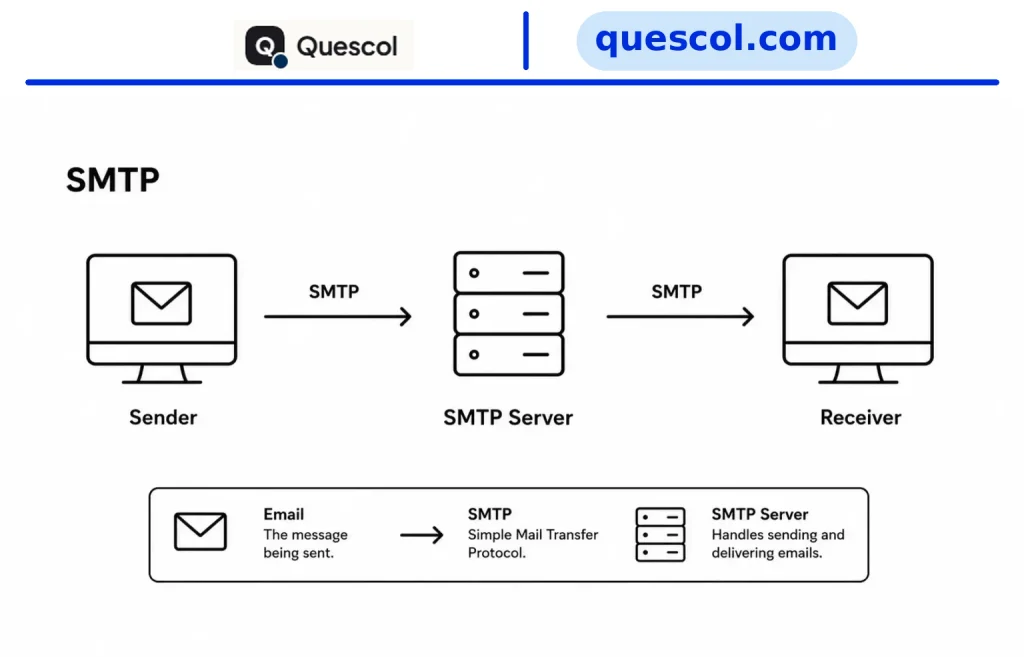
Figure: SMTP
How SMTP Handles Transfer of Videos and Images?
1. MIME Extends SMTP Capabilities
SMTP alone cannot send multimedia files such as videos and images. Therefore, MIME extends SMTP functionality by supporting multimedia attachments in emails. MIME acts as an additional layer that helps SMTP process non-text content efficiently. As a result, users can send rich multimedia emails without difficulty.
2. Encoding Multimedia Files
Videos and images contain binary data, but SMTP supports only ASCII text format. Therefore, MIME converts multimedia files into encoded text using methods such as Base64 encoding. This conversion allows SMTP to transfer the files safely across mail servers. After transmission, the receiver’s email application decodes the content back into its original form.
3. Adding MIME Headers
MIME adds special headers to email messages that describe the content type and file format. For example, MIME identifies whether the attachment is an image, video, PDF, or audio file. These headers help the receiver’s email client process the attachment correctly. Therefore, multimedia files open properly after download.
4. Attachment Size Limits
MIME encodes and labels an image or video as an email body part, but mail servers still impose message-size limits. Large videos are usually shared by a link or another transfer service rather than automatically split by MIME.
5. Decoding at the Receiver Side
After the email reaches the receiver, the email client decodes the encoded multimedia content. Then the original image or video file becomes accessible to the user. Therefore, the receiver can open, view, or download the multimedia attachment easily. This process ensures proper multimedia communication through email systems.
Advantages of IMAP4 over POP3
1. Multi-Device Synchronization
IMAP4 synchronizes emails across multiple devices. Therefore, users can access the same mailbox from smartphones, tablets, and computers. In contrast, POP3 mainly downloads emails to one device only. This makes IMAP4 more suitable for modern communication.
- IMAP4 keeps emails synchronized across multiple devices.
- Any change made on one device automatically appears on other devices.
- Users can access the same mailbox from smartphones, laptops, tablets, and desktops.
- Read and unread email status remains updated everywhere.
- Deleted emails are removed from all synchronized devices.
- Email folders and organization stay the same across devices.
- Draft emails can be accessed and edited from different devices.
- It improves convenience for business and professional communication.
- Users do not need to download emails separately on each device.
- It provides a smooth and consistent email experience.
2. Emails Remain on the Server
IMAP4 stores emails on the mail server instead of downloading them permanently to a local device. Therefore, users can access emails anytime from different locations. In contrast, POP3 may remove emails from the server after downloading.
3. Better Email Management
IMAP4 allows users to create folders, organize messages, and mark emails as read or unread directly on the server. These changes automatically synchronize across devices. Therefore, users experience better email organization and management.
- In IMAP4, emails are stored on the mail server instead of only on the local device.
- Users can access the same emails from multiple devices anytime.
- Emails remain available even if one device is lost or damaged.
- Changes made to emails are saved directly on the server.
- Users can view inbox, sent mail, and folders from any connected device.
- It provides better backup and security for important emails.
- Internet connection allows users to access emails from different locations.
- Server storage helps maintain synchronization across devices.
- Unlike POP3, emails are not usually deleted after access.
- This feature is useful for cloud-based email services such as Gmail and Outlook.
4. Reduced Dependence on One Device
Because IMAP4 keeps the authoritative mailbox on the server, losing one client device does not by itself remove the mailbox. This is not a backup: deletions can synchronize, and recovery depends on the provider’s retention or backup policy. Connection security requires IMAP over TLS and appropriate authentication.
- IMAP4 stores emails safely on the mail server.
- Users can recover emails even if their computer or mobile device gets damaged.
- Important emails remain protected because they are not stored only on one device.
- Users can access old emails anytime from another device with internet access.
- IMAP4 reduces the risk of permanent email loss compared to POP3.
5. Supports Real-Time Access
IMAP4 provides real-time access to emails because it works directly with the server. Therefore, users receive updated mailbox information immediately. This feature is especially useful for business communication.
- IMAP4 provides real-time access to emails directly from the mail server.
- Users can instantly view new emails as soon as they arrive in the inbox.
- Any changes made to emails update immediately across all connected devices.
- Read, unread, deleted, and moved email status stays updated in real time.
- Users can access current mailbox data without downloading all emails permanently.
- It improves communication speed for business and professional users.
- IMAP4 allows users to manage emails from anywhere with an internet connection.
- Cloud-based email services such as Gmail and Outlook use IMAP4 for live synchronization.
- Real-time access helps teams respond quickly to important emails and notifications.
- Unlike POP3, IMAP4 always works with the latest server data.
6. Efficient for Cloud Email Services
Modern cloud-based email systems mainly use IMAP4 because it supports synchronization and remote access. Therefore, services such as Gmail and Outlook work more efficiently with IMAP4 than POP3.
- IMAP4 works efficiently with cloud-based email services such as Gmail and Outlook.
- Emails remain stored on the cloud server instead of only on a local device.
- Users can access their emails from smartphones, laptops, tablets, and web browsers easily.
- IMAP4 keeps all devices synchronized with the latest email updates.
- Changes made on one device automatically appear on other devices in real time.
- Cloud email services use IMAP4 to provide secure backup and recovery of emails.
- Users can organize folders, drafts, and sent emails directly on the server.
- IMAP4 supports remote access, which helps users check emails from any location with internet access.
- Businesses prefer IMAP4 because teams can collaborate and manage emails efficiently.
- Unlike POP3, IMAP4 provides better flexibility and synchronization for modern cloud communication systems.
How Does SMTP Work?
SMTP works as the main protocol for sending emails over the internet. It controls the process of transferring email messages from the sender’s device to the receiver’s mail server. Moreover, SMTP works with mail servers, user agents, and TCP connections to provide reliable communication. Therefore, SMTP plays an important role in modern email systems.
The SMTP process involves several steps such as composing the email, establishing a connection, transferring the message, and delivering it to the receiver’s mailbox. Furthermore, SMTP may use relays and gateways during communication between different servers and networks. Hence, SMTP ensures fast and organized email delivery worldwide.
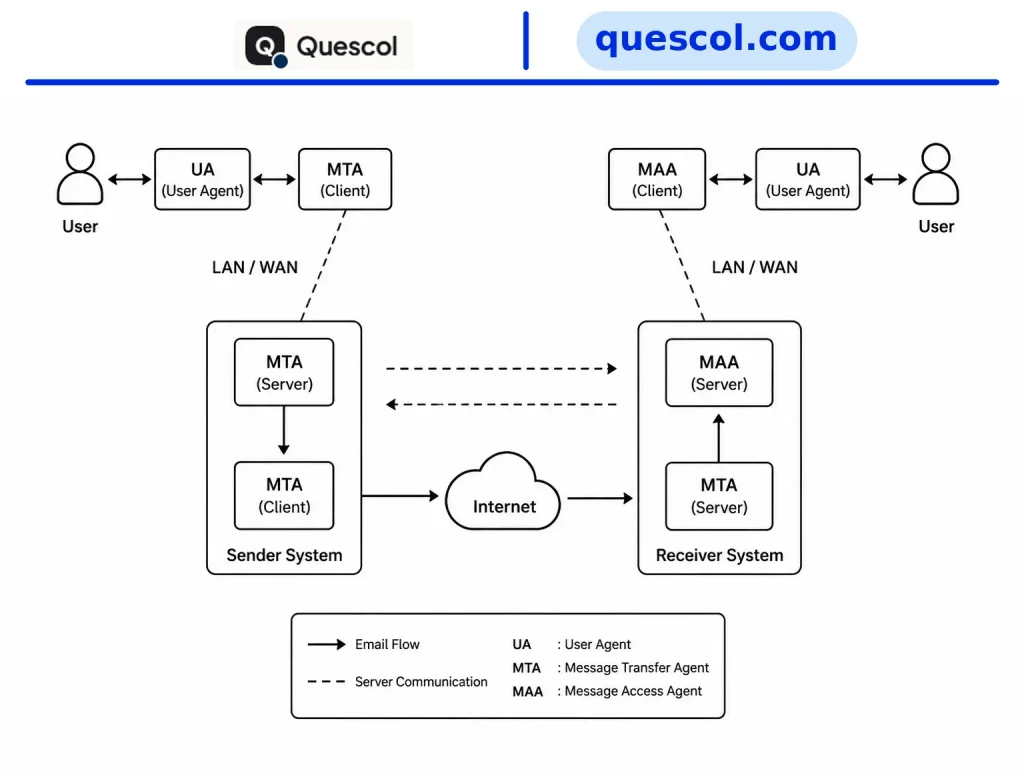
Figure: Working of SMTP
Following are the steps in the working of SMTP:-
1. Sending the Email
The process begins when a user creates an email using a User Agent (UA) such as Gmail, Outlook, or Thunderbird. The sender writes the receiver’s email address, subject, message, and attachments if required. After clicking the send button, the email is transferred to the Mail Transfer Agent (MTA). Therefore, the sending process starts from the user’s email application.
Functions During Sending
- Creates the email message
- Adds subject and attachments
- Transfers email to the mail server
- Starts the SMTP communication process
2. SMTP Client and SMTP Server Communication
After receiving the email, the sender’s Mail Transfer Agent acts as the SMTP Client. It establishes a connection with the receiver’s Mail Transfer Agent, which acts as the SMTP Server. This communication happens through TCP Port 25, which provides reliable message transfer.
The SMTP client sends commands and message data to the SMTP server. Moreover, the server responds with status codes to confirm successful communication. Therefore, SMTP ensures proper connection and message transfer between servers.
Functions of SMTP Client and Server
- Establishes TCP connection
- Transfers email data securely
- Verifies communication between servers
- Supports reliable message delivery
3. Use of Relays and Gateways
Sometimes, the email does not travel directly to the destination server. Instead, it passes through intermediate mail servers called Relays. These relay servers help forward the message toward the correct destination. Moreover, relays improve email routing and communication across large networks.
In some situations, different email systems may use different communication protocols. In such cases, an Email Gateway converts the message into the required format for proper delivery. Therefore, gateways help different email systems communicate smoothly.
Functions of Relays and Gateways
- Forward emails between servers
- Improve routing efficiency
- Convert messages between different protocols
- Support communication between different networks
4. Email Delivery to the Receiver
After the email reaches the destination mail server, the destination MTA accepts the message and passes it to a mail delivery agent (MDA/LDA), which places it in the recipient’s mailbox. Then, the receiver accesses the email using a User Agent through POP3 or IMAP protocols. Furthermore, the user can read, reply, forward, or download attachments from the email. Hence, the email communication process becomes complete.
Functions During Delivery
- Receives incoming emails
- Stores messages in the mailbox
- Allows email retrieval through IMAP or POP3
- Completes communication successfully
Conclusion
SMTP plays an important role in email communication by transferring messages through the internet. However, SMTP alone supports only plain text messages. Therefore, MIME enhances SMTP by allowing the transfer of videos, images, audio, and other multimedia files through encoding techniques. As a result, modern email systems can support rich and interactive communication.
Moreover, IMAP4 provides many advantages over POP3 because it supports multi-device synchronization, real-time access, server-side storage, and cloud-based email services. Therefore, IMAP4 is more suitable for modern users who access emails from different devices. Finally, SMTP with MIME and IMAP4 together create a fast, secure, flexible, and efficient email communication system for personal, educational, and business use.