The presentation layer is the sixth layer of the OSI (Open Systems Interconnection) model. It acts as a translator between the application layer and the lower network layers. This layer ensures that data sent from one device can be properly understood by another device. Therefore, it plays an important role in data formatting, encryption, and compression.
In addition, the presentation layer improves compatibility between different computer systems and applications. It converts data into a standard format before transmission and changes it back into a readable form at the receiver side. This layer also provides security and reduces data size for faster communication. Thus, the presentation layer helps in smooth, secure, and efficient data exchange in computer networks.
What is the Presentation Layer?
The Presentation Layer is the sixth layer of the OSI (Open Systems Interconnection) model. It is responsible for presenting data in a format that can be understood by the receiving application.
The presentation layer acts as a translator between the application layer and the lower layers of the OSI model. It ensures that data sent from one computer is converted into a suitable format before it is delivered to another computer.
Different computers and applications may use different data formats to represent information. The presentation layer helps solve this problem by converting data into a common or understandable format.
It also performs important functions such as data translation, data encryption, data decryption, data compression, and data decompression.
For example, when a user sends an image, document, or text file over a network, the presentation layer helps ensure that the receiving application can interpret the information in the correct format.
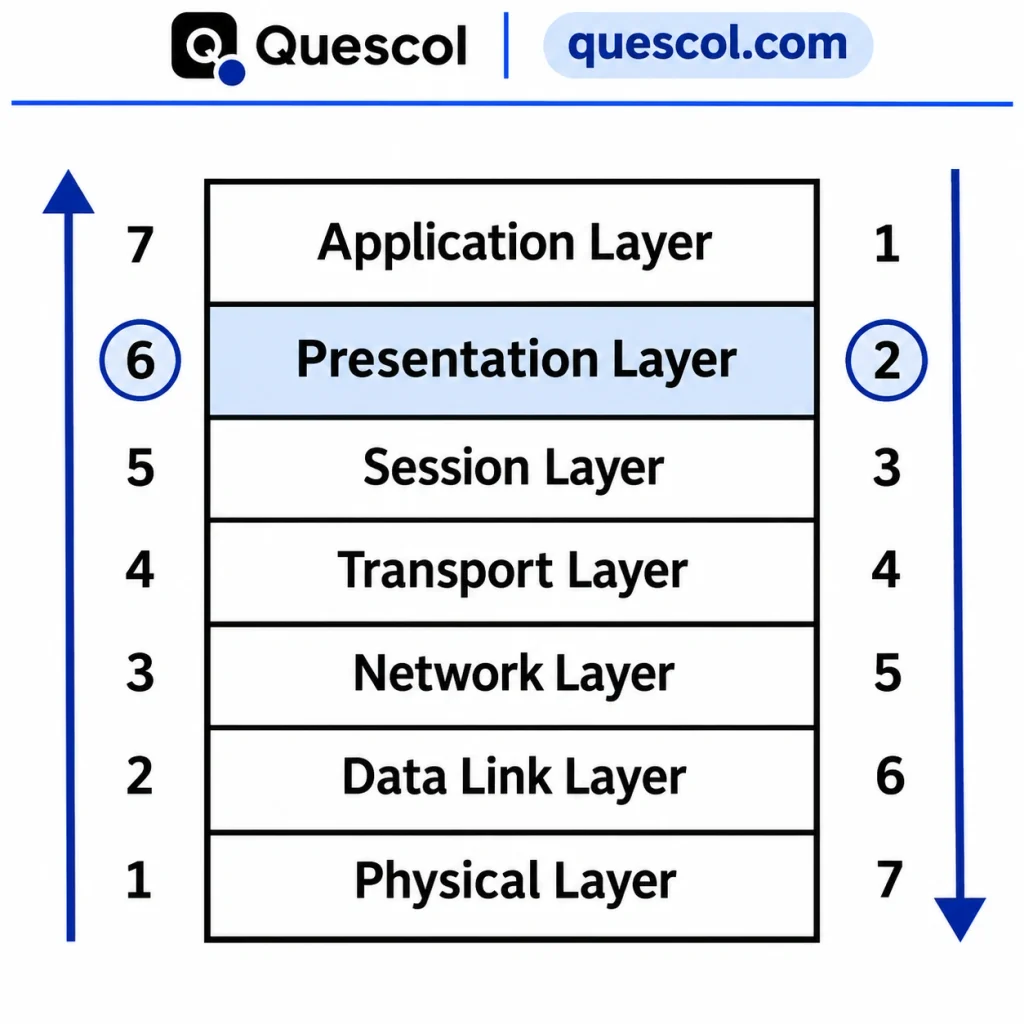
Figure: Presentation Layer
Important Roles of the Presentation Layer
1. Data Translation
The presentation layer converts data into a standard format so that different computer systems and applications can understand and exchange information correctly.
2. Data Encryption
It converts readable data into an unreadable format to protect sensitive information from unauthorized access during transmission.
3. Data Decryption
It converts encrypted data back into its original readable format at the receiving end so that the receiver can understand the information.
4. Data Compression
The presentation layer reduces the size of data before transmission. This helps save network bandwidth and reduces the time required to transfer large files.
5. Multimedia Data Support
It supports the representation and exchange of multimedia information, including audio, video, images, and graphics, in suitable formats.
6. Compatibility Between Different Systems
It helps maintain compatibility between different computers, operating systems, and applications by converting data into formats that can be understood by the receiving system.
7. Character Encoding Conversion
It supports the conversion of character encoding formats such as ASCII and Unicode. This helps ensure that text is displayed correctly on different computer systems.
8. Efficient and Secure Communication
By performing data formatting, encryption, and compression, the presentation layer helps make data communication more efficient and secure.
Design Issues of the Presentation Layer
The Presentation Layer is the sixth layer of the OSI (Open Systems Interconnection) model. It is responsible for converting, formatting, encrypting, and compressing data so that information can be understood by different computer systems.
Different devices and applications may use different data formats, character encoding methods, and multimedia standards. The presentation layer ensures that the data sent by one system is represented in a suitable format for the receiving system.
The major design issues of the presentation layer are explained below.
1. Data Format Conversion
Different computer systems may store and represent data in different formats. For example, one system may represent numbers, images, or documents using a particular format, while another system may use a different format.
The presentation layer converts data from the sender’s format into a format that the receiver can understand. It also performs the reverse conversion when required.
For example, if one computer sends an image in PNG format and the receiving application supports JPEG, the image may need to be converted into a compatible format.
Therefore, data format conversion is important for maintaining compatibility and ensuring that information is correctly understood by different systems.
2. Data Encryption and Security
Data transmitted over a network may contain sensitive information, such as passwords, personal details, and financial information. This information must be protected from unauthorized access.
Encryption converts readable data, known as plaintext, into an unreadable form called ciphertext using an encryption algorithm and a key. The receiving system uses the appropriate decryption process to recover the original information.
For example, when confidential information is exchanged between two systems, encryption helps prevent unauthorized users from understanding the transmitted data.
Therefore, providing secure data representation through encryption and decryption is an important design concern.
3. Data Compression
Large files require more storage space and network bandwidth. Transmitting uncompressed data may also increase communication time, especially when dealing with images, audio, and video files.
The presentation layer uses data compression techniques to reduce the size of information before transmission. The receiving system can decompress the data to obtain the original information or a representation of it.
There are two major types of compression:
- Lossless Compression: Reduces data size without losing the original information. The original data can be recovered exactly. Examples include ZIP and PNG compression.
- Lossy Compression: Reduces file size by removing some information that may not be easily noticed. Examples include JPEG images and MP3 audio.
For example, a large image can be compressed before sending it through a network to reduce its transmission time.
Therefore, the presentation layer must balance compression efficiency, data quality, and processing requirements.
4. Character Encoding
Different computer systems may use different character encoding standards to represent letters, numbers, and symbols. If the sender and receiver use incompatible encoding methods, the received text may not be displayed correctly.
Character encoding defines how characters are represented using binary values. Common encoding standards include ASCII and Unicode.
- ASCII: Represents basic English letters, numbers, and commonly used symbols.
- Unicode: Supports characters from many languages, along with special symbols and emojis.
For example, a message containing English, Hindi, or other language characters must be represented using an encoding that the receiving system can interpret correctly.
Therefore, the presentation layer must support compatible character encoding to ensure accurate text representation during communication.
5. Multimedia Data Handling
Modern computer networks are used to transfer different types of multimedia information, including images, audio, and video. These media files may be created and stored using different formats.
The presentation layer helps ensure that multimedia data is represented in a format that the receiving application can understand. It may also support the conversion and decompression of multimedia information.
For example:
- Images may use formats such as JPEG, PNG, and GIF.
- Audio files may use formats such as MP3, WAV, and AAC.
- Video files may use formats such as MP4 and WebM.
If the receiving system does not support a particular format, the data may need to be converted into a compatible format.
Therefore, handling different multimedia formats and maintaining compatibility between applications are important design challenges.
6. Syntax and Data Structure
Different computer systems and applications may organize information using different syntax rules and data structures. The sender and receiver must understand how the transmitted information is arranged.
The presentation layer is concerned with the representation and structure of data so that the receiving application can interpret it correctly. It helps maintain a consistent format when information is exchanged between different systems.
For example, data may be represented using formats such as JSON, XML, or other structured data formats.
Consider the following JSON representation:
{
  "name": "Ravi",
  "age": 25,
  "city": "Hyderabad"
}
This structure organizes information into key-value pairs. The receiving application must understand the format to access the name, age, and city correctly.
Therefore, maintaining a consistent data structure and syntax is necessary for accurate communication between systems.
7. Interoperability Between Systems
Computer systems developed by different manufacturers may use different operating systems, applications, hardware configurations, and data representation methods.
Interoperability refers to the ability of different systems to exchange information and use that information correctly.
The presentation layer supports interoperability by helping represent data in formats that can be understood by different systems. It reduces compatibility problems caused by differences in data representation.
For example, a document created on a Windows computer should be readable on a macOS or Linux computer when both systems support the document’s format.
Therefore, ensuring smooth data exchange between different devices, operating systems, and applications is an important design issue.
8. Efficient Data Representation
The presentation layer must represent information in a way that allows it to be transferred and interpreted efficiently. Poor data representation may increase file size, processing requirements, and communication overhead.
Efficient data representation involves selecting suitable data formats, encoding methods, and compression techniques according to the type of information being transmitted.
For example, using an appropriate image format can reduce file size while maintaining the required visual quality. Similarly, a suitable text encoding method helps represent characters correctly without unnecessary complexity.
The presentation layer should also ensure that any conversion or compression process does not affect the correctness of the information.
Therefore, efficient data representation helps improve communication performance while maintaining data accuracy and compatibility.
Working of the Presentation Layer
1. Acts as an Intermediary
The presentation layer works between the application layer and the session layer in the OSI model. It acts as a translator between different systems during communication. Therefore, it helps devices exchange data correctly.
2. Formats Data
At the sender’s side, the presentation layer converts data into a standard format before transmission. This allows different systems and applications to understand the information properly. Thus, communication becomes compatible and accurate.
3. Encrypts Data
The presentation layer encrypts data before sending it through the network. Encryption protects sensitive information from unauthorized access. Therefore, communication becomes more secure and reliable.
4. Compresses Data
This layer compresses data to reduce its size before transmission. Compression saves bandwidth and improves data transfer speed. As a result, network performance becomes more efficient.
5. Transfers Data to Session Layer
After processing the data, the presentation layer forwards it to the session layer. The session layer then manages the communication session between devices. Thus, smooth data transmission takes place.
6. Decrypts Received Data
At the receiver’s side, the presentation layer decrypts the encrypted data. This converts secured information back into readable form. Therefore, the receiver can understand the transmitted information correctly.
7. Decompresses Data
The presentation layer decompresses compressed data after receiving it. It restores the data to its original size and structure. Hence, the complete information becomes available to the receiver.
8. Delivers Readable Data
Finally, the presentation layer translates the processed data into a format understandable by the application layer. This ensures proper display of text, images, audio, and video. Therefore, users receive accurate and meaningful information.
Services Provided by Presentation Layer
1. Format Conversion
The presentation layer changes data into a common format before transmission. This helps different systems and applications understand the information correctly. Therefore, communication becomes smooth and compatible.
2. Information Security
This layer protects sensitive information by converting data into encrypted form. It prevents unauthorized users from accessing important data during transmission. Thus, network communication becomes safer.
3. Recovery of Original Data
At the receiver’s side, the presentation layer converts encrypted data back into readable form. This process helps users access the original information correctly. Therefore, secure communication remains effective.
4. Size Reduction of Data
The presentation layer reduces the size of data before sending it through the network. This saves bandwidth and increases transmission speed. As a result, network performance improves efficiently.
5. Text and Character Handling
This layer manages character encoding methods such as ASCII and Unicode. It ensures proper communication between systems using different coding standards. Hence, text data remains understandable across devices.
6. Multimedia Processing
The presentation layer supports multimedia content like images, audio, and video files. It processes these files into suitable formats for communication. Therefore, multimedia applications work properly in networks.
7. Data Structure Management
This service maintains the proper arrangement and structure of transmitted information. It ensures that data follows a standard communication format. Thus, information exchange becomes organized and accurate.
8. Compatibility Support
The presentation layer helps different hardware and software systems communicate effectively. It removes compatibility issues between devices with different formats. Therefore, users experience smooth data communication.
Functions of Presentation Layer
1. Data Translation
The presentation layer converts data from one format to another format. It ensures that different systems can understand the transmitted information correctly. Therefore, communication between devices becomes smooth and compatible.
2. Data Encryption
This layer encrypts data before transmission to protect sensitive information. Encryption prevents unauthorized users from accessing the data during communication. Thus, network security improves significantly.
3. Data Decryption
The presentation layer decrypts encrypted data at the receiver side. It converts secured information back into its original readable form. Therefore, the receiver can access and understand the data properly.
4. Data Compression
This function reduces the size of data before transmission over the network. Compression helps save bandwidth and increases communication speed. As a result, data transfer becomes more efficient.
5. Data Formatting
The presentation layer formats text, images, audio, and video into a suitable structure. It ensures that multimedia data is displayed correctly on different devices. Hence, users receive information in the proper format.
6. Character Encoding Conversion
This layer converts character encoding schemes such as ASCII and Unicode. It helps devices using different coding standards communicate effectively. Therefore, data remains understandable across various systems.
7. Syntax Processing
The presentation layer manages the syntax and structure of transmitted data. It ensures that data follows a common communication format. Thus, information exchange becomes accurate and organized.
8. Multimedia Support
The presentation layer supports transmission of multimedia files like images, videos, and sound. It processes these files for proper communication between systems. Therefore, multimedia applications work efficiently in networks.
Presentation Layer Protocols
1. SSL (Secure Sockets Layer)
SSL is a security protocol used to encrypt data during network communication. It protects sensitive information such as passwords and banking details from unauthorized access. Therefore, it provides secure communication over the internet.
2. TLS (Transport Layer Security)
TLS is an advanced version of SSL that provides secure data transmission. It encrypts communication between web browsers and servers to improve privacy and security. Thus, it is widely used in secure websites and online services.
3. JPEG (Joint Photographic Experts Group)
JPEG is a presentation layer standard used for image compression. It reduces the size of image files while maintaining acceptable image quality. Therefore, it helps in faster image transmission and storage.
4. MPEG (Moving Picture Experts Group)
MPEG is used for compressing and transmitting video and audio files. It helps reduce multimedia file size without greatly affecting quality. Thus, it supports efficient video streaming and multimedia communication.
5. GIF (Graphics Interchange Format)
GIF is a format used for image representation and simple animations. It supports compressed image formats for efficient transmission over networks. Therefore, it is commonly used for web graphics and animations.
6. ASCII (American Standard Code for Information Interchange)
ASCII is a character encoding standard used for text representation in computers. It converts letters, numbers, and symbols into binary codes. Hence, systems can exchange text information correctly.
7. Unicode
Unicode is a universal character encoding standard that supports multiple languages and symbols. It allows computers worldwide to represent text consistently. Therefore, it improves compatibility between different systems and languages.
8. XDR (External Data Representation)
XDR is used to standardize data representation between different computer systems. It helps systems with different architectures exchange information accurately. Thus, it improves interoperability in network communication.