In computer networks, connecting multiple computers and Local Area Networks (LANs) is important for sharing information and resources. As organizations grow, they need a reliable and high-speed network infrastructure to connect computers, servers, and different LAN segments.
To meet these requirements, different networking technologies are used to transfer data between devices over long distances.
One such technology is FDDI (Fiber Distributed Data Interface). It is a high-speed networking technology designed to provide reliable data communication over fiber-optic cables.
FDDI uses a dual-ring architecture to transmit data at a speed of 100 Mbps. The two rings provide an additional communication path, which helps maintain network connectivity even when a cable or station fails.
FDDI is mainly used as a backbone network to connect multiple LANs, computers, servers, and other network devices within large organizations, campuses, and industrial environments.
It provides high-speed communication, fault tolerance, and reliable data transmission.
FDDI
FDDI (Fiber Distributed Data Interface) is a high-speed network technology that uses fiber-optic cables and a dual-ring architecture to transmit data at 100 Mbps.
It was developed to provide reliable communication between computers and LANs over larger distances than traditional Ethernet networks of its time.
FDDI uses a token-passing access method to control how devices transmit data over the network.
In this method, a special data unit called a token continuously travels around the ring. A device must capture the token before it can transmit data. After transmitting its data, the device releases the token so that other devices can use the network.
One of the important characteristics of FDDI is its dual-ring architecture. It consists of two separate rings:
- Primary Ring: The primary ring is normally used for data transmission.
- Secondary Ring: The secondary ring provides an alternative communication path when a failure occurs in the primary ring.
FDDI supports a standard data transmission speed of 100 Mbps and can cover a larger geographical area than many traditional LAN technologies.
Main Features of FDDI
FDDI provides several features that make it suitable for high-speed and reliable network communication.
1. High Data Transmission Speed
FDDI supports a data transmission speed of 100 Mbps. This speed allows multiple computers and LANs to exchange information efficiently.
2. Dual-Ring Architecture
FDDI uses two separate rings, known as the primary ring and secondary ring. The secondary ring provides backup communication when a failure occurs.
3. Fault Tolerance
FDDI provides fault tolerance through its dual-ring structure. If a cable or station fails, the network can reconfigure itself to maintain communication through the remaining path.
4. Token-Passing Mechanism
FDDI uses a token-passing technique to control data transmission. Only the station holding the token can transmit data, which helps prevent data collisions.
5. Long-Distance Communication
FDDI supports communication over relatively long distances using fiber-optic cables. A standard dual-ring FDDI network can cover up to approximately 100 km of total fiber path length.
6. Reliable Data Transmission
The use of fiber-optic cables reduces the effect of electromagnetic interference and provides reliable data communication.
7. Backbone Network Support
FDDI can connect multiple LANs, computers, and servers through a high-speed backbone network.
Working Principle of FDDI
FDDI works using a token-passing mechanism and a dual-ring architecture. The token controls which station can transmit data, while the two rings provide an alternative communication path in case of network failure.
The working process can be explained through the following steps:
1. Token Circulation: A special token continuously travels around the primary ring in a fixed direction.
2. Token Capture: When a computer or network station needs to transmit data, it waits until the token reaches it.
3. Data Transmission: After receiving the token, the station captures it and sends its data around the ring.
4. Data Reception: The destination station receives the data and identifies whether the information is intended for it.
5. Data Removal: The transmitting station removes the data from the ring after it completes its circulation.
6. Token Release: The transmitting station releases a new token so that another station can transmit data.
7. Failure Recovery: If a cable or station fails, FDDI can use its secondary ring to establish an alternative communication path.
This process allows FDDI to provide organized data transmission and reliable network connectivity.
Architecture of FDDI
FDDI uses a dual-ring network architecture consisting of two fiber-optic rings that carry data in opposite directions.
The two rings are known as:
1. Primary Ring
The primary ring is the main communication path used for transmitting data between network stations.
Under normal operating conditions, data travels through the primary ring using the token-passing mechanism.
2. Secondary Ring
The secondary ring provides a backup communication path.
It is normally available for protection and can be used when a failure occurs in the primary ring. In the standard dual-attached configuration, the two rings can be wrapped together around a failure to maintain communication.
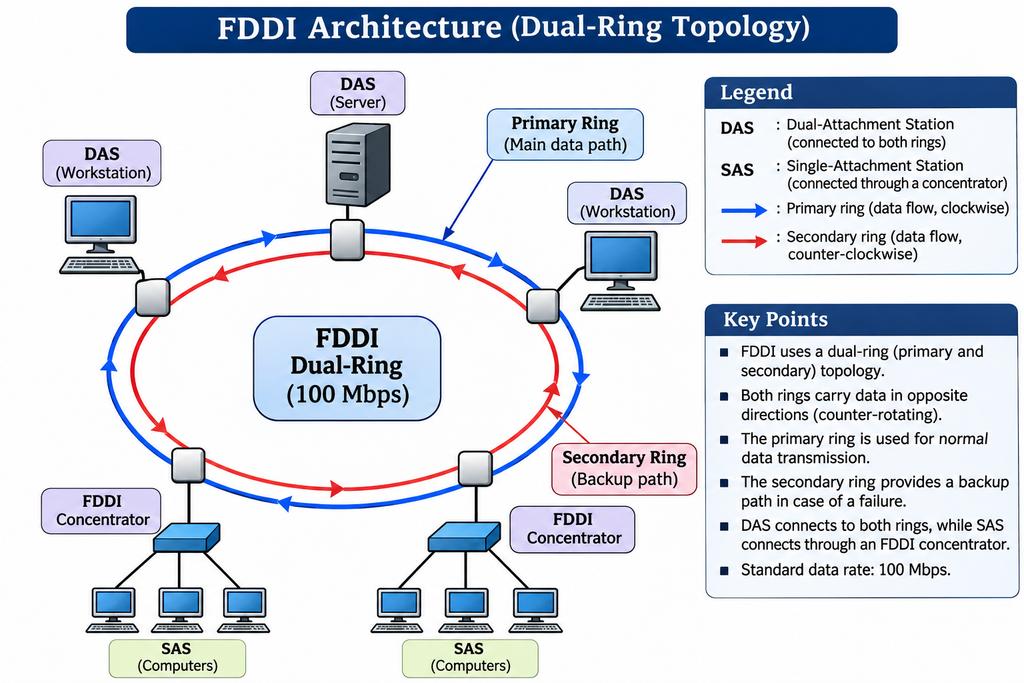
Figure: FDDI Architecture
How Can an FDDI Ring Be Used as a Backbone to Connect LANs and Computers?
An FDDI ring can be used as a backbone network to connect multiple Local Area Networks (LANs), computers, servers, and other network devices.
A backbone network is a central, high-speed network that connects different smaller networks and allows them to exchange information.
FDDI is suitable for this purpose because it provides a 100 Mbps transmission speed, supports long-distance communication, and offers fault tolerance through its dual-ring architecture.
Meaning of FDDI as a Backbone Network
In a large organization, different departments may have their own LANs. For example, an organization may have separate LANs for:
- Administration Department
- Computer Laboratory
- Accounts Department
- Research Department
- Server Room
Instead of connecting every computer directly to every other computer, these LANs can be connected through a common FDDI backbone.
The FDDI ring acts as a central communication path through which information travels between different LANs.
Working of FDDI as a Backbone Network
The working of an FDDI backbone can be explained through the following steps:
1. Connecting Different LANs: Multiple LANs, such as Ethernet and Token Ring networks, are connected to the FDDI backbone using bridges or routers.
2. Establishing the FDDI Ring: The FDDI network forms a dual-ring structure consisting of a primary ring and a secondary ring.
3. Data Transmission: When a computer in one LAN wants to communicate with a computer in another LAN, the data is forwarded to the FDDI backbone through a suitable network device.
4. Token Passing: FDDI uses a token-passing mechanism to control data transmission between stations connected to the ring.
5. Data Forwarding: The FDDI backbone carries the data towards the destination LAN or computer.
6. Receiving Data: The destination network device receives the data and forwards it to the intended computer.
7. Failure Recovery: If a cable or station fails, the primary and secondary rings can be wrapped together to provide an alternative communication path.
Example of FDDI as a Backbone
Consider a college that has different LANs in its departments.
- The Computer Science Department has one LAN.
- The Electronics Department has another LAN.
- The Administration Department has a separate LAN.
- The Central Server Room contains important servers.
All these LANs can be connected through a common FDDI backbone using bridges or routers.
When a computer in the Computer Science Department wants to access information stored on a server in the Central Server Room, the data travels through the FDDI backbone and reaches the destination network.
In this way, FDDI allows different LANs and computers to communicate through a common high-speed network.
FDDI Network Components
An FDDI network consists of different components that help establish communication between computers and LANs.
1. FDDI Stations
FDDI stations are the devices connected to the FDDI network. They can be computers, servers, workstations, or other networking devices.
2. Dual-Attachment Station (DAS)
A Dual-Attachment Station is connected to both the primary and secondary rings.
It provides connections to both rings and helps maintain network communication during failures.
3. Single-Attachment Station (SAS)
A Single-Attachment Station is connected to only one ring, usually through an FDDI concentrator.
It is commonly used to connect individual computers and workstations to the FDDI network.
4. FDDI Concentrator
An FDDI concentrator is a device that connects multiple single-attachment stations to the FDDI network.
It also helps prevent the failure or power-off of one connected computer from interrupting the entire ring.
5. Bridges and Routers
Bridges and routers connect different LANs to the FDDI backbone.
They help forward data between different networks and allow devices connected to separate LANs to communicate.
FDDI Cabling
FDDI was originally designed to use fiber-optic cables for high-speed and long-distance data transmission.
Fiber-optic cables transmit information in the form of light signals instead of electrical signals. They provide high bandwidth, low signal interference, and reliable communication.
FDDI uses two separate fiber-optic paths to create its dual-ring architecture.
Types of FDDI Cables
The two major types of fiber-optic cables used in FDDI are:
1. Multimode Fiber (MMF)
Multimode fiber allows multiple light paths, called modes, to travel through the fiber.
Its important characteristics are:
- It is commonly used for communication within buildings.
- It is suitable for relatively shorter distances.
- It is generally less expensive than single-mode fiber.
- It was commonly used in traditional FDDI installations.
- It uses LED-based optical transmitters in many traditional implementations.
Multimode fiber is suitable for connecting computers, workstations, and network devices located within the same building or campus.
2. Single-Mode Fiber (SMF)
Single-mode fiber allows light to travel through a single optical path.
Its important characteristics are:
- It is suitable for longer-distance communication.
- It provides lower signal dispersion over long distances.
- It is commonly used for connections between buildings.
- It generally supports longer transmission distances than multimode fiber.
- It commonly uses laser-based optical transmitters.
Single-mode fiber is useful when FDDI networks need to connect buildings or network locations separated by longer distances.
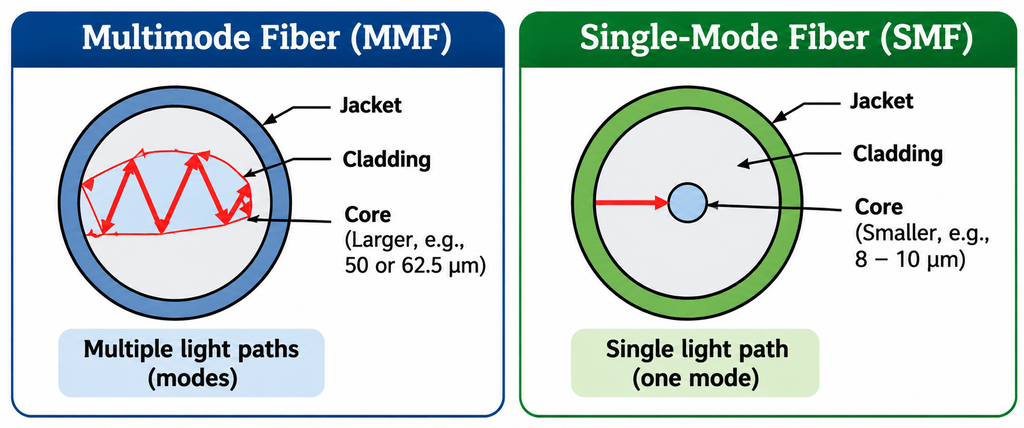
Figure: Comparison of Multimode Fiber and Single-Mode Fiber
Comparison Between Multimode and Single-Mode Fiber
| Multimode Fiber | Single-Mode Fiber |
|---|---|
| Allows multiple light paths. | Allows a single light path. |
| Suitable for shorter distances. | Suitable for longer distances. |
| Generally lower cost. | Generally higher cost. |
| Commonly used within buildings. | Commonly used between buildings. |
| Commonly uses LED transmitters in traditional FDDI implementations. | Commonly uses laser transmitters. |
Advantages of FDDI
FDDI provides several advantages that make it useful for connecting multiple LANs and computers.
1. High-Speed Data Transmission: FDDI supports a data transmission rate of 100 Mbps, allowing computers and LANs to exchange information efficiently.
2. Fault Tolerance: Its dual-ring architecture provides an alternative communication path when a cable or station fails.
3. Long-Distance Communication: Fiber-optic cables allow FDDI to connect network devices over relatively long distances.
4. Collision-Free Transmission: Its token-passing mechanism controls access to the network and prevents collisions between stations transmitting on the same ring.
5. High Reliability: Fiber-optic cables are resistant to electromagnetic interference, making communication more reliable.
6. Backbone Network Support: FDDI can connect multiple LANs, servers, and workstations through a common high-speed backbone.
7. Better Network Availability: Ring wrapping helps maintain communication even when certain network components fail.
Disadvantages of FDDI
Although FDDI provides high-speed and reliable communication, it also has some limitations.
1. High Installation Cost: Fiber-optic cables and the equipment required for FDDI installation can be expensive.
2. Complex Configuration: Setting up and maintaining a dual-ring network requires specialized knowledge and equipment.
3. Limited Data Rate Compared to Modern Networks: Its 100 Mbps speed is much lower than modern Gigabit Ethernet and higher-speed technologies.
4. Difficult Maintenance: Identifying and repairing problems in fiber-optic cables may require specialized tools.
5. Additional Cabling: The dual-ring architecture requires two separate communication paths, increasing cabling requirements.
6. Specialized Hardware: FDDI requires compatible network interface cards, concentrators, bridges, or other networking equipment.
Applications of FDDI
FDDI was mainly used in environments that required high-speed communication and reliable network connectivity.
Some important applications include:
1. Campus Networks: It was used to connect different buildings, departments, and computer laboratories within large educational institutions.
2. Enterprise Networks: Organizations used FDDI to connect multiple departmental LANs through a common backbone.
3. Data Centers: It was used to connect servers, workstations, and storage systems requiring reliable data communication.
4. Research Institutions: Research laboratories used FDDI to exchange large amounts of information between computers.
5. Industrial Networks: It was used in certain industrial environments where reliable communication between network devices was required.
6. High-Performance Workstations: It provided network connectivity for computers handling data-intensive applications such as image processing and engineering work.