TCP (Transmission Control Protocol) is a connection-oriented protocol used in the transport layer of computer networks. It provides reliable communication between two devices by ensuring that data is delivered accurately, completely, and in the correct order.
To achieve reliable communication, TCP uses a special structure called the TCP Header. The TCP header contains important control information required for establishing connections, identifying applications, managing data transmission, detecting errors, and controlling the flow of data.
Whenever data is transmitted using TCP, a header is added to the data to form a TCP segment. The header helps the sender and receiver manage communication properly.
The minimum size of a TCP header is 20 bytes, while its maximum size is 60 bytes when optional fields are included.
What is TCP(Transmission Control Protocol)?
The TCP header is the initial part of a TCP segment that contains control information required for reliable data transmission between devices in a network.
- It operates at the Transport Layer (Layer 4) of the OSI model and is an important part of the TCP/IP protocol suite used for internet communication.
- TCP creates a logical connection between the sender and receiver before starting data transmission.
- It ensures that data is delivered accurately and in the correct order by using sequence numbers and acknowledgements.
- TCP also detects errors using a checksum mechanism and retransmits any lost or corrupted packets to maintain data integrity.
- It includes fields such as port numbers, sequence numbers, acknowledgement numbers, flags, window size, checksum, and urgent pointer, which help in managing connection establishment, data transfer, error detection, and flow control.
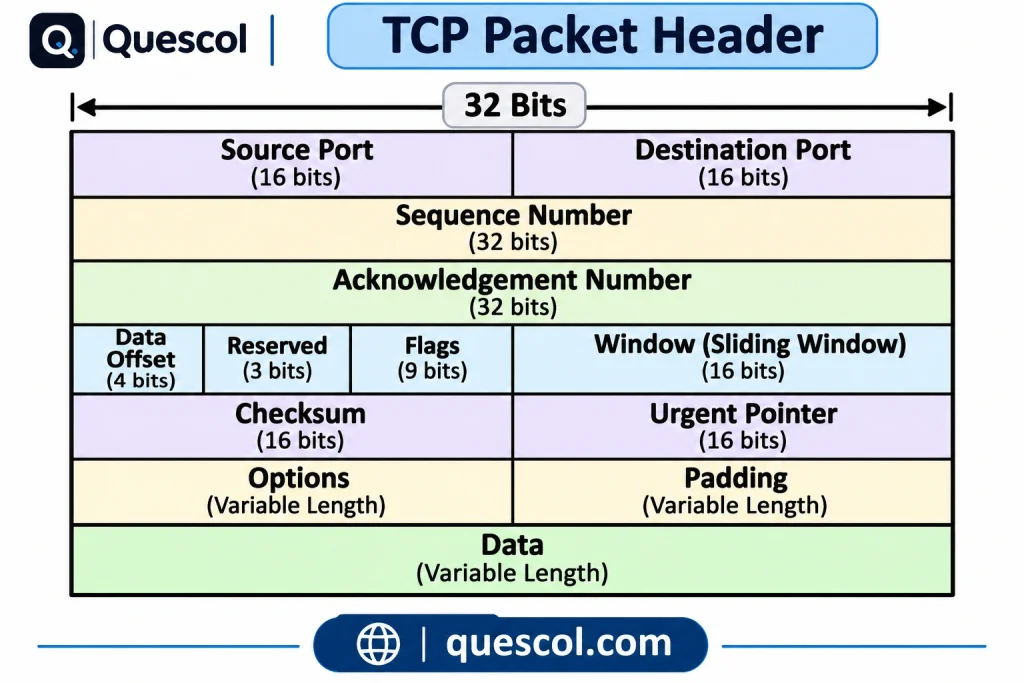
Figure: TCP Header Format
| Source Port—16 bits |
| Destination Port—16 bits |
| Sequence Number—32 bits |
| Acknowledgement Number—32 bits |
| Data Offset—4 bits (TCP header length in 32-bit words) |
| Reserved—reserved bits, set to zero |
| Control Flags—connection and transfer control |
| Window Size—16 bits |
| Checksum—16 bits over pseudo-header, TCP header, and data |
| Urgent Pointer—16 bits, meaningful when URG is set |
| Options and Padding—variable, making the header 20 to 60 bytes. |
Connection Establishment and Termination (TCP)
Connection establishment and termination explain how two devices start and end a reliable communication session in TCP. Since TCP is connection-oriented, it first creates a proper link before sending data and then closes it in a controlled way after communication is complete.
1. Connection Establishment (Three-Way Handshake)
TCP establishes a connection using a process called the Three-Way Handshake. This ensures both sender and receiver are ready for communication.
- SYN (Synchronize): The sender sends a SYN request to start a connection.
- SYN-ACK (Synchronize-Acknowledge): The receiver replies with SYN-ACK to accept the request and confirm readiness.
- ACK (Acknowledge): The sender sends an ACK to confirm the connection is fully established.
This process ensures both sides are synchronized before data transfer begins, which helps in avoiding data loss and errors at the start of communication.
2. Connection Termination (Four-Way Handshake)
TCP closes the connection using a Four-Way Handshake to ensure both sides finish communication safely.
- FIN (Finish): The sender sends a FIN signal to request closing the connection.
- ACK (Acknowledge): The receiver acknowledges the FIN request.
- FIN (Finish from Receiver): The receiver also sends a FIN when it is ready to close.
- ACK (Acknowledge): The sender sends the final ACK, completing the termination.
This step-by-step process ensures that all data is properly transmitted before the connection is fully closed, making communication safe and complete.
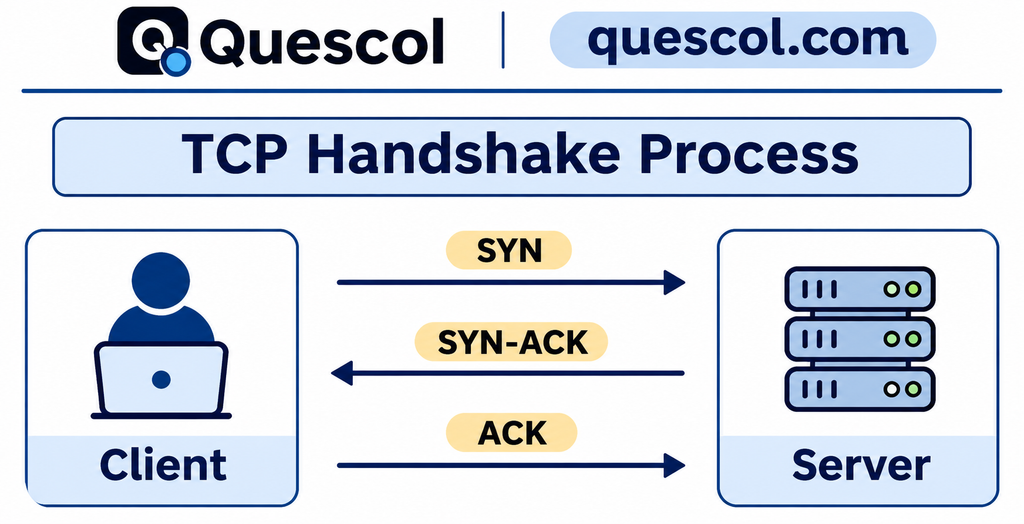
Figure: TCP Handshake Process
Working of TCP Header
1. Connection Establishment (Three-Way Handshake)
TCP starts communication using a process called the Three-Way Handshake. First, the sender sends a SYN signal to request a connection. Then, the receiver replies with a SYN-ACK signal to confirm readiness. Finally, the sender sends an ACK signal to complete the connection. This process ensures both sender and receiver are synchronized and ready for reliable data transfer before communication begins.
2. Segmentation of Data
In this step, TCP divides large data into smaller parts called segments. Each segment is assigned a unique sequence number for proper identification and tracking. This helps the receiver to arrange data in the correct order during reassembly. As a result, data transmission becomes more efficient and manageable across the network.
3. Data Transmission
After segmentation, TCP sends data segments over the network along with header information. The TCP header contains important details such as source port, destination port, sequence number, and control flags. These details help in proper routing and delivery of data. Therefore, TCP ensures that each segment reaches the correct destination safely.
4. Acknowledgement Mechanism
TCP uses acknowledgements to confirm successful data delivery. When the receiver gets the data correctly, it sends an ACK signal back to the sender. The ACK number indicates the next expected byte of data. This process ensures that no data is lost and communication remains reliable.
5. Error Control and Retransmission
TCP continuously checks for errors using sequence numbers and acknowledgements. If any segment is lost or corrupted during transmission, it is detected easily. Then TCP automatically retransmits the missing or damaged segments. This ensures complete, accurate, and error-free data delivery.
6. Flow Control
Flow control in TCP manages the speed of data transmission between sender and receiver. The receiver uses a window size field to inform the sender how much data it can handle. This prevents data overload at the receiver side. Therefore, smooth and balanced communication is maintained throughout the process.
7. Connection Termination
TCP closes the connection using FIN and ACK flags. Both sender and receiver confirm that all data has been successfully transferred before closing. Once confirmed, the connection is terminated in a proper and organized way. This ensures a clean and graceful end to communication between devices.
Fields of the TCP Header
The TCP header contains the following fields:
1. Source Port Address
The Source Port field identifies the port number of the application sending the data.
- It is a 16-bit field.
- It helps identify the sending application or process.
- It allows the receiver to identify where the response should be sent.
Example: If a web browser sends a request to a web server, the source port identifies the browser’s communication endpoint.
2. Destination Port Address
The Destination Port field identifies the application or service that should receive the data.
- It is a 16-bit field.
- It specifies the port number of the destination application.
- It helps TCP deliver data to the correct application.
Example: HTTP commonly uses port 80, while HTTPS commonly uses port 443.
3. Sequence Number
The Sequence Number field is used to identify the position of data bytes in the TCP communication.
- It is a 32-bit field.
- It helps arrange received data in the correct order.
- It helps identify missing data during transmission.
- It supports reliable data delivery by allowing lost data to be retransmitted.
Example: If a sender transmits data in multiple segments, sequence numbers help the receiver arrange the data in the correct order.
4. Acknowledgment Number
The Acknowledgment Number field is used to confirm the successful receipt of data.
- It is a 32-bit field.
- It indicates the next sequence number expected by the receiver.
- It helps the sender understand which data has been successfully received.
- It is meaningful when the ACK flag is set.
Example: If a receiver successfully receives bytes numbered 1 to 100, it sends an acknowledgment number of 101, indicating that it expects byte 101 next.
5. Data Offset (Header Length)
The Data Offset field specifies the length of the TCP header.
- It is a 4-bit field.
- It indicates where the actual data begins.
- The minimum TCP header size is 20 bytes.
- The maximum TCP header size is 60 bytes.
This field is important because the TCP header can contain optional information, making its size variable.
6. Reserved Bits
Reserved bits are kept for future use and are generally set to zero unless a specific extension defines their use.
- They are used for future protocol extensions.
- They help maintain compatibility with TCP implementations.
- They are not normally used for regular data transmission.
7. Control Bits (Flags)
Control bits are also called TCP flags. They are used to manage and control communication between the sender and receiver.
The commonly defined TCP control flags are:
| Flag | Full Form | Function |
|---|---|---|
| CWR | Congestion Window Reduced | Indicates that the sender has reduced its congestion window. |
| ECE | ECN-Echo | Indicates congestion information when ECN is used. |
| URG | Urgent | Indicates that the Urgent Pointer field is meaningful. |
| ACK | Acknowledgment | Indicates that the acknowledgment number is valid. |
| PSH | Push | Requests that received data be pushed to the application. |
| RST | Reset | Resets or rejects a TCP connection. |
| SYN | Synchronize | Establishes a connection and synchronizes sequence numbers. |
| FIN | Finish | Indicates that the sender has finished sending data. |
These flags help establish connections, acknowledge received data, manage congestion, and terminate connections.
8. Window Size
The Window Size field is used for flow control in TCP communication.
- It is a 16-bit field.
- It indicates how much additional data the receiver is willing to accept.
- It prevents the sender from transmitting more data than the receiver can handle.
- It helps avoid receiver buffer overflow.
TCP uses a sliding window mechanism to control the amount of data transmitted.
Example: If the receiver advertises a window size of 4,000 bytes, the sender can transmit up to 4,000 bytes of unacknowledged data within that advertised window, subject to other TCP limitations.
9. Checksum
The Checksum field is used for error detection during TCP data transmission.
- It is a 16-bit field.
- It helps detect errors in the TCP header and data.
- It is calculated using the TCP segment and an IP pseudo-header.
- If corruption is detected, the segment is discarded by the receiving TCP implementation.
TCP can retransmit lost or damaged data when necessary.
10. Urgent Pointer
The Urgent Pointer field is used to identify the boundary of urgent data in the TCP byte stream.
- It is a 16-bit field.
- It works along with the URG control flag.
- It identifies the position immediately following the urgent data.
- It is meaningful only when the URG flag is set to 1.
This field allows the receiving application to identify data that requires urgent attention.
11. Options
The Options field provides additional features and information to TCP communication.
- It is a variable-length field.
- It is used to support additional TCP features.
- It can contain information such as Maximum Segment Size (MSS), Window Scaling, and Timestamps.
- It helps improve communication efficiency and performance.
The Options field is optional and is included only when additional information is required.
12. Padding
Padding is used to make the TCP header length a multiple of 32 bits (4 bytes).
- It consists of extra bits, usually zeros.
- It is added when required to align the header properly.
- It ensures that the header follows the required format.
Padding is generally added after the Options field.
Functions of TCP Header
The TCP header performs several important functions that help in reliable communication between sender and receiver. Each function works together to ensure that data is delivered safely, in order, and without errors.
Following are the functions of TCP Header:-
1. Segmentation and Reassembly
TCP divides large messages into smaller segments before sending them over the network. Each segment is carried with a sequence number in the TCP header. At the receiver side, these segments are again arranged in the correct order to rebuild the original message. This ensures smooth and organized data transfer.
2. Reliable Data Delivery
One of the main functions of the TCP header is to ensure reliable communication. It uses acknowledgment (ACK) to confirm that data has been received successfully. If any data is lost, TCP automatically retransmits it. This guarantees complete and error-free delivery.
3. Flow Control
TCP manages the speed of data transmission using the window size field in the header. This prevents the sender from sending too much data at once. As a result, the receiver is not overloaded, and communication remains smooth and stable.
4. Error Detection
The TCP header contains a checksum field that helps detect errors in data during transmission. If any error is found, the segment is discarded or retransmitted. This ensures that only correct data reaches the receiver.
5. Connection Management
TCP handles both connection establishment and termination using control flags like SYN, ACK, and FIN. It ensures that both sender and receiver are ready before data transfer begins. It also ensures a proper closing of the connection after communication ends.
6. Data Ordering
TCP ensures that data segments are delivered in the correct sequence using sequence numbers. Even if packets arrive out of order, they are rearranged properly at the receiver side. This maintains data consistency and accuracy.
7. Multiplexing
TCP allows multiple applications to communicate over the same network using port numbers. The source and destination port fields in the header help identify different processes. This enables multiple services like browsing, email, and file transfer to work simultaneously.
Advantages of TCP Header
1. Reliable Data Transfer
TCP ensures that data reaches the receiver without loss. It uses acknowledgment and retransmission methods to guarantee delivery. Because of this, communication becomes highly reliable.
2. Error Detection and Correction
The TCP header includes a checksum field that checks errors in transmitted data. If any error is found, the data is retransmitted. This ensures accurate and error-free communication.
3. Ordered Data Delivery
TCP delivers data in the correct sequence using sequence numbers. Even if packets arrive out of order, they are rearranged properly. This maintains data consistency.
4. Flow Control
TCP controls the speed of data transmission using the window size field. It prevents the sender from overwhelming the receiver. As a result, smooth communication is maintained.
5. Connection-Oriented Communication
TCP establishes a proper connection before data transfer using the three-way handshake. This ensures both sender and receiver are ready before communication starts. It improves stability and reliability.
6. Multiplexing Support
TCP allows multiple applications to use the same network connection through port numbers. This helps different services like browsing, email, and file transfer to run at the same time.
7. Secure and Stable Communication
Due to its control mechanisms, TCP provides stable and secure data transmission. It reduces data loss and ensures proper delivery. Therefore, it is widely used in important applications like banking and web services.
Applications of TCP Header
1. Web Browsing (HTTP/HTTPS)
TCP is heavily used in web browsing through HTTP and HTTPS protocols. It ensures that web pages load correctly without missing data. When a user opens a website, TCP delivers all files like text, images, and videos in the correct order. This makes browsing smooth and reliable.
2. Email Services
Email services like Gmail and Outlook use TCP for sending and receiving messages. It ensures that emails are delivered completely without loss of information. Attachments and text are transferred safely. Therefore, users receive accurate and complete emails.
3. File Transfer
TCP is used in file transfer applications such as FTP. It ensures that files like documents, images, and videos are transferred without corruption. If any data is lost, TCP retransmits it. This guarantees safe file sharing between systems.
4. Online Banking and Transactions
Banking applications use TCP to ensure secure and reliable transactions. It protects sensitive data like account details and payment information. TCP ensures that every transaction is completed correctly. This makes financial communication safe and trustworthy.
5. Remote Login (SSH, Telnet)
TCP is used in remote login services like SSH and Telnet. It allows users to access and control remote systems securely. The connection remains stable and reliable during communication. This helps in system administration and remote work.
6. Database Communication
TCP is used in database systems to transfer queries and results between client and server. It ensures that data is delivered in correct order without errors. This helps in maintaining accurate database operations. Therefore, it is important in enterprise applications.
7. Messaging Applications
Applications like email chat systems and messaging services use TCP for reliable message delivery. It ensures that messages are not lost during transmission. Every message reaches the receiver in proper order. This improves communication accuracy.\
In conclusion, TCP connection establishment and termination are very important processes for reliable communication in computer networks. The Three-Way Handshake helps in setting up a stable connection by ensuring that both sender and receiver are ready before data transfer begins. This reduces errors and improves synchronization.
Similarly, the Four-Way Handshake ensures that the connection is closed in a safe and proper manner after all data is successfully transmitted. It prevents data loss and maintains communication integrity. Therefore, these processes make TCP a highly reliable and widely used protocol for secure and organized data transmission.