The internet and computer networks use different technologies to make communication faster, easier, and more efficient. DNS helps users access websites using simple domain names, while a virtual terminal allows users to control remote computers through a network connection. Both technologies play an important role in networking and online communication.
Moreover, DNS and virtual terminals improve user convenience and system accessibility. DNS removes the need to remember complex IP addresses, whereas virtual terminals help users interact with remote systems as if they were physically present. Therefore, these technologies are essential in modern networking and internet services.
What is DNS (Domain Name System)?
DNS stands for Domain Name System. It is a network service that translates human-readable domain names into machine-readable IP addresses. This process helps computers locate websites and servers on the internet quickly and accurately. In addition, DNS reduces the need to memorize difficult numerical IP addresses for every website.
Working of DNS (Domain Name System)
The working of DNS is a step-by-step process that helps users access websites using easy domain names instead of difficult IP addresses. Whenever a user enters a website name in the browser, DNS translates that domain name into an IP address so the browser can connect to the correct web server. Moreover, this process happens within a few seconds and makes internet browsing simple and fast.
DNS works through multiple servers and lookup stages to find the correct website information. It uses cache memory, DNS resolvers, root servers, TLD servers, and authoritative servers to complete the request efficiently. Therefore, DNS ensures smooth communication between users and websites across the internet.
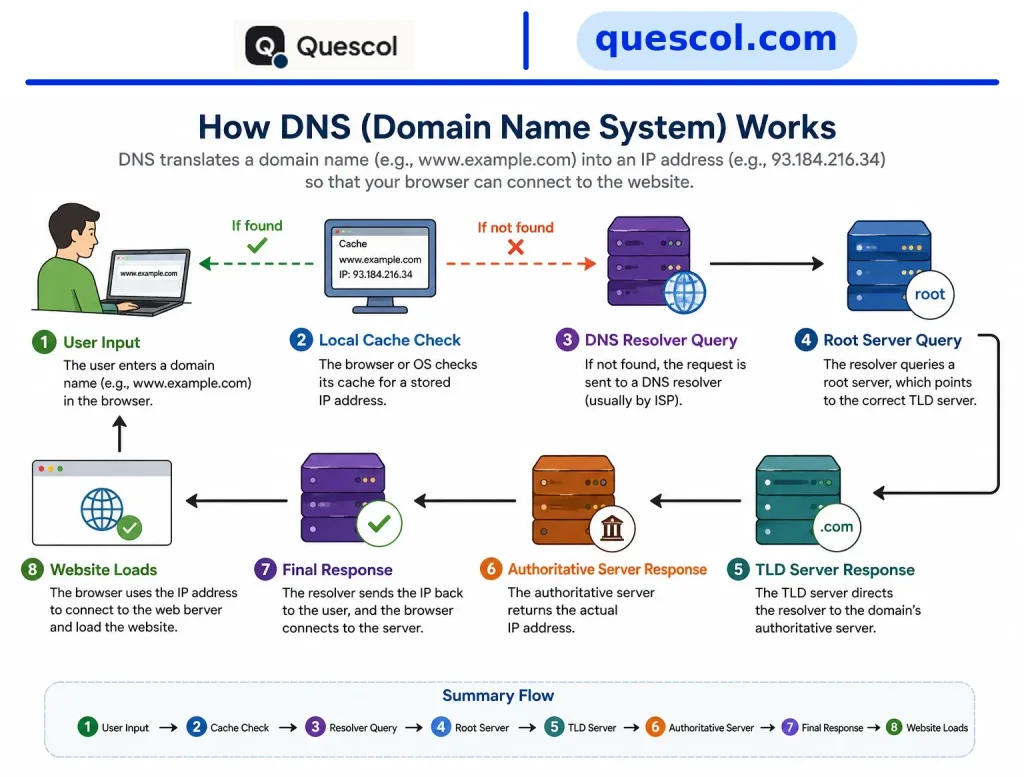
Figure: DNS
1. User Input
The DNS process starts when a user enters a domain name such as “www.google.com” into the web browser. Instead of remembering a long IP address, users simply type an easy website name. Then, the browser begins searching for the corresponding IP address.
Moreover, this step improves user convenience because people can remember names more easily than numbers. Therefore, DNS makes internet browsing more user-friendly and accessible for everyone.
For example, When a student types “www.wikipedia.org” in the browser, the system starts searching for the website’s IP address. The browser cannot connect directly using only the domain name. Therefore, it sends a DNS request to find the correct server location. Thus, DNS begins the website lookup process.
2. Local Cache Check
After receiving the request, the browser and operating system first check their local cache memory. The cache stores previously visited website IP addresses for a limited time. If the required IP address already exists in the cache, the browser uses it directly without contacting external DNS servers.
As a result, websites load faster because the browser skips additional DNS lookup steps. Moreover, caching reduces internet traffic and improves browsing efficiency.
For example, If a user recently visited “www.youtube.com,” the browser may already have its IP address stored in cache memory. Therefore, the browser quickly opens the website without performing another DNS search. Consequently, the webpage loads faster and saves network resources.
3. DNS Resolver Query
If the browser does not find the IP address in cache memory, it sends the request to a DNS resolver. Usually, the Internet Service Provider (ISP) provides this DNS resolver. The resolver acts as an intermediary between the user and other DNS servers.
Furthermore, the resolver searches different DNS servers to locate the correct IP address. Therefore, it helps simplify and manage the DNS lookup process efficiently.
For example, When a user opens a new website for the first time, the local system may not know the IP address. In this case, the request goes to the ISP’s DNS resolver. Then, the resolver starts searching for the required website information. Thus, the DNS lookup process continues.
4. Root Server Query
The DNS resolver first contacts a root DNS server when it does not know the IP address. Root servers are the highest level of the DNS hierarchy. They do not store exact website addresses, but they guide the resolver to the correct Top-Level Domain (TLD) server.
Moreover, root servers help organize internet traffic efficiently by directing requests properly. Therefore, they play a very important role in the DNS infrastructure.
For example, If the resolver searches for “www.amazon.com,” the root server identifies that “.com” is the top-level domain. Then, it directs the resolver to the correct .com TLD server. Thus, the search moves to the next DNS stage.
5. TLD Server Response
The Top-Level Domain (TLD) server manages domain extensions such as .com, .org, .net, and .edu. After receiving the request from the resolver, the TLD server provides the address of the domain’s authoritative DNS server.
In addition, TLD servers help organize domain information according to domain categories. Therefore, DNS lookups become more structured and efficient.
For example, When searching for “www.microsoft.com,” the .com TLD server identifies the authoritative DNS server responsible for Microsoft’s domain. Then, it sends that information back to the resolver. Consequently, the resolver can continue the lookup process.
6. Authoritative Server Response
The authoritative DNS server stores the actual DNS records for the requested domain name. It contains the correct IP address associated with the website. Once the resolver contacts this server, it returns the exact IP address needed to access the website.
Moreover, authoritative servers provide accurate and updated website information. Therefore, they are essential for successful internet communication.
For example, The authoritative server for “www.facebook.com” returns the correct IP address of Facebook’s web server. Then, the resolver receives this information and prepares to send it to the user’s browser. Thus, the browser can locate the website successfully.
7. Final Response
Finally, the DNS resolver sends the IP address back to the user’s browser. The browser then uses this IP address to connect to the web server hosting the website. After that, the requested webpage loads on the user’s screen.
Furthermore, the browser may store this IP address temporarily in cache memory for future use. As a result, the next visit to the same website becomes faster.
For example, After receiving the IP address of “www.netflix.com,” the browser connects directly to Netflix’s server and displays the homepage. The entire DNS process usually completes within a few milliseconds. Therefore, users experience fast and smooth website access.
Types of Domains in DNS (Domain Name System)
DNS divides domain names into different types to organize websites and internet resources efficiently. These domain types help users identify websites based on purpose, location, and network functions. Moreover, domain categorization improves internet management and makes domain resolution faster and more structured.
In addition, different types of domains support both forward DNS lookup and reverse DNS lookup. Forward lookup converts domain names into IP addresses, while reverse lookup converts IP addresses back into domain names. Therefore, domain types play a very important role in internet communication and network management.
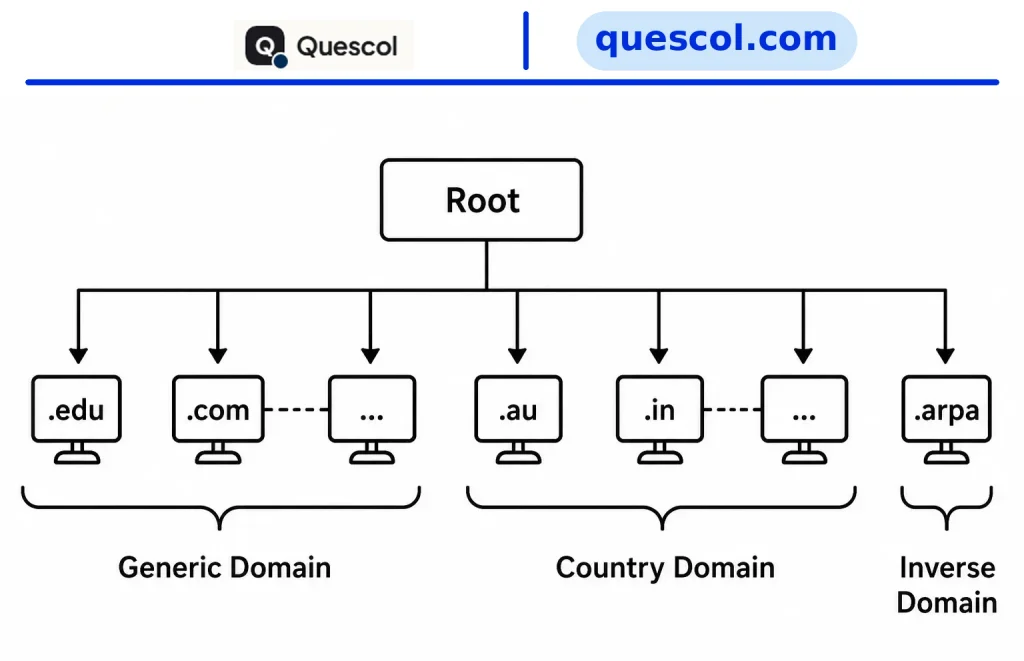
Figure: Types of DNS
1. Generic Domains (gTLDs)
Generic Top-Level Domains, also called gTLDs, are domains used for general purposes across the world. These domains are not connected to any specific country or region. They help organizations, businesses, educational institutions, and individuals create websites for different purposes.
Moreover, gTLDs are managed by international domain authorities and are widely used on the internet. Common examples include .com, .org, .net, .edu, and .info. Therefore, gTLDs provide a flexible and globally recognized naming system.
Features of Generic Domains
- Not restricted to any country
- Used worldwide for general purposes
- Easy to recognize and remember
- Supports businesses, organizations, and education
- Managed globally by domain authorities
For example, The website “www.amazon.com” uses the “.com” generic domain because it is a commercial website. Similarly, “www.wikipedia.org” uses “.org” because it represents a non-profit organization. Educational institutions often use “.edu” domains. Thus, generic domains help users identify the purpose of websites easily.
2. Country Code Domains (ccTLDs)
Country Code Top-Level Domains, also called ccTLDs, are domains assigned to specific countries or geographic regions. These domains usually contain two-letter country codes based on international standards. They help websites identify their country or regional presence on the internet.
Furthermore, each country manages its own ccTLD through national domain authorities. As a result, users can easily recognize websites related to a particular country or region.
Features of Country Code Domains
- Represents specific countries or regions
- Managed by national authorities
- Helps local businesses and organizations
- Improves regional identity on the internet
- Often used for local services and websites
For example, The domain “.in” represents India, while “.uk” represents the United Kingdom. Similarly, “.jp” is used for Japan and “.us” for the United States. For instance, “www.gov.in” is an Indian government website that uses the Indian country code domain. Therefore, ccTLDs help identify the geographical location of websites.
3. Reverse DNS Domains
Reverse DNS domains are used to perform reverse DNS lookups, where an IP address is translated back into a domain name. Unlike normal DNS lookup, which converts domain names into IP addresses, reverse DNS works in the opposite direction.
Moreover, reverse DNS helps verify server identities and improves network security and email authentication. IPv4 addresses use “in-addr.arpa,” while IPv6 addresses use “ip6.arpa” for reverse mapping. Therefore, reverse DNS is important for network management and troubleshooting.
Features of Reverse DNS
- Converts IP addresses into domain names
- Uses PTR (Pointer) records
- Helps verify server identity
- Improves email server authentication
- Supports network troubleshooting and security
For example, When an email server receives a message, it may perform a reverse DNS lookup to verify the sender’s server identity. If the IP address correctly maps back to the domain name, the email becomes more trustworthy. Similarly, network administrators use reverse DNS to identify servers and devices on a network. Thus, reverse DNS improves internet security and reliability.
Advantages of DNS (Domain Name System)
1. Easy Website Access
One of the biggest advantages of DNS is that it allows users to access websites using simple and easy-to-remember domain names instead of complex numerical IP addresses. People can type names such as “www.google.com” or “www.youtube.com” without memorizing long numbers. Therefore, DNS makes internet browsing more convenient and user-friendly.
Moreover, domain names are easier for businesses and organizations to promote and remember. This improves accessibility and helps users quickly reach websites without confusion.
2. Faster Browsing
DNS improves browsing speed through DNS caching. When a website is visited, the DNS resolver stores the IP address temporarily in cache memory. If the same website is accessed again, the browser uses the stored information instead of performing another DNS lookup.
As a result, websites load faster and network traffic decreases. Moreover, faster DNS responses improve the overall browsing experience for users.
3. Better Internet Management
DNS organizes websites and domain names systematically through its hierarchical structure. This structure includes root servers, TLD servers, and authoritative servers, which help manage millions of websites across the internet efficiently.
Furthermore, DNS allows website owners to update server IP addresses without changing domain names. As a result, websites remain accessible even when servers change locations or hosting providers.
4. Supports Online Services
DNS supports many internet services such as websites, email systems, cloud platforms, online gaming, and streaming applications. It helps these services communicate with servers correctly and efficiently.
Moreover, DNS ensures that users connect to the correct servers for web browsing, sending emails, and accessing cloud applications. Therefore, DNS is considered the backbone of modern internet communication.
Disadvantages of DNS (Domain Name System)
1. Security Risks
DNS servers can become targets of cyberattacks such as DNS spoofing, cache poisoning, and Distributed Denial of Service (DDoS) attacks. Attackers may redirect users to fake websites or steal sensitive information.
Furthermore, insecure DNS systems can expose users to phishing attacks and malware. Therefore, strong security measures such as DNSSEC are necessary to protect DNS communication.
2. Server Dependency
DNS depends heavily on DNS servers for website access and communication. If DNS servers fail or become unavailable, users may not access websites even if the internet connection works properly.
Moreover, server downtime can affect businesses, online services, and communication systems. Therefore, organizations often use backup DNS servers for reliability.
3. Complex Configuration
Managing DNS records and DNS servers can become complicated, especially for large organizations and websites. Administrators must correctly configure records such as A, MX, CNAME, and TXT records to ensure proper communication.
In addition, incorrect DNS settings can lead to website downtime, email delivery failures, and security issues. Therefore, DNS management requires technical knowledge and careful monitoring.
What is Virtual Terminal?
A Virtual Terminal is a software-based terminal that allows a user to communicate with a remote computer or server through a network. It creates an environment where the user can access and control another system as if working directly on that machine. Moreover, virtual terminals are commonly used in remote login services such as Telnet and SSH.
In addition, virtual terminals allow users to send commands, manage files, and monitor systems remotely. This technology improves system administration, remote support, and network management. Therefore, virtual terminals are widely used in networking and server management.
For example, A network administrator can use a virtual terminal to connect to a remote Linux server using SSH. Then, the administrator can execute commands, manage files, and configure the system from another location. Similarly, companies use virtual terminals to manage cloud servers remotely. Thus, virtual terminals provide remote system access efficiently.
Working of Virtual Terminal
The working of a virtual terminal allows users to communicate with and control a remote computer or server through a network connection. A virtual terminal creates a software-based environment that behaves like a physical terminal connected directly to the remote system. Therefore, users can execute commands, manage files, and access resources from distant locations.
Moreover, virtual-terminal sessions can use protocols such as Telnet or SSH; SSH encrypts and authenticates the session, whereas Telnet sends session data in plaintext. Once the connection is established, users can interact with the remote system through command-line instructions. As a result, virtual terminals make remote system management simple and efficient.
Steps in the Working of Virtual Terminal
1. User Starts the Virtual Terminal Session
The process begins when the user opens a virtual terminal application such as Telnet or SSH client on the local computer. Then, the user enters the IP address or domain name of the remote server to initiate the connection request.
Furthermore, the client application prepares to communicate with the remote system over the network. Therefore, this step starts the remote access process.
2. Connection Request Sent to Remote Server
After the user enters the server address, the virtual terminal client sends a connection request through the network. The remote server receives the request and checks whether the requested service, such as SSH or Telnet, is active.
Moreover, the server listens on specific communication ports to accept incoming connections. Therefore, proper network connectivity is required for successful communication.
3. User Authentication
Once the server accepts the connection request, the user must provide authentication details such as a username and password. In secure systems, encryption methods and security keys may also be used for authentication.
Furthermore, authentication prevents unauthorized users from accessing the remote system. Therefore, this step improves security and protects sensitive data.
4. Session Establishment
After successful authentication, the server creates a virtual terminal session for the user. The user now receives a command-line interface that behaves like a local terminal connected directly to the remote system.
In addition, the server allocates system resources for the user session and allows command execution. Therefore, the user can interact with the remote operating system in real time.
5. Command Execution and Communication
The user enters commands through the virtual terminal interface, and the client sends these commands to the remote server. Then, the server processes the commands and sends the output back to the client screen.
Moreover, this communication continues until the session ends. As a result, users can manage files, monitor systems, install software, and perform administrative tasks remotely.
6. Session Termination
Finally, the virtual terminal session ends when the user logs out or closes the terminal application. The server then releases the allocated resources and closes the connection securely.
Furthermore, proper session termination helps maintain system security and prevents unauthorized access after the user disconnects.
Working Flow of Virtual Terminal
- User opens virtual terminal client
- Client sends connection request to remote server
- Server verifies and accepts connection
- User provides authentication details
- Server creates virtual terminal session
- User executes commands remotely
- Server sends command results back
- User logs out and session ends
Features of Virtual Terminal
- Allows remote access to computers and servers
- Supports command-line communication
- Enables remote system management
- Works over network connections
- Used in Telnet and SSH services
Advantages of Virtual Terminal
1. Remote Access
One of the major advantages of a virtual terminal is remote access. Users can connect to computers, servers, or network devices from any location through the internet or a local network. Therefore, people do not need to remain physically present near the system to perform tasks.
Moreover, remote access improves flexibility and productivity because users can work from home, offices, or other locations easily. This feature is especially useful for system administrators and IT professionals who manage multiple systems remotely.
2. Easy System Management
Virtual terminals make system management easier because administrators can monitor, configure, and maintain servers remotely. They can install software, update settings, manage files, and restart services without visiting the server room physically.
Furthermore, this remote management capability helps organizations handle large networks efficiently. Therefore, virtual terminals are widely used in server administration and cloud computing environments.
3. Saves Time and Cost
Virtual terminals help organizations save both time and operational costs. Since administrators and support teams can manage systems remotely, companies reduce travel expenses and hardware maintenance costs.
In addition, remote troubleshooting and management reduce downtime and improve efficiency. Therefore, businesses can solve technical problems quickly without sending technicians to different locations.
4. Supports Multiuser Environment
Virtual terminals support multiple users working on the same server simultaneously through separate sessions. Each user can perform tasks independently without affecting others.
Moreover, this multiuser capability is very useful in universities, organizations, and cloud systems where many users need server access at the same time. Therefore, virtual terminals improve collaboration and resource sharing.
Disadvantages of Virtual Terminal
1. Security Issues
One major disadvantage of virtual terminals is security risk. If the connection is not properly secured, attackers may intercept usernames, passwords, and sensitive information during communication.
Moreover, older protocols such as Telnet do not encrypt data, which increases the risk of cyberattacks. Therefore, secure protocols like SSH are preferred for safer remote access.
2. Network Dependency
Virtual terminals depend completely on network availability and internet connectivity. If the network connection becomes slow or unstable, users may face delays or disconnections during remote sessions.
Furthermore, network failures can interrupt important administrative tasks and reduce productivity. Therefore, stable and reliable internet connections are necessary for smooth virtual terminal operation.
3. Limited Graphical Support
Most virtual terminals mainly support text-based command-line interfaces instead of graphical user interfaces (GUI). Users must know command-line commands to perform operations effectively.
In addition, beginners may find command-line environments difficult compared to graphical applications. Therefore, virtual terminals may require technical knowledge and training.
Applications of Virtual Terminal
1. Remote Server Administration
Virtual terminals are widely used for managing web servers, cloud servers, and databases remotely. Administrators can configure systems, monitor resources, and install software from distant locations.
Moreover, remote administration improves server management efficiency and reduces the need for physical access. Therefore, virtual terminals are essential in modern cloud computing environments.
2. Technical Support
IT support professionals use virtual terminals to diagnose and fix technical issues remotely. They can access systems, check logs, restart services, and solve software problems without visiting the user physically.
As a result, organizations can provide faster customer support and reduce downtime. Therefore, virtual terminals improve technical support services.
3. Network Monitoring
Network administrators use virtual terminals to monitor routers, switches, firewalls, and servers. They can check network traffic, update configurations, and troubleshoot connectivity problems remotely.
Furthermore, this remote monitoring capability helps organizations maintain secure and efficient networks. Therefore, virtual terminals are important tools for network management.
4. Educational and Research Purposes
Educational institutions and research organizations use virtual terminals to provide remote access to university servers and computing systems. Students and researchers can perform experiments, coding, and data analysis from different locations.
Moreover, this remote access improves learning flexibility and supports online education environments. Therefore, virtual terminals are widely used in academic and research fields.
Conclusion
DNS and Virtual Terminal are important technologies used in networking and internet communication. DNS converts domain names into IP addresses and helps users access websites easily. On the other hand, a virtual terminal allows users to connect and interact with remote computers through a network.
Moreover, both technologies improve efficiency, accessibility, and system management in modern computing environments. Although they have some security and management challenges, they remain essential parts of networking and internet infrastructure. Therefore, understanding DNS and virtual terminals is very important for students, developers, and network administrators.
The protocol that uses that terminal is explained in Telnet.