Telnet (Teletype Network) is an application-layer protocol used to establish a remote connection between two computers over a network. It allows users to access and control another computer from a different location through a command-line interface.
Telnet works on a client-server model, where a Telnet client sends commands to a remote computer, and the Telnet server receives and executes those commands. It allows users to perform operations such as accessing files, running programs, managing systems, and executing commands on remote machines.
Telnet uses the Transmission Control Protocol (TCP) to establish a reliable connection between the client and server. By default, it uses TCP port number 23 for communication.
One of the important characteristics of Telnet is that it transfers data, including usernames and passwords, in plain text without encryption. Therefore, transmitted information can be intercepted and read by unauthorized users. Due to this security limitation, Telnet has largely been replaced by SSH (Secure Shell), which provides encrypted remote access.
Telnet is mainly used in network testing, remote system administration in controlled environments, and communication with certain network devices.
What Is Telnet?
Telnet is a network protocol that allows a user to access a remote computer and execute commands through a virtual terminal connection. It provides a text-based interface that enables communication between a local computer and a remote system.
When a user starts a Telnet session, the Telnet client establishes a TCP connection with the remote Telnet server. After establishing the connection, the user can enter commands, which are transmitted to the remote system for execution. The server processes the commands and sends the output back to the client.
Telnet uses a concept called Network Virtual Terminal (NVT), which provides a standard format for communication between different types of computers. It helps systems with different operating systems and terminal configurations communicate with each other.
For example, suppose a network administrator wants to access a remote computer located in another office. Using Telnet, the administrator can establish a connection and execute commands on that computer without physically visiting the location.
How Does Telnet Work?
Telnet works using a client-server communication model. It establishes a connection between the local computer and a remote computer through TCP and allows users to exchange commands and responses.
The working process of Telnet involves the following steps:
1. Connection Request: The user opens a Telnet client on the local computer and enters the IP address or hostname of the remote computer. The client sends a connection request to the remote Telnet server.
2. TCP Connection Establishment: The Telnet client establishes a TCP connection with the remote server. By default, Telnet uses TCP port 23 for communication.
3. User Authentication: The remote server may ask the user to enter a username and password. The server checks the supplied credentials and allows access if authentication is successful.
4. Command Transmission: After establishing the session, the user enters commands through the Telnet client. These commands are transmitted to the remote server over the TCP connection.
5. Command Execution: The remote computer receives the commands and executes them according to the user’s permissions.
6. Response Transmission: After executing the commands, the remote server sends the output or response back to the Telnet client.
7. Session Termination: When the user finishes the work, the Telnet session is closed, and the TCP connection is terminated.
Thus, Telnet allows users to communicate with and control remote computers through a text-based interface.
Block Diagram of Telnet
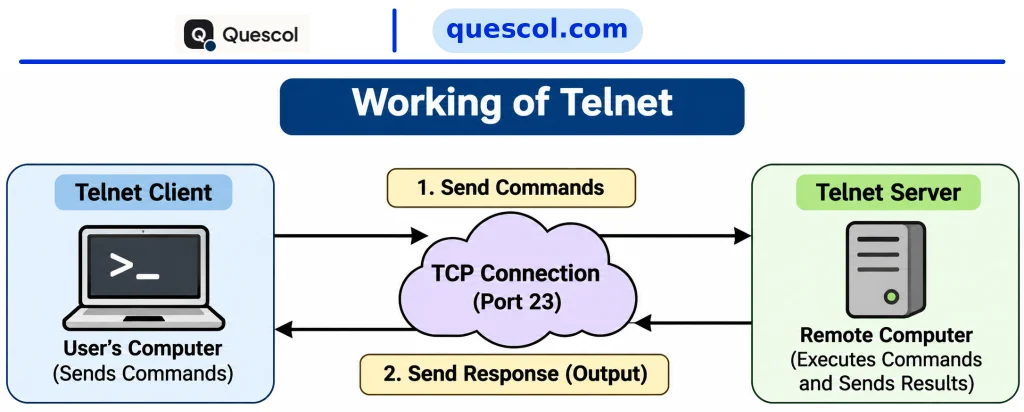
Figure: Working of Telnet
The above diagram represents communication between a local computer and a remote computer using Telnet.
- Telnet Client: Sends commands and connection requests from the user’s computer.
- TCP Connection: Establishes reliable communication between the client and server.
- Telnet Server: Receives commands, processes requests, and sends responses.
- Remote Computer: Executes the commands entered by the user.
Features of Telnet
Telnet provides several features that support remote access and communication between computers.
1. Remote Login: Telnet allows users to log in to a remote computer from another location through a network connection. This helps users access remote systems without being physically present.
2. Client-Server Architecture: It follows a client-server model in which the Telnet client sends requests and the Telnet server processes them and returns responses.
3. Uses TCP Protocol: Telnet uses TCP to establish a reliable connection between the client and server. TCP helps deliver data in the correct order.
4. Uses Port Number 23: Telnet uses TCP port 23 by default for establishing communication between the Telnet client and server.
5. Text-Based Communication: It provides a command-line interface through which users can enter commands and receive responses from a remote computer.
6. Network Virtual Terminal (NVT): Telnet uses NVT to provide a standard communication format between different computer systems and terminal types.
7. Bidirectional Communication: It allows both the client and server to exchange information during an active Telnet session.
8. Remote Command Execution: It allows authorized users to execute commands on remote computers and receive the results through the local terminal.
Advantages of Telnet
Telnet provides several advantages for remote communication and network management.
1. Remote Access: It allows users to access computers located in different places without physically visiting them.
2. Simple to Use: Telnet provides a straightforward command-line interface that makes remote communication easy for users familiar with terminal commands.
3. Low Resource Usage: It requires relatively few system resources because it mainly supports text-based communication rather than graphical interfaces.
4. Platform Compatibility: Its Network Virtual Terminal mechanism helps different operating systems and terminal types communicate through a common format.
5. Network Testing: Telnet clients can be used to test whether a TCP service is reachable on a particular host and port, although other diagnostic tools are often more suitable.
6. Remote Administration: It can be used to execute commands and manage remote systems in isolated or controlled environments where security risks are properly addressed.
Disadvantages of Telnet
Although Telnet provides remote access, it has several security limitations.
1. Lack of Encryption: Telnet transmits information in plain text without encryption. Therefore, attackers who intercept network traffic may read the transmitted data.
2. Password Vulnerability: Usernames and passwords are transmitted without encryption, making them vulnerable to interception and unauthorized access.
3. Security Risks: Since communication is not encrypted, Telnet is vulnerable to attacks such as packet sniffing and man-in-the-middle attacks.
4. No Strong Built-in Authentication: Traditional Telnet does not provide modern, strong authentication and secure key-management mechanisms.
5. Limited Functionality: Telnet mainly provides a text-based interface and does not offer the graphical remote desktop features available in other remote-access technologies.
6. Replaced by SSH: Due to its security limitations, Telnet is generally not recommended for remote administration over untrusted networks. SSH provides encrypted communication and stronger security mechanisms.
Applications of Telnet
Telnet has been used in several areas of computer networking and remote system management.
1. Remote Computer Access: It allows users to access remote computers and execute commands through a command-line interface.
2. Network Device Management: Telnet was traditionally used to configure and manage network devices such as routers and switches. However, SSH is preferred for secure device administration.
3. Network Troubleshooting: Telnet clients can help administrators check whether a particular TCP port is accepting connections on a remote system.
4. Remote System Administration: It allows administrators to execute commands and manage remote systems in isolated testing environments.
5. Legacy System Communication: Some older computer systems and network applications continue to support Telnet for compatibility with existing infrastructure.
6. Testing TCP Services: Administrators can use Telnet to establish a basic TCP connection to a specified host and port to check service connectivity.