A Digital Signature is a cryptographic technique used to verify the authenticity and integrity of digital messages, documents, and electronic transactions. It helps confirm the identity of the sender and ensures that the information has not been modified during transmission.
A digital signature works using public key cryptography (asymmetric encryption), which involves two mathematically related keys: a private key and a public key. The sender uses their private key to create the digital signature, while the receiver uses the sender’s corresponding public key to verify it.
Digital signatures provide three important security services: authentication, data integrity, and non-repudiation. Authentication confirms the identity associated with the signing key, data integrity ensures that the signed information has not been changed, and non-repudiation provides evidence that the holder of the private key signed the document.
Digital signatures are widely used in secure email communication, online banking, electronic contracts, software distribution, government documents, and other applications that require trusted digital communication.
Example: Suppose a company sends an electronic contract to a customer. The company digitally signs the document using its private key. The customer can use the company’s public key to verify the signature and check whether the document has been modified after signing.
What Is a Digital Signature?
A Digital Signature is an electronic security mechanism that uses cryptographic algorithms to verify the authenticity of digital information and detect unauthorized modifications.
It is created by applying a cryptographic hash function to a message or document to generate a fixed-length hash value. The sender then uses their private key with a digital signature algorithm to sign this hash value.
The receiver uses the sender’s public key and the same hash algorithm to verify the signature. If the verification is successful, it indicates that the signature is valid for the received data and that the data has not changed since it was signed.
Unlike an ordinary electronic signature, such as typing a name or inserting an image of a handwritten signature, a digital signature uses mathematical cryptography to provide security.
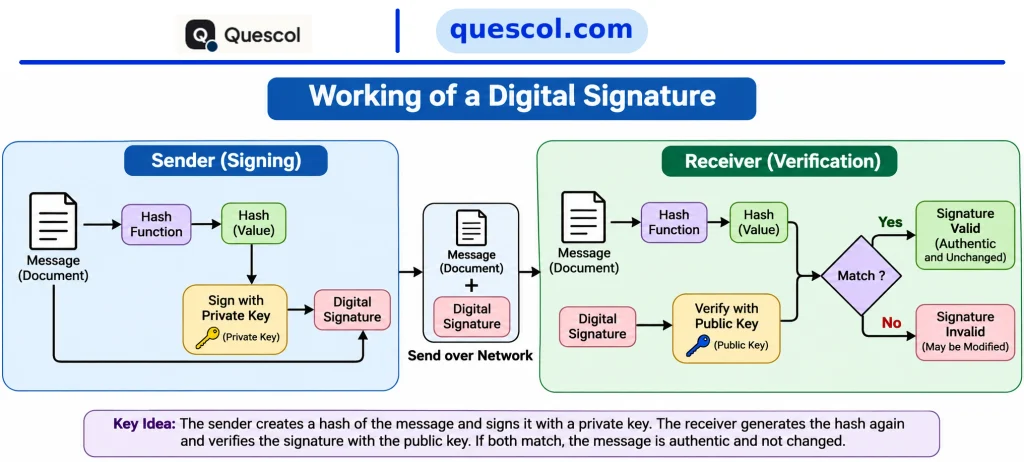
Figure: Working of Digital Signature
Components of a Digital Signature
A digital signature involves several important components that work together to provide secure communication.
1. Private Key: A private key is a secret cryptographic key owned by the sender. It is used to generate the digital signature and must be protected from unauthorized access.
2. Public Key: A public key is shared with others and is used to verify the digital signature created using the corresponding private key.
3. Hash Function: A hash function converts the original message or document into a fixed-length value called a message digest. Even a small change in the original data generally produces a different hash value.
4. Digital Signature Algorithm: It is a cryptographic algorithm used to generate and verify digital signatures. Examples include RSA, DSA, and ECDSA.
5. Digital Certificate: A digital certificate is an electronic document that connects a public key with the identity of its owner. It is generally issued and digitally signed by a trusted Certificate Authority (CA).
Working of a Digital Signature
A digital signature works using a combination of hashing and public key cryptography. It involves two main processes: digital signature generation (signing) and digital signature verification.
The sender generates a digital signature using their private key, and the receiver verifies it using the sender’s corresponding public key.
The working process is explained below.
1. Digital Signature Generation at the Sender’s Side
The sender performs the following steps to create a digital signature:
Step 1: Prepare the Original Message
The sender creates a digital message or document that needs to be transmitted securely. It may be an email, PDF document, electronic contract, or any other digital information.
Step 2: Apply the Hash Function
The sender applies a cryptographic hash function to the original message. The hash function converts the message into a fixed-length value called a message digest.
For example, the SHA-256 algorithm generates a 256-bit hash value, regardless of the original message size.
Step 3: Generate the Digital Signature
The sender uses their private key and a digital signature algorithm to sign the generated message digest. This process produces a digital signature that is mathematically associated with the original message and the sender’s private key.
Step 4: Attach the Digital Signature
The sender attaches the generated digital signature to the original message or document.
Step 5: Send the Message
The sender sends the original message along with its digital signature to the receiver through a communication network.
2. Digital Signature Verification at the Receiver’s Side
After receiving the message and digital signature, the receiver performs the following steps to verify them.
Step 1: Receive the Message and Digital Signature
The receiver obtains the original message or document along with the digital signature created by the sender.
Step 2: Generate a New Hash Value
The receiver applies the same cryptographic hash function to the received message. This produces a new message digest.
Step 3: Verify the Digital Signature
The receiver uses the sender’s corresponding public key and the appropriate signature verification algorithm to verify the received digital signature.
Step 4: Compare the Hash Values
The verification process checks whether the signature is valid for the hash of the received message.
- If Verification Is Successful: The message has not been modified since it was signed, and the signature corresponds to the sender’s public key.
- If Verification Fails: The message may have been modified, the signature may be invalid, or the wrong public key may have been used.
Step 5: Accept or Reject the Message
If verification is successful and the sender’s public key is trusted and correctly associated with the sender’s identity, the receiver can accept the message as authentic and unmodified since signing.
Thus, digital signatures help establish trust and protect digital communication from unauthorized modifications.
Example of Digital Signature
Consider a situation where a company wants to send an important digital contract to a customer.
- The company prepares the electronic contract.
- It generates a hash value of the contract using a cryptographic hash function.
- The company signs the hash using its private key.
- The company sends the contract and digital signature to the customer.
- The customer generates a new hash value from the received contract.
- The customer verifies the digital signature using the company’s public key.
- If verification is successful, the customer can confirm that the document has not changed since it was signed and that the signature corresponds to the company’s signing key.
This process helps prevent unauthorized changes to important digital documents and provides evidence of their origin.
Security Services Provided by Digital Signatures
Digital signatures provide three major security services that help protect information during digital communication.
1. Authentication
Authentication helps verify the identity associated with the digital signature. It allows the receiver to check whether the signature was created using the private key corresponding to the sender’s public key.
For example, when a company digitally signs an electronic contract, the receiver can verify the signature using the company’s authenticated public key and digital certificate.
2. Data Integrity
Data integrity ensures that information has not been modified after it was digitally signed.
If an unauthorized person changes even a small portion of the signed document, the newly generated hash value will differ, and digital signature verification will fail.
For example, if someone modifies the payment amount in a digitally signed invoice, the modification can be detected during verification.
3. Non-Repudiation
Non-repudiation provides evidence that a particular digital signature was created using the private key associated with the signer.
It makes it difficult for the signer to deny having signed a document when the private key was under their control and the signing process is properly established.
However, non-repudiation depends on proper private key protection, identity verification, and applicable legal requirements.
Advantages of Digital Signatures
Digital signatures offer several advantages that make them useful for secure electronic communication and document management.
1. Improved Security: Digital signatures use cryptographic algorithms to protect the authenticity and integrity of digital messages and documents.
2. Sender Authentication: They help receivers verify that a signature was generated using the private key corresponding to the sender’s public key.
3. Data Integrity: They help detect unauthorized changes made to a document or message after it has been signed.
4. Non-Repudiation: They provide evidence of signing and help prevent signers from easily denying their digital signatures.
5. Time Saving: They allow documents to be signed and verified electronically without requiring physical signatures or paper-based processes.
6. Cost Reduction: They reduce expenses related to printing, scanning, paper, physical document transportation, and storage.
7. Easy Document Verification: Receivers can verify digital signatures electronically using the corresponding public key and trusted certificate information.
8. Environment Friendly: They reduce the need for paper documents and support paperless communication and business operations.
Disadvantages of Digital Signatures
Although digital signatures provide strong security benefits, they also have certain limitations.
1. Requires Technical Knowledge: Users may need basic knowledge of cryptographic keys, digital certificates, and signature verification processes.
2. Private Key Security: If an unauthorized person obtains the sender’s private key, they may create fraudulent digital signatures.
3. Certificate Management: Digital certificates may need to be issued, renewed, validated, and revoked when necessary. Managing them can require additional effort.
4. Implementation Cost: Organizations may need to invest in digital signature software, certificate services, secure key storage, and supporting infrastructure.
5. Dependence on Technology: Creating and verifying digital signatures requires compatible software and cryptographic systems.
6. Certificate Expiration: Expired or revoked certificates can create verification problems if certificate validity and signing-time information are not properly handled.
Applications of Digital Signatures
Digital signatures are widely used in different industries to verify digital documents, protect information, and support secure electronic transactions.
1. Email Communication: Digital signatures are used to verify the sender’s identity and detect modifications to digitally signed email messages. Technologies such as S/MIME support digitally signed emails.
2. Online Banking: Banks and financial institutions use digital signature technology in secure electronic transactions and document authentication processes.
3. Electronic Contracts: Businesses use digital signatures to sign agreements, contracts, and other legal documents electronically.
4. Government Services: Government organizations use digital signatures for electronic forms, official documents, certificates, and online administrative services.
5. Software Distribution: Software developers use digital signatures to verify the publisher of software and detect unauthorized changes to installation files and applications.
6. E-Commerce: Digital signatures support authentication and integrity verification in electronic business transactions and digital agreements.
7. Healthcare Systems: Healthcare organizations can use digital signatures to authenticate electronic medical documents, prescriptions, and other official records.
8. Document Management: Organizations use digital signatures to approve reports, invoices, financial statements, and business documents without requiring physical paperwork.
Difference Between Digital Signature and Electronic Signature
Digital signatures and electronic signatures are related, but they are not exactly the same. An electronic signature is a broad term for electronic methods of signing documents, whereas a digital signature uses cryptographic techniques to verify the authenticity and integrity of signed information.
| Digital Signature | Electronic Signature |
|---|---|
| It uses cryptographic techniques to sign digital documents. | It uses electronic methods to indicate agreement or approval. |
| It uses public key cryptography. | It may or may not use cryptography. |
| It uses private and public keys. | It may use a typed name, scanned signature, or click-to-sign method. |
| It helps verify the signer’s identity through cryptographic mechanisms and trusted credentials. | Its identity verification depends on the signing method and service used. |
| It detects unauthorized modifications to signed information. | It does not necessarily provide cryptographic data integrity. |
| It generally requires digital signature software or supporting infrastructure. | It can be created using simple electronic signing tools. |
| It is commonly used for secure documents, software distribution, and official transactions. | It is commonly used for online forms, agreements, and approvals. |