What is Email?
Email, also known as Electronic Mail, is a method of sending and receiving digital messages between users through the internet or other computer networks. It allows individuals and organizations to exchange information electronically without requiring physical documents or direct communication.
Email enables users to send different types of information, including text messages, images, videos, audio files, documents, and other attachments. It is one of the most widely used communication services in computer networks because it provides a quick, convenient, and cost-effective way to exchange information across different geographical locations.
Email communication generally involves a sender, a recipient, an email client, and a mail server. The sender creates a message using an email application and sends it to the recipient’s email address. The mail server processes the message and transfers it to the recipient’s mail server. The recipient can then access the message using an email application or web browser.
Email services such as Gmail, Microsoft Outlook, and Yahoo Mail allow users to create email accounts, compose messages, send attachments, receive messages, and organize their inboxes.
Email works through several application-layer protocols, each performing a specific function in message transmission and reception.
- SMTP (Simple Mail Transfer Protocol): Used to send and relay email messages between mail clients and mail servers or between mail servers.
- POP3 (Post Office Protocol Version 3): Used to retrieve emails from a mail server, usually by downloading them to the recipient’s device.
- IMAP (Internet Message Access Protocol): Allows users to access and manage emails stored on a mail server across multiple devices.
For example, when a student sends an assignment to a teacher through Gmail, the message and attached document are transferred through email servers using appropriate email protocols. The teacher can access the received message from a computer, laptop, or smartphone.
Therefore, email is an essential application-layer service that makes digital communication faster, easier, and more accessible for individuals and organizations around the world.
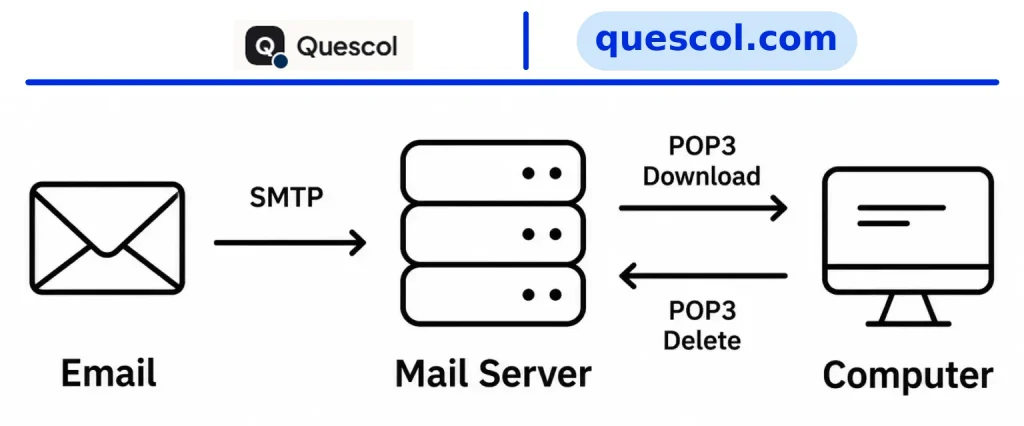
Figure: Email Communication
History of Email
The history of email began in the 1960s when researchers started using computers to exchange simple electronic messages within the same system. At that time, computers were mainly available in universities and research centers. However, users could only send messages to people using the same computer. Therefore, early electronic messaging systems had limited communication features and could not support long-distance digital communication.
A major development happened in the late 1960s with the creation of ARPANET, which connected different computers through a network. This innovation allowed researchers to communicate electronically between multiple systems. Later, in 1971, Ray Tomlinson created the first modern email system and successfully sent a message between two networked computers. Moreover, he introduced the “@” symbol in email addresses, which became a standard feature worldwide.
During the 1980s, email technology became more advanced and widely used in businesses, universities, and government organizations. Computer networks expanded rapidly, and people started depending on email for professional communication. Furthermore, email systems became easier to use, which increased their popularity among computer users. As a result, electronic communication became faster and more reliable than traditional postal services.
Working of Email
Email works through a network of computers and servers connected by the internet. It allows users to send and receive digital messages quickly from anywhere in the world. Moreover, email systems use special protocols to transfer messages securely and efficiently. Therefore, email communication has become one of the fastest and most reliable methods of communication today.
When a user sends an email, the message travels through different email servers before reaching the receiver’s inbox. Furthermore, the process happens within a few seconds using internet technology. Email services also store messages, attachments, and user information safely. Hence, understanding the working of email helps users know how digital communication systems operate.
Following are the steps in the working of email:-
1. Composing the Email
The process starts when the sender writes an email message using an email application or website. The sender enters the receiver’s email address, subject, and message content. Moreover, the sender can attach files such as images, documents, or videos. After completing the message, the sender clicks the send button.
2. Sending Through SMTP
After the email is sent, the email client transfers the message to the outgoing mail server using SMTP (Simple Mail Transfer Protocol). SMTP helps send emails from the sender’s device to the mail server. Furthermore, this protocol ensures proper delivery of the message through the internet. Therefore, SMTP plays an important role in email transmission.
3. Processing by Mail Server
The sender’s mail server checks the receiver’s email address and identifies the destination mail server. Then, it transfers the message through internet networks to the correct server. Moreover, the server may temporarily store the email if the receiver’s server is busy. Thus, mail servers manage and route emails efficiently.
4. Receiving Through POP3 or IMAP
The receiver’s email server stores the message until the user opens the email account. Email clients use POP3 (Post Office Protocol Version 3) or IMAP (Internet Message Access Protocol) to retrieve emails from the server. Furthermore, these protocols help users access messages on computers and mobile devices. Hence, users can read emails anytime and anywhere.
5. Reading the Email
Finally, the receiver opens the inbox and reads the email message. The user can also download attachments, reply to the message, or forward it to others. Moreover, email services store the message for future reference. Therefore, email communication becomes simple, fast, and organized.
Components of Email
Email contains several important components that help users send, receive, and manage messages properly. Each component has a specific function in email communication. Moreover, these components make email organized, professional, and easy to understand. Therefore, understanding the components of email is important for effective digital communication.
1. Sender Address
The sender address shows the email address of the person who sends the message. It helps the receiver identify who sent the email. Moreover, the sender’s address appears in the “From” field of the email. Therefore, users can easily recognize the source of the message.
2. Receiver Address
The receiver address contains the email address of the person who will receive the message. It is written in the “To” field before sending the email. Furthermore, users must enter the correct email address for successful delivery. Hence, this component ensures accurate communication.
3. Subject Line
The subject line gives a short title or summary of the email content. It helps the receiver understand the purpose of the message quickly. Moreover, a clear subject line increases professionalism and readability. Therefore, users should always write meaningful subject lines.
4. CC (Carbon Copy)
The CC field allows users to send a copy of the email to additional people. All recipients can see the email addresses included in the CC section. Furthermore, CC is useful for official communication and group updates. Thus, it improves transparency in communication.
5. BCC (Blind Carbon Copy)
The BCC field also sends copies of the email to multiple people. However, other recipients cannot see the addresses written in the BCC section. Therefore, BCC helps maintain privacy and confidentiality in communication.
6. Message Body
The message body contains the main content of the email. Users write information, instructions, greetings, or discussions in this section. Moreover, the body can include text, links, and formatted content. Hence, it is the most important part of the email.
7. Attachment
Attachments allow users to send files such as documents, images, videos, and presentations along with the email. This feature supports easy digital file sharing. Furthermore, businesses and students commonly use attachments for reports and assignments. Therefore, attachments increase the usefulness of email communication.
8. Signature
An email signature appears at the end of the message. It usually contains the sender’s name, designation, company name, and contact information. Moreover, signatures create a professional impression in business communication. Thus, they improve email authenticity and branding.
Important Email Protocols
1. SMTP (Simple Mail Transfer Protocol)
SMTP is the standard protocol used for sending emails over the internet. It helps transfer outgoing email messages from the sender’s device to the mail server and then to the receiver’s mail server. Whenever a user clicks the “Send” button, SMTP starts the process of delivering the email. Therefore, SMTP plays a major role in email communication systems.
Moreover, SMTP works like a digital post office that manages and routes outgoing messages correctly. It checks the sender and receiver addresses before forwarding the email to the destination server. Furthermore, SMTP only handles sending emails and does not store or download them. Hence, email services depend on SMTP for fast and reliable message delivery.
Functions of SMTP
- Sends outgoing emails through the internet
- Connects sender and receiver mail servers
- Verifies email addresses before delivery
- Supports attachment transfer in emails
For example, When a student sends an assignment email to a teacher using Gmail, SMTP transfers the message from the student’s email account to the teacher’s mail server. As a result, the teacher receives the email within seconds.
2. POP3 (Post Office Protocol Version 3)
POP3 is an email protocol used for receiving and downloading emails from the mail server to the user’s device. After downloading, emails are usually removed from the server storage. Therefore, users can access their messages offline without needing an internet connection.
In addition, POP3 is useful for users who mainly check emails on a single device such as a desktop computer. It reduces server storage because messages move directly to the user’s device. However, emails downloaded through POP3 may not appear on other devices. Hence, POP3 is best for simple offline email access.
Functions of POP3
- Downloads emails from the server
- Allows offline email reading
- Saves emails on the local device
- Reduces server storage usage
For example, An office employee downloads emails to a desktop computer using POP3. Even after the internet disconnects, the employee can still read previously downloaded emails without any problem.
3. IMAP (Internet Message Access Protocol)
IMAP is a modern email protocol used for accessing emails directly from the mail server. Unlike POP3, IMAP keeps messages stored on the server instead of downloading them permanently. Therefore, users can access the same emails from multiple devices such as smartphones, laptops, and tablets.
Furthermore, IMAP automatically synchronizes email folders, read status, and message updates across all connected devices. This makes email management easier and more organized for users. Moreover, businesses and professional users commonly prefer IMAP because it supports real-time email access. Hence, IMAP provides flexible and efficient email communication.
Functions of IMAP
- Accesses emails directly from the server
- Synchronizes emails across multiple devices
- Keeps messages stored online
- Supports real-time email updates
For example, A business manager checks the same email account on a mobile phone and office laptop using IMAP. When the manager reads or deletes an email on one device, the changes automatically appear on the other device as well.
Types of Email
Emails can be divided into different categories based on their purpose and usage. Different types of emails help people communicate personally, professionally, and commercially. Moreover, organizations use specific email types for marketing, updates, customer support, and official communication. Therefore, understanding the types of email helps users communicate more effectively and professionally.
1. General Types of Email
a) Personal Email
Personal email is used for communication between friends, family members, and individuals. People use personal emails to share messages, photos, videos, and personal updates. Moreover, these emails are usually informal and simple in writing style. Therefore, personal email supports daily communication and social interaction.
b) Professional Email
Professional email is used for formal communication in companies, schools, and organizations. Employees send reports, meeting details, project updates, and official notices through professional emails. Furthermore, professional emails follow proper formatting and formal language. Hence, they improve workplace communication and professionalism.
c) Marketing Email
Marketing email is used by businesses to promote products, services, discounts, and special offers. Companies send promotional messages to customers to increase sales and brand awareness. Moreover, marketing emails often include images, links, and advertisements. Therefore, they are an important part of digital marketing strategies.
d) Notification Email
Notification emails provide alerts, reminders, and updates to users. Websites, banks, and online platforms send notifications for account activity, password changes, and delivery updates. Furthermore, these emails help users stay informed about important activities. Thus, notification emails improve communication and security.
2. Types of Email Based on Purpose
a) Newsletters
Newsletters are emails sent regularly to provide news, updates, offers, or educational information. Businesses and organizations use newsletters to stay connected with customers and subscribers. Moreover, newsletters help share company announcements and promotional content. Therefore, they are widely used in marketing and communication.
b) Onboarding Emails
Onboarding emails help new users understand a product, application, or service. Companies send welcome messages, setup instructions, and helpful guidance through onboarding emails. Furthermore, these emails improve user experience and customer satisfaction. Hence, onboarding emails support better customer engagement.
c) Transactional Emails
Transactional emails contain information related to purchases, payments, bookings, or account activities. Online shopping websites and banks commonly use these emails for confirmations and receipts. Moreover, transactional emails provide accurate records of digital transactions. Therefore, they increase trust and communication reliability.
d) Plain-Text Emails
Plain-text emails contain only simple text without images, graphics, or complex formatting. These emails load quickly and are easy to read on all devices. Furthermore, many professional and official communications use plain-text emails for simplicity. Thus, they provide fast and direct communication.
Popular Email Services
1. Google Gmail
Gmail is one of the most widely used email services in the world. It provides large storage space, strong security, and easy integration with Google services such as Google Drive and Google Meet. Moreover, Gmail offers spam filtering and a user-friendly interface. Therefore, students, professionals, and businesses commonly use Gmail.
2. Microsoft Outlook
Outlook is a professional email service developed by Microsoft. It supports email management, calendars, tasks, and Microsoft Office applications. Furthermore, Outlook is widely used in offices and business organizations for professional communication. Hence, it improves productivity and teamwork.
3. Yahoo Mail
Yahoo Mail is a popular email service that provides large storage capacity and useful features like spam protection and news integration. Moreover, it offers a simple interface for personal communication. Therefore, many users prefer Yahoo Mail for daily email usage.
4. ProtonMail
ProtonMail is an email service focused on privacy and security. It provides end-to-end encryption to protect user communication from unauthorized access. Furthermore, ProtonMail is useful for users who want secure email communication. Thus, it is popular among privacy-conscious users.
5. Zoho Mail
Zoho Mail is a business-focused email service designed for professional communication and teamwork. It provides features such as calendars, task management, and collaboration tools. Moreover, Zoho Mail offers a clean and advertisement-free interface. Therefore, many businesses use it for official communication.
Applications of Email
1. Business Communication
Companies use email for official communication, meeting schedules, and project discussions. It helps employees stay connected and informed. Moreover, businesses send invoices, reports, and customer support replies through email. Therefore, email improves workplace communication.
2. Education Sector
Schools and colleges use email to send assignments, notices, and examination updates. Teachers communicate with students through email platforms regularly. In addition, students submit projects and research work online using email. Thus, email supports digital learning systems.
3. Online Shopping and Banking
E-commerce websites and banks send order confirmations, payment alerts, and account updates through email. Customers receive transaction details instantly after purchases. Furthermore, email helps users track online orders and financial activities. Hence, email improves customer service and digital transactions.
4. Marketing and Promotion
Businesses use email marketing to promote products and services to customers. Companies send newsletters, offers, and promotional messages regularly. Moreover, email marketing helps brands reach a large audience at a low cost. Therefore, it is an effective digital marketing tool.
Conclusion
Email has become one of the most important communication technologies in the modern digital era. It helps people send messages, documents, images, and important information quickly and efficiently. Moreover, email supports personal communication, business operations, online education, banking, and marketing services. Therefore, it plays a major role in connecting people and organizations across the world.
Although email has some disadvantages such as spam messages, phishing attacks, and internet dependency, its advantages are much greater. It provides fast, reliable, secure, and low-cost communication for millions of users every day. Furthermore, modern email services continue to improve with better security, cloud storage, and mobile accessibility. Hence, email remains an essential and widely used internet service in today’s digital world.
The servers on that path are explained in email architecture.