In computer networking, devices must create a reliable connection before sending data. TCP (Transmission Control Protocol) uses a special process called Three-Way Handshaking to establish communication between a client and a server. This process helps both devices synchronize and prepare for reliable TCP data transfer.
Three-way handshaking plays an important role in reliable communication over the internet. It checks whether both sides are ready to send and receive data properly. As a result, it reduces communication errors and ensures stable network performance in applications like web browsing, email, and file sharing.
What is Three-Way Handshaking?
Three-way handshaking is a TCP connection establishment process used to create a reliable communication link between a client and a server. In this process, three messages — SYN, SYN-ACK, and ACK — are exchanged between both devices. First, the client requests a connection, then the server responds, and finally the client confirms the connection. After this process completes successfully, data transfer begins safely and efficiently.
For example, When a user opens an online banking website, the browser first performs a 3-way handshake with the bank server. The client sends SYN, the server replies with SYN-ACK, and the client sends ACK. After confirming that both sides are ready, secure financial data transfer begins safely and reliably.
Flow of Three-Way Handshake
- Client → SYN → Server
- Server → SYN-ACK → Client
- Client → ACK → Server
After these three steps, both devices begin exchanging data.
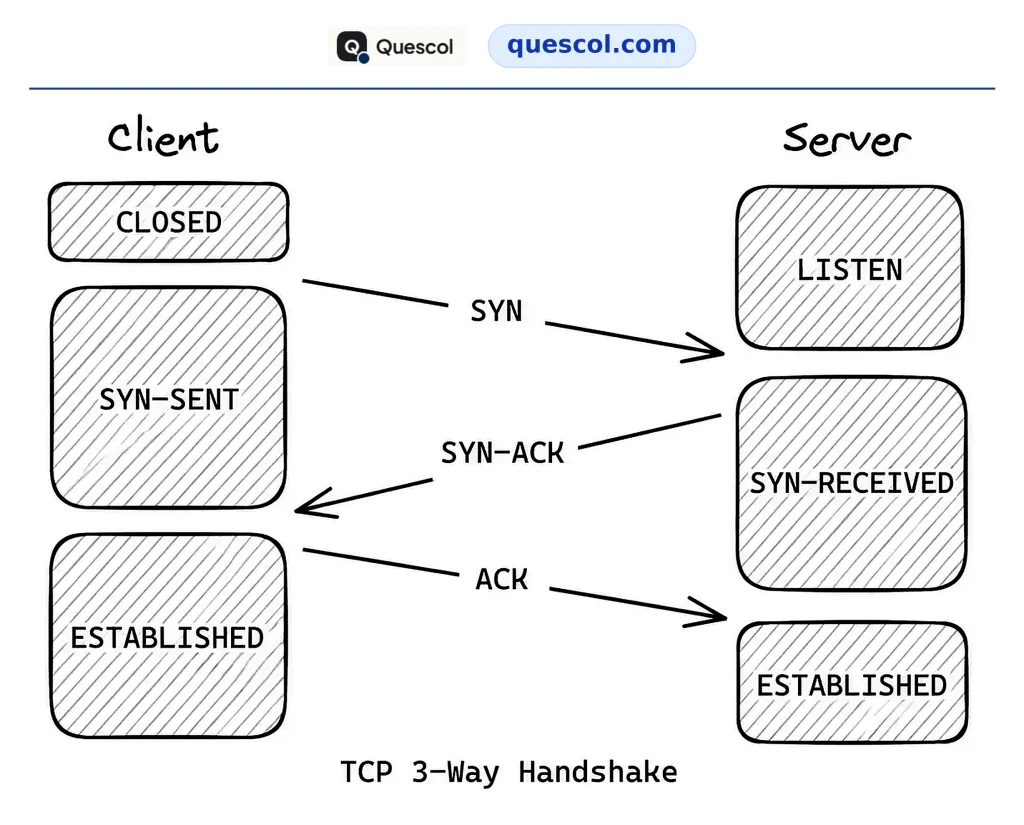
Figure: Three- Way Handshake
Step 1: SYN Request (Client → Server)
At the beginning, the client is in the CLOSED state, while the server is in the LISTEN state waiting for connection requests. When the client wants to communicate, it sends a SYN (Synchronization) message to the server.
After sending the SYN request:
- The client changes its state to SYN-SENT
- The server receives the request
- TCP starts the connection establishment process
- Initial sequence numbers are synchronized
Purpose of SYN
- Starts communication
- Checks server availability
- Synchronizes sequence numbers
- Requests a TCP connection
Step 2: SYN-ACK Response (Server → Client)
When the server receives the SYN message, it replies with a SYN-ACK message. Here:
- SYN means the server also wants synchronization
- ACK means the server acknowledges the client’s request
At this stage:
- The server changes from LISTEN to SYN-RECEIVED
- The client waits for confirmation
- Both systems prepare for reliable communication
Purpose of SYN-ACK
- Confirms request reception
- Sends server synchronization details
- Verifies client-server communication
- Prepares the connection setup
Step 3: ACK Message (Client → Server)
Finally, the client sends an ACK (Acknowledgement) message back to the server. This confirms that the client successfully received the server’s SYN-ACK response.
After this step:
- The client enters the ESTABLISHED state
- The server also enters the ESTABLISHED state
- The TCP connection becomes fully active
- Data transfer can now begin safely
Purpose of ACK
- Completes the handshake
- Confirms successful synchronization
- Establishes reliable communication
- Starts actual data exchange
Understanding the States in the Diagram
| State | Meaning |
|---|---|
| CLOSED | Client is not connected |
| LISTEN | Server waits for requests |
| SYN-SENT | Client has sent SYN request |
| SYN-RECEIVED | Server received SYN and replied |
| ESTABLISHED | Connection is successfully created |
Why TCP Uses 3-Way Handshaking?
TCP uses the 3-way handshaking process to establish a secure and reliable connection between two devices before actual data transfer begins. This process helps both the client and server prepare for communication and ensures that the network connection works properly. As a result, TCP communication becomes more stable, organized, and error-free.
1. Ensure Reliable Communication
The three-way handshake helps create a reliable connection before sending data. Both devices confirm that they are active and ready to communicate properly. Therefore, data transmission becomes more secure and dependable.
Additionally, TCP checks the communication path before transferring information. This reduces the chances of connection failure during communication. As a result, users experience stable network performance.
2. Synchronize Sequence Numbers
TCP uses sequence numbers to track and organize data packets. During the handshake process, both client and server exchange their initial sequence numbers for synchronization.
This synchronization helps:
- Maintain proper data order
- Detect missing packets
- Avoid duplicate data
- Ensure accurate delivery
Because of sequence synchronization, TCP can reassemble data correctly at the receiving end.
3. Avoid Duplicate Connections
Sometimes delayed packets from old connections may still exist in the network. The 3-way handshake helps identify and reject these duplicate or expired connection requests.
By verifying fresh sequence numbers and acknowledgements:
- Old packets are ignored
- Duplicate connections are prevented
- Network confusion decreases
- Communication remains accurate
Therefore, TCP maintains a clean and organized connection setup.
4. Confirm Both Devices Are Ready
Before data transfer starts, TCP ensures that both the sender and receiver are prepared for communication. The handshake process checks whether:
- The client can send requests
- The server can receive requests
- Both systems are available
- The network path is working properly
This confirmation process improves communication reliability and prevents unexpected failures during data transfer.
5. Provide Error-Free Data Transfer
The handshake process helps establish a stable communication channel. Because of this setup, TCP can later provide:
- Error checking
- Packet tracking
- Acknowledgements
- Retransmission of lost packets
As a result, data reaches the destination correctly without loss, corruption, or duplication.
Advantages of Three-Way Handshaking
1. Reliable Connection
Three-way handshaking creates a stable connection before data transfer begins. It ensures that both the client and server are ready for communication. Therefore, data transmission becomes more accurate and dependable.
2. Error Reduction
The handshake process checks the availability of both systems before communication starts. This helps detect connection problems early and reduces transmission errors. As a result, communication becomes smoother and more reliable.
3. Proper Synchronization
TCP exchanges sequence numbers during the handshake process. This synchronization helps maintain the correct order of packets during transmission. Consequently, the receiver gets data in the proper sequence without confusion.
4. Secure Communication
The process confirms that both devices are active and prepared for communication. This reduces the chances of incomplete or stale connections; it does not authenticate either endpoint. Therefore, network communication becomes safer and more secure.
5. Better Data Management
TCP manages packet flow efficiently after establishing the connection. It tracks acknowledgements and controls data transfer properly. As a result, data reaches the destination without duplication or loss.
Disadvantages of Three-Way Handshaking
1. Increased Delay
The handshake process requires three message exchanges before data transfer starts. This adds a small delay to communication. Therefore, connection setup may become slightly slower.
2. More Network Traffic
TCP sends SYN, SYN-ACK, and ACK packets during connection establishment. These extra control messages increase network traffic. Consequently, bandwidth usage becomes slightly higher.
3. Resource Usage
The server stores connection details during the handshake process. This consumes memory and processing power on the system. Therefore, handling many connections may affect server performance.
4. Vulnerable to SYN Flood Attacks
Attackers can send large numbers of fake SYN requests to the server. The server waits for responses and keeps resources occupied. As a result, the server may become overloaded or slow.
Applications of Three-Way Handshaking
1. Web Browsing
Web browsers use three-way handshaking before loading websites. It establishes a reliable connection between the browser and the web server. Therefore, webpages load correctly and securely.
2. File Transfer
Protocols like FTP use TCP handshaking before transferring files. This ensures reliable communication between sender and receiver. As a result, files transfer without corruption or missing data.
3. Email Communication
Email services use TCP connections for sending and receiving messages. The handshake process confirms that both mail servers are ready. Therefore, emails are delivered accurately and reliably.
4. Online Banking
Online banking applications require secure and stable communication. TCP handshaking establishes a TCP connection before transactions begin. Consequently, sensitive financial data transfers safely.
5. Video Streaming and Chat Applications
Streaming and chat applications use TCP for reliable communication. The handshake process helps maintain stable connectivity between devices. As a result, users experience smooth video streaming and messaging.
Conclusion
Three-way handshaking is an important TCP process that establishes a reliable connection between a client and a server before data transfer begins. It uses SYN, SYN-ACK, and ACK messages to synchronize communication, confirm device readiness, and ensure secure connectivity. Because of this process, TCP provides accurate and organized data transmission over networks.
Although the handshake process adds slight delay and increases network traffic, it offers many benefits such as reliable communication, proper synchronization, and error reduction. Therefore, three-way handshaking is widely used in web browsing, file transfer, email communication, online banking, and many other internet applications to maintain stable and established TCP communication.