MIME (Multipurpose Internet Mail Extensions) is an important standard used in computer networks to enhance email communication. It allows emails to carry different types of data such as text, images, audio, video, and documents. Earlier, email systems were limited to only plain text messages, but MIME removed this restriction and made communication more flexible. It works along with email protocols like SMTP to properly format and transmit multimedia content over the internet.
MIME is widely used in modern internet systems to identify and handle various file types efficiently. It defines how data should be encoded, sent, and decoded at the receiver’s end. Because of this, users can easily share rich content without compatibility issues. Today, MIME is an essential part of email services, web browsers, and multimedia applications, making digital communication smooth and reliable.
What is MIME (Multipurpose Internet Mail Extensions)?
MIME stands for Multipurpose Internet Mail Extensions. It is an internet standard that extends the capabilities of the basic email system by allowing users to send different types of data through email messages.
Initially, email systems were designed to send only text messages using ASCII characters. They could not directly support attachments such as images, audio, video, documents, and other non-text files.
To overcome this limitation, MIME was introduced. It allows users to send multimedia content and different file formats through email by defining how the content should be represented and identified.
In simple words, MIME is a standard that allows email messages to contain text, images, audio, video, documents, and other types of attachments.
Why Is MIME Needed?
The basic email system was originally designed to transfer simple text messages. It had several limitations:
- It supported only limited ASCII text characters.
- It could not directly handle multimedia files.
- It did not provide a standard way to identify different file types.
- It could not easily transfer non-text data such as images, audio, and video.
MIME was developed to overcome these limitations and make email communication more flexible.
How MIME Works?
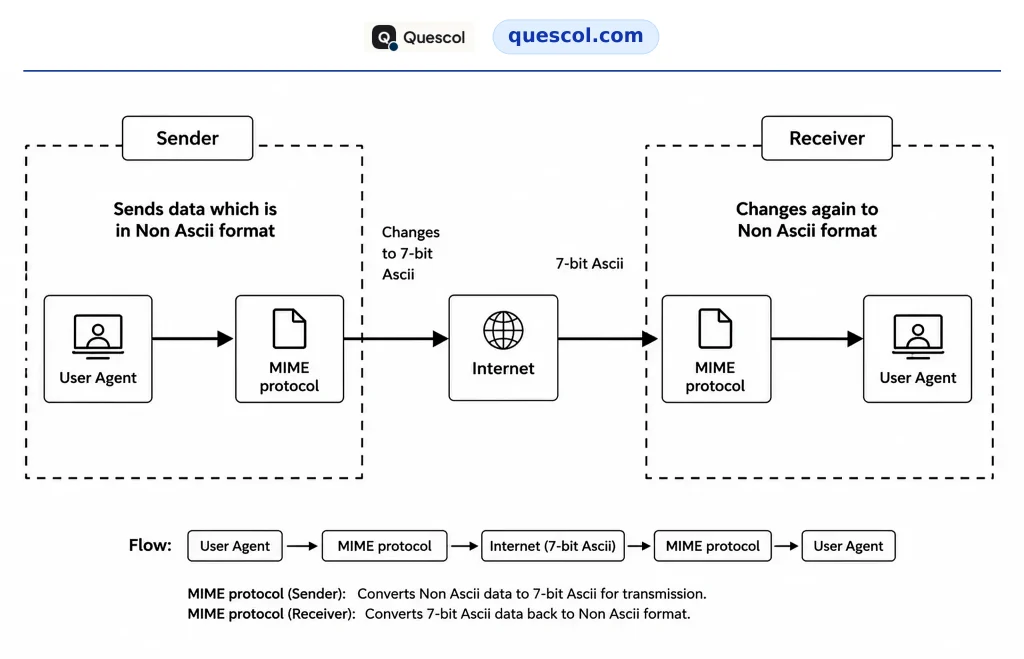
Figure: Working of MIME
MIME (Multipurpose Internet Mail Extensions) is a standard that extends the capabilities of traditional email systems. It allows users to send different types of data, such as images, audio, video, documents, and other file attachments, along with normal text messages.
Traditional email systems were mainly designed to transmit text using ASCII characters. MIME overcomes this limitation by providing information about the content type and encoding method of email messages. It helps the receiving email application identify, interpret, and display different types of content correctly.
Working of MIME
MIME works by adding special headers to an email message. These headers describe the type of content being sent and how that content is encoded.
The working of MIME involves the following steps:
1. Creating the Email Message: The sender creates an email containing normal text, images, audio, video, or file attachments.
2. Identifying the Content Type: MIME identifies the type of data included in the email. For example, it identifies whether the content is plain text, HTML, an image, audio, video, or a document.
3. Encoding the Data: If the email contains binary data, such as images or PDF files, MIME uses a suitable encoding method to represent the data in a form that can be safely transmitted through email systems. Common encoding methods include Base64 and Quoted-Printable.
4. Adding MIME Headers: MIME adds additional headers to describe the email content. These headers provide information about the content type, encoding method, and attachment details.
5. Transmitting the Email: The email is transmitted from the sender’s mail server to the receiver’s mail server using an email transfer protocol such as SMTP.
6. Decoding the Content: The receiving email application reads the MIME headers and identifies the content type and encoding method. It then decodes the encoded data when necessary.
7. Displaying the Email: Finally, the receiving email application displays the message in the correct format. Text is shown as a message, images are displayed as pictures, and attached files are made available for downloading or opening.
Example of MIME Working
Consider a user who wants to send an email containing a text message and a PDF document.
- The sender creates an email with a text message and a PDF attachment.
- MIME identifies the text as
text/plainand the PDF file asapplication/pdf. - The PDF attachment is encoded using Base64 so that it can be transmitted safely through the email system.
- MIME adds the required headers to describe the content.
- The email is transmitted through the mail servers using SMTP.
- The receiver’s email application reads the MIME headers and decodes the PDF attachment.
- The receiver can read the message and download or open the PDF file.
Thus, MIME makes it possible to send different types of content through a standard email system.
Important MIME Headers
MIME uses several headers to describe the content of an email message.
| MIME Header | Purpose |
|---|---|
| MIME-Version | Specifies the MIME version used in the message. |
| Content-Type | Identifies the type of content, such as text, image, audio, or application data. |
| Content-Transfer-Encoding | Specifies the encoding method used to represent the content during transmission. |
| Content-Disposition | Indicates whether the content should be displayed inline or treated as an attachment. |
Characteristics of MIME
1. Supports Multiple Data Types
MIME can handle different types of data such as text, images, audio, video, and application files. This makes email communication more powerful and flexible.
2. Uses Encoding Techniques
It converts non-text data into ASCII format for safe transmission. This ensures that files do not get corrupted during sending over networks.
3. Content Type Identification
MIME clearly defines content types using headers like image/jpeg, text/html, and video/mp4. This helps systems understand how to process each file.
4. Works with Email Protocols
It works along with SMTP to send emails efficiently. MIME enhances basic email systems by adding support for multimedia content.
5. Platform Independent
MIME works across different operating systems and email clients. This ensures smooth communication between different devices and platforms.
6. Reliable Data Transfer
It encodes content so it can pass through mail transports without representation-related corruption; delivery reliability and cryptographic integrity must be provided by other mechanisms.
7. Extensible Standard
MIME is flexible and can support new file types in the future. This makes it suitable for modern internet applications and evolving technologies.
Structure of MIME (Multipurpose Internet Mail Extensions)
1. MIME Header
MIME uses special headers to define the type of content in an email. These headers include information like Content-Type and Content-Transfer-Encoding. They help the receiver understand what type of data is being sent. This is the most important part of MIME structure.
2. Content Type Field
This part specifies the type of data such as text, image, audio, video, or application. For example, image/jpeg or text/html clearly defines the file format. It ensures that the system handles each file correctly. It guides how the content should be displayed.
3. Content Transfer Encoding
MIME converts data into a safe format for transmission using encoding methods like Base64 or quoted-printable. This ensures that non-text data can travel through email systems without corruption. It protects data during transfer. It is essential for safe communication.
4. Body of Message
The body contains the actual content of the email, such as text or encoded attachments. It is separated from headers by a blank line. This section holds the main information sent by the user. It can include multiple types of data.
5. Multipart Structure
MIME supports multiple parts in a single email using boundaries. Each part can contain different types of content like text and images. These parts are separated clearly using boundary markers. It allows sending complex messages in one email.
6. Attachment Handling
Attachments are included as separate MIME parts within the email structure. Each attachment has its own content type and encoding. This ensures proper sending and receiving of files. It makes file sharing easy and organized.
7. MIME Version Field
This field specifies the version of MIME being used, such as MIME-Version: 1.0. It ensures compatibility between email systems. It helps clients understand how to process the message. It is usually included in every MIME email.
Advantages of MIME
1. Supports Multimedia Content
MIME allows emails to carry different types of data such as text, images, audio, video, and documents. This makes communication more rich and useful. Users can easily share complete information in a single email. It improves the overall communication experience.
2. Improves Email Functionality
It enhances basic email systems by enabling attachments and formatted content. As a result, users can share complete information easily. Emails are no longer limited to simple text messages. This makes communication more advanced and effective.
3. Ensures Compatibility
MIME works across different email clients and operating systems. This ensures smooth communication between various platforms without errors. Users can send and receive emails without worrying about system differences. It improves global communication.
4. Safe Data Transmission
It converts data into a safe ASCII format before sending. This reduces the risk of data corruption during transmission. Even large or complex files can travel safely over networks. It ensures reliable communication.
5. Proper Content Identification
MIME clearly defines file types using headers like image/jpeg or text/html. This helps systems correctly interpret and display content. The receiver’s system understands how to handle each file. This avoids confusion in file processing.
6. Easy Integration with Internet Protocols
It works smoothly with protocols like SMTP and HTTP. This makes it widely usable in email systems and web applications. MIME easily fits into existing internet infrastructure. It improves data exchange efficiency.
7. Enhances User Experience
Users can send and receive rich content in a simple way. This improves overall communication quality and efficiency. Emails become more interactive and useful. It makes digital communication more user-friendly.
8. Supports File Attachments
MIME enables users to attach files such as PDFs, Word documents, and images in emails. This makes file sharing fast and convenient. Important documents can be shared in seconds. It supports both personal and professional communication.
Disadvantages of MIME
1. Increases Email Size
MIME converts data into encoded format before sending. This process increases the overall size of the email message. Large emails take more storage and bandwidth. It may slow down transmission.
2. Slower Transmission for Large Files
Since MIME supports multimedia and attachments, large files can take more time to send. Encoding and decoding also add extra processing time. This may reduce communication speed in low network conditions. It affects performance in slow connections.
3. Requires Proper Configuration
MIME needs correct setup in email clients and servers. If not configured properly, emails may not display attachments correctly. This can lead to errors in message reading. It increases system dependency on correct settings.
4. Compatibility Issues in Old Systems
Some older email systems do not fully support MIME standards. As a result, emails may appear broken or unreadable. Users may face problems while receiving attachments. This limits its use in legacy systems.
5. Security Risks
MIME allows attachments, which can sometimes carry harmful files. Malicious content may spread through emails if not checked properly. This increases the risk of viruses and malware attacks. Proper security tools are required.
6. Complex Structure
MIME uses headers, encoding rules, and content types which can be complex to understand. This increases system complexity for developers. Beginners may find it difficult to implement. It requires technical knowledge.
7. Processing Overhead
Encoding and decoding of data require extra processing power. This may increase load on email servers and clients. It can slightly reduce system efficiency. High traffic systems may be affected more.
8. Not Always Efficient for Small Data
For very small messages, MIME encoding becomes unnecessary overhead. It adds extra steps even when not required. This reduces efficiency in simple text communication. It is less optimal for basic emails.
Conclusion
MIME is an important standard in computer networks that enhances the basic email system. It allows users to send and receive different types of data such as text, images, audio, video, and documents in a single message. By using encoding and decoding techniques, MIME ensures safe and reliable data transmission across the internet.
Overall, MIME has made digital communication more advanced, flexible, and user-friendly. It works with email protocols like SMTP and is also used in web browsers and other internet applications. Despite some limitations like increased email size and complexity, MIME plays a crucial role in modern communication systems and supports efficient multimedia data exchange worldwide.