The User Datagram Protocol (UDP) is a Transport Layer protocol in the OSI model that provides a connectionless and fast communication service between applications. It is widely used in applications where speed is more important than reliability, such as video streaming, online gaming, and voice calls. Since UDP does not establish a connection before sending data, it has very low overhead.
UDP uses a simple header structure to handle data transmission. This header contains only the essential information required to deliver data to the correct destination. Because of its minimal design, UDP is faster but does not guarantee delivery, ordering, or error correction of packets.
What is UDP?
UDP (User Datagram Protocol) is a connectionless protocol used in the transport layer of computer networks. It is designed to provide fast and simple data transmission between devices without establishing a connection before sending data.
UDP uses a simple header structure to transfer data from the sender to the receiver. The UDP header contains important information required for identifying applications, determining the length of the datagram, and detecting transmission errors.
Unlike TCP, UDP does not provide acknowledgment, retransmission, flow control, or guaranteed data delivery. Its simple structure reduces communication overhead and makes it suitable for applications that require high speed and low latency.
The UDP header has a fixed size of 8 bytes (64 bits) and consists of four fields. Each field occupies 16 bits (2 bytes).
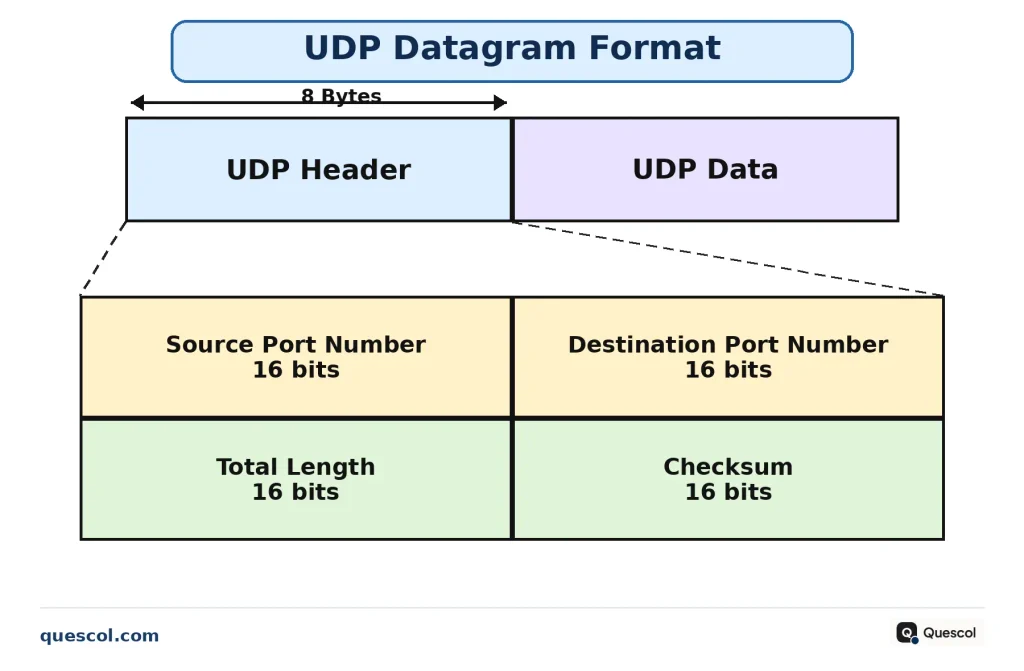
Figure: UDP Header
UDP Header Fields Table
| Field | Size | Description |
|---|---|---|
| Source Port | 16 bits | Identifies the sender’s port number. |
| Destination Port | 16 bits | Identifies the receiver’s port number. |
| Length | 16 bits | Specifies the total length of UDP header and data. |
| Checksum | 16 bits | Used for error detection (optional in IPv4, mandatory in IPv6). |
1. Source Port Number
The Source Port Number field identifies the port number of the application that sends the data.
- It is a 16-bit field (2 bytes).
- It identifies the sending application or process.
- It helps the receiver identify the source application.
- It can be zero when the sending application does not specify a source port.
Example: When a web browser sends a request to a web server, the source port identifies the browser’s communication endpoint.
2. Destination Port Number
The Destination Port Number field identifies the application or service that should receive the data.
- It is a 16-bit field (2 bytes).
- It specifies the port number of the receiving application.
- It helps the receiving device deliver data to the correct application.
- It allows multiple applications to communicate through the same device.
Example: DNS commonly uses destination port 53, while DHCP servers use UDP port 67.
3. Length
The Length field specifies the total length of the UDP datagram, including both the header and the data.
- It is a 16-bit field (2 bytes).
- It represents the complete UDP datagram size.
- The minimum value is 8 bytes because the UDP header itself occupies 8 bytes.
- The maximum value representable by this field is 65,535 bytes.
Example: If a UDP datagram contains an 8-byte header and 100 bytes of data, the total length is:
Therefore, the Length field contains the value 108.
4. Checksum
The Checksum field is used for error detection during data transmission.
- It is a 16-bit field (2 bytes).
- It helps detect errors in the UDP header and data.
- It is calculated using the UDP header, data, and an IP pseudo-header.
- If the receiver detects an invalid checksum, the datagram is discarded.
In IPv4, the UDP checksum is optional. However, in IPv6, the UDP checksum is generally mandatory, with limited exceptions.
The checksum helps identify corrupted data, but UDP does not retransmit damaged datagrams automatically.
4. Size of UDP Header
The UDP header has a fixed size of 8 bytes because it contains four fields, each occupying 16 bits.
| Field | Size in Bits | Size in Bytes |
|---|---|---|
| Source Port Number | 16 bits | 2 bytes |
| Destination Port Number | 16 bits | 2 bytes |
| Length | 16 bits | 2 bytes |
| Checksum | 16 bits | 2 bytes |
| Total | 64 bits | 8 bytes |
Therefore:
UDP Pseudo Header
To improve checksum accuracy, UDP uses a pseudo header (not transmitted) during checksum calculation.
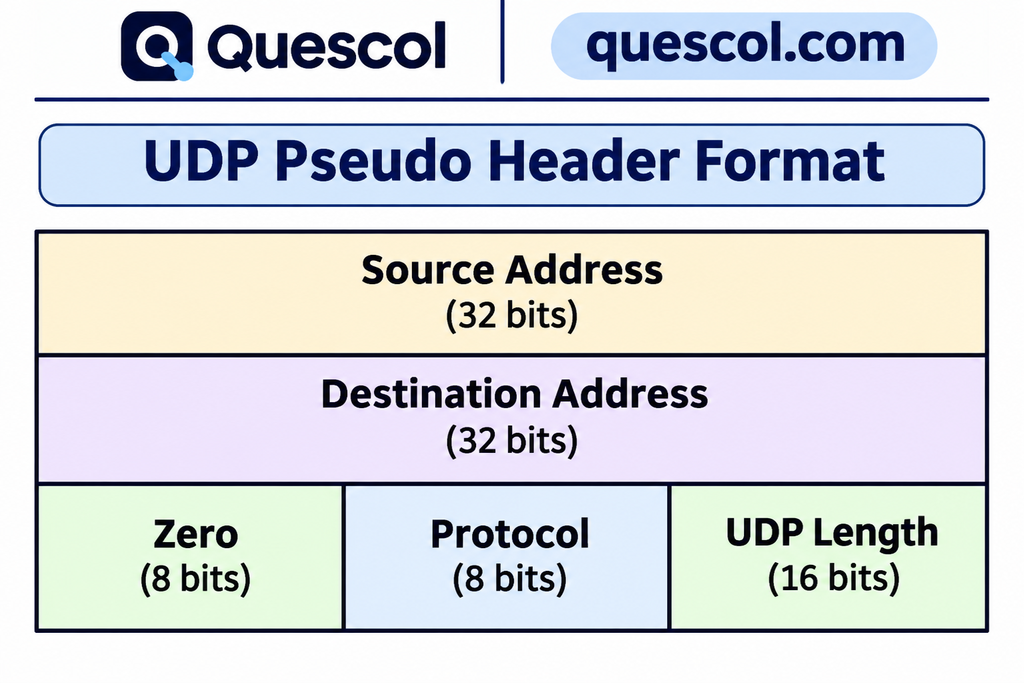
Figure: UDP Pseudo Header
- The UDP segment uses a pseudo header from the IP layer, which includes source IP, destination IP, protocol number, and UDP length for verification purposes.
- The source and destination port numbers in the UDP header ensure that data is delivered to the correct application process on the correct host.
- The UDP length field specifies the total size of the UDP header and data, helping in proper packet identification and processing.
- At the receiver side, UDP uses the checksum (with pseudo header) to check data integrity and detect errors in transmission.
- If the checksum is valid, the packet is accepted and passed to the application layer; otherwise, it is discarded.
Working of UDP
1. No Connection Establishment
UDP does not establish any connection before sending data. There is no handshake process like in TCP, so communication starts immediately. This reduces delay and makes transmission faster. It is useful for real-time applications where quick delivery is important.
2. Data Transmission (Datagrams)
UDP sends data in the form of small packets called datagrams. Each datagram is independent and carries its own header information. These packets travel separately through the network. This independence allows fast transmission but may lead to loss or disorder.
3. No Acknowledgement
UDP does not send acknowledgements after receiving data. The sender does not get confirmation whether the data reached the receiver. This reduces overhead and increases speed. However, it makes communication unreliable.
4. No Error Recovery
UDP does not provide any mechanism to recover lost or corrupted data. It only uses a checksum to detect errors in transmission. If an error is found, the packet is simply discarded. There is no retransmission of lost data.
5. No Flow Control
UDP does not control the rate of data transmission. The sender continues to send data without checking the receiver’s capacity. This can sometimes overload the receiver. However, it helps maintain high speed in communication.
6. No Ordering Guarantee
UDP does not ensure that packets arrive in the correct order. Datagrams may reach the destination in a different sequence. The protocol does not rearrange them. If ordering is needed, it must be handled by the application itself.
Functions of UDP
1. Process-to-Process Communication
UDP uses port numbers to deliver data to the correct application. It enables communication between specific processes on sender and receiver systems. This allows multiple applications to work simultaneously over the network.
2. Fast Data Transmission
UDP sends data without establishing a connection or waiting for acknowledgements. This reduces delay and increases speed. It is suitable for real-time applications like video streaming and online gaming.
3. Connectionless Communication
UDP does not require a connection setup before data transfer. Each datagram is sent independently without depending on previous packets. This makes the protocol simple and efficient.
4. Supports Broadcasting and Multicasting
UDP can send data to multiple devices at the same time. It is useful for applications like live streaming and online conferencing. This improves efficiency in group communication.
5. Low Overhead
UDP has a very small header size of 8 bytes. This reduces processing time and network load. It helps in achieving faster communication.
6. Simple Protocol Design
UDP is simple because it does not include complex mechanisms like error recovery or flow control. This makes it lightweight and easy to implement. It is ideal for applications where speed is more important than reliability.
How UDP Interacts with IP
UDP works on top of the Internet Protocol (IP) to enable communication between applications. It relies on IP for addressing and routing, while UDP handles process-to-process delivery.
Transmission Process
- Data from Application –
The application sends data along with destination details to UDP.
This includes the target port number and IP address.
UDP prepares the data for transmission. - UDP Header Addition –
UDP adds its header containing source port, destination port, length, and checksum.
This forms a complete UDP datagram.
The header helps in identifying the correct application at the receiver. - Passing to IP Layer –
The UDP datagram is handed over to the IP layer.
UDP does not handle routing or delivery.
It depends on IP for further transmission. - IP Processing and Routing –
IP adds its own header with source and destination IP addresses.
It determines the best path for the packet.
The packet is then forwarded across the network. - Delivery at Receiver End –
At the destination, IP removes its header and passes the datagram to UDP.
UDP then removes its header.
Finally, the data is delivered to the correct application using port numbers.
Advantages of UDP Header
1. Low Overhead
The UDP header is very small and contains only essential fields (source port, destination port, length, checksum). This reduces processing overhead, making communication faster.
2. Faster Data Transmission
Since UDP does not require connection setup or complex header processing, data is transmitted quickly and with minimal delay, making it suitable for real-time applications.
3. Simple Structure
The UDP header is simple and easy to process. This reduces the workload on the network devices (routers and hosts), improving overall efficiency.
4. Supports Real-Time Applications
Because of its speed and low delay, UDP is ideal for applications like video streaming, online gaming, VoIP, and live broadcasts, where slight data loss is acceptable.
5. Efficient for Small Data Transfers
UDP is effective when sending small or independent data packets, as it does not require establishing or maintaining a connection.
6. No Connection Setup Delay
The UDP header does not involve a handshake process (like TCP), so data can be sent immediately without waiting, reducing communication delay.
7. Suitable for Broadcast and Multicast
UDP supports broadcast and multicast communication, making it useful for sending data to multiple receivers at the same time efficiently.
Applications of UDP
1. Live Audio and Video Streaming
- UDP is used in streaming services where continuous data flow is important.
- It allows fast transmission with minimal delay.
- Small data loss is acceptable in such applications.
2. Online Gaming
- UDP is widely used in multiplayer online games.
- It provides low latency communication between players.
- Speed is preferred over reliability in gaming.
3. Voice over IP (VoIP)
- Applications like internet calls use UDP for real-time communication.
- It ensures smooth voice transmission with low delay.
- Minor packet loss does not affect conversation much.
4. Domain Name System (DNS)
- UDP is used in DNS queries to quickly resolve domain names.
- It sends and receives small request-response messages.
- Fast response is more important than reliability.
5. Broadcasting and Multicasting
- UDP supports sending data to multiple receivers at once.
- Used in live events and network updates.
- Efficient for group communication.
6. Real-Time Applications
- UDP is ideal for applications requiring immediate data delivery.
- Examples include video conferencing and live feeds.
- It reduces delay and improves performance.