The Transmission Control Protocol (TCP) header is a structured segment of data attached to every TCP segment that is transmitted over a network. It contains important control information required for establishing, maintaining, and terminating a reliable communication session between sender and receiver.5
The TCP header ensures reliable, ordered, and error-checked delivery of data. It includes fields such as port numbers, sequence numbers, acknowledgement numbers, and control flags, which help manage data transmission efficiently.
Typically, the TCP header size ranges from 20 bytes (minimum) to 60 bytes (maximum) depending on the presence of optional fields. Each field in the header plays a specific role in handling tasks like flow control, error detection, and connection management.
In simple terms, the TCP header acts like a control guide that helps data travel safely and correctly from one device to another over the network.
What is TCP Header?
The TCP header is the initial part of a TCP segment that contains control information required for reliable data transmission between devices in a network.
It includes fields such as port numbers, sequence numbers, acknowledgement numbers, flags, window size, checksum, and urgent pointer, which help in managing connection establishment, data transfer, error detection, and flow control.
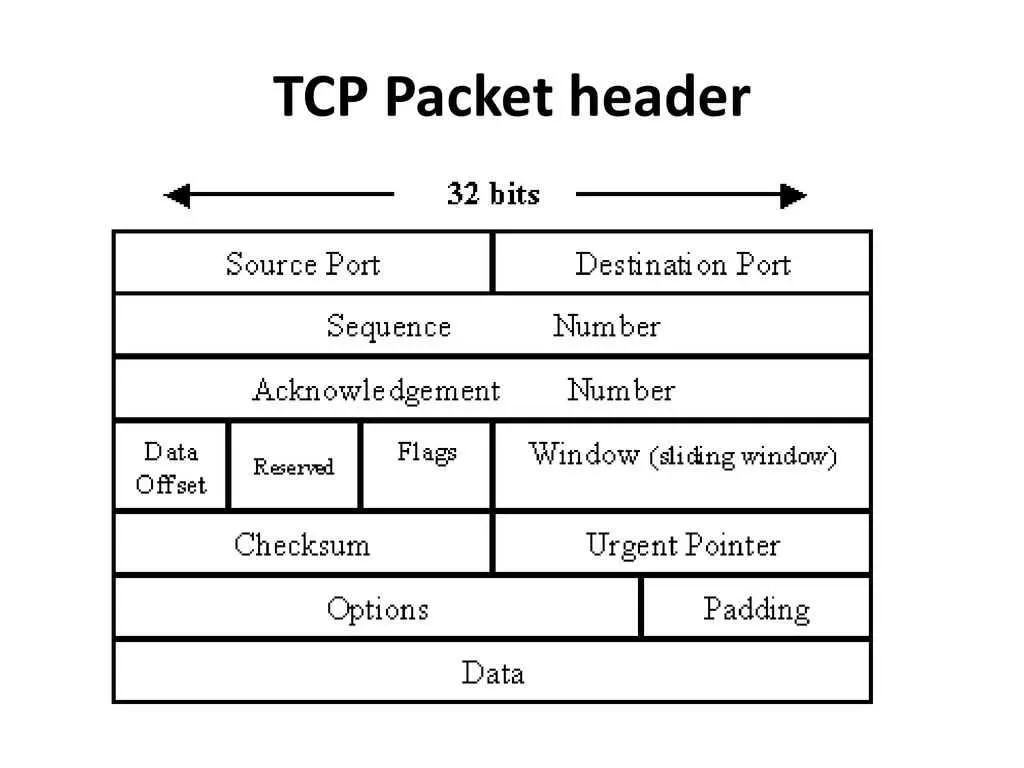
Figure: TCP Header
Working of TCP Header
- Connection Establishment (Three-Way Handshake) –
TCP begins communication using SYN, SYN-ACK, and ACK flags between sender and receiver.
This process ensures both sides are ready and synchronized before data transfer starts.
It establishes a reliable connection and initializes sequence numbers. - Segmentation of Data –
Large data is divided into smaller segments before transmission.
Each segment is assigned a sequence number for proper tracking.
This helps in easy transmission and reassembly at the receiver side. - Data Transmission –
Segments are sent over the network along with TCP header information.
The header contains details like ports, sequence numbers, and flags.
This ensures correct delivery and management of each data segment. - Acknowledgement Mechanism –
The receiver sends acknowledgements (ACK) for successfully received data.
The ACK number indicates the next expected byte.
This confirms reliable delivery and helps track missing data. - Error Control and Retransmission –
TCP detects lost or corrupted segments using sequence numbers.
Missing segments are retransmitted automatically.
This ensures error-free and complete data delivery. - Flow Control –
The receiver controls the rate of data using the window size field.
It prevents the sender from sending too much data at once.
This avoids receiver overload and maintains smooth communication. - Connection Termination –
The connection is closed using FIN and ACK flags.
Both sides ensure all data is transmitted before closing.
This guarantees a proper and graceful termination of communication.
Functions of TCP Header
- Process-to-Process Delivery – Ensures data reaches the correct application using port numbers.
- Connection Establishment and Termination – Controls starting and ending of communication using flags like SYN and FIN.
- Reliable Data Transfer – Guarantees data is delivered without loss.
- Error Detection – Detects errors using checksum.
- Flow Control – Controls data transmission speed using window size.
- Ordered Data Delivery – Maintains correct sequence of data.
- Acknowledgement Mechanism – Confirms successful data receipt.
- Urgent Data Handling – Handles priority data using urgent pointer.
- Segmentation and Reassembly – Divides and reassembles data properly.
1. Source and Destination Port Address
- Source Port: Identifies the sending application (e.g., browser, email client).
- Destination Port: Identifies the receiving application (e.g., web server on port 80).
- These ensure process-to-process communication, not just host-to-host.
Use of Source and Destination Port Address
Source Port Address
- Identifies the sending application/process on the sender’s device.
- Usually a temporary (ephemeral) port number assigned by the system.
- Helps the receiver know where to send the reply back.
Destination Port Address
- Identifies the receiving application/process on the destination device.
- Often a well-known port number (e.g., 80 for HTTP, 443 for HTTPS).
- Ensures data reaches the correct service or application.
2. Sequence and Acknowledgement Numbers
- Sequence Number:
- Indicates the position of the first byte in the data segment.
- Used for ordering data correctly.
- Acknowledgement Number:
- Indicates the next expected byte from the sender.
- Used for reliable communication and error control.
Use of Sequence and Acknowledgement Numbers
Sequence Number
- Identifies the position of data bytes in the entire message stream.
- Ensures data is received in the correct order.
- Helps in detecting lost or duplicate packets.
- Supports retransmission of missing data segments.
Acknowledgement Number
- Indicates the next byte expected from the sender.
- Confirms that previous data has been received successfully.
- Enables error control and reliability in communication.
- Helps the sender decide which data to resend if needed.
3. Code Bits (Flags)
Also called control flags, they manage the connection:
- SYN → Start connection
- ACK → Acknowledgement
- FIN → End connection
- RST → Reset connection
- PSH → Push data immediately
- URG → Urgent data present
Use of Code Bits (Flags) in TCP
Code bits are control flags in the TCP header that manage the connection and data flow between sender and receiver.
- SYN (Synchronize)
- Used to establish a connection.
- Starts the three-way handshake.
- ACK (Acknowledgement)
- Confirms that data has been successfully received.
- Almost every TCP segment after connection setup uses ACK.
- FIN (Finish)
- Used to terminate the connection gracefully.
- Indicates no more data will be sent.
- RST (Reset)
- Immediately aborts the connection.
- Used when an error or unexpected condition occurs.
- PSH (Push)
- Tells the receiver to deliver data immediately to the application.
- Avoids buffering delays.
- URG (Urgent)
- Indicates urgent data is present.
- Works with the Urgent Pointer field.
4. Window Size (Window Bits)
- Specifies how much data (in bytes) the receiver can accept.
- Used for flow control.
- Helps prevent the sender from overwhelming the receiver.
5. Urgent Pointer
- Points to the end of urgent data in the segment.
- Used only when URG flag is set.
- Allows high-priority data to be processed immediately.
Conclusion
The TCP header plays a vital role in ensuring reliable and efficient data communication over networks. Each field in the header has a specific purpose—port addresses enable process-to-process communication, sequence and acknowledgement numbers ensure correct ordering and reliability, code bits (flags) manage connection control, window size provides flow control, and the urgent pointer handles priority data.
Together, these components allow TCP to provide error-free, ordered, and controlled data transmission between sender and receiver. Thus, the TCP header acts as the backbone of reliable communication in computer networks.
How those flags open a connection is in the three-way handshake.