Internet Protocol version 4 (IPv4) is the foundational technology that enables devices to communicate across the internet and most private networks. It provides a standardized way to identify devices (hosts) and deliver data packets from a source to a destination. Even though IPv6 is the newer protocol, IPv4 still carries the majority of global internet traffic. Understanding IPv4 is essential for students of computer networks, system administrators, and anyone preparing for networking exams or careers in IT.
This answer explains what IPv4 means, how it works, its addressing system, packet format, routing behavior, key supporting protocols, advantages and limitations, and real-world applications. The language is kept simple and clear, with worked examples and step-by-step explanations to build strong conceptual understanding.
What Do We Mean by IPv4?
IPv4 (Internet Protocol version 4) is a network-layer protocol in the TCP/IP suite used to identify devices and route data packets across networks. It uses 32-bit addresses to uniquely identify source and destination hosts. IPv4 defines the format of data packets (called IP datagrams), addressing schemes, fragmentation rules, and routing behaviors, enabling end-to-end data delivery over heterogeneous networks.
- Layer: Network layer (Layer 3 of the OSI model)
- Address length: 32 bits (commonly written in dotted-decimal notation)
- Main functions: Addressing, packet forwarding, routing, fragmentation/reassembly
- Companion protocols: ARP, ICMP, DHCP, NAT, and transport protocols like TCP/UDP
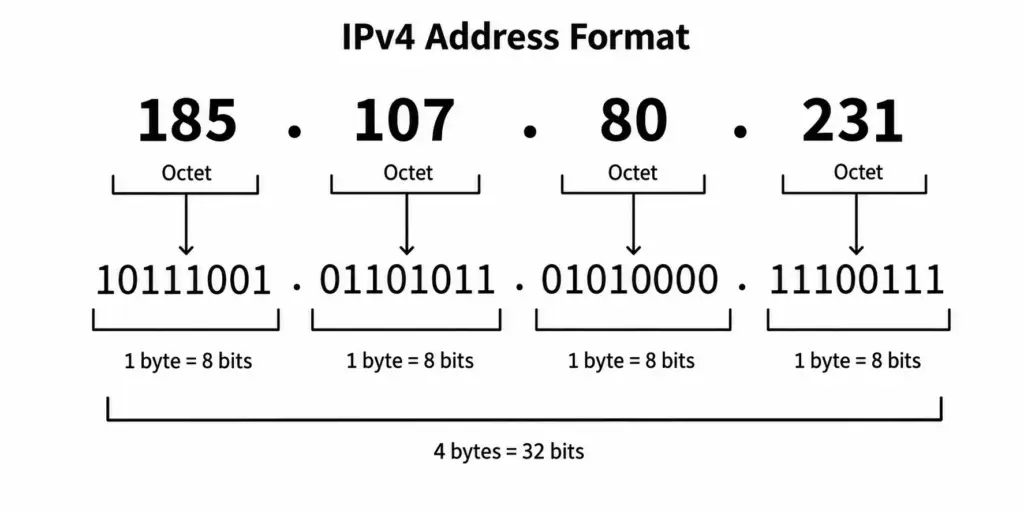
Figure: IPv4 Address Format
Why IPv4 Is Important?
IPv4 is the glue of today’s internet. It connects billions of devices globally and underpins services like web browsing, email, streaming, cloud applications, and mobile apps. Even in networks transitioning to IPv6, IPv4 remains critical through dual-stack deployments, translation techniques, and NAT-based connectivity. Learning IPv4 equips students with practical skills applicable to enterprise networks, data centers, home Wi-Fi, and service provider infrastructures.
Historical Context and Evolution
IPv4 was developed in the early 1980s as part of the ARPANET evolution. Initially, it used classful addressing (Class A, B, C), which was simple but wasteful. As the internet grew, two major improvements were introduced:
- CIDR (Classless Inter-Domain Routing): Allows flexible subnetting and efficient route aggregation using prefix notation (e.g., /24).
- NAT (Network Address Translation): Extends the usability of limited IPv4 addresses by letting multiple private hosts share a single public address.
These changes helped IPv4 scale to billions of users, though address exhaustion eventually led to the development of IPv6.
IPv4 Addressing Basics
An IPv4 address is a 32-bit number that uniquely identifies a device on a network. It is usually written as four decimal numbers separated by dots (dotted-decimal), for example: 192.168.1.10. Each number is an octet (8 bits) ranging from 0 to 255.
- Total theoretical addresses: 2^32 ≈ 4.29 billion
- Practical availability is lower due to reserved and private ranges
Address Classes (Historical) vs CIDR (Modern)
Originally, IPv4 used classful addressing:
- Class A format: 0.0.0.0 to 127.255.255.255 (/8), but ordinary historical Class A unicast network numbers are 1–126 because 0/8 is reserved and 127/8 is loopback.
- Class B: 128.0.0.0 to 191.255.255.255 (default mask /16)
- Class C: 192.0.0.0 to 223.255.255.255 (default mask /24)
- Class D: 224.0.0.0 to 239.255.255.255 (multicast)
- Class E: 240.0.0.0 to 255.255.255.255 (experimental)
Modern networks use CIDR, which expresses networks as address/prefix-length, such as 10.0.0.0/8, 172.16.0.0/12, or 192.168.1.0/24. CIDR improves address efficiency and reduces routing table size through aggregation.
Public and Private IPv4 Addresses
Private IP ranges (RFC 1918) are not routable on the public internet. They are used inside home, enterprise, and campus networks:
- 10.0.0.0/8
- 172.16.0.0/12 (172.16.0.0 to 172.31.255.255)
- 192.168.0.0/16
Public IP addresses are globally unique and routable on the internet. Organizations usually obtain them from Internet Service Providers (ISPs) or Regional Internet Registries (RIRs).
Special IPv4 Address Ranges
- Loopback: 127.0.0.0/8 (commonly 127.0.0.1) for testing local TCP/IP stack
- Link-local/APIPA: 169.254.0.0/16 assigned automatically when DHCP fails
- Default route placeholder: 0.0.0.0 (also used to mean “any address”)
- Broadcast: 255.255.255.255 (limited broadcast), and directed broadcast (e.g., 192.168.1.255 in /24)
- CGNAT space: 100.64.0.0/10 for carrier-grade NAT inside service provider networks
- Multicast: 224.0.0.0/4 for group communication
Types of IPv4 Communication
- Unicast: One-to-one communication between a single source and a single destination.
- Broadcast: One-to-all communication within a local network (e.g., ARP requests).
- Multicast: One-to-many communication to subscribed hosts (e.g., streaming or routing protocols).
- Anycast: One-to-nearest communication, implemented via routing (common with DNS servers), not a distinct IPv4 address type but a routing design.
Subnetting and CIDR: Step-by-Step
Subnetting divides a larger network into smaller sub-networks for efficient management, security, and performance. CIDR notation expresses how many bits are fixed for the network portion.
Key formulas:
- Hosts per subnet = 2(32 − prefix) − 2 (network and broadcast are not assignable to hosts)
- Subnet size (address block) = 2(32 − prefix)
Example: You have 192.168.10.0/24 and need 5 subnets.
- Find the next power of two: 8 subnets require 3 extra bits (2^3 = 8).
- Borrow 3 host bits: new prefix = /27.
- Each /27 subnet has 32 addresses: hosts per subnet = 32 − 2 = 30.
- Subnets (block size 32):
- 192.168.10.0/27 (hosts 1–30, broadcast .31)
- 192.168.10.32/27 (hosts 33–62, broadcast .63)
- 192.168.10.64/27
- 192.168.10.96/27
- 192.168.10.128/27
- 192.168.10.160/27
- 192.168.10.192/27
- 192.168.10.224/27
Note: Exceptions exist, such as /31 for point-to-point links (no network/broadcast) and /32 for loopbacks or host routes.
IPv4 Packet (Datagram) Format
An IPv4 packet consists of a header and a payload. The header contains addressing and control information used by routers and the destination host.
Textual diagram (top to bottom, left to right):
- Row 1: Version (4 bits) | IHL (4) | DSCP/ECN (8) | Total Length (16)
- Row 2: Identification (16) | Flags (3) | Fragment Offset (13)
- Row 3: TTL (8) | Protocol (8) | Header Checksum (16)
- Row 4: Source IP Address (32)
- Row 5: Destination IP Address (32)
- Row 6+: Options (if any) | Padding
Key fields explained:
- Version: 4 for IPv4.
- IHL (Internet Header Length): Size of header in 32-bit words (minimum 5).
- DSCP/ECN: Quality of Service markings (DSCP) and congestion notification (ECN).
- Total Length: Full packet size in bytes (header + data).
- Identification, Flags, Fragment Offset: Used for fragmentation and reassembly.
- TTL (Time To Live): Decreases by 1 at each hop; packet discarded when 0.
- Protocol: Indicates upper-layer protocol (e.g., 6 for TCP, 17 for UDP, 1 for ICMP).
- Header Checksum: Validates header integrity.
- Source/Destination: 32-bit IPv4 addresses.
Fragmentation and MTU: Step-by-Step
Different network links have different Maximum Transmission Units (MTUs). If a packet is larger than the MTU, it may be fragmented unless the “Don’t Fragment” (DF) flag is set.
Process overview:
- Source sends an IP packet with size S.
- A router checks the outgoing interface MTU (M). If S ≤ M, forward as-is.
- If S > M and DF=0, the router splits the packet into fragments.
- Each fragment has its own header; fragment offsets are set accordingly (in 8-byte blocks), and MF (More Fragments) flag is set on all but the last fragment.
- The destination host reassembles fragments using the Identification field and offsets.
- If DF=1 and fragmentation is needed, the router discards the packet and sends an ICMP “Fragmentation Needed” message to the sender (used by Path MTU Discovery).
Routing and Forwarding in IPv4
Routers use routing tables to decide where to send packets next. Each entry maps a destination network prefix to a next-hop IP or interface.
- Forwarding rule: Use longest-prefix match (the most specific route).
- Default route: 0.0.0.0/0 – used when no more specific route exists.
- Static routing: Manually configured, simple but not scalable.
- Dynamic routing: Protocols like OSPF, EIGRP, IS-IS, BGP maintain routes automatically.
Before forwarding on a local Ethernet, the router resolves the destination (or next-hop) MAC address using ARP and then encapsulates the IPv4 packet in a Layer-2 frame.
Core Supporting Protocols
IPv4 works closely with several essential protocols:
- ARP (Address Resolution Protocol): Maps IPv4 addresses to MAC addresses on local networks. ARP requests are broadcasts; ARP replies are unicasts.
- ICMP (Internet Control Message Protocol): Sends error and status messages. Used by ping (Echo Request/Reply) and traceroute (Time Exceeded messages as TTL counts down).
- DHCP (Dynamic Host Configuration Protocol): Automatically assigns IP addresses, subnet masks, gateways, and DNS servers to clients.
- NAT (Network Address Translation): Translates private IP addresses to public addresses to conserve IPv4 space and enable internet access.
DHCP Address Assignment: Step-by-Step (DORA)
- Discover: Client broadcasts a DHCP Discover looking for servers.
- Offer: Server responds with a DHCP Offer proposing an IP and configuration.
- Request: Client broadcasts a DHCP Request to accept one offer.
- Ack: Server sends DHCP Acknowledgment with final lease details.
This process reduces manual configuration and prevents address conflicts.
NAT and PAT: How IPv4 Scales in Practice
NAT allows a device (like a home router) to present a single public IPv4 address to the internet while serving many private hosts internally. Common types:
- Static NAT: One-to-one mapping between private and public IP.
- Dynamic NAT: Many-to-many mapping from a private pool to a public pool.
- PAT (Port Address Translation, also called NAT overload): Many-to-one mapping using unique port numbers to differentiate flows. This is what home routers commonly use.
Step-by-step example of PAT:
- Host A (192.168.1.10:51500) connects to example.com (93.184.216.34:80).
- Router translates source to public IP 203.0.113.5:40001 and records the mapping.
- Server replies to 203.0.113.5:40001; router looks up mapping and forwards to 192.168.1.10:51500.
- Multiple internal hosts can share the same public IP because their port mappings are unique.
Advantages:
- Conserves public IPv4 addresses
- Hides internal topology (basic obfuscation)
Limitations:
- Complicates inbound connections
- Breaks true end-to-end connectivity and can affect some protocols without helpers
Quality of Service (DSCP/ECN)
IPv4 includes a field historically called Type of Service (ToS), now commonly used for DSCP (Differentiated Services Code Point) and ECN (Explicit Congestion Notification). Network devices can prioritize traffic (e.g., voice over IP) or mark congestion for better performance under load.
Security Considerations in IPv4
IPv4 by itself does not provide encryption or authentication. Common security practices include:
- Firewalls and ACLs to filter traffic
- VPNs using IPsec or SSL/TLS for confidentiality and integrity
- Anti-spoofing filters and uRPF to mitigate IP source spoofing
- Rate-limiting and intrusion detection to reduce DoS impacts
While IPsec can work with IPv4, it is optional, and most security is implemented via separate devices or protocols.
Broadcasts, Multicasts, and ARP: Practical Impacts
On local Ethernet networks, broadcasts can cause unnecessary load if the broadcast domain is very large. To manage this:
- Use VLANs and subnetting to limit broadcast domains
- Use IGMP snooping for efficient multicast distribution
- Monitor ARP traffic to detect anomalies and prevent ARP spoofing
Real-World Applications of IPv4
- Home networks: Wi-Fi routers use 192.168.x.x spaces with DHCP and NAT.
- Enterprise networks: Structured subnetting by department or building, VLANs, ACLs, routing via OSPF/EIGRP.
- Cloud computing: VPC/VNet CIDR blocks, security groups, NAT gateways, and peering.
- Service providers: Use CGNAT, BGP for internet routing, and MPLS underlays with IPv4 labels.
- IoT and industrial networks: Lightweight devices using private IPv4 ranges and gateways to the cloud.
Worked Example: Designing a Small IPv4 Network
Scenario: A startup needs three departments with different host counts: Admin (60 hosts), Engineering (110 hosts), and Sales (25 hosts). They own 10.0.0.0/24.
- Admin: Needs at least 60 hosts → choose /26 (64 addresses, 62 usable)
- Engineering: Needs at least 110 hosts → choose /25 (128 addresses, 126 usable)
- Sales: Needs at least 25 hosts → choose /27 (32 addresses, 30 usable)
Allocate subnets contiguously:
- Engineering: 10.0.0.0/25 (hosts .1–.126)
- Admin: 10.0.0.128/26 (hosts .129–.190)
- Sales: 10.0.0.192/27 (hosts .193–.222)
- Remaining: 10.0.0.224/27 reserved for future use
This plan aligns subnet sizes with needs, avoids waste, and leaves room to grow.
Troubleshooting IPv4: Practical Steps
- Check addressing: IP, subnet mask, default gateway, DNS.
- Ping local gateway to verify Layer-3 reachability.
- Use ARP table to confirm MAC resolution for local peers.
- Traceroute to identify where packets drop along the path.
- Check NAT translations and firewall rules for internet access.
- Validate MTU issues by testing with DF bit and adjusting MSS/PMTUD.
IPv4 vs IPv6: Key Differences
- Address size: IPv4 uses 32 bits; IPv6 uses 128 bits (virtually unlimited space).
- Configuration: IPv6 supports stateless autoconfiguration (SLAAC) in addition to DHCPv6.
- NAT: Common in IPv4; typically avoided in IPv6 to restore end-to-end connectivity.
- Header: IPv6 has a simpler, fixed header without fragmentation by routers.
- Security: IPsec is available for both IPv4 and IPv6; IPv6 does not make its implementation or use universally mandatory.
Despite these advantages, IPv4 remains dominant due to legacy systems, compatibility needs, and the effectiveness of NAT and CIDR in extending its life.
Advantages of IPv4
- Ubiquity: Universally supported by devices, OSs, and applications.
- Simplicity: Easy-to-understand dotted-decimal notation.
- Mature ecosystem: Powerful tools, protocols, and best practices exist.
- Scalability with aids: CIDR, NAT, and CGNAT extend IPv4’s usefulness.
Limitations of IPv4
- Address exhaustion: Limited to about 4.29 billion addresses.
- NAT complexity: Breaks end-to-end principle and complicates some applications.
- Security: No built-in encryption/authentication by default.
- Broadcast overhead: Can burden large Layer-2 domains.
Common Exam-Oriented Concepts to Remember
- Dotted-decimal format and 32-bit structure
- Private ranges (RFC 1918) and special addresses (loopback, APIPA, broadcast)
- CIDR notation and subnet masks (e.g., /24 = 255.255.255.0)
- Subnetting math: hosts per subnet, block sizes, and route summarization
- Header fields: TTL, Protocol, Fragmentation flags, DSCP/ECN
- ICMP purpose and typical messages (Echo, Destination Unreachable, Time Exceeded)
- DHCP DORA process and role of NAT/PAT
- Longest-prefix match in routing and default route 0.0.0.0/0
Short Case Study: Web Access from a Home Network
When you open a website from your laptop:
- DHCP gives your laptop a private IPv4 (e.g., 192.168.1.25), mask (/24), gateway, and DNS.
- Your browser resolves the domain via DNS to a public IP.
- The laptop sends TCP SYN to the server’s IPv4 address; the home router performs PAT, translating your private IP to a public IP:port.
- Routers on the internet forward the packet using longest-prefix match until it reaches the server.
- Server replies; NAT router reverses the translation and the page loads in your browser.
This everyday action demonstrates IPv4 addressing, routing, DNS resolution, and NAT in practice.
Best Practices for IPv4 Network Design
- Plan CIDR blocks with growth in mind; avoid overlapping subnets.
- Use VLANs and subnets to segment traffic by function or security level.
- Summarize routes to reduce routing table size and improve convergence.
- Limit broadcast domains; monitor ARP and implement DHCP snooping and dynamic ARP inspection where available.
- Document IP allocations and use DHCP reservations for critical devices.
- Adopt IPv6 in parallel (dual-stack) for future scalability.
Example Calculations to Strengthen Understanding
- Find the network and broadcast address of 172.16.34.77/20.
- /20 means mask 255.255.240.0; the block size in the third octet is 16.
- Third octet is 34; the nearest multiple of 16 not exceeding 34 is 32.
- Network: 172.16.32.0/20
- Broadcast: 172.16.47.255
- Host range: 172.16.32.1 to 172.16.47.254
- How many hosts can a /26 support?
- Hosts = 2(32 − 26) − 2 = 26 − 2 = 64 − 2 = 62 hosts
Performance and Reliability Features
- TTL limits loops; ICMP Time Exceeded helps detect them during troubleshooting.
- Checksum on the header catches corruption in transit; routers recalculate it on each hop.
- Route redundancy with dynamic protocols improves reliability; equal-cost multipath (ECMP) can balance traffic.
- DSCP-based QoS ensures critical traffic (voice/video) receives appropriate priority.
Where IPv4 Stands Today
Although regional internet registries have largely exhausted free pools of IPv4 addresses, the protocol remains widely used thanks to NAT, CGNAT, and address markets (the transfer of blocks between organizations). Many networks operate dual-stack (IPv4 and IPv6) to ensure compatibility while preparing for a long-term shift to IPv6. Understanding IPv4 is therefore both immediately practical and foundational for learning IPv6.
Conclusion
IPv4 is a 32-bit network layer protocol that enables addressing, packet delivery, and routing across interconnected networks. It forms the core of Internet communication, working alongside ARP, ICMP, DHCP, and NAT. Using dotted-decimal addresses, CIDR prefixes, and structured headers, IPv4 supports efficient subnetting and routing. Though limited by address exhaustion and heavy NAT use, its maturity and reliability keep it vital. Understanding IPv4 addressing, subnetting, routing, and troubleshooting builds essential networking skills and prepares you for seamless IPv6 transition.
The newer address is explained in what IPv6 is.