Network Connecting Devices
In computer networks, different devices are connected to each other to share information and communicate. Sometimes, a network needs to cover a large geographical area or connect different types of networks.
To establish communication between devices and extend network connectivity, different networking devices are used. These devices help transfer data, improve signal strength, connect network segments, and enable communication between different networks.
Three important networking devices are Repeaters, Bridges, and Gateways. Each device performs a different function depending on the network requirements.
1. Repeater
What Is a Repeater?
A Repeater is a networking device that receives weak or degraded signals, regenerates them, and retransmits them to extend the communication distance of a network.
When data travels through a communication medium such as a cable, the signal may become weak due to attenuation (signal loss). This can affect the quality of communication and limit the distance over which data can be transmitted.
A repeater solves this problem by receiving the incoming signal, regenerating it into a suitable form, and transmitting it again.
A repeater operates at the Physical Layer (Layer 1) of the OSI model because it deals with signals and bits rather than examining packet addresses.
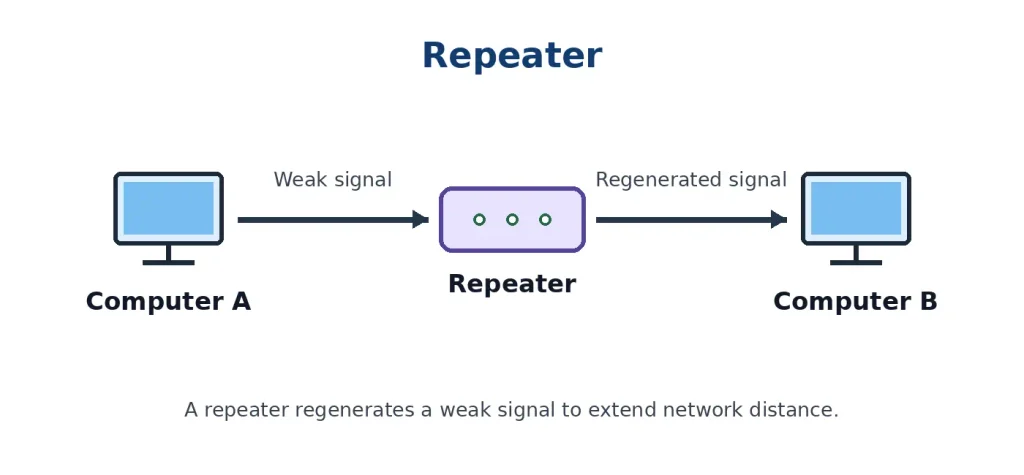
Figure: Repeater
Working of a Repeater
The working of a repeater can be explained through the following steps:
- Signal Reception: The repeater receives a signal from one segment of the network.
- Signal Examination: It detects the incoming signal and processes its physical characteristics.
- Signal Regeneration: The repeater regenerates the signal to restore its original strength and timing.
- Signal Transmission: It retransmits the regenerated signal into the next network segment.
- Signal Delivery: The regenerated signal travels through the extended network and reaches the destination device.
In this way, a repeater helps signals travel longer distances without requiring the source device to transmit at a higher power.
Example of a Repeater
Suppose two computers are connected through a long communication cable.
As the signal travels through the cable, its strength gradually decreases. If the cable distance exceeds the supported transmission limit, the receiver may not correctly recognize the transmitted data.
In this situation, a repeater is placed between the two computers. It receives the weak signal, regenerates it, and retransmits it toward the destination.
Thus, the repeater helps extend the communication distance.
Characteristics of a Repeater
- Physical Layer Device: It operates at the first layer of the OSI model.
- Signal Regeneration: It regenerates weak or degraded signals before retransmitting them.
- Network Extension: It helps extend the communication distance between network devices.
- No Address Filtering: It does not examine MAC addresses or IP addresses to decide where data should be sent.
- Bit-Level Operation: It works with signals representing transmitted bits.
- Same Network Technology: A traditional repeater extends a network using compatible physical-layer signaling.
Types of Repeaters
1. Analog Repeater
An analog repeater amplifies an incoming analog signal before retransmitting it. However, amplification may also increase existing noise.
2. Digital Repeater
A digital repeater regenerates digital signals by reconstructing their logical levels and timing before retransmission.
Advantages of a Repeater
- Extends Network Distance: It allows communication over longer distances.
- Regenerates Signals: It restores degraded digital signals before retransmitting them.
- Simple Installation: It is generally easy to install and configure.
- Cost-Effective: It can extend a network without replacing the entire communication infrastructure.
- Improves Signal Quality: Digital regeneration helps reduce the effects of accumulated signal degradation.
Disadvantages of a Repeater
- No Traffic Filtering: It cannot filter unwanted data based on MAC or IP addresses.
- No Congestion Control: It does not control network traffic or prevent congestion.
- Same Collision Domain: In traditional shared Ethernet segments, a repeater extends the same collision domain.
- Limited Functionality: It only works with physical signals and cannot perform routing or address-based forwarding.
Applications of a Repeater
- Extending communication distance in wired networks.
- Improving signal coverage in wireless networks.
- Regenerating signals in long communication links.
- Extending network connectivity between distant locations.
- Supporting communication in large buildings and campuses.
2. Bridge
What Is a Bridge?
A Bridge is a networking device used to connect two or more LAN segments and forward data frames between them based on MAC addresses.
A bridge helps divide a large local area network into smaller segments. It examines the destination MAC address of incoming frames and decides whether to forward or filter them.
Unlike a repeater, which simply regenerates signals, a bridge can identify devices using their MAC addresses and control the forwarding of data frames.
A bridge operates at the Data Link Layer (Layer 2) of the OSI model.
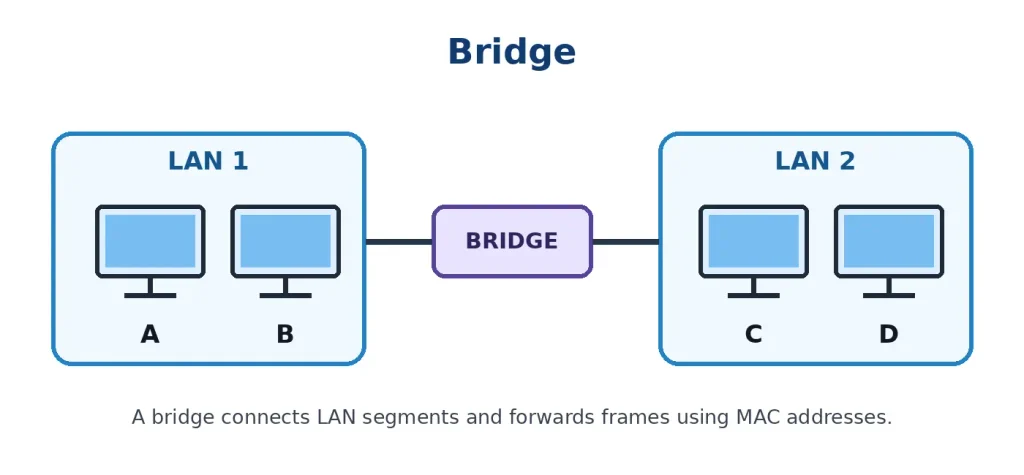
Figure: Bridge
Working of a Bridge
The working of a bridge can be explained through the following steps:
- Frame Reception: The bridge receives a data frame from one network segment.
- MAC Address Examination: It reads the source and destination MAC addresses present in the frame header.
- MAC Address Learning: It learns the location of devices by recording the source MAC address and the interface through which the frame arrived.
- Address Table Checking: The bridge checks its MAC address table to identify the destination device’s network segment.
- Frame Forwarding or Filtering: If the destination is on another segment, the bridge forwards the frame through the appropriate port. If the destination is on the same segment, it filters the frame instead of forwarding it unnecessarily.
- Frame Delivery: The frame reaches the appropriate network segment and is delivered to the destination device.
Thus, a bridge helps control unnecessary traffic between connected LAN segments.
Example of a Bridge
Suppose an organization has two LAN segments:
- LAN 1 contains Computers A and B.
- LAN 2 contains Computers C and D.
A bridge connects these two LAN segments.
When Computer A sends data to Computer C, the bridge checks the destination MAC address and forwards the frame from LAN 1 to LAN 2.
However, when Computer A sends data to Computer B, the bridge recognizes that both computers belong to the same segment and does not forward the frame to LAN 2.
Therefore, a bridge reduces unnecessary traffic between network segments.
Characteristics of a Bridge
- Data Link Layer Device: It operates at the second layer of the OSI model.
- MAC Address-Based Forwarding: It uses MAC addresses to make forwarding decisions.
- Network Segmentation: It connects and separates LAN segments.
- MAC Address Table: It maintains a table containing learned MAC addresses and their associated ports.
- Traffic Filtering: It filters frames that do not need to travel to another segment.
- Collision Domain Separation: Each bridge port creates a separate collision domain in traditional Ethernet networks.
- Broadcast Forwarding: A traditional transparent bridge forwards broadcast frames to other segments within the same bridged network.
Types of Bridges
1. Transparent Bridge
A transparent bridge automatically learns the MAC addresses of connected devices and forwards frames based on its MAC address table.
It is commonly used in Ethernet networks.
2. Source Routing Bridge
A source routing bridge is a type of bridge in which the sending device determines the route that a frame should follow through the network.
It was traditionally used in Token Ring networks.
3. Translational Bridge
A translational bridge connects two LAN segments that use different Data Link Layer technologies and translates the frame formats when necessary.
Advantages of a Bridge
- Reduces Unnecessary Traffic: It filters frames and forwards only those that need to reach another segment.
- Connects LAN Segments: It allows multiple LAN segments to communicate.
- Improves Network Performance: It helps reduce unnecessary traffic on individual segments.
- MAC Address Learning: It automatically learns device addresses and updates its forwarding table.
- Separates Collision Domains: It reduces the impact of collisions by dividing a network into separate collision domains.
Disadvantages of a Bridge
- Limited Scalability: Traditional bridges are less suitable for very large and complex networks.
- Broadcast Traffic: Broadcast frames are generally forwarded across the bridged network, which can increase traffic.
- Processing Delay: It requires time to examine MAC addresses and make forwarding decisions.
- Loop Problems: Incorrect connections can create switching loops. Spanning Tree Protocol (STP) is used to prevent Layer 2 loops.
- Limited Functionality: It cannot route packets between different IP networks based on IP addresses.
Applications of a Bridge
- Connecting two or more LAN segments.
- Dividing a large LAN into smaller segments.
- Filtering unnecessary network traffic.
- Connecting different Ethernet segments.
- Improving network organization and performance.
3. Gateway
What Is a Gateway?
A Gateway is a networking device or software system that connects different networks and enables communication between them. It can perform protocol conversion when the connected networks use different communication technologies or protocols.
A gateway acts as an entry and exit point through which data travels between networks.
It may translate data formats, communication protocols, or addressing information to allow devices using different systems to communicate with each other.
A gateway can operate at different layers of the OSI model, depending on its purpose and implementation.
A common example is a protocol gateway that connects networks using different communication protocols.
In IP networks, a default gateway is the router or Layer 3 device that forwards traffic from a local network to other networks.
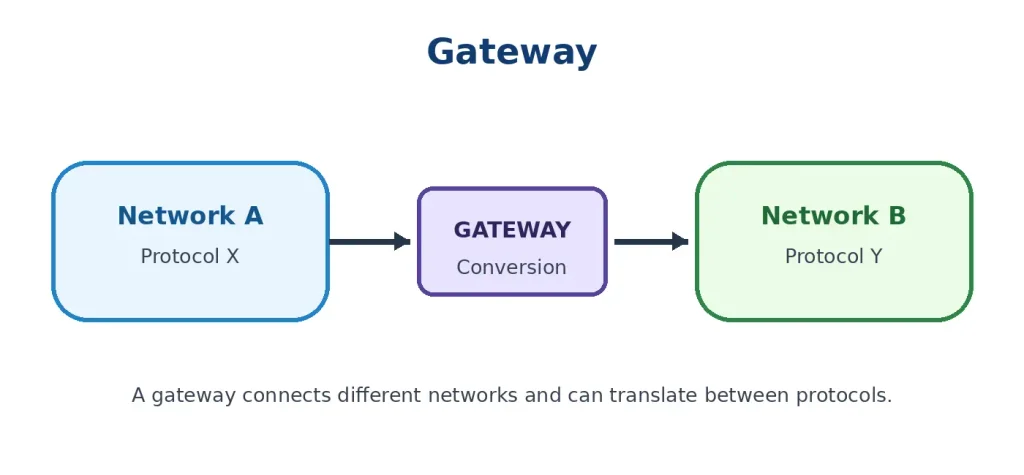
Figure: Gateway
Working of a Gateway
The working of a gateway can be explained through the following steps:
- Data Reception: The gateway receives data from a device or network.
- Protocol Identification: It examines the communication protocols and formats used by the incoming data.
- Data Processing: It processes the data according to the requirements of the connected networks.
- Protocol Conversion: If the networks use different protocols, the gateway translates the data into a compatible format.
- Data Forwarding: After processing or conversion, the gateway forwards the data to the destination network.
- Data Delivery: The destination network receives the data and delivers it to the intended device or application.
Thus, a gateway enables communication between different types of networks and systems.
Example of a Gateway
Suppose an organization uses two different networks:
- Network A uses one communication protocol.
- Network B uses a different communication protocol.
Direct communication between these networks may not be possible because they follow different communication rules.
A gateway is placed between them to translate the required data and protocol information.
After conversion, the data can be transmitted to the destination network.
Another common example is a home router acting as the default gateway. When a computer wants to access a website outside its local network, it sends the packet to the default gateway, which forwards it toward the Internet.
Characteristics of a Gateway
- Network Connection: It connects different networks and enables communication between them.
- Protocol Conversion: It can translate between different communication protocols when required.
- Different OSI Layers: Depending on its function, it can operate at different layers of the OSI model.
- Data Translation: It may convert data formats and communication methods to support interoperability.
- Network Access: It can provide an entry and exit point for communication between networks.
- Flexible Functionality: It can perform routing, protocol conversion, security filtering, and other functions depending on its implementation.
Types of Gateways
1. Default Gateway
A default gateway is the device to which a computer sends packets when the destination is outside its local network and no more specific route is available.
It is commonly a router connected to the local network and the Internet.
2. Protocol Gateway
A protocol gateway connects networks or systems that use different communication protocols. It translates protocol information so that the systems can communicate.
3. Application Gateway
An application gateway operates at the application level and acts as an intermediary between applications or services.
It may inspect, filter, or translate application-level traffic.
4. Cloud Gateway
A cloud gateway connects local network environments with cloud-based services and helps manage communication between them.
Advantages of a Gateway
- Connects Different Networks: It allows communication between networks that may use different technologies.
- Protocol Conversion: It translates communication protocols when necessary.
- Improves Interoperability: It enables different systems and applications to exchange information.
- Network Access: It provides a path for devices to communicate with external networks.
- Additional Services: Depending on its implementation, it can provide security filtering, traffic management, and access control.
Disadvantages of a Gateway
- Complex Configuration: Setting up gateways can be complicated, especially when multiple protocols are involved.
- Higher Cost: Advanced gateways may require expensive hardware or software.
- Processing Delay: Protocol conversion and data processing can introduce additional delays.
- Maintenance Requirements: Gateways may require regular updates and monitoring.
- Single Point of Failure: If a gateway is the only communication path between networks and it fails, communication between those networks may be interrupted.
Applications of a Gateway
- Connecting different types of computer networks.
- Providing access from a local network to the Internet.
- Connecting cloud services with local networks.
- Enabling communication between different industrial systems.
- Translating communication protocols between different devices.
- Connecting enterprise networks with external services.
Difference Between Repeater, Bridge, and Gateway
Repeaters, Bridges, and Gateways are important networking devices, but they perform different functions in a computer network.
| Basis | Repeater | Bridge | Gateway |
|---|---|---|---|
| Meaning | Regenerates and retransmits signals | Connects LAN segments and forwards frames | Connects networks and may translate protocols |
| OSI Layer | Physical Layer (Layer 1) | Data Link Layer (Layer 2) | Depends on implementation |
| Main Function | Signal regeneration | Frame forwarding and filtering | Network connection and protocol conversion |
| Address Used | Does not examine MAC or IP addresses | MAC address | Depends on implementation |
| Data Handled | Signals and bits | Frames | Data at one or more protocol layers |
| Network Connection | Extends a network segment | Connects LAN segments | Connects different networks or systems |
| Traffic Filtering | No | Yes, using MAC addresses | May provide filtering |
| Example | Ethernet repeater | Ethernet bridge | Protocol gateway or default gateway router |
| Main Purpose | Extending signal distance | Reducing unnecessary LAN traffic | Enabling communication between different networks |
Repeaters, Bridges, and Gateways are three important networking devices used to improve communication and connectivity in computer networks.
A Repeater operates at the Physical Layer and regenerates weak signals to extend the communication distance. A Bridge operates at the Data Link Layer and connects LAN segments by forwarding or filtering frames based on MAC addresses. A Gateway connects different networks and may perform protocol conversion to enable communication between systems that use different technologies.
Therefore, Repeaters extend network signals, Bridges connect and filter LAN segments, and Gateways enable communication between different networks and protocols.