In computer networks, data communication plays an important role in transferring information from one device to another. Whenever a user makes a voice call, sends an email, shares a file, streams a video, or accesses a website, data must travel through a network to reach its intended destination.
But how does this information travel from the source to the destination? How does a network decide the path through which data should be transferred?
This process is managed using switching techniques. Switching is a method used in communication networks to transfer data from a sender to a receiver through intermediate devices and communication links. It determines how communication paths or network resources are used to deliver information.
In computer networks and telecommunications, there are three conventional switching techniques: Circuit Switching, Message Switching, and Packet Switching. Each technique follows a different method of establishing connections, handling data, and transmitting information across a network.
For example, circuit switching establishes a dedicated communication path between two devices, message switching transfers the complete message through intermediate nodes, and packet switching divides data into smaller packets before transmitting them through the network.
Each switching technique has its own working mechanism, advantages, disadvantages, and applications. Understanding these techniques helps explain how different communication networks transfer information efficiently.
What is a Switch?
A switch is a networking device that operates mainly at the Data Link Layer (Layer 2) of the OSI model. Its job is to connect multiple devices (such as computers, printers, and servers) within a local area network (LAN) and forward data frames to the correct device based on their Media Access Control (MAC) addresses. Unlike hubs, which broadcast data to all ports, a switch learns which MAC address is reachable on which port and forwards frames only to the intended destination. This selective forwarding reduces unnecessary traffic, improves efficiency, and increases network performance.
- Learning: The switch builds a MAC address table by observing source addresses of incoming frames.
- Forwarding/Filtering: The switch forwards frames to a specific port if the destination MAC is known, or floods them to all ports (except the incoming one) if unknown.
- Collision domains: Each switch port defines its own collision domain, reducing collisions compared to hubs.
- Advanced features: VLANs, link aggregation, port security, and spanning tree protocols for loop prevention.
While a switch is a physical device used in LANs, the broader concept of “switching” refers to the method by which a network routes data across many intermediate devices and links. The three conventional switching methods in network theory are circuit switching, message switching, and packet switching.
How Does a Network Switch Work?
A network switch is a networking device used to connect multiple devices such as computers, printers, servers, and phones within a Local Area Network (LAN). It helps in efficient data communication between connected devices.
When a source device sends a data packet, the packet first reaches the switch. The switch reads the packet header and checks the destination MAC address to identify the target device. After identifying the correct destination, the switch forwards the packet only through the appropriate port connected to that device.
A switch creates a temporary communication path between the source and destination devices and ends the connection after the data transfer is completed. It also provides full bandwidth to each connected device, allowing simultaneous sending and receiving of data. This reduces network collisions and improves overall network performance and speed.
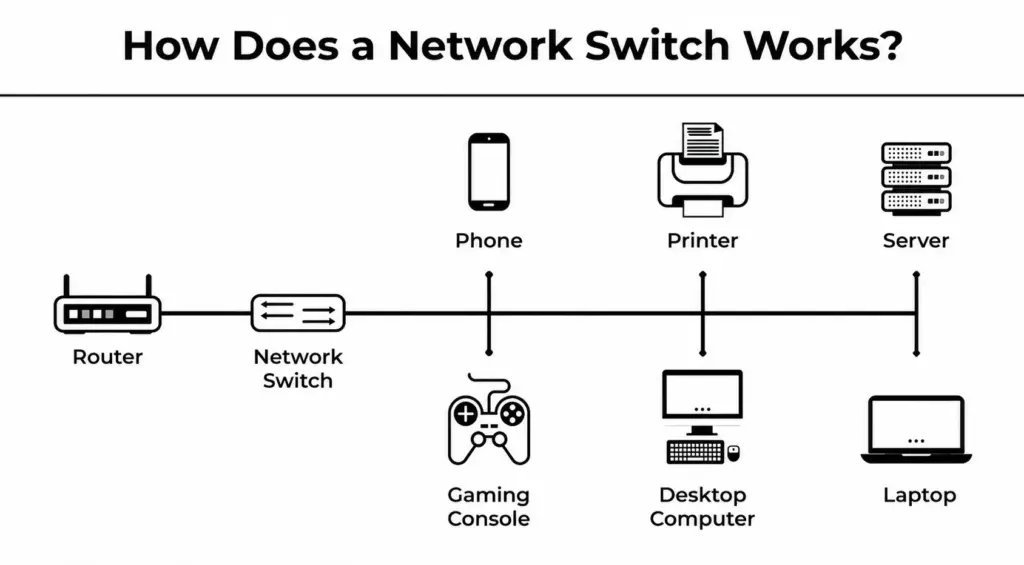
Figure: Working of Switch
Why Do Networks Use Switching?
Switching allows multiple users, devices, and applications to share network resources efficiently. It helps networks transfer data from a source to its destination without wasting bandwidth or overloading communication paths.
Network traffic changes constantly. Some paths may become congested, and others may fail. Therefore, networks use switching to manage data transmission effectively and maintain reliable communication.
The main reasons networks use switching are:
- Choosing Routes: Switching helps direct data from the source to the correct destination through suitable network paths.
- Efficient Bandwidth Utilization: It allows network resources to be shared efficiently and helps reduce unnecessary bandwidth usage.
- Reducing Network Congestion: It helps manage traffic and avoid overloading a particular communication path.
- Balancing Network Performance: It helps maintain a balance between reliability, latency (delay), and throughput (amount of data transferred).
- Supporting Scalability: Switching enables networks to support a growing number of users, devices, and applications across different geographical locations.
Three Conventional Switching Methods
The three conventional switching methods used historically and conceptually in communication networks are:
- Circuit switching
- Message switching
- Packet switching
These methods reflect different philosophies about how to allocate resources and how to organize the flow of data through intermediate network nodes.
1. Circuit Switching
Circuit switching is a communication method in which a dedicated path is established between the sender and receiver before data transmission begins. This path remains reserved for the entire communication session, even when no data is being transmitted.
It provides a continuous connection with predictable performance. A traditional telephone network, known as the Public Switched Telephone Network (PSTN), is a common example of circuit switching.
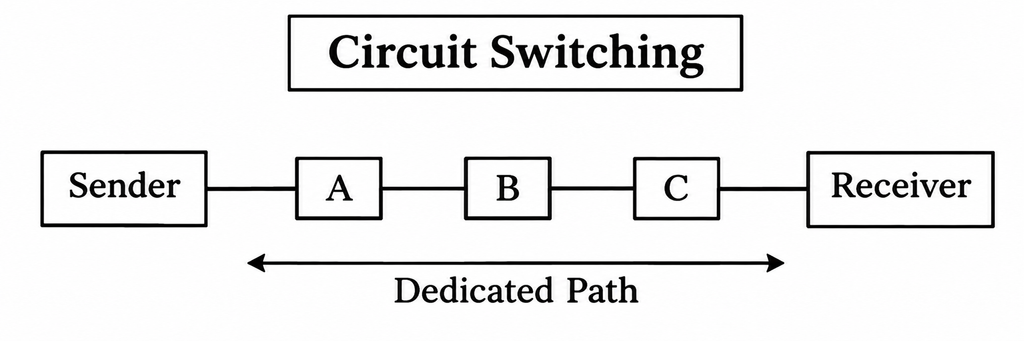
Figure: Circuit Switching
How Circuit Switching Works (Step-by-Step)
- – Step 1: Call Setup: The sender requests a connection through the first switch. Intermediate switches identify an available path and reserve the required communication channels. Once all the necessary resources are available, a dedicated connection is established between the sender and receiver.
- – Step 2: Data Transfer: After the connection is established, the sender and receiver exchange information through the reserved path. Since the resources are dedicated to the connection, transmission generally has predictable delay and low variation in delay.
- – Step 3: Connection Teardown: When the communication ends, a termination signal is sent through the network. The switches release the reserved channels and make those resources available for other users.
Characteristics of Circuit Switching
- Dedicated Resources: A specific communication path and its resources are reserved for the entire session, even during idle periods.
- Predictable Performance: It provides consistent bandwidth and relatively stable delay, making it suitable for real-time voice communication.
- Connection-Oriented: A connection must be established before data transmission and released after communication ends.
- Resource Reservation: Network resources remain allocated to the connection until the session is terminated.
- Inefficient for Bursty Data: Reserved resources may remain unused when the sender has no data to transmit.
Diagram Description (Circuit Switching)
Imagine five nodes labeled A–B–C–D–E in a line. A user attached to node A calls a user attached to node E. A solid line is drawn from A to E passing through B, C, and D, indicating a single, reserved path. No other data can use the reserved channels until the call is ended.
Advantages of Circuit Switching
- Stable Performance: Provides predictable bandwidth and relatively consistent transmission delay throughout the communication session.
- Dedicated Connection: A reserved communication path ensures that resources are available for the connected users.
- Low Delay Variation: Once the connection is established, data travels through the same path, resulting in low jitter.
- Simple Data Transfer: Data can be transmitted continuously without requiring individual packets to be routed separately.
- Suitable for Real-Time Communication: Works well for continuous voice communication where consistent transmission is important.
Disadvantages of Circuit Switching
- Resource Wastage: Reserved bandwidth remains unavailable to other users even when the connection is idle.
- Connection Setup Time: A dedicated path must be established before communication begins, which can introduce an initial delay.
- High Cost: Maintaining dedicated communication channels can be expensive, especially when many connections are required.
- Limited Scalability: Reserving resources for every connection makes it less efficient when a large number of users communicate simultaneously.
- Not Suitable for Bursty Data: It is less efficient for applications such as email and web browsing, where data is transmitted at irregular intervals.
Real-World Examples
- Traditional Telephone Networks: Traditional landline telephone calls use circuit switching to establish a dedicated communication path between callers.
- Leased Lines: Businesses use dedicated communication circuits to maintain continuous connections between different office locations.
- Time Division Multiplexing (TDM): Traditional TDM-based telephone systems divide a communication link into time slots and allocate specific slots to established connections.
2. Message Switching
Message switching is a communication method in which the entire message is transmitted from the sender to the receiver through intermediate network nodes. No dedicated communication path is established in advance. Instead, each intermediate node receives and stores the complete message before forwarding it to the next node. This method is also known as Store-and-Forward Switching.
Message switching allows multiple users to share network resources because a communication channel is used only when a message is being transmitted.
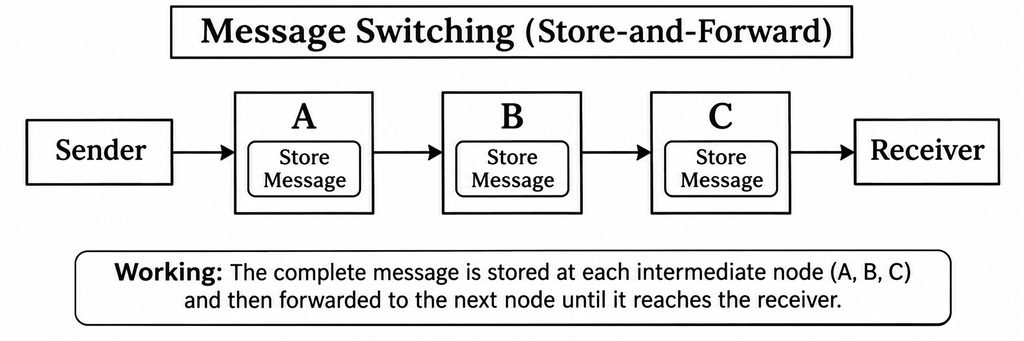
Figure: Message Switching
How Message Switching Works (Step-by-Step)
- Step 1: Message Transmission: The sender sends the complete message into the network. The message contains the destination address so that network nodes can identify where it should be delivered.
- – Step 2: Message Storage: The intermediate node receives the entire message and temporarily stores it in its memory or buffer.
- – Step 3: Forwarding: After checking the destination address and identifying the next suitable route, the node forwards the message to the next intermediate node.
- – Step 4: Message Delivery: This process continues until the complete message reaches the destination.
Characteristics of Message Switching
- No Dedicated Path: A fixed communication path is not reserved between the sender and receiver.
- Store-and-Forward: Each intermediate node stores the complete message before forwarding it.
- Variable Delay: Delivery time may vary depending on network traffic and the time required to store and forward messages.
- Efficient Resource Sharing: Network links can be shared by multiple users.
- Large Storage Requirement: Intermediate nodes need sufficient memory to store complete messages.
Diagram Description (Message Switching)
Visualize the same nodes A–B–C–D–E. A large envelope icon (representing the whole message) moves from A to B and is stored (shown as being placed in a mailbox), then forwarded to C, then to D, and finally to E. At each node, the envelope pauses, indicating store-and-forward delays.
Advantages of Message Switching
- No Dedicated Connection: It does not require a dedicated communication path, allowing network resources to be shared.
- Efficient Bandwidth Utilization: Communication links are used only when messages are being transmitted.
- Flexible Routing: Messages can be forwarded through different routes depending on network conditions.
- Message Priority: Some systems can assign priorities to messages and forward important messages first.
- Reliable Storage: Messages can be stored temporarily at intermediate nodes before being forwarded.
Disadvantages of Message Switching
- High Delay: Storing and forwarding the complete message at every intermediate node increases delivery time.
- Large Memory Requirement: Intermediate nodes need sufficient storage to hold entire messages.
- Not Suitable for Real-Time Communication: Variable delays make it unsuitable for applications such as live voice and video calls.
- Network Congestion: Large messages can occupy storage space and increase congestion.
- Longer Delivery Time: Messages may experience additional delays when intermediate nodes are busy.
Real-World Examples
- Traditional Telegraph Systems: Messages were stored and forwarded through intermediate communication offices before reaching their destinations.
- Email Systems: Email servers store messages temporarily before forwarding them to the recipient’s mail server. Modern email uses store-and-forward principles, although it is not a pure message-switching network.
3. Packet Switching
Packet switching is a communication method in which a complete message is divided into smaller units called packets before transmission. Each packet contains a portion of the original data along with control information, such as source and destination addresses.
These packets are transmitted through the network and may travel through the same or different routes to reach the destination. At the receiving end, the packets are reassembled to form the original message.
Packet switching is widely used in modern computer networks and the Internet because it allows multiple users to share network resources efficiently.
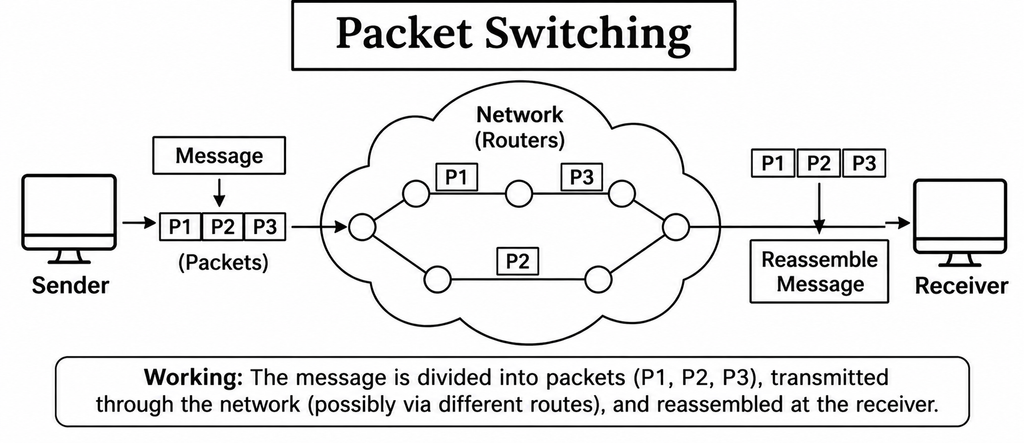
Figure: Packet Switching
How Packet Switching Works (Step-by-Step)
- Step 1: Packet Creation: The sender divides the original message into smaller units called packets. Each packet contains data and necessary information, including destination details.
- – Step 2: Packet Transmission: The packets are sent independently through the network. Depending on the routing method and network conditions, they may follow the same or different paths.
- – Step 3: Packet Routing: Routers examine packet information and forward packets towards their destination through suitable network paths.
- – Step 4: Packet Reception: The receiver collects the incoming packets. They may arrive in a different order from the one in which they were sent.
- – Step 5: Packet Reassembly: The receiving system arranges the packets in the correct order and combines them to reconstruct the original message.
Characteristics of Packet Switching
- No Dedicated Path: A fixed communication path is not reserved between the sender and receiver.
- Data Division: The original message is divided into smaller packets for transmission.
- Efficient Resource Sharing: Multiple users can share the same network links.
- Flexible Routing: Packets may travel through different routes depending on network conditions and the switching method.
- Packet Reassembly: The packets are collected and reassembled at the destination.
- Variable Delay: Transmission delay may vary due to congestion and network traffic.
Diagram Description (Packet Switching)
Picture five nodes A, B, C, D, and E in a mesh with links A–B, A–C, B–C, B–D, C–D, C–E, and D–E. A large message from A is split into three small packets (P1, P2, P3). P1 travels A–B–C–E, P2 goes A–B–D–E, and P3 goes A–C–D–E. At E, the packets are reassembled in order. The diagram shows multiple thin arrows along different paths, emphasizing that packets can take different routes.
Advantages of Packet Switching
- Efficient Bandwidth Utilization: Network resources are shared among multiple users, reducing bandwidth wastage.
- No Dedicated Connection: It does not require a reserved communication path before sending data.
- Flexible Routing: Packets can be forwarded through alternative routes when a network path becomes congested or unavailable.
- Reliable Communication: In some packet-switching approaches, lost packets can be retransmitted.
- Scalability: It supports a large number of users and devices communicating through the same network.
Disadvantages of Packet Switching
- Variable Delay: Packets may experience different transmission delays depending on network traffic.
- Packet Loss: Packets may be lost due to congestion or transmission errors.
- Out-of-Order Delivery: Packets may reach the destination in a different order.
- Processing Overhead: Routers and receiving devices must process packet headers and manage packet delivery.
- Congestion: Heavy network traffic can cause delays and packet loss.
Real-World Examples
- Internet Browsing: When users open a website, data is transmitted through packets between their devices and web servers.
- Email Communication: Email data travels through networks using packets to reach the recipient.
- Video Streaming: Video data is transmitted in packets and processed by the receiving device.
- Online Gaming: Game information is exchanged through packets between players and game servers.