A LAN connects devices in a small area such as a room, lab, or office. A MAN covers a city. A WAN connects places across a large region or a country.
In today’s digital world, computer networks play a crucial role in connecting people, systems, and devices for communication, resource sharing, and data exchange. Whether it is sending an email, streaming a video, or accessing cloud data, computer networks form the backbone of all these activities.
Networks are classified into different categories based on their geographical coverage, purpose, and ownership. Among these, the three most fundamental and widely used types are:
- LAN (Local Area Network)
- MAN (Metropolitan Area Network)
- WAN (Wide Area Network)
1. Local Area Network (LAN)
A Local Area Network (LAN) is a type of computer network that connects devices within a small geographical area, such as a single building, office, campus, or home.
The main objective of a LAN is to share resources like files, printers, or internet connections among a limited number of users.
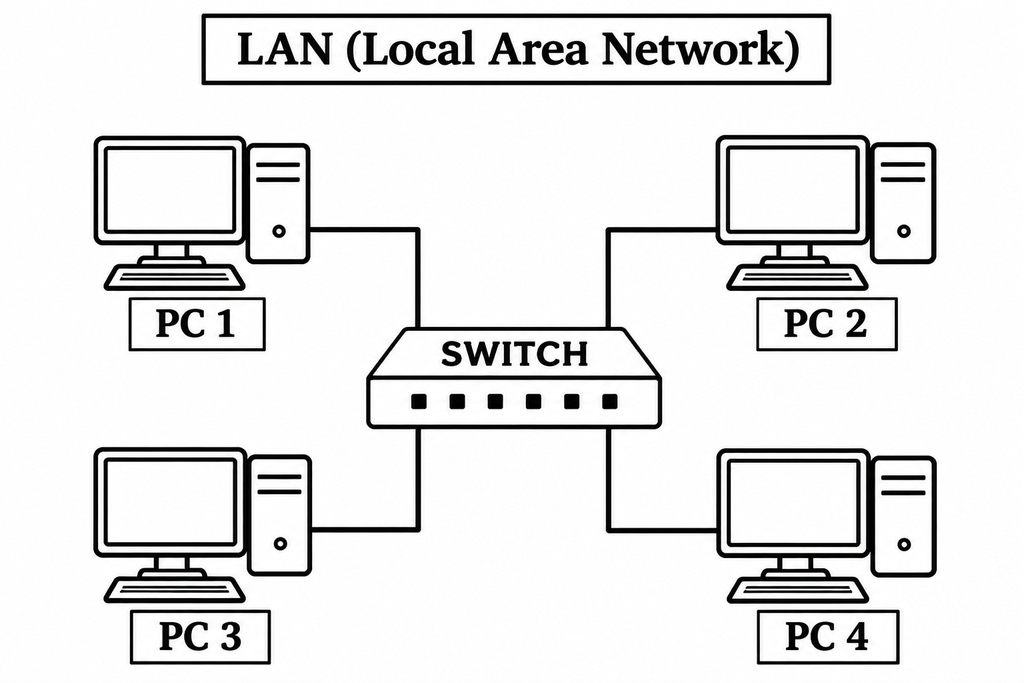
Figure: LAN Network
Characteristics of Local Area Network (LAN)
A Local Area Network (LAN) is a network that connects computers and devices within a limited geographical area, such as a home, school, office, or campus. It allows users to share data, resources, and internet connections efficiently. Below are the key characteristics of LAN explained in detail:
1. Limited Coverage Area
A LAN is designed to operate within a small geographical region, typically a few meters to a few kilometers.
Examples include a school campus, office building, laboratory, or home network.
Because of this limited range, LANs are easy to manage, maintain, and secure. The smaller coverage area ensures that the signal strength remains high, and data transmission occurs with minimal delay or interference.
- Example: A LAN connecting all computers in a company’s office building allows employees to share files and printers easily.
2. High Data Transfer Speed
LANs offer very high data transfer speeds, typically ranging from 10 Mbps to 10 Gbps or even higher in modern setups.
- Traditional Ethernet LANs provided speeds of 10 Mbps (Megabits per second).
- Fast Ethernet supports 100 Mbps.
- Gigabit Ethernet delivers 1 Gbps or 1000 Mbps.
- Modern LANs can even reach 10 Gbps or more using fiber-optic cables.
High-speed communication allows for smooth video conferencing, large file transfers, and quick data sharing among connected devices. Since the devices are located close to each other, signal degradation is minimal, which contributes to faster data exchange.
3. Private Ownership
Unlike large-scale networks like WANs (Wide Area Networks), a LAN is usually owned, managed, and operated by a single organization or individual.
This means the organization has full control over the hardware (like routers, switches, and cables) and software (like network configurations, security policies, and user permissions).
Because of private ownership:
- The network can be customized according to specific requirements.
- Maintenance and upgrades can be performed as needed.
- Security policies can be strictly implemented without relying on external service providers.
Example: A company can control which devices can connect to its LAN and what data can be accessed internally.
4. Reliable Communication
LANs are known for their high reliability and stable communication because they cover short distances and use high-quality transmission media.
- Shorter distances mean less signal loss and fewer transmission errors.
- LANs have low latency, ensuring quick response times during communication or data sharing.
- In case of any failure, issues can be detected and fixed quickly due to the small network size.
LANs often use advanced networking technologies like error detection and correction, which further enhance reliability.
Example: In an office LAN, employees can share files, access centralized databases, and use shared printers without frequent interruptions.
5. Use of Wired and Wireless Connections
LANs can use both wired and wireless technologies to connect devices.
(a) Wired LAN:
- Uses physical cables like Ethernet (Cat5, Cat6) or fiber-optic cables.
- Offers higher speed, greater security, and less interference.
- Ideal for offices, schools, and data centers where stable connections are required.
(b) Wireless LAN (WLAN):
- Uses radio waves or Wi-Fi technology instead of cables.
- Allows devices like laptops, smartphones, and tablets to connect without physical wires.
- Provides mobility and ease of installation, though it may face interference from other signals.
Many modern LANs use a hybrid setup combining both wired and wireless connections to balance speed, flexibility, and convenience.
Example: In a university network, desktop computers may use Ethernet cables, while students access Wi-Fi on their mobile devices.
Components of a LAN
The components of a Local Area Network (LAN) play a vital role in ensuring efficient communication, data sharing, and resource management within a limited geographical area such as an office, school, or organization. These components are a combination of hardware and software elements that work together to create a reliable and fast network. The major components are discussed in detail below:
1. Network Interface Card (NIC):
- The Network Interface Card (NIC) is a hardware component installed in each computer or device that enables it to connect to the LAN.
- It provides a unique MAC (Media Access Control) address to identify the device within the network.
- NICs can be wired (using Ethernet cables) or wireless (using Wi-Fi).
- The card converts the data generated by the computer into electrical signals (for wired) or radio signals (for wireless) that can be transmitted over the network.
- Modern computers and laptops usually have built-in NICs, ensuring smooth network communication.
2. Switch:
- A switch is a central networking device that connects multiple computers, printers, or other devices within a LAN.
- It uses the MAC addresses of devices to forward data only to the intended recipient, making it faster and more efficient than older devices like hubs.
- Switches operate at the Data Link Layer (Layer 2) of the OSI model and help in reducing data collisions.
- They play a crucial role in managing traffic within a LAN, ensuring smooth and secure data transfer among connected devices.
3. Router:
- A router connects the LAN to other networks, such as the Internet or another LAN.
- It operates at the Network Layer (Layer 3) of the OSI model and is responsible for determining the best path for data packets to reach their destination.
- Routers assign IP addresses to devices in the network and manage both internal and external communication.
- In home and office setups, routers often combine the functionalities of modems, switches, and access points, simplifying the network design.
4. Cables and Connectors:
- In a wired LAN, data is transmitted through Ethernet cables such as Cat5e, Cat6, or Cat7.
- These cables connect devices to switches, routers, or other networking equipment.
- Connectors like RJ45 are used to plug the cables into network devices.
- The choice of cable determines the speed and reliability of the network — for example, Cat6 cables support higher bandwidth and less interference compared to Cat5e.
- Wired connections are often preferred in environments that require high security, low latency, and stable connections.
5. Access Points (APs):
- Access Points are devices used in Wireless LANs (WLANs) to provide Wi-Fi connectivity to multiple users.
- They connect to the wired network (via switches or routers) and transmit data wirelessly to devices like laptops, smartphones, and tablets.
- APs extend the network coverage area and allow mobility, enabling users to connect from different parts of the building.
- In large setups like campuses or organizations, multiple access points are strategically placed to ensure seamless wireless coverage.
6. Servers:
- A server is a powerful computer that provides centralized services and resources to clients (computers) connected in the LAN.
- Common types include file servers (store and manage data), print servers (manage printing tasks), and application servers (run specific software applications).
- Servers improve efficiency by ensuring that resources like files, printers, and applications are accessible to multiple users simultaneously.
- They also manage user authentication, data backup, and network security policies, making the LAN more organized and secure.
Topology of LAN
LANs can be designed using various network topologies, such as:
- Star Topology: All devices are connected to a central switch or hub. (Most common)
- Bus Topology: All devices share a single communication line.
- Ring Topology: Devices are connected in a circular manner.
- Mesh Topology: Each device connects to every other device.
Advantages of a Local Area Network (LAN)
1. High Speed:
- LANs offer high data transfer speeds, typically ranging from 10 Mbps to 10 Gbps or more, depending on the technology used (e.g., Ethernet or Wi-Fi).
- Because the distance between connected devices is short, signal loss and transmission delay are minimal.
- This high speed enables quick file transfers, fast data access, and smooth communication between computers and servers within the network.
- Applications like video conferencing, online collaboration, and data backup perform efficiently due to this speed advantage.
2. Resource Sharing:
- One of the major benefits of LANs is the ability to share resources among multiple users.
- Devices such as printers, scanners, storage drives, and internet connections can be shared without requiring individual hardware for each user.
- For example, several employees can print documents using a single shared network printer.
- This promotes collaboration and reduces hardware costs, as all users can access shared files or applications from the central server.
3. Cost-Effective:
LANs are economical to install and maintain because they cover a limited geographical area such as an office, school, or building.
- The use of affordable networking hardware (like Ethernet cables, switches, and routers) makes setup inexpensive compared to wide area networks (WANs).
- Maintenance and troubleshooting are easier and cheaper since the network infrastructure is localized.
- Overall, LANs provide a high return on investment by combining low cost with efficient data and resource management.
4. Centralized Management:
- In a LAN, all data, users, and network activities can be managed centrally by an administrator.
- The administrator can control user access rights, security settings, software updates, and data backups from a single point.
- Centralized management simplifies network monitoring and maintenance, allowing quick detection and resolution of issues.
- It also ensures consistent policy enforcement across all devices, maintaining network integrity and efficiency.
5. Secure and Reliable:
- Since data transmission occurs within a restricted area, LANs are inherently more secure and reliable than wide area networks.
- Network administrators can implement strong firewalls, authentication systems, and encryption methods to protect sensitive data.
- The likelihood of data interception or unauthorized access is minimal because the network is private.
- Additionally, the reliability of LANs is high due to stable wired connections and reduced interference, ensuring uninterrupted communication.
Disadvantages of LAN
1. High Initial Setup Cost:
- Setting up a LAN requires investment in network hardware such as switches, routers, network cables, servers, and Network Interface Cards (NICs).
- For wired LANs, installation costs can be high due to the need for cabling, connectors, and network configuration.
- Even though LANs are cost-effective in the long run, the initial cost of equipment and setup can be a financial burden, especially for small organizations.
2. Security Issues:
- Since all devices are interconnected, a single security breach (like malware or unauthorized access) can affect the entire network.
- Shared resources and data are vulnerable if proper security measures such as firewalls, encryption, and user authentication are not implemented.
- Internal users might also intentionally or unintentionally compromise data privacy, leading to data leaks or corruption.
- Maintaining network security policies requires regular monitoring and updates, which adds complexity.
3. Maintenance and Administration:
- LANs require constant maintenance to ensure smooth performance and prevent downtime.
- Skilled network administrators are needed to manage users, troubleshoot network issues, install updates, and secure the system.
- Without proper management, the network can experience congestion, malfunction, or security vulnerabilities.
- This increases the overall operational cost and technical dependency of the organization.
4. Limited Coverage Area:
- A LAN is confined to a small geographical area, such as a single office building, campus, or residence.
- It cannot efficiently support communication between devices located in distant places.
- To connect multiple LANs across cities or countries, a Wide Area Network (WAN) must be used, which increases complexity and cost.
- Thus, LANs are not suitable for organizations that require long-distance connectivity.
5. Risk of Data Loss or Network Failure:
- If the central server or main switch fails, the entire LAN can stop functioning until the problem is fixed.
- Since all data and applications are often stored on the central server, hardware failure or a power outage may lead to temporary data inaccessibility or loss.
- Proper backup and redundancy systems are needed to minimize such risks, adding to the overall expense.
6. Cable Dependency (for Wired LANs):
- In wired LANs, excessive cabling can make the network setup messy and difficult to manage.
- Cables are prone to damage, wear, or disconnection, which can disrupt communication between devices.
- Expanding or rearranging the network often requires additional cabling and configuration, making scalability challenging.
- Wireless LANs can overcome this issue but may introduce other problems like signal interference or lower speed.
2. Metropolitan Area Network (MAN)
A Metropolitan Area Network (MAN) covers a larger area than a LAN but smaller than a WAN. It usually spans a city or a large campus, connecting multiple LANs together within that region.
The goal of a MAN is to provide high-speed connectivity across multiple buildings or institutions located in the same metropolitan area.
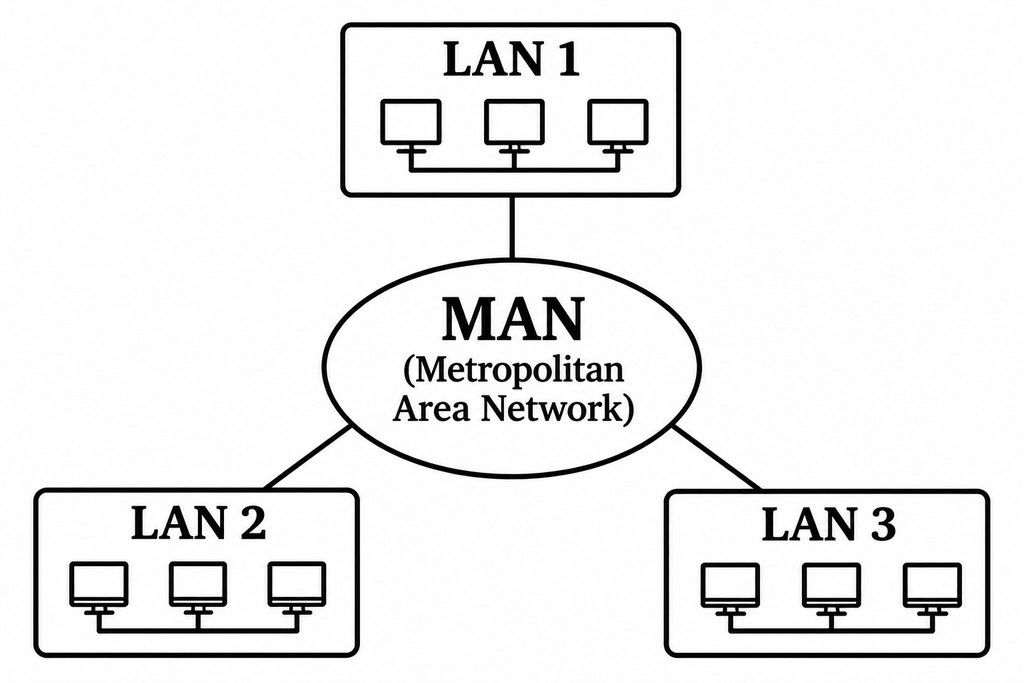
Figure: MAN Network
Characteristics of a Metropolitan Area Network (MAN):
1. Geographical Coverage
A Metropolitan Area Network (MAN) covers a larger geographical area than a Local Area Network (LAN) but smaller than a Wide Area Network (WAN).
- Typically, a MAN spans 10 to 50 kilometers, which can include an entire city, a large campus, or a group of nearby offices.
- It is designed to connect multiple LANs located in different buildings or areas within the same metropolitan region.
- For example, a city’s government offices, hospitals, universities, and corporate offices might all be connected through a MAN for efficient communication and data sharing.
- This wide coverage allows for high-speed connectivity and resource sharing across different branches or institutions within the same city.
2. Interconnection of LANs
One of the main purposes of a MAN is to connect multiple LANs together to create a larger, unified network.
- For example, different LANs in a company’s various office locations across a city are interconnected using MAN technology.
- This helps in centralized data management, allowing users from different locations to access shared servers, databases, and internet resources.
- MAN acts as a bridge between LAN and WAN, offering a balance between speed, coverage, and cost.
- The interconnection improves communication efficiency and supports real-time applications like video conferencing or large file transfers across different LANs.
3. Moderate to High Data Speeds
MANs offer faster data transfer speeds than WANs but are slightly slower than LANs.
- The data transfer rates usually range between 100 Mbps to 1 Gbps, depending on the technology and medium used.
- These high speeds allow for fast data exchange, streaming, file sharing, and remote system access across different parts of the city.
- Because MANs often use fiber optic cables, the speed and reliability are significantly better than traditional copper-wire connections.
- The high bandwidth makes MAN suitable for organizations, universities, and service providers that need efficient and quick data communication over moderate distances.
4. Public or Private Ownership
A MAN can be owned and operated by different entities depending on its purpose:
- Public MANs: Often established by government authorities or telecommunication companies to provide internet and data services to the general public or multiple organizations within a city.
- Private MANs: Created and managed by large corporations or institutions to connect their various branches, offices, or departments across a metropolitan area.
- Ownership determines network access, control, and maintenance—public MANs focus on service availability, while private MANs emphasize data privacy and customized performance.
- In both cases, the network requires well-defined infrastructure and management to ensure reliability and security.
5. Use of High-Speed Transmission Media
MANs rely on high-capacity transmission media to handle large amounts of data efficiently over medium distances.
Common transmission technologies include:
- Fiber Optic Cables: Provide very high bandwidth and low latency, making them ideal for core MAN connections.
- Microwave Links: Used for wireless data transmission between buildings where physical cabling is not feasible.
- Radio and Infrared Links: Useful for short-range, line-of-sight communication, especially in urban areas.
- These media types ensure stable, fast, and secure data transmission across multiple locations.
- In modern setups, metro Ethernet (Ethernet-based MAN) is widely used because it supports scalable bandwidth and easy integration with existing LANs.
Components of a Metropolitan Area Network (MAN):
1. Routers and Switches
Routers and switches are the core networking devices that form the foundation of any MAN setup.
- Routers are used to connect multiple LANs within the metropolitan area and direct data packets between them efficiently.
- They determine the best path for data transmission across the connected networks using routing tables and algorithms.
- Routers can connect different types of networks (for example, Ethernet LANs, fiber links, and wireless systems) and ensure smooth communication among them.
- Switches, on the other hand, work within smaller sections of the MAN to connect multiple devices within a LAN and forward data frames based on MAC addresses.
- Together, routers and switches ensure seamless data transfer, congestion management, and network efficiency across the metropolitan area.
- They also support redundancy and load balancing, ensuring that the MAN remains operational even if one route fails.
2. Fiber Optic Cables
Fiber optic cables form the backbone of MAN networks, providing high-speed and reliable data transmission across long distances.
- These cables transmit data in the form of light pulses, allowing for extremely high bandwidth, low signal loss, and minimal interference compared to copper wires.
- Since MANs cover large areas (10–50 km), fiber optics are ideal for connecting multiple buildings, offices, and campuses within a city.
- They support data speeds from hundreds of megabits to several gigabits per second, making them suitable for modern high-traffic applications like video conferencing, data backups, and cloud computing.
- Fiber networks also support future scalability, as additional bandwidth can be added without replacing the physical cables.
- Examples include metro Ethernet and fiber distributed data interface (FDDI) networks commonly used in MAN infrastructure.
3. Wireless Links
Wireless communication plays an important role in MANs, especially where laying physical cables is difficult or expensive.
- Technologies such as WiMAX (Worldwide Interoperability for Microwave Access) and microwave radio systems are widely used in MANs for high-speed wireless data transmission.
- These links are typically line-of-sight connections between two fixed points, such as between tall buildings or network towers.
- Microwave links can cover long distances and transmit large volumes of data efficiently, while WiMAX offers a cost-effective solution for providing broadband connectivity to multiple users.
- Wireless links are also used as backup connections in case of cable failures, ensuring network redundancy and reliability.
- They reduce dependence on physical infrastructure and offer flexibility in expanding the network to new areas within the city.
4. Metropolitan Area Servers
Metropolitan Area Servers are centralized systems that manage, store, and control the data flow within the MAN.
- They act as intermediaries between different LANs, helping coordinate communication, manage user access, and ensure data security.
- These servers often host essential services such as domain control, authentication, email, data storage, and network management.
- In public MANs (operated by ISPs or government bodies), the servers handle traffic routing, load balancing, and data caching to optimize performance for all connected users.
- In private MANs (used by organizations), the servers may manage internal applications, database access, or intranet resources shared across multiple branches.
- Metropolitan servers ensure smooth coordination, centralized monitoring, and efficient management of network resources within the metropolitan network.
Advantages of a Metropolitan Area Network (MAN)
- Wide Coverage:
- MANs span a larger area than LANs, typically 10–50 km, connecting multiple buildings, offices, or campuses within a city.
- This allows organizations with geographically separated locations to communicate and share data seamlessly.
- High-Speed Data Transfer:
- Provides faster data transmission than WANs due to shorter distances and fewer intermediate devices.
- Typical speeds range from 100 Mbps to 1 Gbps, supporting real-time applications like video conferencing and cloud services.
- Efficient Resource Sharing:
- Multiple LANs connected through a MAN can share resources such as servers, printers, storage devices, and internet connections.
- This reduces redundancy, lowers hardware costs, and improves collaboration between departments or branches.
- Supports Multiple Communication Types:
- MANs can handle voice, video, and data traffic simultaneously, enabling diverse services like VoIP, online meetings, multimedia streaming, and remote access.
- This makes it suitable for corporate offices, universities, hospitals, and government organizations that require integrated communication.
- Cost-Effective for Large Institutions:
- Reduces the need for separate networking infrastructure for each branch or location.
- Shared connectivity and centralized management cut operational costs and simplify maintenance.
- Technologies like fiber optics and metro Ethernet ensure long-term savings due to low maintenance and high durability.
- Centralized Management and Control:
- Network administrators can monitor and manage the entire MAN from a central location.
- Simplifies tasks like traffic management, security enforcement, backup scheduling, and troubleshooting, improving overall efficiency.
- Scalability:
- MANs can easily expand by adding new LANs or nodes within the metropolitan area.
- This ensures that the network grows along with the organization’s requirements without major infrastructure changes.
Disadvantages of a Metropolitan Area Network (MAN)
- High Initial Setup Cost:
- Setting up a MAN requires expensive equipment like routers, switches, fiber optic cables, servers, and access points.
- Laying fiber cables across a city or installing microwave towers increases installation costs.
- Complex Maintenance and Administration:
- MANs need skilled network administrators to manage traffic, monitor performance, and troubleshoot issues.
- Maintenance can be time-consuming and costly, especially for large networks connecting multiple LANs.
- Security Concerns:
- Connecting multiple LANs over a metropolitan area increases the risk of unauthorized access, hacking, and data breaches.
- Proper firewalls, encryption, and authentication protocols are essential, adding complexity and cost.
- Dependence on Transmission Media:
- Wired MANs rely heavily on fiber optic cables, which can be expensive to repair or replace if damaged.
- Wireless MANs (WiMAX, microwave links) may suffer from interference, weather-related issues, or line-of-sight limitations.
- Limited Control in Public MANs:
- MANs operated by telecom providers or government bodies may not offer full control over the network.
- Organizations using such networks may face restrictions in configuration, bandwidth allocation, or service quality.
- Potential for Network Congestion:
- With multiple LANs and many users connected simultaneously, MANs can experience traffic bottlenecks if not properly managed.
- High data loads may reduce performance, especially during peak usage times.
- Risk of Network Failure:
- A failure in a central router, switch, or backbone fiber link can affect multiple LANs connected to the MAN.
- Network downtime can disrupt communication and operations across all connected sites.
- Scalability Challenges:
- Expanding a MAN beyond its original design can be technically complex and expensive.
- Adding new nodes or extending coverage may require upgrading transmission media, equipment, and management systems.
3. Wide Area Network (WAN)
A Wide Area Network (WAN) is the largest type of network that covers a vast geographical area, such as a country, continent, or even the entire globe. WANs are used to connect multiple LANs and MANs so that users and organizations can communicate and share resources across long distances.
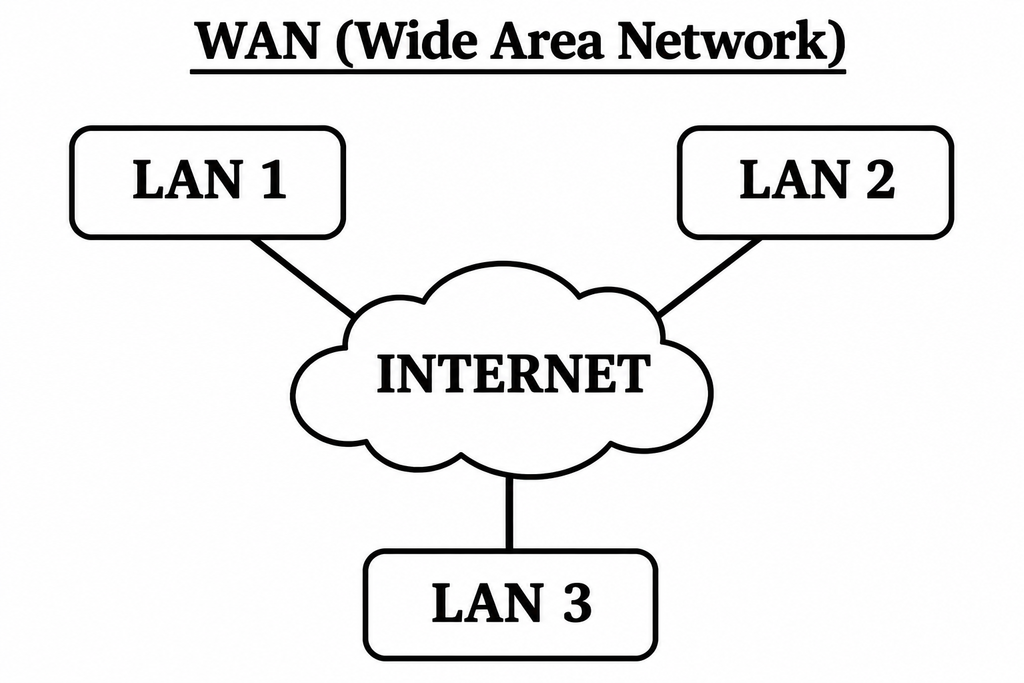
Figure: WAN Network
1. Extensive Geographical Coverage
A Wide Area Network (WAN) covers a very large geographical area, much larger than LANs and MANs.
- WANs can span hundreds, thousands of kilometers, or even connect multiple countries and continents.
- They are designed to link multiple LANs and MANs located in distant locations.
- For example, a multinational corporation can connect its offices in New York, London, and Tokyo via a WAN to share data and communicate in real-time.
- WANs provide the infrastructure for global communication, enabling enterprises, government agencies, and internet services to operate seamlessly across the globe.
2. Use of Public Communication Systems
WANs often rely on public communication infrastructure to transmit data over long distances.
- This includes telecommunication satellites, undersea fiber optic cables, and leased telephone lines.
- These systems allow data to travel across countries and continents without the need for private physical infrastructure everywhere.
- WANs can also use packet-switched networks like the Internet to connect different networks efficiently.
- Leveraging public systems reduces the cost of building private long-distance networks but requires service agreements with telecom providers.
3. Lower Speed Compared to LAN/MAN
Due to the long distances involved in data transmission, WANs typically have lower speeds compared to LANs or MANs.
- WANs often face higher latency, signal degradation, and network congestion, which can slow down communication.
- Typical speeds vary depending on the medium and technology used, ranging from Mbps to several Gbps in modern high-capacity WANs.
- Applications like video conferencing, cloud computing, or large file transfers may experience delays or buffering if the WAN connection is not optimized.
- WAN technologies use modems, routers, and multiplexers to manage transmission efficiently over long distances.
4. Public and Private Ownership
WANs can be maintained and managed by various entities depending on their scope and purpose.
- Public WANs: Operated by Internet Service Providers (ISPs), telecom companies, or government agencies. The Internet itself is a prime example of a global public WAN.
- Private WANs: Set up by corporations or multinational organizations to connect their offices across countries or continents. These networks often use leased lines, MPLS, or VPNs to ensure secure communication.
- Ownership affects control, security, and cost—private WANs offer more control but are expensive, while public WANs are accessible but rely on third-party management.
5. Heterogeneous Systems
WANs are designed to connect different types of networks and systems, making them highly heterogeneous.
- They link LANs, MANs, mobile networks, and cloud-based systems into a single unified network.
- WANs must support various network protocols, hardware, and data formats, allowing communication between devices and systems that may operate differently.
- For example, a WAN may connect a company’s LAN in New York (using Ethernet) to a MAN in London (using fiber optics) and mobile users accessing the network via 4G/5G.
- This heterogeneous capability makes WANs flexible, scalable, and essential for global communication.
Components of a Wide Area Network (WAN)
1. Routers and Gateways
Routers and gateways are essential for connecting different networks across long distances in a WAN.
- Routers:
- Direct data packets between LANs, MANs, and other WAN nodes efficiently.
- Determine the best path for data transmission using routing protocols like OSPF, BGP, or EIGRP.
- Ensure reliable and efficient communication between networks in different cities or countries.
- Gateways:
- Act as interfaces between different network architectures or protocols.
- Convert data from one format to another to ensure compatibility between networks, e.g., connecting an Ethernet LAN to a satellite link.
- Gateways are critical for integrating heterogeneous systems, allowing WANs to connect LANs, MANs, and even mobile networks.
2. Transmission Media
WANs use various transmission media to carry data over long distances:
- Fiber Optic Cables:
- Provide high-speed, low-latency, and high-bandwidth connections across cities and countries.
- Often used in undersea cables to connect continents.
- Microwave Links:
- Used for point-to-point wireless communication in remote or difficult-to-wire areas.
- Requires line-of-sight between transmitting and receiving antennas.
- Satellites:
- Enable communication in remote or inaccessible areas where terrestrial cables cannot reach.
- Useful for global broadcasting, military applications, and rural connectivity.
- Leased Telephone Lines or DSL:
- Older WANs used analog lines or DSL connections for long-distance communication, converting digital data to analog signals.
3. WAN Switches
WAN switches are specialized network switches designed to manage large-scale and high-volume data traffic across a wide area:
- Direct data packets efficiently between different nodes and networks.
- Support technologies like ATM (Asynchronous Transfer Mode), Frame Relay, and MPLS (Multiprotocol Label Switching).
- Reduce network congestion by handling traffic efficiently, even when multiple data streams are transmitted simultaneously.
- Often located in data centers or central offices of service providers to manage citywide or regional WAN traffic.
4. Modems
Modems are devices that convert signals for transmission over long-distance communication lines:
- Digital-to-Analog Conversion (DAC): Converts digital signals from computers into analog signals for transmission over telephone lines.
- Analog-to-Digital Conversion (ADC): Converts incoming analog signals back into digital format for the receiving devices.
- Modems are essential for older WAN technologies that relied on the public switched telephone network (PSTN).
- Modern WANs may still use modems for DSL or dial-up backup connections, but fiber and satellite links are now more common.
5. Cloud and Internet Backbone
Modern WANs often rely on the global Internet and cloud infrastructure to transmit data:
- Internet Backbone: Comprises high-capacity fiber optic cables, routers, and data centers managed by major ISPs.
- Provides WAN users with intercontinental connectivity, supporting web services, cloud applications, and global communication.
- Cloud services allow WAN users to store and access data remotely, facilitating collaboration across multiple locations.
- This backbone forms the central structure that supports WAN traffic efficiently and reliably.
Advantages of WAN
- Global Connectivity:
Enables communication between people and organizations located anywhere in the world. - Centralized Data Access:
Employees in different regions can access the same database or applications hosted on a central server. - Supports Business Expansion:
Essential for multinational corporations and government agencies. - Reliable and Scalable:
Can easily add new connections or remote offices as organizations grow. - Facilitates E-commerce and Cloud Services:
WANs form the backbone of the internet, cloud computing, and online businesses.
Disadvantages of WAN
- High Setup and Maintenance Cost:
Requires expensive infrastructure such as leased lines, satellites, and routers. - Lower Speed and Higher Latency:
Data may take longer to travel across vast distances. - Security Challenges:
As WANs often use public networks, they are vulnerable to hacking, viruses, and cyberattacks. - Complex Management:
Managing such a large network requires advanced skills and resources. - Dependency on ISPs:
Internet Service Providers control most WAN links, affecting performance and reliability.
Differences Between LAN, MAN and WAN
| Basis | LAN | MAN | WAN |
|---|---|---|---|
| Full Form | Local Area Network | Metropolitan Area Network | Wide Area Network |
| Geographical Area | Covers a small area. | Covers a city or metropolitan area. | Covers large areas such as countries and continents. |
| Network Size | Small | Medium | Large |
| Speed | Generally high | Depends on technology | Varies depending on technology. |
| Cost | Low | Moderate to high | High |
| Coverage | Home, school, office | City or town | Multiple cities and countries |
| Connection | Connects devices within a small area. | Connects multiple LANs. | Connects multiple LANs and MANs. |
| Ownership | Usually privately owned. | Private or service-provider managed. | Often uses service-provider infrastructure. |
| Maintenance | Easy | Moderate | Complex |
| Example | Home Wi-Fi network | City-wide bank network | Internet |