Unit 5 of AKTU Artificial Intelligence (KCS071) focuses on the practical applications of Artificial Intelligence in different fields, including natural language processing, information retrieval, speech recognition, and robotics. It introduces students to how AI systems understand human language, process information, recognize speech, and interact with the physical world.
On this page, you can find complete AKTU Artificial Intelligence Unit 5 Notes, prepared for B.Tech Computer Science and Engineering students according to the AKTU syllabus. The study material covers important topics such as AI applications, Language Models, Information Retrieval, Information Extraction, Natural Language Processing (NLP), Machine Translation, Speech Recognition, Robot Hardware, Robot Perception, Robot Planning, and Robot Movement.
The notes include easy-to-understand explanations, important definitions, working principles, algorithms, diagrams, examples, comparison tables, and exam-oriented questions to help students understand the concepts effectively.
Whether you are preparing for your semester examination, learning how AI processes human language, understanding speech recognition systems, or exploring robotic technologies, these unit-wise notes will help you study in a structured way.
Explore the complete Unit 5 notes below and strengthen your understanding of Artificial Intelligence applications for your AKTU B.Tech semester examination.
AKTU Artificial Intelligence UNIT 5 Syllabus
APPLICATIONS:
AI applications – Language Models – Information Retrieval- Information Extraction – Natural Language Processing – Machine Translation – Speech Recognition – Robot – Hardware – Perception – Planning – Moving
Artificial Intelligence Applications
Artificial Intelligence (AI) is used in various fields to develop intelligent systems that can perform tasks that normally require human intelligence. These systems can learn from data, solve problems, recognize patterns, understand human language, and make decisions.
AI applications are designed to automate complex tasks, improve efficiency, reduce human effort, increase accuracy, and provide intelligent solutions to real-world problems.
Major Applications of Artificial Intelligence
| Application | Description | Example |
|---|---|---|
| Healthcare | Helps in disease diagnosis and medical image analysis. | AI-based cancer detection |
| Education | Provides personalized learning and intelligent tutoring. | AI learning assistants |
| Banking | Detects fraud and supports financial decision-making. | Fraud detection systems |
| Transportation | Enables autonomous driving and traffic management. | Self-driving cars |
| Robotics | Automates manufacturing and repetitive tasks. | Industrial robots |
| Agriculture | Monitors crops and predicts agricultural conditions. | Smart farming |
| E-commerce | Recommends products based on user preferences. | Amazon recommendation systems |
| Natural Language Processing | Enables computers to understand human language. | Chatbots |
| Cybersecurity | Identifies suspicious activity and cyber threats. | Intrusion detection systems |
| Entertainment | Recommends movies, songs, and videos. | Netflix recommendations |
Advantages of AI Applications
- Automation: Automates repetitive and complex tasks with minimal human intervention.
- Improved Accuracy: Reduces errors in tasks such as data analysis and pattern recognition.
- Higher Productivity: Helps individuals and organizations complete tasks more efficiently.
- Faster Decision-Making: Analyzes large amounts of data and provides useful insights quickly.
- Continuous Operation: AI systems can operate continuously without human fatigue.
- Efficient Data Processing: Processes large volumes of information and identifies meaningful patterns.
- Cost Reduction: Can reduce operational costs by automating suitable tasks.
Limitations of AI Applications
- High Development Cost: Developing, deploying, and maintaining AI systems can be expensive.
- Data Dependency: AI systems require sufficient and good-quality data to produce reliable results.
- Bias and Incorrect Results: Biased training data or model limitations may lead to unfair or incorrect predictions.
- Lack of Human Emotions: AI systems do not experience human emotions or possess human-like understanding.
- Privacy and Security Risks: Collecting and processing personal data can create privacy and security concerns.
- Job Displacement: Automation may reduce the demand for certain repetitive jobs.
- Limited Common-Sense Reasoning: AI systems may struggle with situations requiring broad human common-sense understanding.
Language Models
A Language Model (LM) is an Artificial Intelligence system that learns the patterns and structure of human language and predicts the probability of a sequence of words or tokens.
Language models are an important part of Natural Language Processing (NLP). They are used in applications such as text generation, machine translation, chatbots, speech recognition, and text classification.
A language model estimates:
Where:
- w1,w2,…,wn are words or tokens.
- P represents the probability of a sequence.
Types of Language Models
A. Statistical Language Models
Statistical Language Models calculate the probability of words and word sequences using statistical techniques based on a training corpus.
They use the frequency and occurrence of words to predict the next word in a sentence.
Examples:
- Unigram Model: Considers one word at a time.
- Bigram Model: Considers two consecutive words.
- Trigram Model: Considers three consecutive words.
- N-gram Model: Considers a sequence of N consecutive words.
B. Neural Language Models
Neural Language Models use artificial neural networks to learn complex relationships between words, sentences, and their contexts.
Unlike traditional statistical models, they can learn more complex language patterns from training data.
Examples:
- Recurrent Neural Networks (RNN): Process sequential data by maintaining information from previous steps.
- Long Short-Term Memory (LSTM): A type of RNN designed to capture long-term dependencies in sequences.
- Transformer Models: Use attention mechanisms to understand relationships between tokens in a sequence.
C. Large Language Models (LLMs)
Large Language Models (LLMs) are neural language models trained on massive amounts of text data using large numbers of model parameters.
They can understand language patterns, generate text, summarize information, answer questions, and perform various language-related tasks.
Examples:
- GPT-based models
- BERT
- Llama
N-gram Language Model
An N-gram is a sequence of N consecutive words in a text. N-gram models are commonly used in statistical language processing to estimate the probability of word sequences.
Depending on the value of N, N-gram models are classified as follows:
| Model | Description | Example |
|---|---|---|
| Unigram | One word | Artificial |
| Bigram | Two consecutive words | Artificial Intelligence |
| Trigram | Three consecutive words | Applications of Artificial |
| Four-gram | Four consecutive words | Applications of Artificial Intelligence |
Example:
Consider the sentence:
“Artificial Intelligence is useful.”
Its possible N-grams include:
- Unigrams: Artificial, Intelligence, is, useful.
- Bigrams: Artificial Intelligence, Intelligence is, is useful.
- Trigrams: Artificial Intelligence is, Intelligence is useful.
- Four-gram: Artificial Intelligence is useful.
Bigram Model
A Bigram Language Model is a statistical language model that predicts the probability of a word based on the immediately preceding word.
It assumes that the probability of the current word depends only on the previous word.
The probability is represented as:
Example:
Sentence: “Artificial Intelligence is useful.”
Possible bigrams:
- Artificial Intelligence
- Intelligence is
- is useful
The probability of the complete sentence can be approximated as:
Where:
- P(W) = Probability of the complete sentence.
- P(w1) = Probability of the first word.
- P(wi | wi-1) = Probability of a word given the previous word.
- n = Total number of words.
Applications of Language Models
| Application | Description |
|---|---|
| Text Generation | Generates human-like text. |
| Machine Translation | Translates text between languages. |
| Chatbots | Generates conversational responses. |
| Text Summarization | Produces shorter versions of documents. |
| Speech Recognition | Helps determine the most likely word sequence. |
| Text Classification | Categorizes text into predefined classes. |
Advantages of Language Models
- Language Understanding: Learn linguistic patterns and relationships between words.
- Text Generation: Generate meaningful sentences and paragraphs.
- Automated Processing: Support automated language-processing tasks.
- Improved Prediction: Help predict words and complete sentences.
- Conversational AI: Enable chatbots and intelligent virtual assistants.
- Multiple Applications: Support translation, summarization, classification, and speech recognition.
Limitations of Language Models
- Incorrect Information: May generate incorrect or misleading information.
- Ambiguous Language: Can struggle with words or sentences having multiple meanings.
- Training Requirements: Require large amounts of training data and computational resources, particularly for large models.
- Bias: May inherit biases present in their training datasets.
- Limited Factual Reliability: Predicting likely word sequences does not guarantee factual accuracy or genuine understanding.
- Context Limitations: Some models may struggle to maintain relevant information across very long conversations or documents.
Information Retrieval (IR)
Information Retrieval (IR) is the process of searching, identifying, and retrieving relevant information from a large collection of documents based on a user’s query.
It is an important application of Artificial Intelligence that helps users find useful information quickly and efficiently.
An Information Retrieval system analyzes a user’s query, searches through stored documents, and displays the results according to their relevance.
Examples:
- Google Search
- Digital libraries
- Document search systems
- Search engines
- Academic research databases
Components of an Information Retrieval System
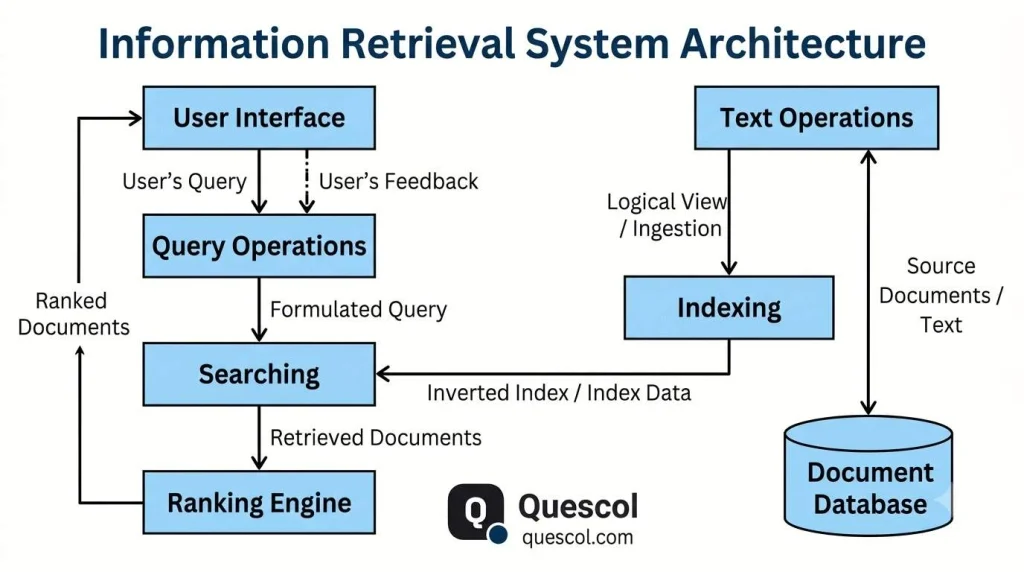
An Information Retrieval System (IRS) consists of several components that work together to search and retrieve relevant information.
An Information Retrieval System consists of the following components:
| Component | Description |
|---|---|
| Document Collection | A collection of documents stored in the system. |
| Document Processing | Processes and prepares documents for searching. |
| Indexing | Creates an index to enable fast retrieval. |
| Query Processing | Processes the user’s search query. |
| Matching | Compares the query with indexed documents. |
| Ranking | Arranges retrieved documents according to relevance. |
| Results | Displays relevant documents to the user. |
Working of Information Retrieval
The working of an IR system involves the following steps:
- Document Collection: Documents are collected from different sources, such as websites, databases, and digital libraries.
- Document Processing: The collected documents are cleaned and normalized to prepare them for searching.
- Indexing: Important terms are extracted and stored in an index for faster retrieval.
- Query Submission: The user enters a search query to find specific information.
- Query Processing: The system processes the query into searchable terms.
- Matching: The system matches the query terms with the indexed documents.
- Ranking: Retrieved documents are ranked based on their relevance to the query.
- Result Display: The system displays the most relevant documents to the user.
Information Retrieval Techniques
A. Boolean Retrieval
Boolean Retrieval is an information retrieval technique that uses logical operators such as AND, OR, and NOT to retrieve documents based on specific search conditions.
| Operator | Meaning | Example |
|---|---|---|
| AND | Retrieves documents containing both terms. | AI AND Robotics |
| OR | Retrieves documents containing either term. | AI OR ML |
| NOT | Excludes documents containing a term. | AI NOT Robotics |
Example:
If a user searches for AI AND Robotics, the system retrieves documents that contain both terms.
B. Vector Space Model
The Vector Space Model (VSM) is an information retrieval technique that represents documents and search queries as vectors in a multidimensional space.
Each dimension represents a term, and its value represents the importance or weight of that term in the document or query.
The similarity between query and document vectors can be measured using Cosine Similarity.
Where:
- A represents the query vector.
- B represents the document vector.
- A . B = Dot product of the two vectors.
- ||A|| and ||B|| = Magnitudes of the vectors.
Interpretation:
- A value close to 1 indicates high similarity.
- A value close to 0 indicates low similarity.
- A value of -1 indicates opposite directions in the vector space.
C. TF-IDF
TF-IDF is a statistical technique used to measure the importance of a word in a document relative to a collection of documents.
It combines two measures:
- Term Frequency (TF): Measures how frequently a term appears in a particular document.
- Inverse Document Frequency (IDF): Measures how important or rare a term is across the entire document collection.
The TF-IDF formula is:
Where:
- TF(t,d): Frequency of term t in document d.
- N: Total number of documents.
- DF(t): Number of documents containing term t.
Example:
A word that appears frequently in one document but rarely across the entire collection may receive a high TF-IDF score. Such a word can be useful for identifying the document’s subject.
Evaluation Metrics of Information Retrieval
| Metric | Description |
|---|---|
| Precision | Measures how many retrieved documents are relevant. |
| Recall | Measures how many relevant documents are retrieved. |
| F-measure | Combines precision and recall. |
1. Precision
Precision measures the proportion of retrieved documents that are actually relevant.
2. Recall
Recall measures the proportion of all relevant documents that are successfully retrieved.
3. F1-Measure
F1-measure is the harmonic mean of precision and recall. It provides a combined evaluation of both metrics.
Advantages of Information Retrieval
- Fast Information Retrieval: Quickly retrieves relevant information from large document collections.
- Handles Large Data: Supports searching across massive collections of documents.
- Reduced Manual Effort: Reduces the time and effort required to find information manually.
- Information Discovery: Helps users discover useful and related information.
- Improved Accessibility: Makes digital information easier to access and retrieve.
- Efficient Searching: Uses indexing and ranking techniques to improve search efficiency.
Applications of Information Retrieval
- Web Search Engines: Retrieve relevant web pages based on user queries.
- Digital Libraries: Help users search and access books, journals, and research papers.
- E-commerce Search: Retrieve products based on user search terms and preferences.
- Medical Information Systems: Help healthcare professionals retrieve relevant medical information.
- Research Paper Retrieval: Find academic papers related to specific research topics.
- Enterprise Document Search: Helps organizations search internal documents, reports, and records.
Information Extraction (IE)
Information Extraction (IE) is the process of automatically identifying and extracting structured information from unstructured or semi-structured data.
It converts unstructured text into meaningful, structured information that can be stored, analyzed, and used by computer systems.
Information Extraction is an important application of Natural Language Processing (NLP) because it helps computers identify entities, relationships, events, and other useful details from text.
Example of Information Extraction:
Sentence:
“Narayan joined ABC Technologies on 15 June 2025.”
Extracted information:
| Entity | Extracted Value |
|---|---|
| Person | Narayan |
| Organization | ABC Technologies |
| Date | 15 June 2025 |
Here, the system extracts the person’s name, organization, and joining date from the sentence and organizes them into a structured format.
Information Extraction Components
| Component | Description |
|---|---|
| Text Preprocessing | Cleans and prepares text. |
| Tokenization | Divides text into tokens. |
| Named Entity Recognition (NER) | Identifies names, locations, dates, organizations, etc. |
| Relation Extraction | Identifies relationships between entities. |
| Event Extraction | Identifies events and their attributes. |
| Structured Output | Converts extracted information into tables or databases. |
Steps in Information Extraction
- Input Text: Collect text from documents, websites, emails, reports, or other sources.
- Preprocessing: Remove unwanted characters, handle formatting issues, and normalize the text.
- Tokenization: Divide the text into smaller units such as words or tokens.
- Entity Recognition: Identify important entities such as people, places, dates, and organizations.
- Relation Extraction: Identify relationships between the recognized entities.
- Information Structuring: Organize the extracted information into meaningful fields.
- Output Generation: Store or present the extracted information in a structured format.
Types of Information Extraction
1. Named Entity Recognition (NER)
Named Entity Recognition identifies and classifies important entities in text into predefined categories.
Example:
Sentence: “Ravi works at Google in Hyderabad.”
| Entity | Value |
|---|---|
| Person | Ravi |
| Organization | |
| Location | Hyderabad |
2. Relation Extraction
Relation Extraction identifies the relationships between two or more entities in a sentence.
Example:
Sentence: “Ravi works at Google.”
Extracted relationship:
| Entity 1 | Relationship | Entity 2 |
|---|---|---|
| Ravi | Works at |
3. Event Extraction
Event Extraction identifies important events mentioned in text along with their related details.
Example:
Sentence: “ABC Technologies acquired XYZ Solutions in 2025.”
Extracted information:
- Event: Acquisition
- Acquiring Organization: ABC Technologies
- Acquired Organization: XYZ Solutions
- Year: 2025
4. Attribute Extraction
Attribute Extraction identifies specific properties or characteristics of entities.
Example:
Sentence: “The laptop costs ₹50,000 and has 16 GB RAM.”
Extracted attributes:
| Attribute | Value |
|---|---|
| Product | Laptop |
| Price | ₹50,000 |
| RAM | 16 GB |
5. Template Filling
Template Filling extracts relevant information from text and places it into predefined fields or templates.
Example:
In resume parsing, an Information Extraction system identifies candidate details and organizes them into a structured format.
| Field | Extracted Information |
|---|---|
| Name | Ravi Kumar |
| Qualification | B.Tech |
| Skills | Python, Java, SQL |
| Experience | 2 Years |
Difference Between Information Retrieval and Information Extraction
| Information Retrieval | Information Extraction |
|---|---|
| Retrieves relevant documents. | Extracts specific facts from documents. |
| Output is usually a list of documents. | Output is structured information. |
| Focuses on finding information. | Focuses on identifying information. |
| Uses indexing and ranking techniques. | Uses entity and relation extraction techniques. |
| Example: Google Search. | Example: Extracting names from resumes. |
Applications of Information Extraction
Information Extraction is widely used in different fields to automatically identify useful information from large amounts of text.
- Resume Parsing: Extracts candidate names, qualifications, skills, and work experience from resumes.
- Medical Record Analysis: Extracts patient details, diseases, symptoms, and medication information from medical records.
- Financial Report Processing: Identifies company names, financial figures, revenue, and transaction details.
- News Analysis: Extracts information about people, organizations, locations, and events from news articles.
- Email Automation: Extracts dates, order details, invoice numbers, and other important information from emails.
- Knowledge Graph Construction: Identifies entities and relationships to build interconnected knowledge structures.
Natural Language Processing (NLP)
Natural Language Processing (NLP) is a branch of Artificial Intelligence that enables computers to understand, interpret, process, and generate human languages such as English, Hindi, and Telugu.
NLP combines Artificial Intelligence, linguistics, machine learning, and computational techniques to enable communication between humans and computers.
It helps machines process human language in the form of text and speech and perform tasks such as translation, sentiment analysis, text summarization, and question answering.
Goals of NLP
- Understanding Human Language: Enables computers to understand the meaning of human language.
- Processing Text and Speech: Allows systems to analyze written and spoken language.
- Identifying Meaning: Helps identify the meaning and relationships between words in sentences.
- Generating Responses: Enables computers to generate meaningful natural language responses.
- Language Translation: Supports automatic translation between different languages.
- Human-Computer Interaction: Makes communication between humans and computers easier and more natural.
Architecture of NLP
The Architecture of NLP describes the different stages involved in processing human language. It explains how a computer analyzes text, identifies grammatical structures, understands meaning, and interprets language based on context.
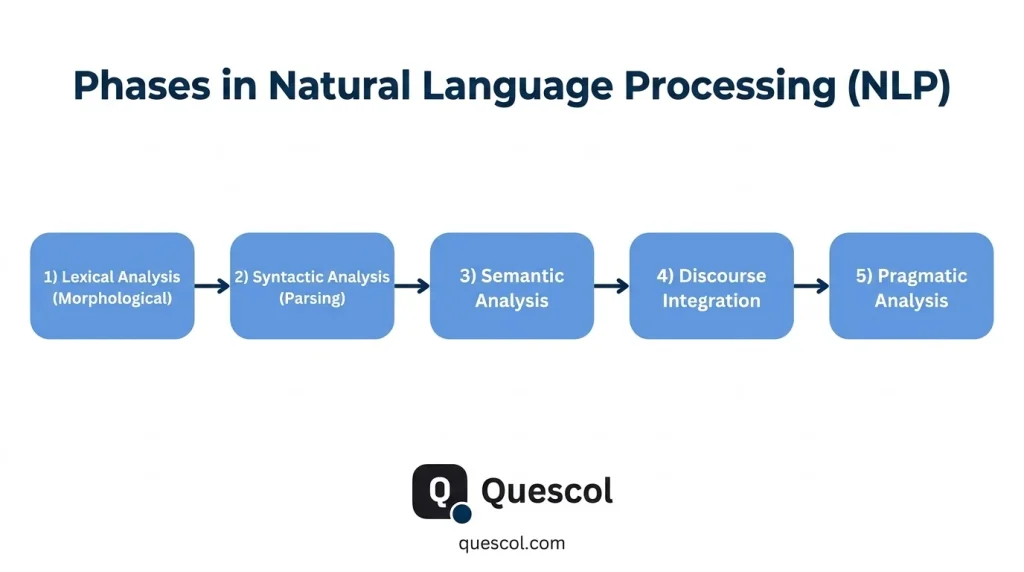
1. Lexical Analysis
Lexical Analysis is the process of dividing text into smaller units called tokens, such as words, punctuation marks, and symbols.
It is usually the first stage of NLP and helps prepare text for further processing.
Example:
Sentence: “AI is powerful.”
Tokens:
- AI
- is
- powerful
- .
2. Morphological Analysis
Morphological Analysis studies the internal structure of words and identifies their root forms, prefixes, and suffixes.
It helps computers understand how words are formed.
Example:
“Playing” → “Play” + “ing”
3. Syntactic Analysis
Syntactic Analysis determines the grammatical structure of a sentence and identifies relationships between words using grammar rules.
It helps identify the subject, verb, object, and other grammatical components.
Example:
“The student reads a book.”
Subject: The student
Verb: reads
Object: a book
4. Semantic Analysis
Semantic Analysis determines the meaning of words, phrases, and sentences.
It helps computers understand the relationships between different words and interpret the actual meaning of a sentence.
Example:
“The boy eats an apple.”
The system identifies the relationship between the boy, eating, and the apple.
5. Discourse Integration
Discourse Integration interprets a sentence by considering the context of previous sentences in a conversation or document.
It helps identify relationships between sentences and understand references to previously mentioned entities.
Example:
“Ravi bought a car. He drives it daily.”
The system identifies that “He” refers to Ravi and “it” refers to the car.
6. Pragmatic Analysis
Pragmatic Analysis identifies the intended meaning of language based on the situation, speaker’s intention, and surrounding context.
It helps computers understand what a person actually means rather than interpreting only the literal meaning of words.
Example:
“Can you open the window?”
The sentence is interpreted as a request rather than a question about ability.
NLP Tasks
| Task | Description |
|---|---|
| Tokenization | Divides text into tokens. |
| Stemming | Reduces words to their root form. |
| Lemmatization | Converts words to their dictionary form. |
| POS Tagging | Identifies parts of speech. |
| Named Entity Recognition | Identifies named entities. |
| Sentiment Analysis | Identifies opinions and emotions. |
| Text Classification | Categorizes text. |
| Text Summarization | Produces concise summaries. |
| Question Answering | Answers questions using text or knowledge. |
NLP Applications
NLP is widely used in different applications to improve communication between humans and computers.
- Chatbots and Virtual Assistants: Understand user queries and generate conversational responses.
- Machine Translation: Translates text from one language to another.
- Speech Recognition: Converts spoken language into text.
- Sentiment Analysis: Identifies positive, negative, or neutral opinions from customer reviews.
- Text Summarization: Generates concise summaries of lengthy documents.
- Search Engines: Helps understand search queries and retrieve relevant information.
- Grammar Checking: Identifies grammatical and spelling errors in written text.
- Question-Answering Systems: Provides answers to questions based on available information.
Advantages of NLP
- Natural Communication: Enables humans to interact with computers using natural language.
- Automation: Automates language-related tasks such as translation and text classification.
- Efficient Data Processing: Processes large amounts of textual information quickly.
- Multilingual Support: Supports communication and processing across different languages.
- Improved User Experience: Makes applications easier to use through conversational interfaces.
- Information Extraction: Helps identify useful information from unstructured text.
Limitations of NLP
- Language Ambiguity: A word or sentence may have multiple meanings, making interpretation difficult.
- Sarcasm Detection: Understanding sarcasm, humor, and irony can be challenging.
- Context Dependency: The meaning of a sentence may depend on previous conversations or situations.
- Language-Specific Challenges: Different languages have different grammatical structures and linguistic rules.
- Training Data Requirements: NLP systems require sufficient and high-quality training data.
- Cultural Differences: Expressions and meanings may vary across regions and cultures.
Machine Translation (MT)
Machine Translation (MT) is an application of Artificial Intelligence (AI) and Natural Language Processing (NLP) that automatically translates text or speech from one language into another without requiring human translators for every sentence.
It helps people communicate across different languages and makes information accessible to a wider audience.
Example:
English: “How are you?”
Hindi: “आप कैसे हैं?”
Types of Machine Translation
A. Rule-Based Machine Translation (RBMT)
Rule-Based Machine Translation uses predefined linguistic rules, dictionaries, grammar, and syntactic structures to translate text from one language into another.
Characteristics:
- Uses predefined grammar and language rules.
- Requires bilingual dictionaries.
- Translation depends on linguistic knowledge.
- Follows predefined rules for sentence structure.
- Difficult to maintain when handling complex languages and grammatical variations.
Example: Translating an English sentence into Hindi using predefined English-to-Hindi grammar rules and dictionaries.
B. Statistical Machine Translation (SMT)
Statistical Machine Translation uses statistical models trained on bilingual text corpora to translate sentences.
It calculates the probability of a target-language sentence given a source-language sentence and selects the most probable translation.
Where:
- S: Source sentence.
- T: Target sentence.
- P(T|S): Probability of target translation.
Characteristics:
- Learns translation patterns from bilingual data.
- Uses statistical probabilities to select translations.
- Requires large parallel text corpora.
- Can produce grammatically incorrect translations.
- Translation quality depends on the training data.
Example: A system learns English-to-Hindi translations by analyzing thousands of previously translated sentence pairs.
C. Neural Machine Translation (NMT)
Neural Machine Translation uses artificial neural networks and deep learning techniques to translate text between languages.
Modern NMT systems commonly use Transformer architectures, which help understand relationships between words and their context.
Characteristics:
- Uses deep learning and neural networks.
- Captures context and relationships between words.
- Generates more fluent and natural translations.
- Can process entire sentences by considering their context.
- Requires substantial training data and computational resources.
Architecture of Machine Translation
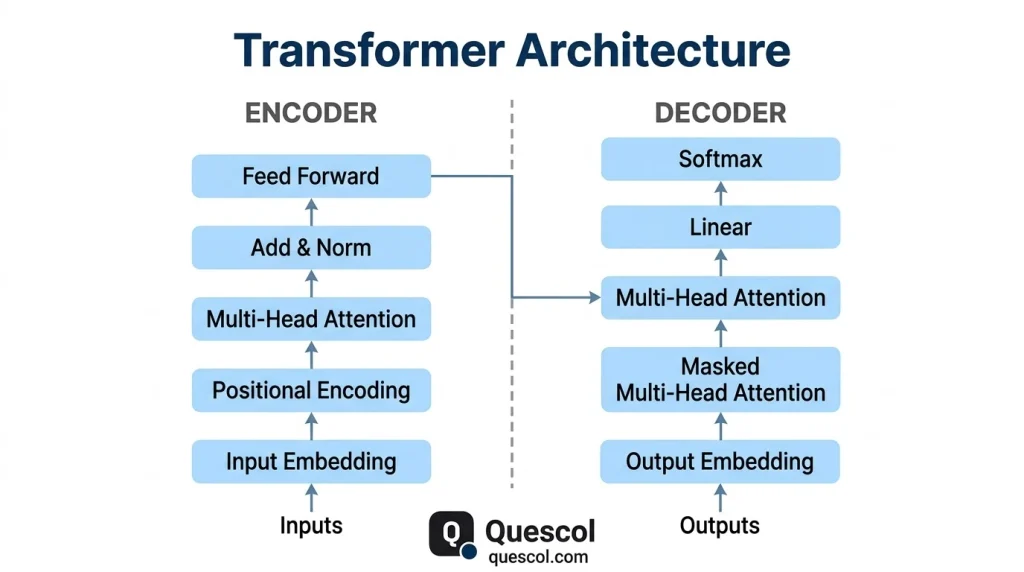
The general working of a Machine Translation system involves the following steps:
- Source Language Input: The user enters text or speech in the source language.
- Preprocessing: The input is tokenized, normalized, and prepared for translation.
- Encoding: The source sentence is converted into a numerical or internal representation that the model can process.
- Translation Model: The model analyzes the source representation and determines the appropriate target-language sequence.
- Decoding: Target-language words or tokens are generated in the correct sequence.
- Postprocessing: The translated output is formatted, and necessary corrections are applied.
- Target Language Output: The translated sentence is displayed to the user.
Example: When a user enters “Good Morning” in English, the system processes the sentence and generates “सुप्रभात” in Hindi.
Applications of Machine Translation
Machine Translation is used in various fields to support communication and information sharing across languages.
| Application | Description |
|---|---|
| Website Translation | Translates web pages into multiple languages. |
| Document Translation | Translates reports, books, and documents. |
| Communication | Supports multilingual conversations. |
| Education | Helps students access content in other languages. |
| Tourism | Translates signs, menus, and travel information. |
| Business | Enables communication with international customers. |
Advantages of Machine Translation
- Fast Translation: Translates text within seconds.
- Multilingual Communication: Helps people communicate across different languages.
- Reduced Cost: Reduces the need for manual translation of every sentence.
- Large Document Processing: Can translate large amounts of text quickly.
- Improved Accessibility: Makes information available to people who speak different languages.
Limitations of Machine Translation
- Cultural Differences: May fail to preserve cultural meanings and expressions.
- Idioms and Ambiguity: May struggle with idioms, slang, and sentences with multiple meanings.
- Translation Errors: Can generate inaccurate or misleading translations.
- Human Post-Editing: Important documents may require review and correction by human translators.
- Language Dependency: Translation quality varies depending on the language pair and available training data.
Speech Recognition
Speech Recognition is the process of converting spoken language into text or machine-readable commands using Artificial Intelligence (AI) and Natural Language Processing (NLP).
It is also known as Automatic Speech Recognition (ASR).
Speech recognition enables computers and digital devices to understand human speech and respond to voice-based instructions.
It is also known as Automatic Speech Recognition (ASR).
Example:
Spoken input: “Open the browser.”
Output: Open the browser
Working of Speech Recognition
The speech recognition process consists of the following stages:
1. Speech Input
The user speaks through a microphone. The microphone captures the spoken words and converts them into an audio signal.
2. Signal Processing
The captured audio signal is processed to remove unwanted background noise and improve audio quality.
3. Feature Extraction
Important characteristics of the audio signal are extracted to help the system identify speech sounds.
Examples:
- Mel-Frequency Cepstral Coefficients (MFCC)
- Spectral features
- Frequency characteristics
4. Acoustic Modeling
The acoustic model identifies relationships between extracted audio features and speech sounds. It helps determine which phonemes or speech units are present in the audio.
5. Language Modeling
The language model predicts the most probable sequence of words based on grammar, vocabulary, and linguistic context.
6. Decoding
The decoder combines information from the acoustic model and language model to determine the most likely sequence of spoken words.
7. Text Output
The recognized speech is converted into text and displayed to the user or passed to another application as a command. speech is converted into text.
Speech Recognition Architecture
The architecture of a speech recognition system consists of several components that work together to convert spoken input into text.
| Component | Function |
|---|---|
| Microphone | Captures speech. |
| Signal Processing | Removes noise and prepares audio. |
| Feature Extraction | Extracts audio features. |
| Acoustic Model | Maps audio features to speech units. |
| Language Model | Predicts probable word sequences. |
| Decoder | Selects the most likely transcription. |
| Output | Produces recognized text. |
Speech Recognition Techniques
Speech recognition systems use different statistical and deep learning techniques to identify spoken words.
| Technique | Description |
|---|---|
| Hidden Markov Models (HMM) | Model temporal sequences of speech. |
| Gaussian Mixture Models (GMM) | Model probability distributions of acoustic features. |
| Deep Neural Networks (DNN) | Learn complex speech representations. |
| Recurrent Neural Networks (RNN) | Process sequential speech data. |
| Transformer Models | Use attention to model speech sequences. |
Applications of Speech Recognition
- Voice Assistants: Enables users to interact with virtual assistants through spoken commands.
- Voice Typing: Converts spoken words into written text.
- Automated Customer Service: Helps automated systems understand customer queries.
- Voice-Controlled Devices: Allows users to control smart devices using voice commands.
- Speech-to-Text Transcription: Converts meetings, interviews, and lectures into text.
- Accessibility Systems: Helps people with disabilities interact with computers.
- Medical Dictation: Converts doctors’ spoken notes into written medical records.
Advantages of Speech Recognition
- Hands-Free Operation: Allows users to operate devices without typing.
- Improved Accessibility: Helps people interact with digital systems through speech.
- Fast Text Input: Converts spoken words into text quickly.
- Task Automation: Automates voice-based commands and operations.
- Natural Interaction: Makes communication with computers more convenient.
Limitations of Speech Recognition
- Background Noise: Noisy environments can reduce recognition accuracy.
- Different Accents: Variations in pronunciation and accents may create difficulties.
- Similar-Sounding Words: Words with similar pronunciations may be incorrectly recognized.
- Audio Quality: Poor microphone quality or unclear speech can affect results.
- Multiple Speakers: Overlapping conversations can make it difficult to identify individual speakers.
Difference Between Speech Recognition and NLP
| Speech Recognition | NLP |
|---|---|
| Converts speech into text. | Processes and understands human language. |
| Mainly deals with audio input. | Mainly deals with text and language meaning. |
| Uses acoustic and language models. | Uses linguistic and language models. |
| Example: Voice typing. | Example: Sentiment analysis. |
Robotics in Artificial Intelligence
A robot is a programmable machine capable of performing tasks automatically or semi-autonomously using sensors, actuators, control systems, and computational intelligence.
A robot can sense its environment, process information, make decisions, and perform physical actions to complete specific tasks.
Robotics is a branch of science and engineering concerned with the design, construction, programming, operation, and control of robots.
AI-based Robotics combines Artificial Intelligence (AI) with robotic hardware to enable robots to perform tasks intelligently. It allows robots to analyze their surroundings, learn from information, make decisions, and adapt to changing environments.
Example: An autonomous warehouse robot uses sensors to detect obstacles, AI algorithms to determine its path, and motors to move products from one location to another.
Characteristics of Robots
Robots have several characteristics that help them perform different tasks in industrial, medical, domestic, and other environments.
- Programmable Operation: Robots can be programmed to perform specific tasks.
- Physical Task Execution: Robots can perform physical activities such as lifting, welding, assembling, and moving objects.
- Environmental Perception: Robots use sensors to collect information about their surroundings.
- Movement and Control: Robots use actuators and motors to perform physical movements.
- Autonomous Operation: Robots can perform certain tasks independently without continuous human control.
- Repetitive Task Execution: Robots can perform repetitive operations with speed and consistency.
- Decision-Making: AI-based robots can analyze collected information and select suitable actions.
Types of Robots
| Type | Description | Example |
|---|---|---|
| Industrial Robot | Performs manufacturing operations. | Robotic welding arm |
| Mobile Robot | Moves through an environment. | Warehouse robot |
| Humanoid Robot | Resembles human structure. | Human-like service robot |
| Medical Robot | Assists in healthcare operations. | Surgical robot |
| Autonomous Robot | Performs tasks without continuous human control. | Autonomous delivery robot |
| Service Robot | Provides assistance to people. | Cleaning robot |
Robot Hardware
Robot Hardware refers to the physical components of a robot that enable it to sense its environment, process information, perform movements, and interact with the surrounding world.
These components work together to help a robot perform tasks automatically or under human control.
Components of Robot Hardware
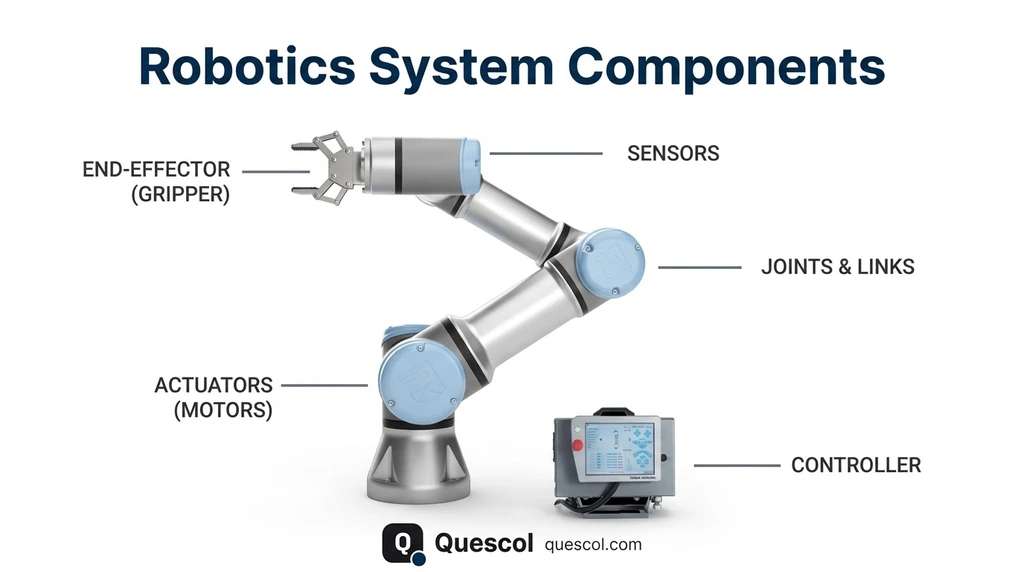
A. Sensors
Sensors are devices that collect information about the robot’s surroundings and internal conditions. They help robots detect objects, measure distances, identify movement, and understand their environment.
| Sensor | Function |
|---|---|
| Camera | Captures visual information. |
| Ultrasonic Sensor | Measures distance using sound waves. |
| Infrared Sensor | Detects objects using infrared radiation. |
| LiDAR | Measures distance using laser light. |
| Gyroscope | Measures rotational movement. |
| Accelerometer | Measures acceleration. |
| Touch Sensor | Detects physical contact. |
| GPS | Determines geographic location. |
B. Actuators
Actuators are devices that convert energy into physical movement. They help robots move their wheels, rotate joints, lift objects, and perform other mechanical operations.
Types:
- Electric Motors: Convert electrical energy into rotational or linear motion.
- Servo Motors: Provide controlled movement to a specific position or angle.
- Hydraulic Actuators: Use pressurized liquid to generate force and movement.
- Pneumatic Actuators: Use compressed air to produce mechanical movement.
C. Controller
A controller is the processing unit responsible for executing instructions and controlling the robot’s operations.
It receives information from sensors, processes the data, and sends control signals to actuators.
Examples:
- Microcontrollers
- Embedded computers
- PLCs
- Robot control processors
D. Manipulator
A manipulator is a mechanical structure, commonly designed as a robotic arm, used to move objects or perform operations.
It consists of two main parts:
- Links: Rigid mechanical sections that form the structure of the robotic arm.
- Joints: Connections between links that allow rotational or linear movement.
Example: An industrial robotic arm uses a manipulator to pick up, position, and assemble components.
E. End Effector
An end effector is a device attached to the end of a robotic manipulator that directly interacts with objects or performs specific tasks.
Examples:
- Grippers: Hold and pick up objects.
- Welding Tools: Perform welding operations.
- Suction Cups: Pick up objects using vacuum pressure.
- Cutting Tools: Cut or shape materials.
Example of End Effector: A robotic arm uses a gripper as its end effector to pick up products and place them on a conveyor belt.
F. Power Supply
A power supply provides the energy required to operate the robot’s hardware components, including controllers, sensors, motors, and other devices.
Examples:
- Batteries: Provide electrical energy to mobile robots.
- Electrical Power Systems: Supply power to stationary industrial robots.
- Hydraulic Power Sources: Provide pressurized fluid to hydraulic actuators.
Example of Power Supply: A battery supplies electrical power to an autonomous mobile robot so that it can move and operate without being connected to a power cable.
Robot Perception
Robot Perception is the process by which a robot uses sensors and computational techniques to understand and interpret its surrounding environment.
Perception enables robots to identify objects, detect obstacles, estimate positions, recognize patterns, and make decisions based on environmental information.
Example: A self-driving robot uses cameras and LiDAR sensors to detect nearby vehicles, identify pedestrians, and recognize obstacles while moving.
Components of Robot Perception
| Component | Description |
|---|---|
| Sensor Data Acquisition | Collects information from sensors. |
| Data Processing | Filters and processes sensor data. |
| Feature Extraction | Identifies important environmental features. |
| Object Recognition | Identifies objects in the environment. |
| Localization | Determines the robot’s position. |
| Environment Mapping | Creates a representation of surroundings. |
| Decision Making | Uses perception results to determine actions. |
Steps in Robot Perception
- Sensor Data Collection: Sensors capture information from the surrounding environment.
- Data Preprocessing: Removes noise and unwanted information from the collected data.
- Feature Extraction: Identifies useful information such as shapes, edges, colors, and patterns.
- Object Detection: Identifies objects, obstacles, and other important elements.
- Localization: Determines the robot’s current position and orientation.
- Mapping: Builds a map or representation of the surrounding environment.
- Interpretation: Analyzes the collected information to understand the environment and support decision-making.
Techniques Used in Robot Perception
| Technique | Description |
|---|---|
| Computer Vision | Processes visual data from cameras. |
| Image Processing | Enhances and analyzes images. |
| Object Detection | Identifies objects and their locations. |
| Sensor Fusion | Combines data from multiple sensors. |
| Localization | Estimates the robot’s position. |
| SLAM | Simultaneous Localization and Mapping. |
SLAM (Simultaneous Localization and Mapping)
SLAM (Simultaneous Localization and Mapping) is a technique that enables a robot to construct a map of an unknown environment while simultaneously determining its own position within that map.
It is especially useful when a robot operates in an environment where a predefined map is unavailable.
Example: A robotic vacuum cleaner uses SLAM to map a room, identify its current position, and navigate around furniture while cleaning.
Applications of SLAM:
- Autonomous mobile robots.
- Self-driving vehicles.
- Robotic vacuum cleaners.
- Warehouse robots.
- Drones and unmanned aerial vehicles.
Applications of Robot Perception
- Autonomous Navigation: Helps robots understand their surroundings and move safely.
- Object Manipulation: Enables robots to identify and handle objects.
- Obstacle Detection: Detects obstacles and helps prevent collisions.
- Industrial Inspection: Identifies defects and monitors manufacturing processes.
- Autonomous Vehicles: Recognizes roads, traffic signs, pedestrians, and other vehicles.
- Warehouse Automation: Helps robots identify products, shelves, and pathways.
Robot Planning
Robot Planning is the process of determining a sequence of actions that enables a robot to achieve a specified goal while satisfying environmental and operational constraints.
Planning determines what actions a robot should perform and in what order to reach its destination or complete a task.
Example:
A robot in a warehouse must move from location A to location B while avoiding obstacles.
The robot analyzes the environment, generates possible routes, selects a suitable path, and executes the required movements.
Types of Robot Planning
| Type | Description |
|---|---|
| Task Planning | Determines the sequence of tasks. |
| Path Planning | Determines a collision-free route. |
| Motion Planning | Determines the movements required to follow a path. |
| Reactive Planning | Selects actions based on current environmental conditions. |
| Global Planning | Plans using a complete or known map. |
| Local Planning | Plans using nearby environmental information. |
Steps in Robot Planning
- Goal Specification: Defines the desired objective that the robot must achieve.
- Environment Representation: Represents the available space, obstacles, and other environmental conditions.
- State Identification: Identifies the robot’s current position, orientation, and other relevant conditions.
- Path Generation: Generates possible routes or action sequences to reach the goal.
- Path Evaluation: Evaluates possible paths based on distance, time, energy consumption, and safety constraints.
- Path Selection: Selects the most suitable path based on the planning objectives.
- Execution: Executes the selected movement or action plan.
- Monitoring: Monitors the robot’s progress and adjusts the plan when environmental conditions change.
Robot Planning Algorithms
| Algorithm | Description |
|---|---|
| Breadth-First Search (BFS) | Searches level by level in a graph. |
| Depth-First Search (DFS) | Explores one branch deeply. |
| A* Search | Uses path cost and heuristic information. |
| Dijkstra’s Algorithm | Finds shortest paths with non-negative edge costs. |
| RRT | Rapidly explores continuous spaces using random sampling. |
| Potential Field Method | Uses attractive and repulsive forces for navigation. |
Advantages of Robot Planning
- Goal-Directed Behavior: Helps robots perform tasks systematically to achieve specific objectives.
- Obstacle Avoidance: Helps robots identify safe routes around obstacles.
- Efficient Navigation: Reduces unnecessary movements and improves path selection.
- Reduced Energy Consumption: Helps select routes that can minimize travel distance and energy usage.
- Autonomous Decision-Making: Enables robots to select and execute actions with minimal human intervention.
Challenges in Robot Planning
- Dynamic Environments: Moving objects and changing surroundings require frequent plan updates.
- Unknown Obstacles: Unexpected obstacles can make previously selected paths unsuitable.
- Uncertain Sensor Data: Inaccurate sensor information can affect planning decisions.
- Computational Complexity: Complex environments may require significant processing time.
- Limited Battery Power: Robots must consider energy consumption while selecting paths.
- Collision Avoidance: Robots must plan safe movements to avoid collisions with objects and people.
Robot Moving (Robot Motion)
Robot Moving, also known as Robot Motion, refers to the physical movement of a robot from one location to another or the movement of its mechanical components to perform a specific task.
Robot motion is controlled using actuators, motors, controllers, sensors, and motion planning techniques. It enables robots to navigate environments, move objects, and perform physical operations.
Example: A warehouse robot moves from one shelf to another to collect and deliver products.
Types of Robot Locomotion
| Type | Description | Example |
|---|---|---|
| Wheeled Locomotion | Robot moves using wheels. | Delivery robot |
| Tracked Locomotion | Robot moves using continuous tracks. | Military robot |
| Legged Locomotion | Robot moves using legs. | Quadruped robot |
| Aerial Locomotion | Robot moves through the air. | Drone |
| Aquatic Locomotion | Robot moves underwater or in water. | Underwater robot |
Types of Robot Motion
A. Linear Motion
Linear Motion occurs when a robot or its component moves along a straight line.
Example: A mobile robot moving forward.
B. Rotational Motion
Rotational Motion occurs when a robot or one of its components rotates around a fixed or moving axis.
Example: A robotic arm rotating at a joint.
C. Circular Motion
Circular Motion occurs when a robot moves along a circular path around a fixed center or point.
Example: A robot moving around a fixed object.
D. Combined Motion
Combined Motion occurs when a robot performs two or more types of movement simultaneously or in coordination.
Example: A mobile robot moving forward while turning.
Robot Motion Control
Robot Motion Control is the process of regulating and controlling a robot’s movement to achieve the desired position, velocity, and orientation.
It ensures that the robot performs movements accurately and safely.
Important components:
- Motion Controller: Generates control commands to achieve the desired movement.
- Sensors: Measure the robot’s position, speed, and movement.
- Actuators: Convert control signals into physical movement.
- Feedback System: Compares actual movement with desired movement and helps correct errors.
- Motion Planning Algorithm: Determines the required movement or path to reach a target.
Types of Robot Motion Control
1. Open-Loop Control
Open-Loop Control is a control method in which a robot executes commands without using feedback to monitor or correct its actual movement.
The controller sends commands to the actuators based on predefined instructions.
Example: A robot moves its motor for a fixed duration without checking whether it has reached the desired position.
Characteristics:
- Does not use feedback for movement correction.
- Uses predefined control commands.
- Has a simple control structure.
- Cannot automatically correct movement errors.
2. Closed-Loop Control
Closed-Loop Control is a control method in which a robot uses feedback from sensors to compare its actual movement with the desired movement and correct errors.
The controller continuously monitors the robot’s performance and adjusts its actions when necessary.
Example: A mobile robot uses wheel encoder feedback to measure its movement and adjusts motor speed to reach the desired position.
Characteristics:
- Uses sensor feedback to monitor movement.
- Compares actual output with the desired output.
- Automatically corrects movement errors.
- Provides better accuracy and control.
Important Artificial Intelligence AKTU Examination Questions – Unit 5
- Explain the major applications of Artificial Intelligence in detail with examples.
- Explain Language Models and discuss N-gram models with suitable examples.
- Describe the architecture, working, and evaluation metrics of an Information Retrieval system.
- Explain Information Extraction in detail with its components, steps, and applications.
- Explain the different phases of Natural Language Processing with suitable examples.
- Describe Machine Translation and explain Rule-Based, Statistical, and Neural Machine Translation.
- Explain the architecture and working of Speech Recognition with a neat diagram.
- Explain the components of Robot Hardware with a neat labeled diagram.
- Discuss Robot Perception, its components, and the role of SLAM in robotics.
- Explain Robot Planning and discuss different path-planning algorithms.
- Explain robot locomotion, robot motion, and motion control techniques.
- Explain the complete architecture of an AI-based robotic system, including hardware, perception, planning, and movement.
Explore More AKTU Artificial Intelligence Resources
| Resource | Link |
|---|---|
| AKTU Artificial Intelligence Question Bank | Artificial Intelligence Questions and Answers → |
| AKTU Artificial Intelligence Previous Year Question Papers | Artificial Intelligence Previous Year Question Papers → |
Explore Other AKTU Artificial Intelligence Units Notes
Continue your AKTU Artificial Intelligence preparation with complete unit-wise notes, explanations, important concepts, and examination questions.
| Artificial Intelligence Unit | Study Notes |
|---|---|
| Unit 1 – Introduction to Artificial Intelligence | Read Unit 1 Notes→ |
| Unit 2 – Problem Solving Methods | Read Unit 2 Notes→ |
| Unit 3 – Knowledge Representation | Read Unit 3 Notes→ |
| Unit 4 – Software Agents | Read Unit 4 Notes→ |
Explore More Study Materials
Visit Quescol Home Page
Explore more AKTU B.Tech CSE notes, syllabus, question banks, previous year papers, and examination preparation resources on Quescol.