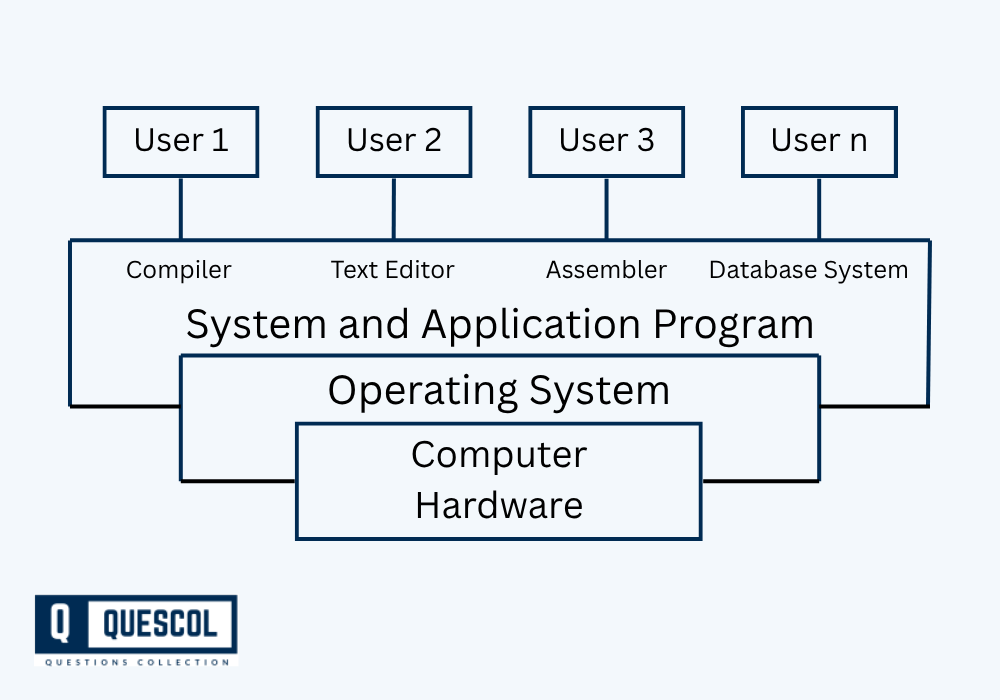
An Operating System (OS) is one of the most critical components of a computer system. It acts as a bridge/interface between the user and computer hardware. Without an OS, using a computer would be an extremely difficult and complex task because users would have to communicate with hardware in machine language. It manages hardware resources, facilitates user interaction, and provides an environment for running applications. Key functions of an OS include process management, memory management, file system handling, and device control.
Moreover, a computer system consists of several interrelated components that work together to process and store data, execute tasks, and provide meaningful output.
Major components of Computer System
- Hardware: The physical parts such as CPU, memory, and input/output devices.
- Software: System and application software, including the OS.
- Users: People who interact with the system.
- Data: Raw facts processed into information.
Together, these components work cohesively to perform computing tasks efficiently and reliably under the control of the OS.
Let’s explore each in detail below.
What is an Operating System?
An Operating System is system software that manages the computer hardware and software resources. It offers a stable and consistent environment for other software to run.
Functions of an Operating System
- Process Management: Controls the execution of processes including multitasking and scheduling.
- Memory Management: Allocates and deallocates memory to processes and applications.
- File Management: Manages data storage, retrieval, naming, sharing, and protection.
- Device Management: Manages device communication via drivers.
- User Interface: Provides command-line or graphical user interface (GUI) for user interaction.
- Security and Access Control: Ensures only authorized access to system resources.
Types of Operating Systems
1. Batch Operating System
- Groups similar tasks together and executes them in batches without user interaction during execution.
- Jobs are queued, and the system runs them one after another, which reduces idle time but has slow turnaround for urgent tasks.
2. Time-Sharing Operating System
- Allows multiple users to share system resources simultaneously by rapidly switching between tasks.
- Each user gets a small time slice, creating the illusion of parallel execution.
3. Distributed Operating System
- Manages a group of independent computers and makes them appear as a single system to users.
- Enables resource sharing, load balancing, and fault tolerance across multiple machines.
4. Network Operating System
- Runs on a server and provides services like file sharing, printer access, and communication over a network.
- Requires users to log in and is mainly used in LAN environments.
5. Real-Time Operating System (RTOS)
- Processes data and responds to events within a strict time constraint.
- Used in applications like medical devices, robotics, and aircraft systems where delays are unacceptable.
Components of a Computer System
A computer system is made up of several essential components that interact through the operating system:
1. Hardware
Hardware refers to the physical elements of the computer system.
- Central Processing Unit (CPU): The brain of the computer that performs calculations and executes instructions.
- Control Unit (CU): Directs operations of the processor.
- Arithmetic Logic Unit (ALU): Performs arithmetic and logical operations.
- Memory Units:
- Primary Memory: RAM and ROM used for temporary and permanent data storage.
- Secondary Memory: Hard disks, SSDs for long-term data storage.
- Input Devices: Devices like keyboard, mouse, scanner used to input data.
- Output Devices: Devices like monitor, printer, speaker used to output data.
2. Software
Software consists of programs and operating systems that run on the hardware.
- System Software
- Operating Systems
- Utility Programs (e.g., antivirus, disk cleaners)
- Application Software
- Word processors, web browsers, games, etc.
3. Users
Users interact with the computer system through interfaces provided by the operating system. They can be:
- End Users: Individuals using applications (e.g., students, professionals).
- System Administrators: People managing hardware and software resources.
4. Data
Data is the core element processed by a computer system. It is transformed into useful information through various operations.
- Input Data: Raw facts.
- Processed Data: Organized and meaningful information.
Example Of Operating System
- Example 1: When you open Microsoft Word, the OS allocates memory and CPU resources, manages the file when you save it, and handles input from your keyboard.
- Example 2: In a mobile phone, Android OS manages applications, calls, sensors, and battery usage.
Diagram
Applications of Operating systems
Operating systems and computer system components are essential in
- Personal Computing: Windows, macOS, and Linux in desktops and laptops.
- Mobile Devices: Android, iOS.
- Servers and Datacenters: Linux, Windows Server for running enterprise applications.
- Embedded Systems: OS like VxWorks, RTOS in devices like washing machines, IoT gadgets.
- Cloud Computing: Virtual machines using OS to manage cloud services.
Advantages and Disadvantages of Operating systems
Advantages of an Operating System
- Efficient resource management.
- User-friendly interface (especially GUI).
- Enables multitasking.
- Provides security and protection.
Disadvantages of an Operating System
- Complex design and development.
- System crashes or bugs can halt all processes.
- Consumes memory and CPU resources.
Conclusion
The operating system plays a central role in the functioning of a computer system. It not only bridges the gap between hardware and user but also ensures efficient execution of processes and applications. Alongside, a computer system comprises interconnected components hardware, software, users, and data that collectively perform computing tasks. By understanding these elements, students gain a foundational grasp of how computers operate, which is vital for further studies in computing and information systems.